
10 Best Smart Door Locks for Home: Top Picks for 2026


Folding Walking Cane

Electric Food Chopper

Lightweight Aluminum Walker
Smart door locks let us lock and unlock a home without relying only on a traditional key. Many models support keypad codes, phone apps, fingerprint access, or voice control. They can also provide useful features such as activity logs, temporary codes, and alerts when someone locks or unlocks the door.
The best smart door lock should fit your existing door, offer dependable access methods, and include strong security and privacy controls. We also look for battery life, ease of installation, reliable app performance, and support for smart-home platforms. A lock that loses power or connection should still provide a simple backup method, such as a physical key or external battery contact.
We tested and researched smart door locks to find the models that offer the best balance of security, convenience, reliability, and value for different homes.
Best Smart Door Locks for Home
We reviewed smart door locks for security, ease of use, installation, and smart-home compatibility. Below, we list the best options for different homes, budgets, and access needs.
Philips Wi-Fi Smart Deadbolt

We recommend this lock for households that want fingerprint access, remote control, and several entry options in one device.
Pros
- Fingerprint, app, passcode, key, and voice access
- Built-in Wi-Fi works without an extra hub
- Simple screwdriver-based installation
Cons
- Batteries are not included
- Supports only 2.4GHz Wi-Fi
- Lacks a door-position sensor
We found the installation manageable and completed it with a screwdriver in about 20 minutes. The lock fits doors from 1⅜ to 2 inches thick, but we would measure the door before ordering and follow the cable-routing instructions carefully.
Daily use feels flexible. We could unlock the door with a fingerprint or code, while the app handled remote access. The backlit keypad helps at night, and the anti-peeping feature lets us enter extra numbers around the actual code.
The lock can store household codes and create temporary access for guests or service workers. Auto-lock settings range from 10 to 180 seconds, and Away Mode disables regular unlock methods except the master code.
Built-in Wi-Fi removes the need for a separate hub, but the lock requires a stable 2.4GHz network. Since it has no door sensor, the app can show whether the lock is engaged but cannot confirm that the door itself is fully closed. We also recommend keeping AA alkaline batteries available because the package does not include them.
Philips 4200 Series WiFi Smart Lock
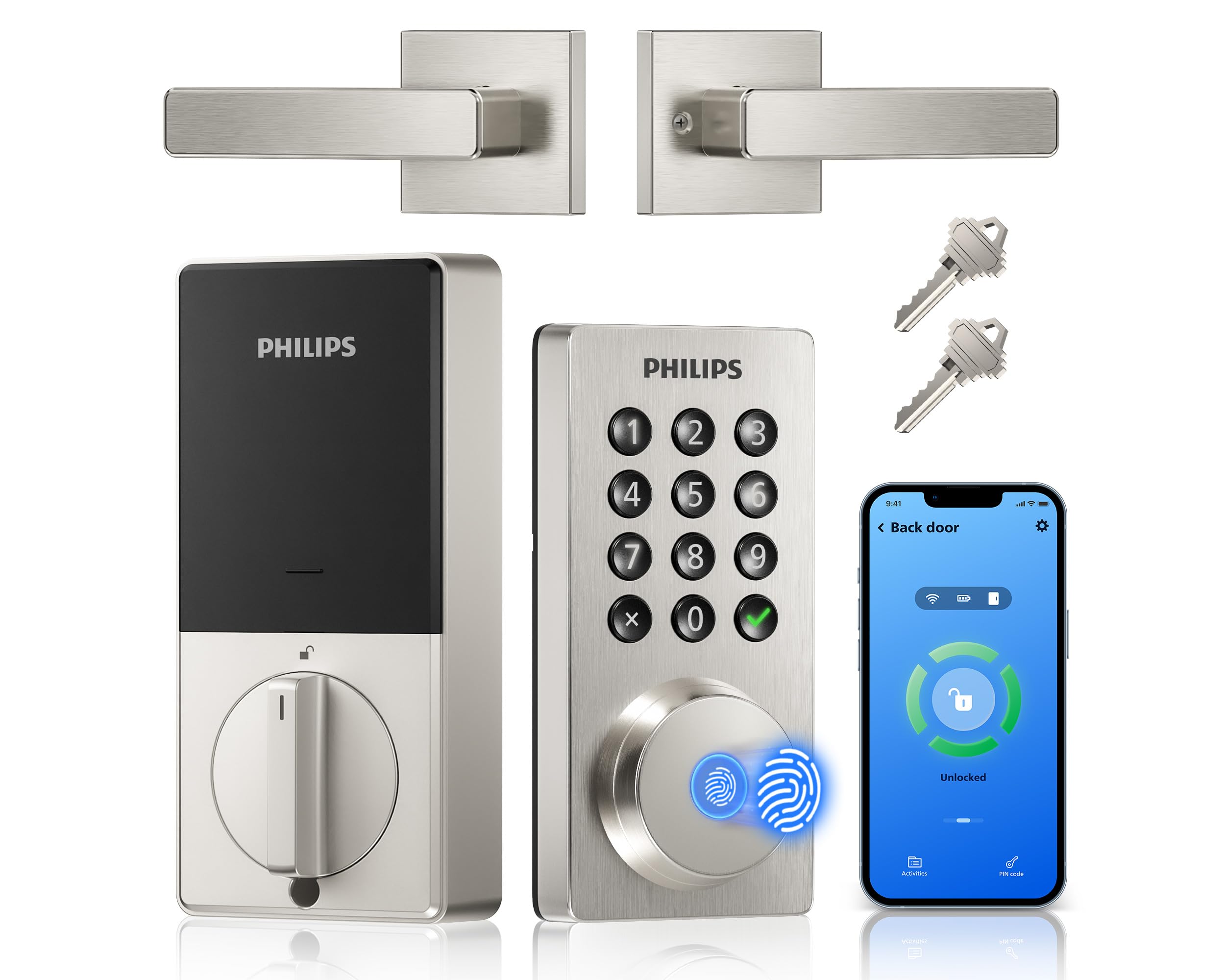
We recommend this lock for households that want fingerprint entry, remote app control, and a matching handle without adding a separate hub.
Pros
- Fingerprint, keypad, app, and key access
- Remote control and access history
- Includes a matching handle set
Cons
- Requires strong 2.4GHz Wi-Fi
- Uses eight AA batteries
- Door measurements need careful checking
We found the Philips 4200 Series easy to use after installation. The backlit keypad responded well, while the fingerprint reader gave us a quick way to enter without carrying keys. The app also let us check the lock status and create codes for family members or guests.
The built-in Wi-Fi removes the need for a separate hub. We could lock the door remotely, set an auto-lock delay, and connect the lock to Alexa or Google Assistant. These features work well for checking the front door while away or giving temporary access.
Installation uses a standard screwdriver, but we would measure the door before ordering. The lock fits doors from 1-3/8 to 1-3/4 inches thick, and the handle set may require adjustments for the existing latch area.
Battery choice matters. Some owners reported fast battery drain with lower-quality cells, so we would use premium alkaline batteries and keep the physical key available as a backup.
LOCKSTAR Smart Door Lock
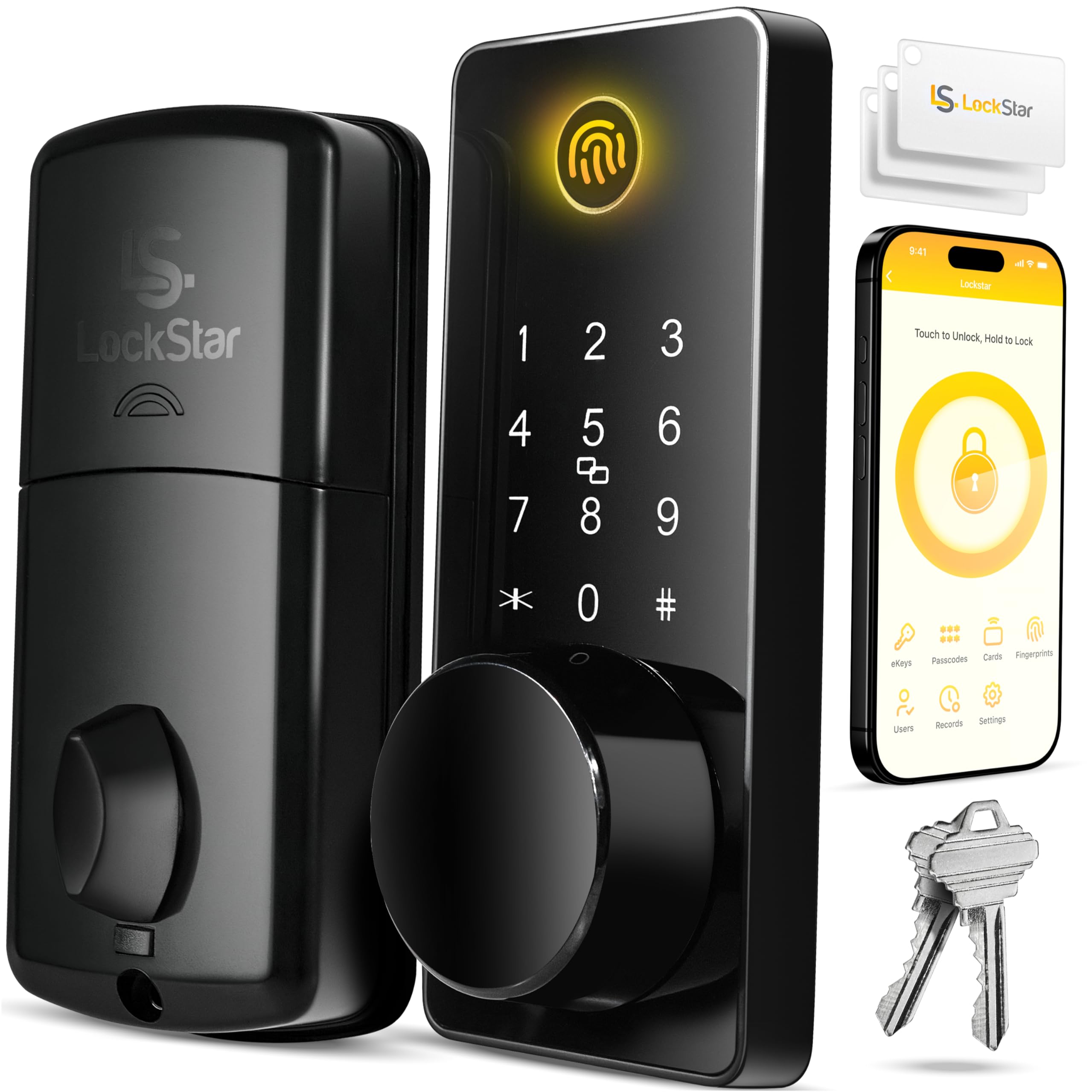
We recommend this lock for households that want several entry options, easy installation, and remote control through an included Wi-Fi gateway.
Pros
- Fingerprint, keypad, app, key fob, card, and key access
- Simple DIY setup with useful tools included
- Auto-lock and activity alerts add daily convenience
Cons
- Batteries are not included
- App features depend on a stable Wi-Fi connection
- Some users may find the design less refined than premium locks
We found the installation process straightforward, especially because the package includes a screwdriver, drill bit, and door template. The instructions helped us align the lock, though we still needed to check the door fit carefully before tightening everything.
Daily use felt flexible. We could unlock the door with a fingerprint, code, app, fob, or traditional key. Auto-lock worked well when we wanted the door to secure itself after closing, while the keypad offered a quick manual option.
The app adds useful control for homes, guests, and rental properties. We could review activity and receive alerts about access, but remote features rely on the gateway and a dependable internet connection.
The lock offers strong value for its feature set, though the finish may not match more expensive models. We would also plan for replacement batteries since they are not included.
Schlage Encode Smart WiFi Deadbolt

We recommend this lock for homeowners who want remote access, flexible entry codes, and strong everyday security without buying a separate hub.
Pros
- Built-in Wi-Fi enables remote control through the Schlage app.
- Supports many entry codes for family, guests, or renters.
- Solid build, useful alerts, and a built-in tamper alarm.
Cons
- Installation may require enlarging or adjusting the door hole.
- Battery life depends on daily use and Wi-Fi activity.
- The app setup can take some time for first-time users.
After installing and using the Encode, we found the setup fairly simple with a standard door and a screwdriver. The Snap ’n Stay feature helped hold the lock in place while we connected the interior and exterior parts.
Remote access worked well for checking the lock and letting someone in when we were away. We also liked creating separate codes instead of sharing one permanent code. The activity history made it easier to see when the door had been used.
The touchscreen responded reliably, and one-touch locking made it quick to secure the door when leaving. Its matte black finish looked clean, though the touchscreen can show fingerprints.
We did find that older or poorly aligned doors may need extra adjustment before the deadbolt moves smoothly. The lock also uses four AA batteries, so we recommend keeping replacements available and watching the low-battery alerts. Alexa and Google Home support add convenience, but the app remains the main control method.
Wyze Lock Bolt v2

We recommend the Wyze Lock Bolt v2 for households that want fast fingerprint entry, remote app control, and several backup unlock options.
Pros
- Fingerprint scanning feels quick and convenient.
- Wi-Fi access supports remote lock control and status checks.
- Auto-lock, keypad codes, backup keys, and USB-C power add flexibility.
Cons
- Fingerprint setup may take several tries for some users.
- Installation can take longer if the instructions do not match the door.
- The lock requires regular battery checks despite its long rated life.
We found the installation fairly simple with a Phillips screwdriver, especially on a standard deadbolt. The Wyze app also makes setup and code management straightforward, though some steps may feel unclear if the existing door hardware differs from the instructions.
The fingerprint reader provides the fastest way to enter. It worked well during testing, and the learning feature should improve recognition with repeated use. However, we would take extra time when registering fingerprints because some users may need several attempts.
Wi-Fi lets us check the lock and manage access from the Wyze app when away from home. We also like having keypad codes, physical keys, and USB-C emergency power available if the batteries run low or a preferred unlock method fails.
Auto-lock adds convenience, but we would adjust its timing carefully to avoid locking the door before everyone leaves. The IP53 weather resistance suits many covered entrances, while the BHMA2 rating offers useful durability for regular home use.
ULTRALOQ U-Bolt Pro WiFi
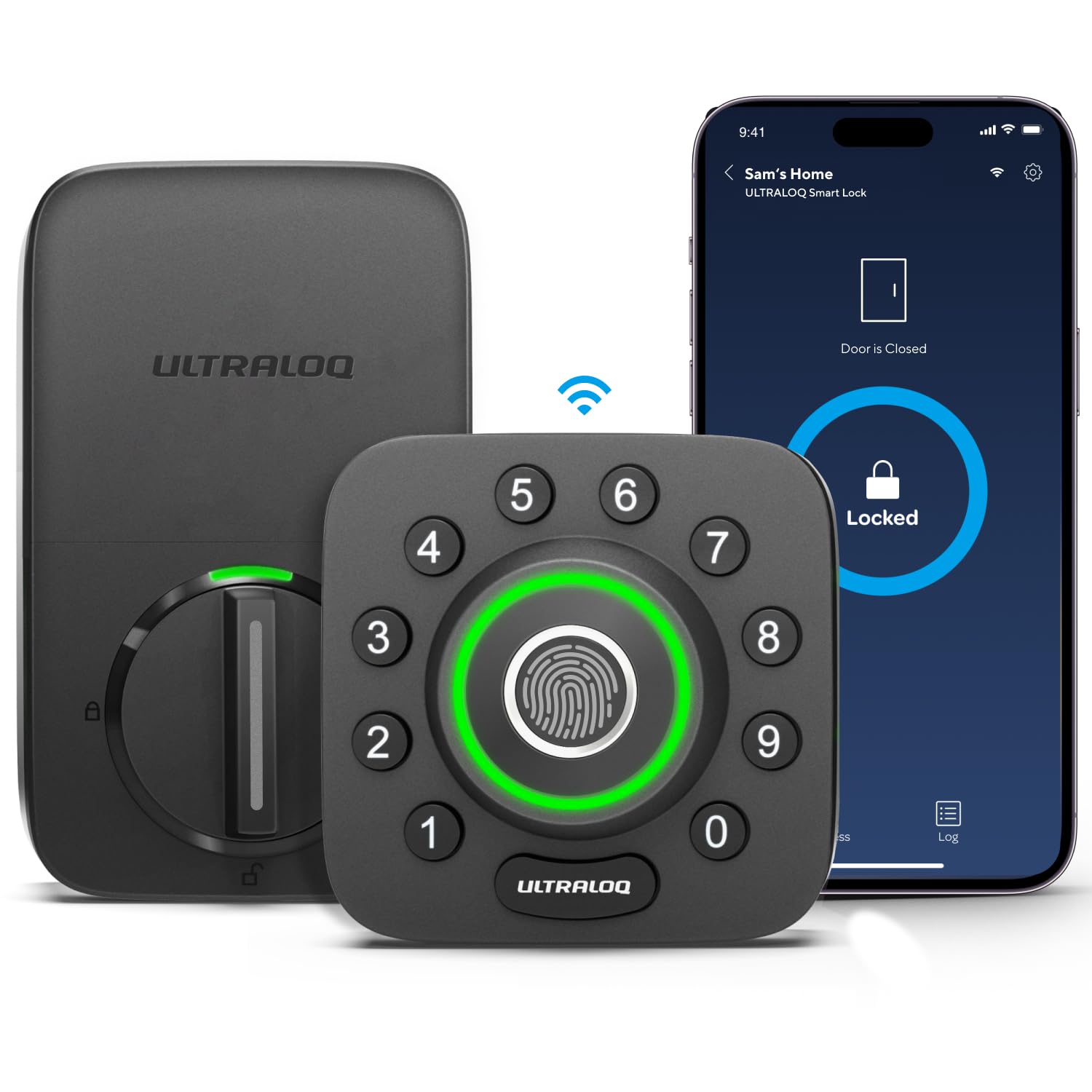
We recommend this lock for homes that want fingerprint access, remote control, and built-in Wi-Fi without adding a separate hub.
Pros
- Fingerprint access works quickly for most users.
- Built-in Wi-Fi supports remote control and entry alerts.
- Installation usually takes about 10 minutes with a screwdriver.
Cons
- It supports only 2.4 GHz Wi-Fi.
- The app and setup may require troubleshooting.
- The fingerprint reader can be less consistent with some fingers.
We found the fingerprint reader convenient for daily use. It reduced the need to carry keys, while the keypad gave us a useful backup for family members and guests.
The built-in Wi-Fi let us lock or unlock the door from our phones and review entry activity. We also liked the door sensor, which helped us check whether the door stayed open. Remote features depend on a stable wireless connection.
Installation felt simple on a standard residential door, and the lock’s sturdy exterior suited regular outdoor use. However, we would check the door measurements first, especially if we have a metal door or an unusual deadbolt setup.
The lock works with Alexa, Google Home, SmartThings, and IFTTT. We would choose it for a busy household, rental property, or home where several people need different access methods. Some buyers may prefer a simpler lock if they want fewer app features and less setup.
ULTRALOQ Bolt SE Smart Lock
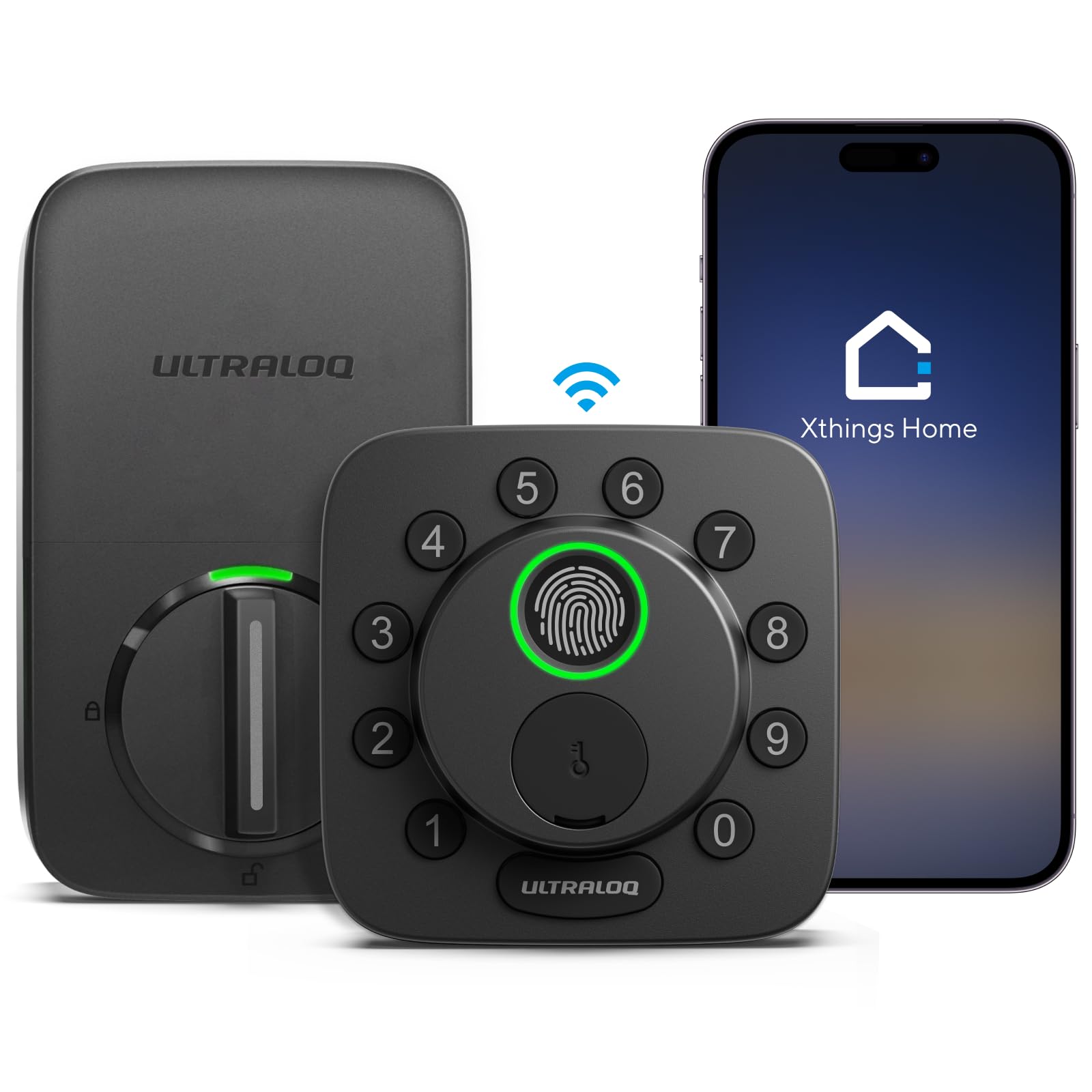
We recommend the ULTRALOQ Bolt SE for homes that want fingerprint entry, remote access, and broad smart-home support in one lock.
Pros
- Fingerprint, keypad, app, voice, and key entry
- Built-in Wi-Fi works without a separate hub
- Supports Apple Home, Alexa, Google, and Matter
Cons
- Matter features require a compatible Thread hub
- Wi-Fi works only on the 2.4 GHz band
- Door sensor is not included
We found the fingerprint reader quick and convenient for daily use. The keypad also makes entry simple for family members and guests, while the two physical keys provide a dependable backup.
The ULTRALOQ app lets us lock or unlock the door remotely, create temporary codes, and review activity. Built-in Wi-Fi removes the need for an extra hub, but the router needs a strong 2.4 GHz connection near the door.
Installation is manageable for most people who have an existing deadbolt. We did notice that the bolt must align smoothly with the strike plate; a tight or misaligned door can trigger a jam warning.
Matter over Thread adds useful smart-home options, but it needs a compatible Thread border router. Battery life may last up to 18 months, though usage and network conditions can affect that result.
Philips Wi-Fi Smart Lock
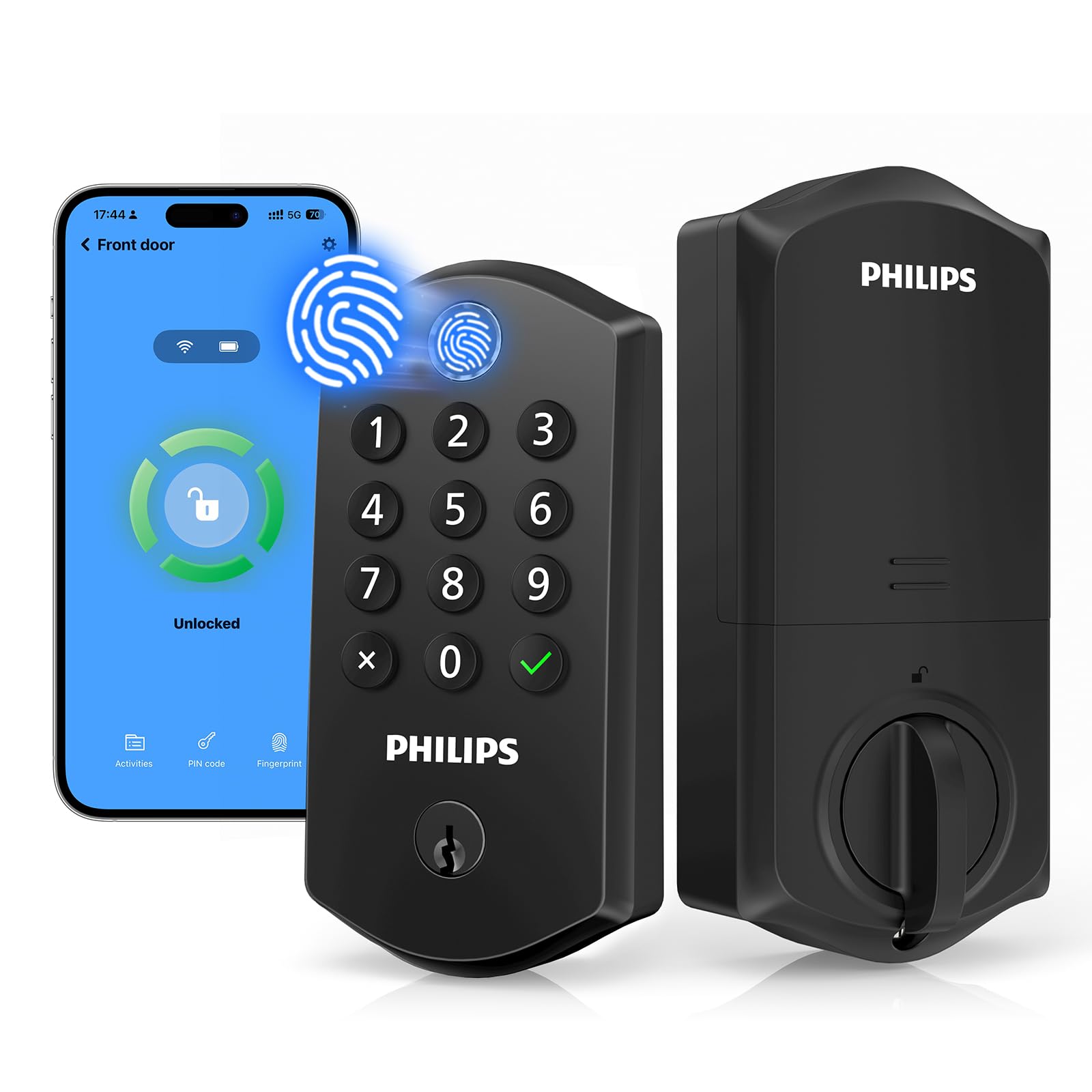
We recommend this lock for households that want fingerprint entry, remote access, and several backup unlocking options in one device.
Pros
- Fingerprint access feels quick and natural.
- Supports temporary and scheduled guest codes.
- Works remotely without a separate hub.
Cons
- Battery life may be shorter than expected.
- The app can feel unreliable when adding users.
- Wi-Fi connections may drop for some users.
We found the fingerprint reader easy to reach because it sits at the top of the lock. Fingerprint, PIN, app, voice control, and physical key access give us useful choices when our hands are full or our phone is unavailable.
The lock also suits homes with guests, cleaners, or renters. We can create separate codes, set expiration dates, and remove access without changing the main code. The activity log helps us see when someone unlocked the door.
Installation fits many standard doors and supports either swing direction. We should note that the lock needs eight AA alkaline batteries, which are not included. Some owners also report fast battery drain, so we would keep fresh batteries nearby.
Remote control worked well when the connection stayed active, but app setup and user management may require patience. Overall, we see this as a flexible choice for buyers who value fingerprint entry and guest access more than a consistently polished app.
Yamiry Smart Door Handle Lock

We recommend this lock for households that want several easy entry options and simple app-based access management.
Pros
- Fingerprint, keypad, app, key fob, and key entry
- Quick installation with common tools
- Temporary codes and unlock history in the app
Cons
- Remote control requires a separate Wi-Fi gateway
- App features depend on a Bluetooth connection without the gateway
- Battery life will require regular checking
We found the installation straightforward on a standard door, with no extra drilling needed. The reversible handle also makes it easier to fit different door setups.
The fingerprint reader responded quickly during daily use, while the keypad offered a useful backup. Key fobs and mechanical keys add more options for family members who may not want to use the app.
The app lets us create permanent or temporary codes and review unlock activity. That works well for guests, rentals, and service visits, although remote access requires the separately sold gateway.
Its matte black finish and metal construction give the lock a solid feel. We would choose it for an interior entry door, garage-to-home door, or rental property where flexible access matters.
Philips Wi-Fi Smart Deadbolt

We recommend this lock for households that want fingerprint entry, keypad access, and remote control in one set.
Pros
- Fingerprint entry works quickly for daily use.
- Includes matching handles and a Wi-Fi gateway.
- Supports temporary, recurring, and one-time codes.
Cons
- Installation may require careful door measurements.
- Remote features use 2.4 GHz Wi-Fi.
- The app and gateway add setup steps.
We found the fingerprint reader convenient when our hands were full. The backlit keypad also made nighttime entry simple, while the included keys provided a useful backup.
The Philips app lets us check the lock, manage user access, and receive alerts from outside the home. Auto-lock can run on a timer, but we would test the setting carefully before relying on it every day.
The handle and lock create a clean, matching look. Installation should go smoothly on compatible doors, though we would measure the door thickness, bore, and backset first. Some doors may need extra drilling or adjustment.
Voice control works with Alexa and Google Assistant after connecting the gateway. Overall, this lock fits homes that want several entry choices, but buyers should expect more setup than with a basic keypad deadbolt.
Buying Guide
We should start by checking whether a lock fits our existing door, deadbolt, and frame. Measure the backset, door thickness, and interior clearance. Some models replace the entire deadbolt, while others attach to the inside of an existing lock.
Key features to compare:
| Feature | What to look for |
|---|---|
| Access methods | Keypad, phone app, fingerprint, physical key, or voice control |
| Connectivity | Bluetooth, Wi-Fi, or a hub; check range and network needs |
| Power | Battery type, expected battery life, and low-battery alerts |
| Security | Strong encryption, two-factor authentication, and activity logs |
| Installation | Clear instructions and compatibility with our door |
| Emergency access | Backup key, external battery contact, or temporary codes |
| Smart-home support | Compatibility with our existing platform and devices |
We should choose access options that suit everyone in our household. Temporary codes can help guests or service workers enter without sharing a permanent code. An activity log can show when the lock opened and which code or account unlocked it.
Installation and maintenance also matter. We should look for a secure fit, manual controls, weather resistance for exposed doors, and a dependable way to enter when the battery runs low. We should also review privacy settings and understand what information the app collects.
Editor’s Choice
We choose the August Wi-Fi Smart Lock as our editor’s pick for most homes. Its compact design fits over many existing deadbolts, so we can keep the outside hardware and keys already in place.
The built-in Wi-Fi lets us lock or unlock the door remotely without adding a separate hub. We can also create virtual keys, check the lock’s activity, and connect it with common smart home platforms.
| Feature | August Wi-Fi Smart Lock |
|---|---|
| Installation | Fits many existing deadbolts |
| Remote access | Built-in Wi-Fi |
| Guest access | Virtual keys |
| Keypad | Sold separately |
| Power | Batteries |
We recommend pairing it with the August Smart Keypad if we want keyless entry. The lock works best when our door and deadbolt already move smoothly, since a stiff or misaligned door can affect any smart lock’s operation.
Its main drawback is battery use. We should check the battery level in the app and keep a physical key available for backup.
Conclusion
We should choose a smart door lock based on our door, budget, and daily needs. Keypad models suit homes where family members need code-based entry, while app-connected locks offer remote access and activity alerts.
Before buying, we should check door compatibility, battery life, and the lock’s connection options. Wi-Fi supports remote control without an extra hub, while Bluetooth and Z-Wave may use less power or work better with an existing smart home system.
Security features also matter. We should look for strong encryption, automatic locking, temporary access codes, and clear access logs. A physical key or backup power option can help us enter the home if the battery runs out.
The best choice gives us dependable access without adding needless complexity. By matching the lock’s features to our home and habits, we can improve convenience while keeping control of who enters.
FAQS
Are smart door locks secure?
We can improve home access control with features such as encryption, auto-locking, activity alerts, and temporary codes. We should still use strong passwords, install firmware updates, and secure our home Wi-Fi network.
Do smart locks work without Wi-Fi?
Many models use Bluetooth, a keypad, or a physical key when Wi-Fi is unavailable. Wi-Fi usually supports remote access, notifications, and integration with other smart-home devices.
Will a smart lock fit our existing door?
We need to check the lock type, door thickness, backset, and available space around the deadbolt. Some models replace the entire deadbolt, while others attach to the inside and keep the exterior hardware.
Can we still use a key?
Several smart locks include a keyway for traditional entry. Keyless models may use a keypad, fingerprint reader, Bluetooth connection, or mobile app instead.
How long do the batteries last?
Battery life often ranges from several months to about a year, depending on usage, lock design, and network features. We should choose a model with low-battery alerts and keep spare batteries available.
Can we control the lock remotely?
We can control a lock from outside the home when it supports Wi-Fi or works with a compatible hub. Bluetooth-only models usually require us to be nearby.
Do smart locks work with voice assistants?
Many locks support Alexa, Google Home, Apple Home, or other platforms. We should verify compatibility before buying, especially if we want voice commands or automated routines.