
Google Nest vs Honeywell Home Smart Thermostat for Seniors

Tablet for Seniors

Adjustable Bed Frame

Reacher Grabber Tool
Choosing between Google Nest vs Honeywell Home smart thermostat for seniors can be tricky because Honeywell Home offers several smart thermostat models. For a useful comparison, this guide focuses on the Google Nest Learning Thermostat (4th gen) and the Honeywell Home T9 Smart Thermostat.
Both can control heating and cooling through an app. Both can also automate temperature settings. The main difference is how they handle smart scheduling, room temperatures, controls, and home integration.
For seniors, the best choice may depend less on having the most features and more on having a thermostat that is easy to understand and manage every day.
Quick Comparison
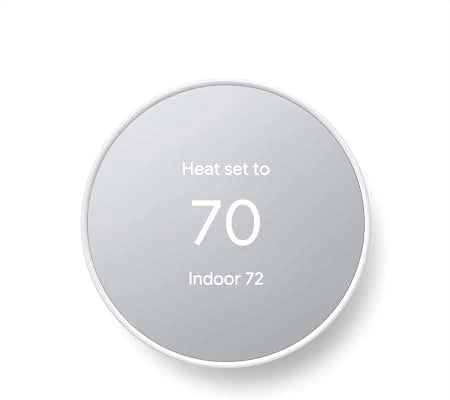
The Google Nest Learning Thermostat (4th gen) is a strong fit for seniors who want automatic scheduling, a modern display, and Google Home control. It also includes a Nest Temperature Sensor for managing temperature in another room.
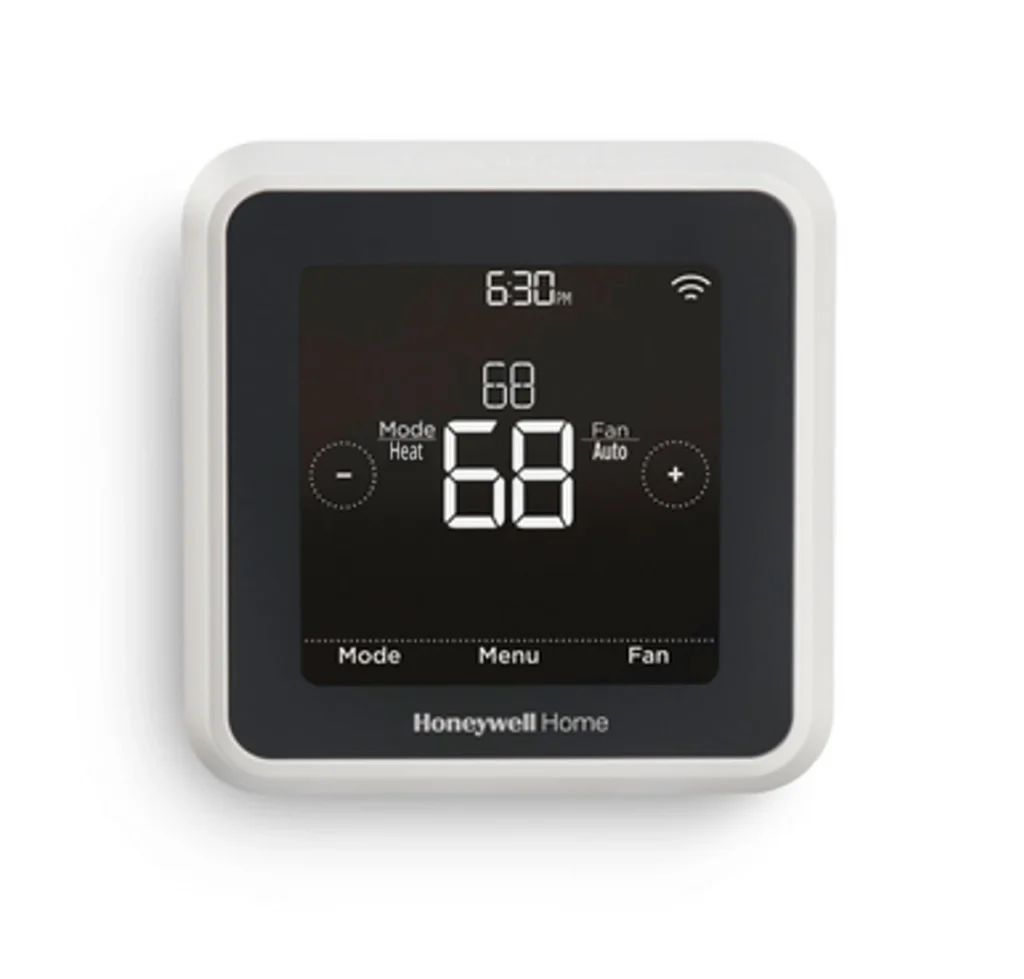
The Honeywell Home T9 is a good option for households that want room sensors, geofencing, scheduling, and broad smart-home support. Honeywell Home says the T9 can work with Alexa, Google Assistant, and other smart-home platforms.
For simple everyday control, both are capable. The better fit depends on the home’s HVAC system and which smart-home platform the household already uses.
Google Nest vs Honeywell Home At a Glance
Here is a simple look at the main differences.
| Feature | Google Nest Learning Thermostat | Honeywell Home T9 |
|---|---|---|
| App control | Google Home | Resideo app |
| Room sensor | Included with 4th gen | Available |
| Smart scheduling | Smart Schedule | Smart Response and schedules |
| Geofencing | Available through Google Home features | Available |
| Voice control | Google ecosystem | Alexa, Google Assistant and more |
| Remote control | Yes | Yes |
| HVAC compatibility | Most 24V systems | Check system compatibility |
| Senior-friendly focus | Simple display and automation | Room sensing and flexible control |
The Nest Learning Thermostat 4th gen has a 2.68-inch circular display and weighs about 5.7 ounces. It supports most 24V HVAC systems.
Google Nest Learning Thermostat Review for Seniors
The Google Nest Learning Thermostat 4th gen is designed around automatic temperature management and Google Home control.
Its circular display gives the thermostat a familiar physical interface, while the Google Home app provides remote settings and schedules. Google also includes a Nest Temperature Sensor with the 4th-generation Learning Thermostat.
Ease of Use
Nest can be useful for seniors who want fewer daily adjustments.
The thermostat can learn preferred temperatures and suggest schedule changes. This can reduce the need to repeatedly change the temperature manually.
The Google Home app is useful for caregivers or family members who help manage a household’s smart devices.
However, app-based control does require a smartphone, Google account, and Wi-Fi connection for the full feature set. Google states that most features become available after connecting the thermostat to the Google Home app.
Key Strengths
- Automatic scheduling can reduce daily adjustments.
- Included temperature sensor can help with room-to-room comfort.
- Large circular display is easy to identify.
- Google Home provides remote control.
- Supports many common 24V HVAC systems.
Potential Drawbacks
- Some users may prefer a more traditional thermostat interface.
- Smart features depend on the Google Home ecosystem.
- HVAC compatibility should be checked before installation.
- Advanced setup may still require help from a family member or installer.
Honeywell Home T9 Review for Seniors
The Honeywell Home T9 Smart Thermostat takes a slightly different approach.
Its major strength is room sensing. Compatible T9 Smart Sensors measure temperature, humidity, and motion. Honeywell Home says the sensors work with T9 thermostats and connect through the Resideo app.
Ease of Use
The T9 gives users app-based control from a smartphone. It also supports scheduling and geofencing.
Geofencing can adjust the home’s temperature based on whether people are inside or outside the designated area.
That can be useful for seniors who have regular routines. It may also help family members who assist with home temperature settings.
The main learning curve comes from the connected features. Someone who only wants basic manual temperature control may not need all the available options.
Key Strengths
- Smart room sensors can monitor different areas.
- Geofencing can automate temperature changes.
- Resideo app allows remote control.
- Works with several major smart-home platforms.
- T9 sensors can measure temperature, humidity, and motion.
Potential Drawbacks
- Sensor features add another layer of setup.
- Compatibility should be checked before installation.
- The Resideo app may feel unnecessary for users who want only basic thermostat control.
- More connected features can mean more settings to learn.
Which Is Easier for Seniors to Use?
Both thermostats can make everyday temperature control easier, but they approach the task differently.
Nest focuses heavily on automatic learning and Google Home control. Honeywell Home T9 focuses strongly on room sensors, scheduling, and geofencing.
| Senior Need | Google Nest | Honeywell Home T9 |
|---|---|---|
| Simple daily automation | Strong | Strong |
| Remote app control | Yes | Yes |
| Multiple-room temperature control | Sensor included | T9 sensors available |
| Smart-home integration | Google Home | Multiple platforms |
| Caregiver assistance | Google Home | Resideo app |
For a senior who already uses Google devices, Nest may feel more familiar.
For a household that wants flexible room sensing or uses Alexa and other smart-home products, the T9 may fit better.
Performance Comparison
Smart thermostats do not compete like appliances with motors or batteries. Their useful performance comes from temperature control, automation, sensing, and HVAC compatibility.
Nest Learning Thermostat 4th gen supports most 24V heating and cooling systems, including gas, electric, oil, forced-air, heat-pump, and radiant systems.
Honeywell Home’s T9 also provides smart temperature control, room sensing, scheduling, and geofencing. However, Honeywell recommends checking compatibility for systems with special configurations such as line voltage, dual fuel, fan coil, or certain two-wire systems.
| Performance Area | Google Nest | Honeywell Home T9 |
|---|---|---|
| Temperature automation | Strong | Strong |
| Room sensing | Included sensor | Optional T9 sensors |
| Scheduling | Smart Schedule | Smart Response and schedules |
| Geofencing | Supported | Supported |
| HVAC compatibility | Most 24V systems | Compatibility check recommended |
The practical winner here depends on the home’s HVAC system and the type of automation the user wants.
Comfort, Accessibility, and Senior-Friendly Design
A thermostat should not require constant attention.
Nest can reduce manual work through its learning and scheduling features. The included temperature sensor can also help address rooms that feel warmer or cooler than the thermostat location.
Honeywell Home T9 takes a similar approach through remote room sensors. These sensors can monitor temperature and humidity in different locations.
For seniors who have difficulty walking to a thermostat, smartphone control can be useful. It lets the user adjust the temperature without physically reaching the wall-mounted thermostat.
Still, a smartphone should not be assumed to be easier for every senior. Some people may prefer physical controls.
Features Comparison
The two systems have overlapping smart features, but their ecosystems are different.
| Feature | Google Nest | Honeywell Home T9 |
|---|---|---|
| Mobile control | Google Home | Resideo |
| Smart scheduling | Yes | Yes |
| Room sensors | Included with 4th gen | Available separately |
| Geofencing | Available | Available |
| Voice platforms | Google ecosystem | Alexa, Google Assistant and more |
| Air filter reminders | Yes | Yes |
Google lists air-filter reminders and HVAC system health monitoring among the intelligent features available on its current Nest thermostats.
Honeywell Home also highlights filter reminders, energy reports, smart response, and alerts on its smart thermostat platform.
Price, Maintenance, and Long-Term Value
Smart thermostat prices can change based on the model, retailer, promotions, and whether sensors are included.
The bigger long-term question is what comes with the thermostat and what you may need to add later.
| Cost Factor | Google Nest | Honeywell Home T9 |
|---|---|---|
| Main thermostat | Varies by model | Varies by package |
| Room sensors | 4th-gen sensor included | Additional sensors available |
| App | Google Home | Resideo |
| Maintenance | Low | Low |
| Professional installation | Available | Available |
Nest’s 4th-generation Learning Thermostat includes a Nest Temperature Sensor, which can add value for households that need another temperature reading.
Honeywell Home offers T9 sensors separately, allowing users to expand room monitoring when needed.
Who Should Choose Google Nest?
Choose Google Nest if:
- You already use Google Home devices.
- You want automatic temperature scheduling.
- You prefer a simple, modern thermostat design.
- You want a room sensor included with the 4th-generation Learning Thermostat.
- A family member may help manage the thermostat through Google Home.
- Your HVAC system passes Google’s compatibility check.
Who Should Choose Honeywell Home T9?
Choose Honeywell Home T9 if:
- You want remote room sensors.
- You use Alexa, Google Assistant, or another supported smart-home platform.
- You like geofencing.
- You want flexible room-by-room temperature monitoring.
- You already use the Resideo ecosystem.
- Your HVAC system is compatible with the T9.
Google Nest vs Honeywell Home Final Verdict
Best for Google Home households: Google Nest Learning Thermostat.
Best for flexible room sensing: Honeywell Home T9.
Best for automatic scheduling: Both offer useful automation.
Best for smart-home flexibility: Honeywell Home T9 has broader platform support.
Best for included room sensing: Google Nest Learning Thermostat 4th gen includes a Nest Temperature Sensor.
There is no single choice that fits every senior household. Nest makes particular sense when Google Home is already part of the home. T9 can make more sense when room sensors and broader smart-home integration are priorities.
Scoring Summary
The scores below are editorial comparisons based on the documented features above, not laboratory test results.
| Category | Google Nest | Honeywell Home T9 |
|---|---|---|
| Ease of Use | 9/10 | 8/10 |
| Senior-Friendly Design | 9/10 | 8/10 |
| Smart Features | 9/10 | 9/10 |
| Maintenance | 9/10 | 9/10 |
| Value | 8/10 | 8/10 |
These scores are most useful as a quick summary. Individual needs can change which features matter most.
How We Evaluate Products
For SeniorsProTalk, the comparison focuses on practical factors rather than marketing claims.
We consider:
- Ease of everyday use
- Accessibility
- Controls and display
- Setup
- Smart features
- Room sensing
- Maintenance
- HVAC compatibility
- Long-term practicality
- Value
This comparison does not claim hands-on testing. The assessment is based on current manufacturer information and documented product specifications.
Senior-Specific Buying Considerations
A few checks matter before buying any smart thermostat.
Physical Effort
Remote control can be useful if the user does not want to walk to the thermostat each time.
Controls
Look at the physical display as well as the smartphone app. A simple interface can make daily adjustments easier.
Setup
Check HVAC compatibility first. Google provides a compatibility checker, while Honeywell Home also recommends checking compatibility for the T9.
Maintenance
Both systems require little routine maintenance compared with many household appliances. Filter reminders can help users remember HVAC maintenance tasks.
Smart-Home Support
Choose a thermostat that works well with the smart-home platform already used in the household.
Common Buying Mistakes
Avoid these common mistakes when choosing between Nest and Honeywell Home:
- Buying before checking HVAC compatibility
- Choosing based only on appearance
- Paying for features that will not be used
- Forgetting about room-sensor needs
- Ignoring the smartphone app experience
- Assuming every smart thermostat works with every HVAC system
Compatibility is especially important. Google notes that some high-voltage and proprietary systems are not compatible with Nest thermostats.
Safety
Smart thermostat installation involves HVAC wiring, so safety should come first.
Google instructs users to switch off power before exposing thermostat wiring and warns against connecting Nest thermostats to high-voltage wiring.
If the existing system is unfamiliar or uses unusual wiring, professional installation is a sensible option.
Honeywell Home also recommends professional help for certain system types, including line-voltage and some specialized HVAC configurations.
Conclusion
Google Nest and Honeywell Home T9 can both make temperature control easier for older adults. Nest stands out for Google Home integration, automatic scheduling, and its included room sensor with the 4th-generation Learning Thermostat.
Honeywell Home T9 is more appealing for households that want flexible room sensing and support for several smart-home platforms. Before choosing either one, check HVAC compatibility and consider which app and smart-home ecosystem the household already uses.