
Google Nest vs ecobee Smart Thermostat for Seniors: Which?


Folding Walking Stick with Seat

Button Hook Dressing Aid

Shower Chair for Elderly
Google Nest vs ecobee smart thermostat for seniors is a useful comparison if you want easier temperature control without constantly adjusting the thermostat. The two systems take different approaches to comfort, scheduling, sensors, and smart-home features.
For this comparison, the focus is on the Google Nest Learning Thermostat (4th gen) and ecobee Smart Thermostat Premium. Both support remote control and room sensing, but their features and smart-home ecosystems differ.
Quick Comparison
For many seniors, Google Nest may be easier for simple temperature control and automatic scheduling. Its large display, rotating interface, learning schedule, and included temperature sensor make everyday use fairly straightforward.
ecobee Smart Thermostat Premium may suit seniors who want a larger touchscreen, more detailed room sensing, indoor air-quality information, and broader smart-home integration. It also includes a SmartSensor.
The better choice depends more on the home’s needs and the user’s preferred smart-home platform than on age alone.
Google Nest vs ecobee At a Glance
Here is the basic difference between the two current models.
| Feature | Google Nest Learning Thermostat 4th Gen | ecobee Smart Thermostat Premium |
|---|---|---|
| Display | 2.7-inch circular display | 4-inch color touchscreen |
| Room sensor | 1 included Nest Temperature Sensor | 1 included SmartSensor |
| Smart scheduling | Learns temperature preferences | Schedule Assistant and smart scheduling |
| Air quality | Smart ventilation features | Built-in indoor air-quality monitor |
| Voice control | Google Home and Matter ecosystem | Alexa built-in, Siri support |
| HVAC compatibility | Most 24V systems | Most 24VAC HVAC systems |
| Warranty | 2 years retail | 3 years |
| Current US list price checked | $279.99 | $259.99 |
Specifications and pricing can change, so check the manufacturer’s current page before buying.
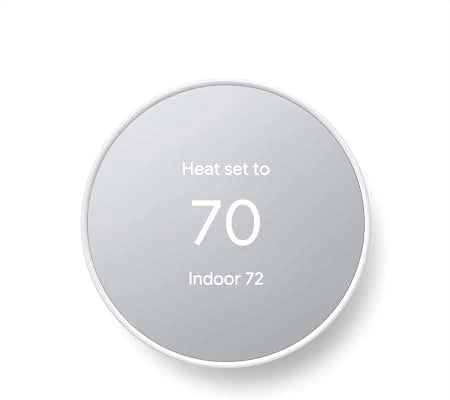
Google Nest Learning Thermostat 4th Gen Review
The Google Nest Learning Thermostat 4th gen focuses on automatic scheduling and simple everyday interaction. Its display is 60% larger than the previous generation, and one Nest Temperature Sensor is included.
Ease of Use
The Nest uses a familiar physical thermostat design with a clear circular display. Its Dynamic Farsight display can show temperature, weather, or a clock when you look toward it.
The Google Home app is required for setup and can be used for temperature control and schedules. Google says its installation process provides step-by-step instructions.
For a senior who wants fewer manual schedule changes, Smart Schedule is useful. It can learn from temperature adjustments and suggest or automatically apply schedule changes.
Key Strengths
- Large, easy-to-see display
- Automatic learning schedule
- One temperature sensor included
- Remote control through Google Home
- Works with Google Home and Matter
- Supports many common HVAC systems
- Does not usually require a C wire
Potential Drawbacks
- Setup still requires a smartphone and Google Home app
- Some advanced functions may take time to learn
- Compatibility should be checked before installation
- Best suited to people comfortable with the Google ecosystem
ecobee Smart Thermostat Premium Review
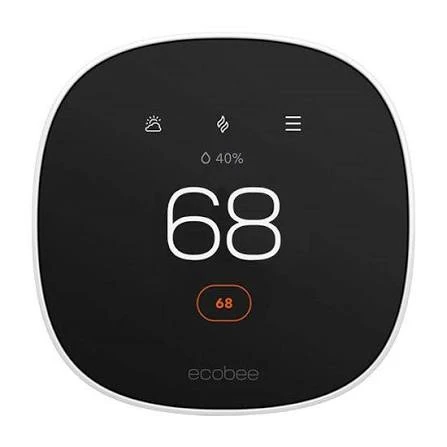
The ecobee Smart Thermostat Premium takes a more feature-rich approach. It has a 4-inch color touchscreen, built-in occupancy sensing, indoor air-quality monitoring, and an included SmartSensor.
Ease of Use
The large touchscreen is a strong point for users who prefer visible on-screen controls. Temperature, humidity, schedules, and other information can be accessed directly from the thermostat.
The ecobee app also allows temperature changes and schedule adjustments remotely. The thermostat supports voice control through Alexa and can be enabled with Siri when paired with a compatible Apple HomePod or HomePod mini.
Key Strengths
- Large 4-inch color touchscreen
- Included SmartSensor
- Built-in indoor air-quality monitoring
- Alexa built in
- Siri support
- Broad smart-home compatibility
- Three-year warranty
- Supports many HVAC configurations
Potential Drawbacks
- More features can mean a larger learning curve
- Some security features require an ecobee subscription
- The touchscreen interface may feel more complex than a basic thermostat
- Compatibility should still be checked before installation
Which Is Easier for Seniors to Use?
Both are designed to reduce the amount of manual thermostat work.
Nest has an advantage for people who like a simple physical interaction and automatic learning. The 4th-generation model also has a larger display than its predecessor, which can help when checking the temperature from across the room.
ecobee has a larger touchscreen and puts more information directly on the thermostat. This may appeal to seniors who prefer a larger visual interface.
A simpler thermostat is not always the best thermostat. The right choice depends on which controls feel more natural to the person using it.
For someone who wants simple temperature changes and automatic scheduling, Nest may feel more straightforward. For someone who wants large touchscreen controls and more information in one place, ecobee may be more appealing.
Performance Comparison
The key performance difference is not basic heating or cooling. Both are designed to control compatible HVAC systems. The bigger difference is how each system manages comfort around the home.
| Performance Area | Google Nest | ecobee |
|---|---|---|
| Automatic scheduling | Strong | Strong |
| Room temperature sensing | Included sensor | Included SmartSensor |
| Occupancy sensing | Yes | Yes |
| Indoor air quality | Smart ventilation features | Built-in air-quality monitor |
| Energy monitoring | Energy-saving features | Home Energy Reports |
Nest uses Smart Schedule and its temperature sensor to help manage comfort and energy use.
ecobee uses occupancy sensing and its SmartSensor to help manage hot and cold spots. Its Premium model also monitors indoor air quality and provides alerts.
Comfort, Accessibility, and Senior-Friendly Design
Both thermostats can reduce the need to walk to the wall and make frequent adjustments.
Nest’s room sensor can help manage temperature in a different room from the thermostat. Google says up to six sensors can be used with the 4th-generation Learning Thermostat.
ecobee includes a SmartSensor and uses occupancy information to help adjust comfort in important rooms. Its larger touchscreen may also be helpful for users who prefer bigger on-screen controls.
Neither product should be chosen based on assumptions about age. Consider the individual’s eyesight, dexterity, smartphone comfort, and preferred smart-home system.
Features Comparison
The feature sets are different enough to affect the buying decision.
| Feature | Google Nest | ecobee |
|---|---|---|
| Learning schedule | Yes | Schedule Assistant |
| Included room sensor | Yes | Yes |
| Air-quality monitor | No dedicated built-in monitor listed | Yes |
| Voice control | Google ecosystem | Alexa and Siri options |
| Smart-home support | Google Home, Matter | Apple Home, Alexa, Google Assistant, SmartThings |
| HVAC accessories | Ventilation, humidifier, dehumidifier support | Humidifier, dehumidifier, HRV, ERV support |
ecobee lists support for Apple Home, Amazon Alexa, Google Assistant, and Samsung SmartThings, while Nest supports Google Home and Matter.
Price, Maintenance, and Long-Term Value
At the time checked, Google lists the Nest Learning Thermostat 4th gen at $279.99 in the US, while ecobee lists the Smart Thermostat Premium at $259.99. Prices and promotions can change.
| Cost Factor | Google Nest | ecobee |
|---|---|---|
| Current listed price checked | $279.99 | $259.99 |
| Included sensor | 1 | 1 |
| Warranty | 2 years retail | 3 years |
| Subscription needed for basic thermostat use | No | No |
| Optional advanced services | Nest services/ecosystem features | ecobee Smart Security subscription |
ecobee’s Premium model has a three-year warranty, while Google’s listed retail warranty for the Nest Learning Thermostat 4th gen is two years.
Who Should Choose Google Nest?
- Choose Nest if you already use Google Home.
- Choose Nest if automatic learning is important.
- Choose Nest if you prefer a physical thermostat interaction.
- Choose Nest if you want an included room sensor.
- Choose Nest if you want a large display without moving to a full touchscreen interface.
Who Should Choose ecobee?
- Choose ecobee if a large touchscreen is important.
- Choose ecobee if indoor air-quality monitoring matters.
- Choose ecobee if you use Apple Home, Alexa, or SmartThings.
- Choose ecobee if you want more HVAC accessory support.
- Choose ecobee if the longer listed warranty is valuable to you.
Google Nest vs ecobee — Final Verdict
Best for simple smart scheduling: Google Nest
Best for a large touchscreen: ecobee
Best for indoor air-quality information: ecobee
Best for Google Home users: Google Nest
Best for broader smart-home platform support: ecobee
There is no universal winner for every senior. Nest emphasizes learning, simple interaction, and the Google ecosystem. ecobee puts more information and controls on its larger touchscreen and adds indoor air-quality monitoring and broader smart-home integration.
Scoring Summary
These scores are a practical comparison of the features most relevant to senior use, not laboratory test results.
| Category | Google Nest | ecobee |
|---|---|---|
| Ease of Use | 9/10 | 8.5/10 |
| Senior-Friendly Design | 9/10 | 9/10 |
| Smart Features | 9/10 | 9.5/10 |
| Maintenance | 9/10 | 9/10 |
| Value | 8.5/10 | 9/10 |
The scores reflect the feature comparison above and should not be treated as independent testing.
How We Evaluate Products
This comparison focuses on practical factors that can matter in everyday senior use.
We look at:
- Ease of operation
- Display and controls
- Room sensing
- Setup
- Smart-home compatibility
- Comfort features
- Maintenance
- HVAC compatibility
- Warranty
- Long-term value
No hands-on testing is claimed here. Product information is based on current manufacturer documentation and specifications.
Senior-Specific Buying Considerations
Before choosing a smart thermostat, check these points.
Controls
Think about whether the user prefers a physical thermostat interface or a touchscreen.
Display
A larger or more visible display can make temperature checks easier, especially when the thermostat is mounted farther away.
Setup
Check HVAC compatibility before installation. Google and ecobee both provide compatibility information for their thermostats.
Smartphone Use
Both systems offer app-based control. Make sure the user or caregiver is comfortable using the required app.
Room Temperature
If some rooms are consistently warmer or colder, a thermostat with an additional room sensor can be useful.
Common Buying Mistakes
- Buying before checking HVAC compatibility
- Choosing based only on the thermostat’s appearance
- Ignoring the smart-home ecosystem already used at home
- Paying for advanced features that will not be used
- Forgetting to consider room temperature differences
- Assuming every smart feature works without additional services
Safety
Smart thermostat installation involves HVAC wiring and electrical equipment. Turn off system power before exposing thermostat wiring, and use a qualified professional if you are unsure about the installation. Google specifically instructs users to switch off power before working with thermostat wiring.
For an older adult who is not comfortable working with wiring, professional installation can be a sensible option.
Frequently Asked Questions
Is Google Nest easier for seniors than ecobee?
It can be for users who prefer simple physical controls and automatic scheduling. ecobee may suit users who prefer a larger touchscreen.
Does Google Nest include a room sensor?
Yes. The Nest Learning Thermostat 4th gen includes one Nest Temperature Sensor 2nd gen.
Does ecobee Premium include a room sensor?
Yes. The ecobee Smart Thermostat Premium includes a SmartSensor.
Which thermostat has the larger display?
The ecobee Premium has a 4-inch color touchscreen. The Nest Learning Thermostat 4th gen has a 2.7-inch circular display.
Which is better for a Google Home user?
Nest is the more direct fit for someone already using Google’s smart-home ecosystem. ecobee also works with Google Assistant.
Does ecobee monitor indoor air quality?
Yes. The Premium has a built-in indoor air-quality monitor that can provide alerts and tips when air quality is poor.
Conclusion
Google Nest and ecobee Premium both offer useful smart features for older adults, but they emphasize different things. Nest focuses on learning schedules, simple interaction, and Google’s ecosystem, while ecobee Premium offers a larger touchscreen, room sensing, air-quality monitoring, and broad smart-home support.
For seniors, the most important question is not simply which thermostat has more features. It is which one fits the user’s home, HVAC system, preferred controls, and smart-home setup with the least hassle.
