
Eufy vs Wyze Security Camera for Seniors: Which?


Adaptive Eating Utensils
Orthopedic Pillow

Bed Exit Alarm Sensor
Eufy vs Wyze security camera for seniors is a useful comparison because both brands offer cameras with smart alerts, night vision, two-way audio, and app control. The main difference is how each brand handles storage, subscriptions, installation, and the overall security system.
For seniors, the best choice depends less on having the most features and more on how simple the system is to manage. Eufy can be a strong fit for someone who wants local storage and fewer ongoing fees, while Wyze offers a broad range of affordable cameras and a simple app-based setup.
Quick Comparison
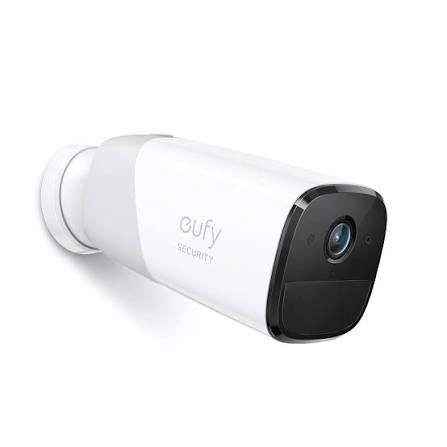
Eufy is generally more appealing for seniors who value local video storage and want to reduce dependence on monthly cloud fees. Many Eufy cameras support local storage, with some systems using HomeBase for centralized storage.
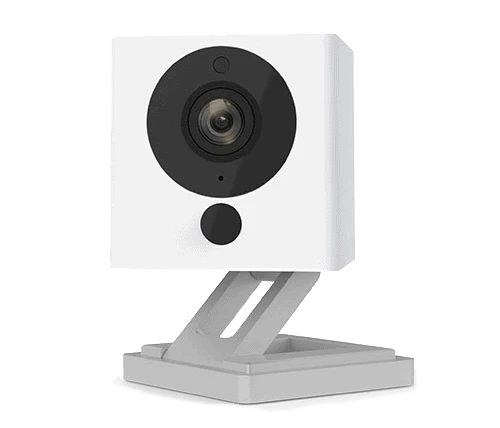
Wyze is attractive for seniors who want a compact, affordable camera with features such as 2.5K video, color night vision, two-way audio, and local microSD recording. Wyze Cam v4, for example, supports 24/7 local recording with a microSD card.
The better choice depends on whether simple local storage and fewer recurring costs or low-cost cameras and a straightforward smart-home experience matter more.
Eufy vs Wyze At a Glance
The two brands offer different camera types, so exact features vary by model. The table below focuses on common senior-friendly considerations and representative current products.
| Feature | Eufy | Wyze |
|---|---|---|
| Ease of use | Good | Good |
| Local storage | Strong option | Available on supported models |
| Subscription dependence | Often low | Optional features may use subscription |
| Video quality | Varies by model, up to 4K on some models | Up to 2.5K on Cam v4 |
| Night vision | Available, including color on some models | Color night vision on current models |
| Battery options | Strong selection | Battery models available |
| Smart alerts | Human, vehicle and other detection on some models | Person detection and other smart alerts |
| Best fit | Local-storage-focused users | Budget-conscious smart-home users |
Eufy Security Cameras for Senior-Friendly Use
Eufy’s current camera range includes indoor, outdoor, wired, battery-powered, and solar-powered options. That gives families more flexibility when choosing a camera for a front door, driveway, living room, or backyard.
Ease of Use
Eufy can work well for seniors who want a security system that does not require constant cloud management. Some Eufy cameras store footage locally, while HomeBase systems can centralize recordings.
For example, the SoloCam S340 includes on-device storage and can work without a HomeBase. Eufy also says the S340 can use solar charging and does not require a hub for basic operation.
A possible drawback is that Eufy’s broader ecosystem can become more complicated when several cameras, HomeBase devices, and advanced features are added.
Key Strengths
- Strong local-storage options
- Several battery-powered cameras
- Solar-powered options are available
- Some models offer high-resolution video
- HomeBase can centralize security devices
- Useful AI detection on supported models
- Can reduce reliance on monthly cloud storage
Potential Drawbacks
- Some systems require extra hardware for advanced features
- The product range can be confusing
- Features vary considerably between models
- More advanced setups may take longer to configure
Wyze Security Cameras for Senior-Friendly Use
Wyze offers a wide range of compact security cameras. Its current lineup includes wired and battery-powered options, with Cam v4 providing 2.5K video, color night vision, a spotlight, two-way audio, and IP65 weather resistance.
Ease of Use
Wyze Cam v4 is wired, so it needs a power connection. That makes it less flexible than a battery-powered camera, but it also means there is no camera battery to recharge.
The Wyze app is central to setup and daily monitoring. A senior who is comfortable using a smartphone may find this convenient. A family member can also help with account setup and camera settings.
Key Strengths
- Compact camera designs
- 2.5K video available on Cam v4
- Color night vision
- Two-way audio
- Built-in spotlight on Cam v4
- Local microSD recording
- Indoor and outdoor models
- Alexa and Google Assistant compatibility
Potential Drawbacks
- Some cameras require wired power
- Advanced AI features can depend on Wyze subscriptions
- The large product range can make model selection confusing
- Cloud-based features may add ongoing costs
Which Is Easier for Seniors to Use?
Ease of use depends heavily on the specific camera.
For a senior who wants minimal battery maintenance, a wired Wyze camera such as Cam v4 can make sense. Once installed near a suitable power source, there is no camera battery to recharge.
For someone who does not want to run a power cable to an outdoor camera, Eufy’s battery and solar options can be more convenient. The SoloCam S340, for example, is designed around solar charging and can operate without a hub.
| Senior Need | Eufy | Wyze |
|---|---|---|
| Avoid battery charging | Solar/wired options | Wired options |
| Avoid power cables outdoors | Strong battery options | Battery models available |
| Simple indoor monitoring | Good | Good |
| Local recording | Strong | Available |
| Multiple cameras | HomeBase ecosystem | Wyze ecosystem |
There is no universal winner here. A senior with an easy power outlet may prefer a wired camera, while someone monitoring a remote driveway may appreciate a battery or solar design.
Performance Comparison
Video quality varies by model rather than simply by brand.
Eufy’s higher-end cameras include models such as the eufyCam 3, which offers 4K video, color night vision, and expandable HomeBase storage.
Wyze Cam v4 records at 2.5K resolution and includes color night vision, a wide field of view, and a motion-activated spotlight.
| Performance Area | Eufy | Wyze |
|---|---|---|
| Daytime video | Varies by model | Strong on current 2.5K models |
| Night vision | Color night vision on some models | Color night vision |
| Wide coverage | Available on several models | Available |
| Zoom | Available on selected models | Smart Focus on Cam v4 |
| Two-way audio | Available | Available |
| Local recording | Strong | Available |
For seniors, image quality is most useful when it makes faces, visitors, vehicles, or other important details easier to recognize.
Comfort, Accessibility, and Senior-Friendly Design
Security cameras are not usually handled throughout the day, so physical comfort matters less than installation and daily monitoring.
A camera that is difficult to mount can create unnecessary problems. Battery cameras reduce the need for permanent wiring, while wired cameras avoid future battery charging.
The app also matters. Seniors who prefer simple routines may benefit from a camera that has clear notifications and does not require frequent settings changes.
For caregivers, remote access can be useful because they can check the camera without needing to visit the home.
Features Comparison
| Feature | Eufy | Wyze |
|---|---|---|
| Local storage | Yes, on supported models | Yes, on supported models |
| Cloud storage | Available on selected systems | Available |
| AI detection | Human, vehicle and other detection on selected models | Person detection and advanced AI with supported services |
| Two-way talk | Yes | Yes |
| Color night vision | Selected models | Current models such as Cam v4 |
| Solar options | Available | Available on selected models |
| HomeBase | Available on supported systems | No equivalent requirement for standard Cam v4 |
Eufy’s HomeBase systems can provide centralized local storage. HomeBase S380 includes 16GB of local storage and supports expansion with an external hard drive up to 16TB.
Wyze Cam v4 can record continuously to a microSD card. Wyze lists support for microSD storage and does not require a subscription for local recording.
Price, Maintenance, and Long-Term Value
Price changes often, so it is better to compare the ownership model than rely on one temporary sale price.
Eufy’s main advantage for some households is local storage. Supported systems can save recordings locally without requiring a monthly storage subscription.
Wyze also supports local recording on cameras such as Cam v4. However, some advanced AI and cloud features are connected to Wyze’s paid services.
| Cost Factor | Eufy | Wyze |
|---|---|---|
| Camera cost | Varies widely | Often positioned as budget-friendly |
| Local storage | Strong option | Available |
| Subscription | Often avoidable for core local recording | Optional for some advanced features |
| Extra hardware | HomeBase on some systems | Usually not required |
| Maintenance | Battery models need charging unless solar | Wired models avoid battery charging |
For long-term value, check the cost of the camera, storage, accessories, replacement parts, and any subscription features before buying.
Who Should Choose Eufy?
- Choose Eufy if local video storage is a major priority.
- Choose Eufy if you want battery or solar camera options.
- Choose Eufy if you want to build a larger security ecosystem.
- Choose Eufy if avoiding recurring cloud-storage costs matters.
- Choose Eufy if centralized HomeBase storage fits your setup.
Who Should Choose Wyze?
- Choose Wyze if you want a compact and affordable camera.
- Choose Wyze if you prefer a wired camera with no battery charging.
- Choose Wyze if 2.5K video and color night vision are important.
- Choose Wyze if you want local microSD recording.
- Choose Wyze if you already use other Wyze smart-home products.
Eufy vs Wyze Security Camera Final Verdict
Best for local storage: Eufy
Best for wired simplicity: Wyze
Best for solar outdoor use: Eufy
Best for compact budget-friendly monitoring: Wyze
Best for avoiding recurring storage costs: Eufy
These are not universal winners. The right option depends on the camera model and the senior’s home setup.
Eufy has an advantage when local storage, solar power, and a broader security ecosystem are priorities. Wyze is a practical choice when a simple wired camera, local microSD recording, and a lower-cost entry point are more important.
Scoring Summary
The scores below are editorial comparisons based on the features discussed above, not laboratory test results.
| Category | Eufy | Wyze |
|---|---|---|
| Ease of Use | 9/10 | 9/10 |
| Senior-Friendly Design | 9/10 | 8/10 |
| Performance | 9/10 | 9/10 |
| Maintenance | 9/10 | 8/10 |
| Local Storage | 10/10 | 9/10 |
| Value | 9/10 | 9/10 |
How We Evaluate Products
For senior-focused security cameras, the most useful factors are simple setup, clear video, easy alerts, local storage, maintenance, privacy, and long-term cost.
We also consider whether the camera requires frequent battery charging, complicated installation, or a paid subscription for features that may be important to everyday use.
This comparison does not claim hands-on testing. It is based on available product specifications and official product information.
Senior-Specific Buying Considerations
Physical Effort
Consider where the camera will be mounted. A battery camera may reduce wiring work, but it can require occasional removal for charging.
Controls
The app should be easy to understand. Large, clear notifications can make it easier to identify important events.
Maintenance
Check whether the camera needs battery charging, microSD management, cleaning, or other regular attention.
Storage
Decide whether local storage or cloud storage is more convenient. Local storage can reduce recurring fees, but someone may still need to manage the storage device.
Setup
A wired camera needs a suitable power source. Battery and solar cameras offer more placement flexibility.
Safety
Avoid mounting cameras where ladders or unsafe climbing would be needed for routine maintenance. If a camera requires difficult installation, consider having a family member or qualified installer handle it.
Common Buying Mistakes
- Choosing a camera without checking the power source.
- Assuming every Eufy or Wyze camera has the same features.
- Ignoring subscription costs.
- Forgetting the cost of a microSD card or HomeBase.
- Choosing high resolution without considering storage needs.
- Installing the camera somewhere that is difficult to maintain.
Frequently Asked Questions
Is Eufy better than Wyze for seniors?
It depends on the senior’s needs. Eufy is particularly useful for people who value local storage and battery or solar options. Wyze can be appealing for simple wired monitoring and local microSD recording.
Does Eufy require a monthly subscription?
Not necessarily. Many Eufy systems support local recording without a monthly storage subscription, although optional cloud or premium features may have separate costs.
Does Wyze require a subscription?
No subscription is required for local recording on supported cameras such as Wyze Cam v4. Paid services can add advanced AI and cloud features.
Which is easier for an outdoor camera?
Eufy has several battery and solar options, which can help when there is no convenient power outlet. Wyze also offers battery-powered outdoor cameras, while cameras such as Cam v4 require wired power.
Which has better video quality?
It depends on the model. Some Eufy cameras offer 4K video, while Wyze Cam v4 offers 2.5K video. Higher resolution can provide more detail, but placement and lighting also matter.
Conclusion
Eufy vs Wyze security camera for seniors comes down to how the camera will be powered, how recordings will be stored, and how much setup the user wants to manage. Eufy stands out for local storage, solar options, and broader security-system choices.
Wyze makes sense for seniors who prefer a compact camera with strong everyday features and local microSD recording. Before choosing, compare the exact models rather than judging the entire brand from one camera.