
Amazon Echo vs Google Nest Smart Speaker for Seniors: Which?


Philips Norelco 2400 Series Electric Shaver
Drive Medical Shower Chair with Back

Apple AirTag (2nd Generation) - 4 Pack
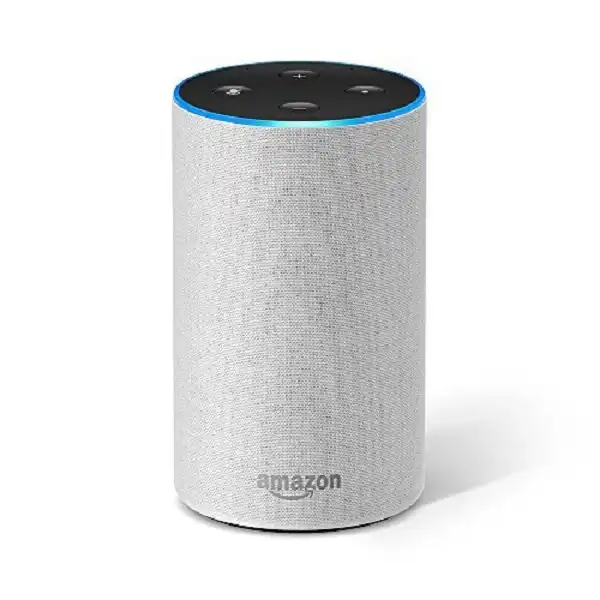
Amazon Echo vs Google Nest smart speaker for seniors is less about which brand has more features and more about which voice assistant fits the user’s daily habits. Both can answer questions, play music, set reminders, and control compatible smart-home devices.
For older adults, the best choice may depend on voice control, setup, phone ecosystem, accessibility, and help from family members. A simple speaker can be useful when buttons and small screens are hard to manage.
Quick Comparison
For most seniors who want simple voice commands and many smart-home options, Amazon Echo is the stronger all-around choice. Alexa also offers routines, reminders, calls, and a wide range of compatible devices.
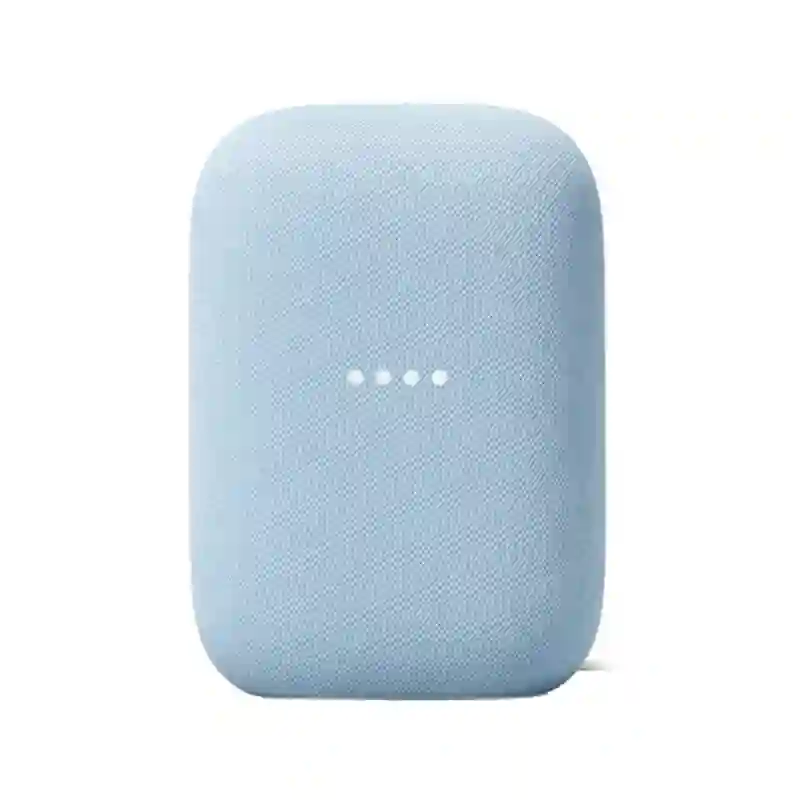
Google Nest is a strong choice for seniors already using Google services such as Google Calendar, Google Photos, YouTube, or Android phones. Google’s newer Home Speaker also adds Gemini-based voice features and improved conversational interaction.
The best speaker is usually the one that fits the user’s existing phone, accounts, and smart-home devices.
Amazon Echo vs Google Nest At a Glance
The exact hardware varies by model, so this table compares the two ecosystems rather than one specific speaker.
| Feature | Amazon Echo | Google Nest |
|---|---|---|
| Voice assistant | Alexa | Google Assistant / Gemini for Home on newer devices |
| Voice control | Excellent | Excellent |
| Smart-home control | Very strong | Very strong |
| Setup | Alexa app | Google Home app |
| Reminders and routines | Excellent | Excellent |
| Google services | Good | Excellent |
| Amazon services | Excellent | Good |
| Accessibility | Strong | Strong |
| Calls | Available on supported Echo devices | Available on supported Nest speakers |
| Best for | Alexa and Amazon users | Google and Android users |
Amazon’s Echo range includes models such as Echo Dot and Echo Pop, while Google’s current speaker lineup is evolving around Google Home and Gemini for Home.
Amazon Echo Is Simple for Daily Senior Use
Amazon Echo is appealing when the goal is straightforward voice control. A senior can use Alexa for alarms, reminders, music, questions, and compatible smart-home controls without needing to reach for a phone.
Ease of Use
Echo devices are normally configured through the Alexa app. The Echo Dot setup process requires Wi-Fi and an Amazon account, with the Alexa app handling device setup.
For someone who dislikes complicated controls, voice commands can reduce the number of physical steps needed.
Amazon also provides microphone controls, so the microphone can be switched off when privacy is a concern. Voice recordings can also be reviewed or deleted through Alexa settings.
Key Strengths
- Simple voice-first operation
- Strong smart-home support
- Useful reminders and routines
- Good integration with Amazon services
- Many Echo models to choose from
- Accessibility features are available on supported devices
Alexa routines can combine several actions into one command. For example, a routine can turn on lights, provide information, play music, or control compatible smart-home devices.
Potential Drawbacks
- The Alexa app is still needed for some setup and settings.
- Features can differ between Echo models.
- Users deeply invested in Google services may prefer Google’s ecosystem.
- Some advanced Alexa features may depend on the specific device or service.
Google Nest Fits Google Users Well
Google Nest speakers are especially attractive for people who already use Google’s ecosystem. Google’s newer Home Speaker is designed around Gemini for Home and supports voice interaction, smart-home control, and personalized features.
Ease of Use
Google speakers are managed through the Google Home app. Voice Match can provide personalized results for different household members, which can be useful when several people share one speaker.
Google also supports voice calling on compatible Nest speakers and displays through Google Meet.
Key Strengths
- Strong Google ecosystem integration
- Voice Match for personalized results
- Good smart-home controls
- Natural voice interaction on newer Gemini-enabled devices
- Accessibility settings through Google Home
- Useful calling features
Potential Drawbacks
- The Google Home app is still needed for setup and many settings.
- Some newer features may depend on specific hardware or subscriptions.
- The product lineup is changing as Google moves toward Gemini for Home.
- Users who rely heavily on Amazon services may prefer Alexa.
Which Is Easier for Seniors to Use?
Both can be easy because the main interface is voice.
Amazon Echo has an advantage for users who want simple routines, reminders, and broad Alexa smart-home control. Google Nest can be easier for someone already comfortable with Google Assistant, Android, and Google services.
Accessibility is also worth considering. Google provides settings for cognitive, mobility, vision, and hearing-related needs.
For a senior with limited dexterity, voice control may be more important than the number of physical buttons.
Performance Comparison
The most useful performance difference is not raw speaker power. It is how well the assistant handles everyday requests.
| Performance Area | Amazon Echo | Google Nest |
|---|---|---|
| Questions | Very good | Very good |
| Smart-home commands | Excellent | Excellent |
| Routines | Excellent | Excellent |
| Reminders | Excellent | Excellent |
| Google information | Good | Excellent |
| Amazon services | Excellent | Good |
| Conversational AI | Strong and evolving | Strong with Gemini for Home |
Google’s current Home Speaker uses Gemini for Home and is designed for more natural conversations and follow-up questions.
Amazon Alexa also supports routines that can be triggered by voice, time, sound detection, or other events.
Comfort, Accessibility, and Senior-Friendly Design
A smart speaker has one major accessibility benefit: the user can speak instead of reaching for a small control.
Google offers accessibility features through the Google Home app, including options related to vision, hearing, mobility, and cognitive assistance.
Amazon also offers accessibility features across supported Echo devices. Amazon lists features such as Tap to Alexa, captioning, screen magnification, and VoiceView for devices with the relevant capabilities.
For seniors with hearing difficulties, however, a speaker-only device may not be enough. A display-based smart device can provide additional visual feedback.
Features Comparison
The two ecosystems overlap heavily, but their strengths are different.
| Feature | Amazon Echo | Google Nest |
|---|---|---|
| Voice assistant | Alexa | Google Assistant / Gemini |
| Personalized voice profiles | Yes | Voice Match |
| Smart-home routines | Yes | Yes |
| Smart-home control | Yes | Yes |
| Voice calling | Supported on compatible devices | Supported on compatible devices |
| Privacy microphone control | Yes | Yes |
| Accessibility options | Yes | Yes |
| AI conversation | Available on supported Alexa experiences | Gemini for Home on newer devices |
Google’s Voice Match can provide personalized information for different users, while compatible Nest devices support voice calling.
Price, Maintenance, and Long-Term Value
Smart speakers are generally low-maintenance devices. The bigger long-term issue is the ecosystem.
| Cost Factor | Amazon Echo | Google Nest |
|---|---|---|
| Entry-level choices | Several | Several |
| App required | Alexa app | Google Home app |
| Subscription | Some advanced services may vary | Some newer Google Home features require subscription |
| Replacement parts | Model dependent | Model dependent |
| Long-term value | Strong for Alexa users | Strong for Google users |
Google’s current Home Speaker is listed at $99.99 in the U.S., while some advanced Google Home features are connected to Google Home Premium.
Prices and availability can change, so the purchase price should not be the only measure of value.
Who Should Choose Amazon Echo?
Choose Amazon Echo if:
- Alexa seems easier for the user to understand.
- The home already uses Amazon or Alexa-compatible devices.
- Reminders and routines are important.
- The user wants many Echo models to choose from.
- Family members are already familiar with Alexa.
- Smart-home control is a major reason for buying the speaker.
Amazon also specifically positions Alexa technology for senior living, highlighting voice calls, reminders, alarms, music, answers, and smart-home control.
Who Should Choose Google Nest?
Choose Google Nest or the newer Google Home Speaker if:
- The user already uses Android or Google services.
- Google Calendar and other Google services matter.
- Personalized results through Voice Match are useful.
- Natural conversational interaction is a priority.
- The household already uses Google Home devices.
- Family members prefer managing the home through Google Home.
Google’s current Home Speaker is built around Gemini for Home and supports Matter and Google Home smart-home control.
Amazon Echo vs Google Nest — Final Verdict
Best for most seniors: Amazon Echo
Best for Google users: Google Nest / Google Home Speaker
Best for routines: Amazon Echo
Best for Google integration: Google Nest
Best for newer conversational AI: Google Home Speaker with Gemini
Best for accessibility: Both have useful accessibility features
There is no universal winner. Amazon Echo makes more sense for a senior who wants Alexa, routines, reminders, and broad smart-home control. Google is the better fit when the household already revolves around Google services.
Scoring Summary
The scores below reflect practical senior usability, not laboratory testing.
| Category | Amazon Echo | Google Nest |
|---|---|---|
| Ease of Use | 9/10 | 9/10 |
| Senior-Friendly Design | 9/10 | 9/10 |
| Smart-Home Control | 9/10 | 9/10 |
| Accessibility | 9/10 | 9/10 |
| Value | 9/10 | 8.5/10 |
These scores are close because both platforms offer strong voice control. The ecosystem the senior already knows can matter more than a small feature difference.
How We Evaluate Products
We compare smart speakers around practical daily use.
The main factors are:
- Ease of setup
- Voice control
- Accessibility
- Smart-home compatibility
- Calling and communication
- Privacy controls
- Maintenance
- Long-term value
- Ease of use for caregivers
We do not treat this as a hands-on laboratory test. The comparison is based on available product and support information.
Senior-Specific Buying Considerations
Voice Control
Check whether the speaker reliably fits the user’s normal speaking style.
Controls
Physical controls should be easy to understand. Voice commands should also be simple enough for daily use.
Setup
A family member may need to help with Wi-Fi, account setup, and smart-home connections.
Maintenance
These speakers need little physical maintenance, but software and account settings may need occasional attention.
Privacy
Both platforms provide ways to control microphone access. Users should understand when the microphone is active and how voice data is managed.
Smart-Home Compatibility
Check the exact lights, plugs, thermostats, cameras, and other devices before buying.
Common Buying Mistakes
Avoid these mistakes when choosing between the two:
- Choosing only because one brand is cheaper
- Ignoring the user’s existing phone ecosystem
- Buying more smart-home features than the user needs
- Forgetting that setup may require a smartphone
- Assuming every Echo or Nest model has identical features
- Ignoring privacy and microphone settings
Safety
Smart speakers should sit on a stable, dry surface and use the supplied power equipment. Amazon’s Echo Dot safety guidance warns against liquids and prolonged listening at high volume.
A smart speaker should also not be treated as a replacement for a phone or dedicated emergency system. Emergency-calling availability varies by service, location, account, and device. Google’s emergency-calling documentation, for example, includes specific requirements and limitations.
Frequently Asked Questions
Is Amazon Echo or Google Nest easier for seniors?
Both can be easy. Amazon Echo may suit seniors who want simple Alexa routines, while Google may feel more natural for people already using Google services.
Can seniors use these speakers without touching them?
Yes. Voice commands are a central part of both platforms. Some functions still require a phone app for setup or settings.
Which is better for smart-home control?
Both are strong. The better choice depends on whether the user’s existing smart-home products work better with Alexa or Google Home.
Can Google Nest make phone calls?
Compatible Google smart speakers can make 1-to-1 voice calls after the preferred calling method is configured.
Does Amazon Echo have accessibility features?
Yes. Supported Echo devices offer accessibility options, with features varying by device.
Should a senior buy a speaker or a smart display?
A speaker is simpler if voice control is enough. A smart display can be better when visual information, touch controls, captions, or video calling are useful.
Conclusion
Amazon Echo and Google Nest can both make everyday tasks easier for seniors through voice control, reminders, music, questions, calls, and smart-home commands. The key difference is the ecosystem rather than a simple hardware winner.
Choose Amazon Echo for a strong Alexa experience and easy routines. Choose Google Nest or the newer Google Home Speaker when Google services, Voice Match, and Gemini-based conversations are more important. For either option, keep the setup simple and choose a model that matches the user’s actual needs.