
Google Nest vs Wyze Video Doorbell for Seniors: Which?


Indoor Security Camera

Reacher Grabber Tool

Electric Jar Opener
Google Nest vs Wyze video doorbell for seniors is mainly a choice between a polished Google smart-home experience and a more flexible local-storage option. Both let you see visitors, receive alerts, and talk through the doorbell.
For older adults, the key question is not just video quality. Setup, app controls, power, alerts, storage, and ongoing costs can make a bigger difference in daily use.
Quick Comparison
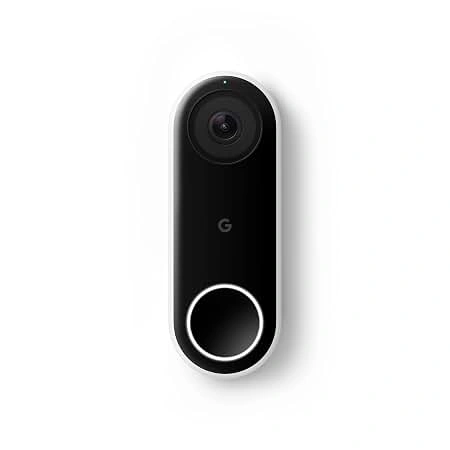
Google Nest is a good fit for seniors who already use Google Home products and want a simple, connected experience. Its visitor announcements and smart alerts can also be useful for caregivers.
Wyze is more appealing when local recording matters. The current Wyze Video Doorbell v2 offers 2K video and 24/7 local recording with a microSD card. It is also designed to work with an existing mechanical chime.
The biggest difference is power. The Nest Doorbell (battery) can run from its built-in rechargeable battery or existing wiring, while Wyze Video Doorbell v2 is hardwired.
Google Nest vs Wyze At a Glance
Here is the basic difference between the current models used for this comparison.
| Feature | Google Nest Doorbell | Wyze Video Doorbell v2 |
|---|---|---|
| Power | Battery or wired | Wired only |
| Video | HD, 960 × 1280 | 2K, 2048 × 1536 |
| Field of view | 145° diagonal | 166.8° diagonal |
| Local storage | No removable microSD | Up to 256GB microSD |
| 24/7 recording | Not available | Available with microSD |
| Two-way talk | Yes | Yes |
| App | Google Home | Wyze |
| Existing chime | Compatible options | Supports existing mechanical chime |
| Smart alerts | Person, package and other events | Motion alerts; advanced detection with subscription |
Google lists the Nest Doorbell (battery) at 7.3 oz and 6.3 inches tall. Wyze Video Doorbell v2 measures 4.3 × 1.7 × 0.9 inches.

Google Nest Doorbell Review for Seniors
The Nest Doorbell focuses on easy integration with the Google Home ecosystem. It is especially useful when a senior already has Google speakers or displays around the home.
Ease of Use
The Google Home app handles the main doorbell controls. A senior can view the camera, receive visitor alerts, and use two-way talk from a compatible phone.
Google also supports visitor announcements on compatible speakers and displays. This means a person does not always need to check their phone when someone rings the doorbell.
Key Strengths
- Battery or wired installation
- Google Home integration
- Two-way talk with noise cancellation
- Person and package alerts
- Visitor announcements on compatible Google devices
- Familiar-face features with the appropriate subscription
Potential Drawbacks
- The battery needs charging over time.
- 24/7 video history is not available on the battery model.
- Some advanced features require a paid Google Home Premium subscription.
- It depends on Wi-Fi and the Google Home app.
Google states that the Nest Doorbell (battery) does not provide continuous 24/7 video history, even when wired for power.
Wyze Video Doorbell v2 Review for Seniors
Wyze Video Doorbell v2 takes a different approach. It is a wired doorbell with 2K video, local microSD recording, and support for an existing mechanical chime.
Ease of Use
Once installed, the Wyze app provides live viewing, alerts, and two-way communication. The doorbell also supports preset quick responses.
The main consideration is installation. Wyze requires an existing wired doorbell setup with 16–24V AC power and at least 10VA. The company also warns that older wiring or a low-power transformer can affect operation.
Key Strengths
- 2K video resolution
- 24/7 local recording with microSD
- Up to 256GB microSD support
- Existing mechanical chime support
- Two-way audio
- 3–6 seconds of pre-roll recording
- No battery charging
Potential Drawbacks
- Requires hardwired installation.
- Existing wiring must meet the required power range.
- Advanced AI detections require a subscription.
- Local recording requires a compatible microSD card.
Wyze says the v2 can record continuously to a microSD card and supports up to 256GB.
Which Is Easier for Seniors to Use?
Both can be easy after setup, but they suit different homes.
Google Nest may be easier for seniors who already use Google Home. Visitor announcements can also help someone who does not want to keep checking a phone.
Wyze can be convenient once installed because there is no battery to recharge. However, the initial wiring requirements may make installation more involved.
The easiest doorbell is often the one that fits the home’s existing setup.
For a senior who lives alone, having a family member or professional handle installation can remove much of the setup burden.
Performance Comparison
Video performance is one of the clearest differences.
| Performance Area | Google Nest | Wyze v2 |
|---|---|---|
| Resolution | 960 × 1280 HD | 2048 × 1536 2K |
| Field of view | 145° diagonal | 166.8° diagonal |
| Night vision | Yes | Yes |
| HDR | Yes | Not listed in current v2 specs |
| Pre-roll | Not the main feature | 3–6 seconds |
| Continuous local recording | No | Yes |
Wyze has the higher stated video resolution and a wider diagonal field of view. Its wired design also enables 3–6 seconds of pre-roll recording for motion events.
Google, however, offers strong event-based alerts. Current Google Home documentation lists person, package, animal, vehicle, and other event types for supported Nest doorbells.
Comfort, Accessibility, and Senior-Friendly Design
Smart doorbells do not require much physical effort during everyday use. The bigger concern is whether the system is simple to manage.
Google Nest may be easier for someone already familiar with the Google Home app. Compatible Google speakers and displays can also announce visitors.
Wyze avoids battery charging with its wired v2 model. That can be useful for someone who does not want another device to remember to recharge.
The trade-off is installation. If the home does not have suitable wiring, Wyze v2 is not a simple battery-powered replacement.
Features Comparison
The two doorbells take different approaches to storage and smart features.
| Feature | Google Nest | Wyze v2 |
|---|---|---|
| Two-way talk | Yes | Yes |
| Visitor announcements | Yes, with compatible Google devices | No comparable Google-style feature |
| Package alerts | Supported | Available with advanced detection features |
| Familiar faces | With Google Home Premium | Not a core v2 feature |
| Local microSD | No | Yes |
| 24/7 local recording | No | Yes |
| Quick responses | Yes | Yes |
| Voice assistants | Google ecosystem | Alexa and Google Assistant |
Google’s advanced familiar-face feature requires Google Home Premium, while Wyze offers local storage without requiring a cloud subscription for the basic local-recording function.
Price, Maintenance, and Long-Term Value
Price changes often, so the purchase price should not be the only consideration.
The Google Nest Doorbell (battery) is listed by Google at $179.99 on its current US product page. Wyze lists the Video Doorbell v2 at a much lower current price on its US site, although prices and promotions can change.
| Cost Factor | Google Nest | Wyze v2 |
|---|---|---|
| Main power maintenance | Recharge battery | No battery charging |
| Local storage cost | Not applicable | microSD card |
| Cloud features | Subscription for some advanced features | Subscription for advanced cloud/AI features |
| Installation | Battery or wired options | Existing wired setup required |
| Long-term concern | Subscription and charging | Wiring and storage card |
For long-term value, think about the entire setup rather than just the doorbell price.
Who Should Choose Google Nest?
- Choose Nest if the home already uses Google Home devices.
- Choose Nest if visitor announcements are useful.
- Choose Nest if battery installation is easier than running doorbell wiring.
- Choose Nest if smart alerts are more important than local recording.
- Choose Nest if a caregiver wants a Google-based smart-home setup.
Who Should Choose Wyze?
- Choose Wyze if local video storage is important.
- Choose Wyze if 24/7 recording is useful.
- Choose Wyze if higher stated video resolution matters.
- Choose Wyze if the home already has suitable doorbell wiring.
- Choose Wyze if avoiding battery charging is a priority.
Google Nest vs Wyze — Final Verdict
There is no single choice that fits every senior.
Google Nest makes more sense for a senior who values Google Home integration, visitor announcements, and smart event alerts. Wyze Video Doorbell v2 makes more sense for someone who wants 2K video, local microSD storage, and continuous recording.
The most important question is simple: Does the home benefit more from Google’s connected smart-home experience or Wyze’s local recording and wired setup?
Scoring Summary
The scores below are a practical comparison based on the features discussed above, rather than laboratory test results.
| Category | Google Nest | Wyze v2 |
|---|---|---|
| Ease of Use | 9/10 | 8/10 |
| Senior-Friendly Design | 9/10 | 8/10 |
| Video Performance | 8/10 | 9/10 |
| Storage Flexibility | 6/10 | 10/10 |
| Maintenance | 8/10 | 9/10 |
| Smart Features | 9/10 | 8/10 |
| Value | 7/10 | 9/10 |
These scores are editorial comparisons based on documented features and senior-use considerations, not independent product testing.
How We Evaluate Products
This comparison focuses on practical factors that can affect everyday use.
We consider:
- Ease of setup
- App simplicity
- Accessibility
- Video performance
- Alerts
- Storage
- Maintenance
- Power requirements
- Smart-home compatibility
- Long-term value
We do not treat manufacturer marketing claims as independent testing.
Senior-Specific Buying Considerations
A few checks can prevent problems after installation.
Setup
Check whether the home already has compatible doorbell wiring. Wyze v2 requires a wired setup with the appropriate power supply.
Controls
Look at the app before buying. A simple interface may matter more than having every available smart feature.
Maintenance
Battery models need periodic charging. Wired models avoid that task but depend on suitable electrical wiring.
Storage
If keeping a longer record of activity matters, local storage can be useful. Wyze v2 supports continuous local recording with a microSD card.
Privacy
Smart doorbells can collect video and, with some services, face-related information. Check the privacy settings and local laws before enabling features such as familiar-face detection. Google specifically advises checking applicable laws before saving face data.
Common Buying Mistakes
Avoid these common mistakes when comparing the two.
- Choosing only by camera resolution
- Ignoring existing doorbell wiring
- Forgetting about battery charging
- Assuming every smart feature is free
- Buying without checking Wi-Fi reliability
- Ignoring local-storage needs
Safety
Doorbell cameras are generally low-effort devices, but installation involves electrical wiring on wired models.
If the existing wiring or transformer is uncertain, consider having a qualified installer check it. Wyze specifically notes that transformer output and aging wiring can affect the v2’s operation.
Also, make sure the doorbell is mounted securely and positioned where visitors can be seen clearly.
Frequently Asked Questions
Is Google Nest or Wyze easier for seniors?
Google Nest may be easier for seniors already familiar with Google Home. Wyze can be simple after installation, but its v2 model requires compatible wired power.
Does Wyze Video Doorbell v2 record 24/7?
Yes. Wyze v2 supports continuous local recording with a compatible microSD card.
Does Google Nest Doorbell record 24/7?
The Nest Doorbell (battery) does not provide 24/7 video history, even when connected to existing wiring.
Does Google Nest have better smart alerts?
Google offers a broad range of supported event alerts, including person and package detection on supported Nest doorbells. Some advanced features require Google Home Premium.
Which doorbell is better for local storage?
Wyze Video Doorbell v2 is the stronger fit if local storage is a priority because it has a built-in microSD slot and supports up to 256GB.
Can caregivers use either doorbell?
Yes. Both can provide remote access through their respective apps. Google Nest can also work with compatible Google speakers and displays, which may be useful in a connected home.
Conclusion
Google Nest and Wyze take different approaches to smart doorbells. Nest focuses on Google Home integration, smart alerts, and visitor announcements, while Wyze Video Doorbell v2 emphasizes 2K video, local storage, and continuous recording.
For seniors, the best fit depends on the home setup and the features that matter most. Check the power requirements, app experience, storage needs, and ongoing subscription costs before choosing either one.