
Eufy vs Wyze Video Doorbell for Seniors: Which?


Fall Detection Smart Watch

Large Button TV Remote

GPS Tracker for Elderly
Eufy vs Wyze video doorbell for seniors is a useful comparison for anyone who wants simple door security without making the setup hard to manage. Both brands offer battery-powered options, app alerts, two-way audio, and local storage on some current models.
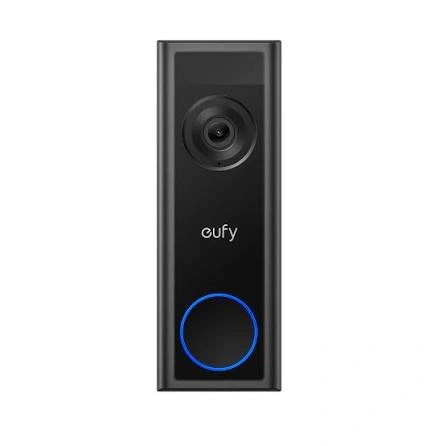
For this comparison, we are looking at the eufy Video Doorbell C31 and Wyze Battery Video Doorbell. The main differences are storage, viewing area, setup, and how each system handles recordings and optional cloud services.
Quick Comparison
The eufy C31 is a strong fit for seniors who want local storage and no required monthly fee. It supports a microSD card up to 128GB. It can also work with eufy HomeBase.
The Wyze Battery Video Doorbell is also easy to install. It offers a wide 150° horizontal and vertical view. It supports local and cloud storage.
For simple long-term use, the choice comes down to storage needs and the app experience you prefer.
Eufy vs Wyze At a Glance
Here is the basic difference between the two current battery-friendly options.
| Feature | Eufy C31 | Wyze Battery Doorbell |
|---|---|---|
| Power | Battery or wired | Battery or wired |
| Video | 2K | 1536 × 1536 HD+ |
| Local storage | microSD up to 128GB | microSD up to 256GB |
| Cloud storage | Optional | Available |
| Monthly fee required | No | No for basic local storage |
| Field of view | Wide view | 150° H × 150° V |
| Smart home | Alexa | Alexa, Google Home |
| Two-way audio | Yes | Yes |
| Best fit | Local storage | Wide view and flexible storage |
The exact features can vary by package and model. Always check the product version before buying.

Eufy C31 Review for Senior-Friendly Use
The eufy C31 focuses on simple home security with local storage and flexible power.
That can be useful for seniors who do not want another monthly service to manage.
Ease of Use
The C31 can work with battery power or hardwiring. Its quick-release battery design can make battery changes easier than removing the whole doorbell.
The doorbell also supports live video, voice features, and smart-home functions. These can help a senior check the front door without opening it.
The main setup task is connecting the doorbell to Wi-Fi and the eufy app. A family member or caregiver may want to handle the first setup if the user is not comfortable with smart-home devices.
Key Strengths
- Local microSD storage
- No required monthly storage fee
- Battery or wired installation
- Up to 128GB microSD support
- HomeBase support
- Two-way communication
- Useful smart-home support
Potential Drawbacks
- The microSD card is not included with the C31.
- Some advanced features may require learning the eufy app.
- HomeBase adds another device if expanded storage is wanted.
Eufy says C31 recordings can be stored locally without a subscription. HomeBase S380 can also expand storage considerably.
Wyze Battery Doorbell Review for Seniors
The Wyze Battery Video Doorbell puts a strong focus on a wide view and flexible installation.
It can be used wire-free or with existing wiring. Wyze lists a 1536 × 1536 resolution and a 150° horizontal and vertical field of view.
Ease of Use
The battery option can be useful when running new wiring is difficult.
The Wyze app handles live viewing and recorded events. The doorbell also supports motion detection zones, which can help reduce alerts from areas that do not matter.
For a senior who mainly wants to see who is at the door, the wide view is useful. It can show more of the area around the entrance.
Key Strengths
- Wide 150° × 150° field of view
- Battery or wired operation
- Local microSD recording
- Supports cards up to 256GB
- Two-way audio
- Alexa and Google Home support
- Motion detection zones
Potential Drawbacks
- Some cloud features are tied to Wyze subscription plans.
- Local recording needs a microSD card.
- The larger set of app features may take time to learn.
Wyze currently offers optional camera subscription plans, while compatible doorbells can also use local storage.
Which Is Easier for Seniors to Use?
Both doorbells can be simple once they are set up.
The bigger issue is the first setup. A senior who is comfortable with smartphones may manage either app. Someone who prefers fewer settings may benefit from having a family member handle installation and setup.
A simple setup matters more than having every possible smart feature.
For battery use, both models avoid the need for permanent wiring. That can make installation easier in homes where existing doorbell wiring is not available.
The Wyze model has a very wide field of view. The eufy C31 has a quick-release battery design and local storage options.
Performance Comparison
For a doorbell camera, the useful performance areas are video, viewing area, alerts, and recordings.
| Performance Area | Eufy C31 | Wyze Battery Doorbell |
|---|---|---|
| Video resolution | 2K | 1536 × 1536 HD+ |
| Viewing area | Wide | 150° × 150° |
| Motion alerts | Yes | Yes |
| Two-way audio | Yes | Yes |
| Local recording | Yes | Yes |
| Cloud option | Optional | Available |
The two models take slightly different approaches.
The eufy C31 emphasizes local security and storage. Wyze emphasizes a wide view and flexible storage options.
Comfort, Accessibility, and Senior-Friendly Design
A video doorbell does not need much physical effort after installation.
The main senior-friendly features are easy phone access, clear alerts, simple charging, and dependable viewing.
The eufy C31’s quick-release battery can make battery changes more convenient. The Wyze Battery Doorbell can also be used wire-free, which can simplify installation.
For seniors with limited dexterity, having a family member install the doorbell may be helpful. After that, daily use mostly happens through the phone.
Neither product should be treated as a replacement for a complete home security system.
Features Comparison
The biggest differences become clearer when the important features are placed side by side.
| Feature | Eufy C31 | Wyze Battery Doorbell |
|---|---|---|
| Local storage | Up to 128GB | Up to 256GB |
| HomeBase support | Yes | No |
| Battery use | Yes | Yes |
| Wired use | Yes | Yes |
| Smart-home support | Alexa | Alexa, Google Home |
| Motion zones | Smart detection features | Yes |
| Subscription required | No | No for local storage |
Eufy’s C31 supports microSD storage up to 128GB and HomeBase expansion. Wyze lists local and cloud storage for the Battery Video Doorbell.
Price, Maintenance, and Long-Term Value
Price can change often, so it is better to compare ownership costs than one temporary sale price.
Both models can avoid a required monthly storage fee when using local storage.
Eufy’s C31 uses a microSD card for local recordings. Wyze also supports local recording with a microSD card. Wyze states that continuous local recording requires wired power.
| Cost Factor | Eufy C31 | Wyze Battery Doorbell |
|---|---|---|
| Doorbell cost | Mid-range | Often lower |
| Local storage cost | microSD card | microSD card |
| Required subscription | No | No |
| Optional cloud service | Yes | Yes |
| Extra hub | Optional | Not required |
For a senior who wants a simple setup with local recordings, avoiding recurring fees can be a meaningful benefit.
Who Should Choose Eufy C31?
Choose the eufy C31 if:
- Local storage is important.
- You want no required monthly fee.
- You like the option of HomeBase.
- Battery replacement should be straightforward.
- You want a flexible battery or wired setup.
- A family member can help with initial setup.
Who Should Choose Wyze Battery Doorbell?
Choose the Wyze Battery Doorbell if:
- A very wide view is important.
- You want local storage with a larger supported microSD capacity.
- You already use Wyze products.
- You want Alexa or Google Home support.
- You prefer a lower-cost entry into smart doorbell security.
- You want battery or wired installation.
Eufy vs Wyze — Final Verdict
The eufy C31 and Wyze Battery Video Doorbell are aimed at similar everyday needs, but their strengths differ.
Best for local storage: Eufy C31
Best for a very wide view: Wyze Battery Video Doorbell
Best for HomeBase expansion: Eufy C31
Best for Google Home support: Wyze Battery Video Doorbell
Best for avoiding a required subscription: Both
There is no single choice that fits every senior. The better option depends on the user’s comfort with the app, preferred storage method, existing smart-home setup, and willingness to manage a battery.
Scoring Summary
These scores are comparison estimates based on the listed features. They are not laboratory test results.
| Category | Eufy C31 | Wyze Battery Doorbell |
|---|---|---|
| Ease of Use | 9/10 | 9/10 |
| Senior-Friendly Design | 9/10 | 9/10 |
| Performance | 9/10 | 9/10 |
| Maintenance | 9/10 | 8/10 |
| Value | 9/10 | 9/10 |
The scores are close because both products offer practical features for everyday door monitoring. The important differences are better understood through the specific features above.
How We Evaluate Products
This comparison focuses on practical factors that matter for senior users.
We consider:
- Ease of setup
- Ease of daily use
- App controls
- Battery management
- Video quality
- Viewing area
- Storage
- Maintenance
- Smart-home support
- Long-term value
We do not claim hands-on testing. The comparison is based on current product information and documented features.
Senior-Specific Buying Considerations
A few checks can make the buying decision easier.
Setup
Check whether the home already has doorbell wiring. Battery models offer more flexibility when wiring is not available.
Controls
Look for an app that the user can understand. Too many alerts can become annoying.
Battery
Think about who will recharge or replace the battery. A family member may need to handle this task.
Storage
Local storage can reduce dependence on monthly cloud plans. Check the supported card size before buying.
Alerts
Motion alerts should be useful rather than constant. Proper detection settings can make daily use easier.
Common Buying Mistakes
Avoid these common mistakes when choosing a smart doorbell:
- Buying only because the price is low.
- Ignoring battery management.
- Forgetting the microSD card.
- Assuming every feature is free.
- Choosing a model without checking Wi-Fi coverage.
- Ignoring app compatibility.
- Forgetting to check existing doorbell wiring.
Safety
A video doorbell is a home security device, not an emergency response system.
Make sure the doorbell is installed securely. Follow the manufacturer’s instructions for wiring, batteries, and weather exposure.
Also remember that internet or Wi-Fi problems can affect remote viewing and notifications. Eufy notes that internet access is normally needed for live streaming, remote access, and instant notifications.
Conclusion
Eufy vs Wyze video doorbell for seniors is less about finding one universal winner and more about matching the doorbell to the user’s needs. The eufy C31 stands out for local storage and HomeBase support, while the Wyze Battery Video Doorbell offers a very wide view and flexible local and cloud storage.
For seniors, the most important factors are simple setup, clear alerts, easy battery management, and an app that does not feel overwhelming. A family member can also handle the initial setup, leaving the senior with simple day-to-day door monitoring.
