
Eufy vs Google Nest Video Doorbell for Seniors: Which?


Lightweight Aluminum Walker

Digital Thermometer

Pulse Oximeter Finger Monitor
Eufy vs Google Nest video doorbell for seniors is a useful comparison if simple alerts and easy video access matter most. Both can show who is at the door and send alerts to a phone.
The main difference is how they handle video storage and smart-home features. Eufy offers local storage on some current models, while Nest puts more focus on cloud video history and the Google Home app.
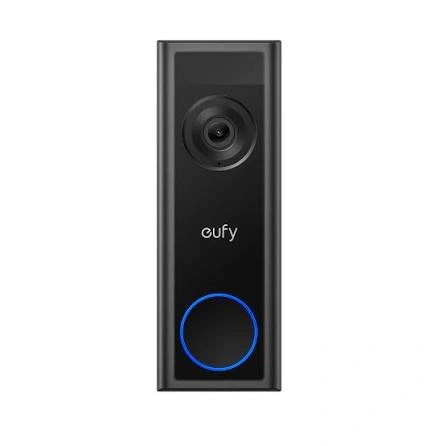
Quick Comparison
Eufy may suit seniors who want local video storage and fewer ongoing fees. Google Nest may suit seniors who already use Google Home and want strong cloud features.
For many households, the choice comes down to local storage vs. Google smart-home integration.
Eufy vs Google Nest At a Glance
The two brands take different approaches. This can make one easier to live with than the other.
| Feature | Eufy | Google Nest |
|---|---|---|
| Setup | Simple on supported models | App-based setup |
| Video storage | Local storage on some models | Cloud-based history |
| Subscription | Some models need no monthly fee | More history needs a plan |
| Smart home | Eufy ecosystem | Google Home |
| Alerts | Motion and person alerts | Motion, person, and smart alerts |
| Privacy choice | Strong local-storage options | Cloud-focused |
Eufy’s current C31, for example, supports microSD storage up to 128GB without a subscription. Nest video history is cloud based, with longer history available through Google Home Premium plans.
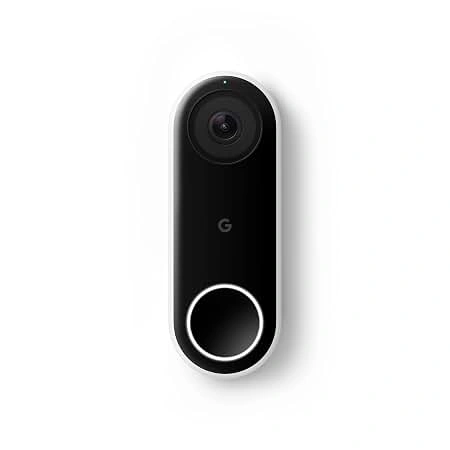
Eufy Video Doorbell Review for Seniors
Eufy has several doorbell models, so features vary. Current options include battery and wired models.
For this comparison, the key Eufy advantage is flexibility in storage and installation.
Ease of Use
Eufy doorbells are controlled through the Eufy Security app. Some models can run without a monthly cloud plan.
The C31 can use a microSD card for local video storage. It can also work with Eufy’s HomeBase system.
That can be useful for a senior who wants to avoid managing another monthly service.
Key Strengths
- Local storage is available on some models.
- Some models support battery or wired installation.
- Local storage can reduce ongoing costs.
- Eufy offers person and package detection on selected models.
- Some models offer two-way audio.
- HomeBase can expand the wider Eufy security system.
Potential Drawbacks
- Features vary a lot between Eufy models.
- The Eufy app adds another smart-home platform to learn.
- Some advanced features may require extra Eufy hardware.
- Local storage means the memory card or HomeBase still needs attention.
Google Nest Doorbell Review for Seniors
Google Nest focuses heavily on the Google Home app and cloud-based video history.
This can work well for a senior or caregiver already using Google Home devices.
Ease of Use
The Google Home app is central to the Nest experience. It lets users view the doorbell and review activity.
Nest doorbells can detect motion and sound events. Supported models can also provide more detailed alerts with a Google Home Premium plan.
The trade-off is that some useful video-history features depend on the subscription and the exact Nest model.
Key Strengths
- Works well within the Google Home ecosystem.
- Cloud video history is easy to access.
- Smart alerts can provide useful event details.
- Familiar face and other advanced features are available with supported plans.
- Good fit for homes already using Google smart devices.
Potential Drawbacks
- Longer video history can require a paid plan.
- Video storage is mainly cloud based.
- Different Nest generations have different features.
- Wired models may need more installation work.
Which Is Easier for Seniors to Use?
Ease of use depends more on the person’s setup than on age alone.
Eufy can be easier for someone who wants a simple local-storage system. A supported model can store recordings on a microSD card without a monthly subscription.
Nest can be easier for someone who already uses Google Home. The same app can become the main place for doorbell activity and other compatible smart-home devices.
For caregivers, app access can also matter. A system that the caregiver already understands may be easier to support.
The simplest system is often the one that fits the smart-home setup already in the home.
Performance Comparison
Both brands offer video doorbells, but performance depends on the model.
For example, Eufy’s E340 has a 2K main camera, a second 1080p camera, HDR, night vision, two-way audio, and several detection features.
Nest models vary by generation. Current Nest doorbells support motion and event detection, while newer models can offer more advanced video-history features through Google Home Premium.
| Performance Area | Eufy | Google Nest |
|---|---|---|
| Live video | Model dependent | Model dependent |
| Night vision | Available on supported models | Available on supported models |
| Person detection | Available on selected models | Available |
| Package detection | Available on selected models | Available on supported models |
| Video history | Local options on some models | Cloud focused |
Do not compare only by brand name. Check the exact model before buying.
Comfort, Accessibility, and Senior-Friendly Design
A video doorbell does not require much physical effort once installed.
The bigger issue is daily interaction with the app.
| Senior Need | Eufy | Google Nest |
|---|---|---|
| Simple daily viewing | Good | Good |
| No monthly storage fee | Available on some models | Limited free history |
| Easy remote viewing | Yes | Yes |
| Caregiver access | Available through app features | Available through Google Home |
| Smart-home integration | Eufy ecosystem | Google ecosystem |
For someone who dislikes recurring fees, Eufy’s local-storage approach may feel simpler. For someone who already uses Google Home, Nest may require less ecosystem switching.
Features Comparison
The most useful differences are not small camera specifications. They are storage, alerts, app experience, and smart-home support.
| Feature | Eufy | Google Nest |
|---|---|---|
| Local video storage | Available on some models | Mainly cloud based |
| Cloud storage | Available on selected models | Core part of Nest video history |
| Smart alerts | Model dependent | Stronger with supported plans |
| Home ecosystem | Eufy Security | Google Home |
| Subscription-free option | Yes on selected models | Limited history without subscription |
Google says the Nest Doorbell battery includes up to three hours of event video history without a subscription. Longer history requires Google Home Premium.
Price, Maintenance, and Long-Term Value
The purchase price changes by model and retailer, so it is better to compare the total ownership setup.
Eufy’s local-storage models can avoid a monthly storage fee. The C31, for example, supports a microSD card up to 128GB. HomeBase can provide additional storage options.
Nest has a different cost structure. Google Home Premium adds longer video history and other smart features.
| Cost Factor | Eufy | Google Nest |
|---|---|---|
| Doorbell cost | Model dependent | Model dependent |
| Storage | Local options | Cloud |
| Monthly plan | Not required on some models | Useful for longer history |
| Extra hardware | May need microSD/HomeBase | Usually app and Wi-Fi focused |
| Long-term cost | Can be lower without cloud plan | Depends on subscription use |
Value depends on what the household actually needs.
Who Should Choose Eufy?
- Choose Eufy if local storage matters.
- Choose Eufy if avoiding a monthly fee is important.
- Choose Eufy if battery and wired options are useful.
- Choose Eufy if you want more control over where recordings are stored.
- Choose Eufy if you plan to build around the Eufy Security ecosystem.
Who Should Choose Google Nest?
- Choose Nest if the home already uses Google Home.
- Choose Nest if cloud video history is important.
- Choose Nest if detailed smart alerts are useful.
- Choose Nest if a caregiver already understands the Google Home app.
- Choose Nest if you want other Google smart-home devices in the same ecosystem.
Eufy vs Google Nest — Final Verdict
There is no single choice for every senior.
Best for local storage: Eufy
Best for Google Home users: Google Nest
Best for avoiding a monthly storage fee: Eufy on supported models
Best for cloud video history: Google Nest with the appropriate plan
Best for smart-home integration: Google Nest for households already using Google Home
The biggest difference is the storage model. Eufy gives some users the option to keep recordings locally, while Nest centers its video-history experience around Google’s cloud service.
Scoring Summary
Scores are only a simple comparison aid. They are based on the features discussed above, not hands-on testing.
| Category | Eufy | Google Nest |
|---|---|---|
| Ease of Use | 9/10 | 9/10 |
| Senior-Friendly Design | 9/10 | 9/10 |
| Storage Flexibility | 10/10 | 7/10 |
| Smart-Home Features | 8/10 | 10/10 |
| Long-Term Value | 9/10 | 8/10 |
These scores can change by model. Eufy’s lineup and Nest’s lineup both include different doorbell versions.
How We Evaluate Products
We focus on the things that matter during daily use.
That includes:
- Ease of setup
- App simplicity
- Video access
- Alert quality
- Storage
- Privacy
- Maintenance
- Smart-home support
- Long-term cost
- Caregiver convenience
This is a specification-based comparison. It does not claim laboratory testing or personal hands-on testing.
Senior-Specific Buying Considerations
Before choosing a doorbell, check these points.
Setup
Make sure the installation type fits the home. Battery models can reduce wiring work. Wired models may need electrical work.
Google notes that its Nest Doorbell wired 2nd generation can have higher power requirements and may require a transformer upgrade in some installations.
Controls
Check whether the person using the doorbell is comfortable with the app.
A simple app can matter more than having many advanced features.
Storage
Decide whether local or cloud storage feels more practical.
Local storage can reduce recurring costs. Cloud storage can make remote history easier to manage.
Caregiver Access
If a family member helps manage the doorbell, check how easily that person can access alerts and video.
Privacy
Think about where video is stored and who can access the account.
Common Buying Mistakes
Avoid these common mistakes:
- Comparing brands without checking the exact model.
- Buying a battery model without considering charging.
- Assuming every Eufy doorbell has the same storage features.
- Assuming every Nest doorbell has the same video-history features.
- Forgetting about subscription costs.
- Ignoring the existing Wi-Fi and smart-home setup.
Safety
Video doorbells are generally low-effort devices after installation, but electrical work can be different.
If a wired installation requires changing a transformer or working with household wiring, professional installation may be safer for someone who is not comfortable with electrical work.
Also use a strong account password and keep the doorbell app updated.
Frequently Asked Questions
Is Eufy or Google Nest easier for seniors?
Both can be easy to use. Eufy may appeal to users who want local storage, while Nest may feel simpler for people already using Google Home.
Does Eufy require a monthly fee?
Some Eufy models can store video locally without a monthly subscription. For example, the C31 supports microSD storage up to 128GB.
Does Google Nest require a subscription?
Not always. The exact amount of free video history depends on the Nest model. The Nest Doorbell battery provides up to three hours of event video history without a subscription.
Which is better for caregivers?
Either can work. The better fit is usually the system the caregiver can easily access and manage.
Does Eufy have local video storage?
Yes, selected models support local storage. Eufy’s C31 can use a microSD card, while HomeBase can provide additional storage options.
Does Nest work with Google Home?
Yes. Nest doorbells are designed to work with the Google Home ecosystem and app.
Conclusion
Eufy and Google Nest take different approaches to video doorbells. Eufy stands out for local-storage options and the ability to avoid monthly storage fees on supported models. Nest stands out for Google Home integration and cloud-based video features.
For seniors, the best fit depends on the home setup. Check the exact model, storage method, app, installation needs, and ongoing costs before choosing.