
10 Best Smart Door Locks for Elderly: Secure and Easy-to-Use Options


Large Button TV Remote

Arthritis Gloves

Orthopedic Sandals
Smart door locks can make home access simpler by replacing or adding to a traditional key. Many models support keypad codes, phone apps, fingerprint readers, or voice assistants. For older adults, these features can reduce the need to carry keys and make it easier for trusted family members or caregivers to enter.
The best smart door locks for elderly users are simple to operate, reliable during power or internet problems, and easy for family members to manage remotely. We also look for clear controls, strong security, long battery life, and helpful access options such as large buttons, auto-locking, and physical keys.
Before buying, we pay close attention to installation, door compatibility, battery alerts, and emergency access. We tested and compared smart locks to find the models that offer the clearest controls, dependable performance, and the least hassle for older adults and their caregivers.
Best Smart Door Locks for Elderly
We selected the best smart door locks for older adults based on ease of use, reliable access, clear controls, and useful safety features. Our list includes options with keypads, smartphone access, voice control, and backup entry methods.
Yamiry Smart Door Handle Lock

We recommend this lock for older adults who want several simple ways to enter without carrying a key.
Pros
- Fingerprint, keypad, app, key fob, and key access
- Quick installation with basic tools
- Temporary codes help family members and caregivers enter
Cons
- Remote access requires a separate Wi-Fi gateway
- App setup may take extra steps
- Battery use requires regular checking
We found the fingerprint reader quick and the keypad easy to use. The key fobs also provide a practical choice for anyone who does not want to use a phone or remember a code.
Installation felt manageable with a screwdriver, and the adjustable latch helped the lock fit an existing door. The reversible handle supports doors that open from either side.
The app lets us create permanent or temporary access codes and review entry activity. That can help families coordinate caregivers or check whether someone entered the home.
We should note that Bluetooth handles nearby control, while remote locking and unlocking needs the separately sold Wi-Fi gateway. We would also keep the mechanical keys available and check the batteries on a regular schedule.
Sifely Fingerprint Smart Lock

We recommend this lock for older adults who want several simple ways to enter without carrying a key.
Pros
- Fingerprint, keypad, app, fob, and key entry
- Straightforward installation on many standard doors
- Backlit keypad, auto-lock, and anti-peeping password feature
Cons
- Remote access requires the optional Wi-Fi gateway
- Some doors may need extra drilling or fitting
- The lock cannot be rekeyed, according to customer feedback
We found the fingerprint reader quick and useful for daily entry. The keypad gives us a dependable backup, while the physical keys and fobs help when someone has trouble using the app or remembering a code.
Installation should be simple on a compatible wood door, but door fit matters. Some users needed extra work on doors with unusual hole sizes or uPVC construction, so we would check the measurements before ordering.
The Bluetooth app lets us manage users, review access records, and unlock the door nearby. For remote control and Alexa or Google Assistant support, we need the separate Sifely Wi-Fi Gateway. Its mix of entry methods makes it a practical choice for families and older adults, though the gateway adds to the total cost.
Veise VE017 Fingerprint Smart Lock
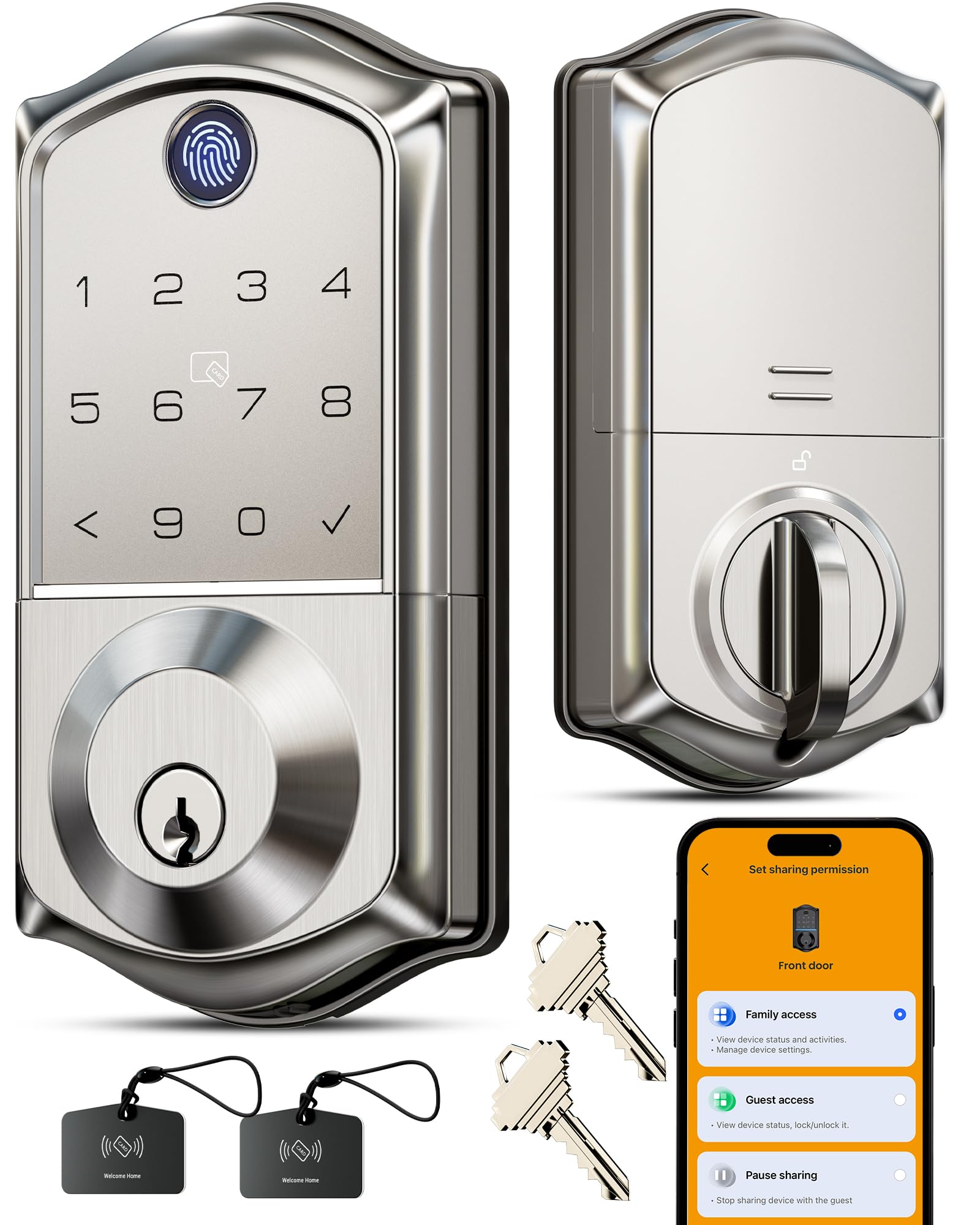
We recommend this lock for older adults who want several easy entry options, especially fingerprint access and simple shared codes.
Pros
- Fingerprint, keypad, app, card, and key entry
- Clear user controls and access logs
- USB-C emergency power port and auto-lock
Cons
- Remote access requires the separate G1 Gateway
- Battery replacement remains necessary
- Installation depends on proper latch alignment
We found the fingerprint reader convenient for daily use because it avoids searching for keys. The backlit keypad also helps in low light, while the anti-peeping feature lets us enter extra numbers before or after the real code.
The KK Home app makes it easy to add family members, create temporary codes, and remove access. We also liked the activity log, which can help caregivers check when someone entered. Remote locking and unlocking, however, require the Veise G1 Gateway, sold separately.
Setup uses the existing deadbolt hole and needs only a screwdriver. The lock supports left- and right-hand doors, but the latch must line up correctly with the strike plate. Four AA batteries should last about a year, and the low-battery alert plus USB-C backup port adds useful peace of mind.
Philips 4200 WiFi Smart Lock
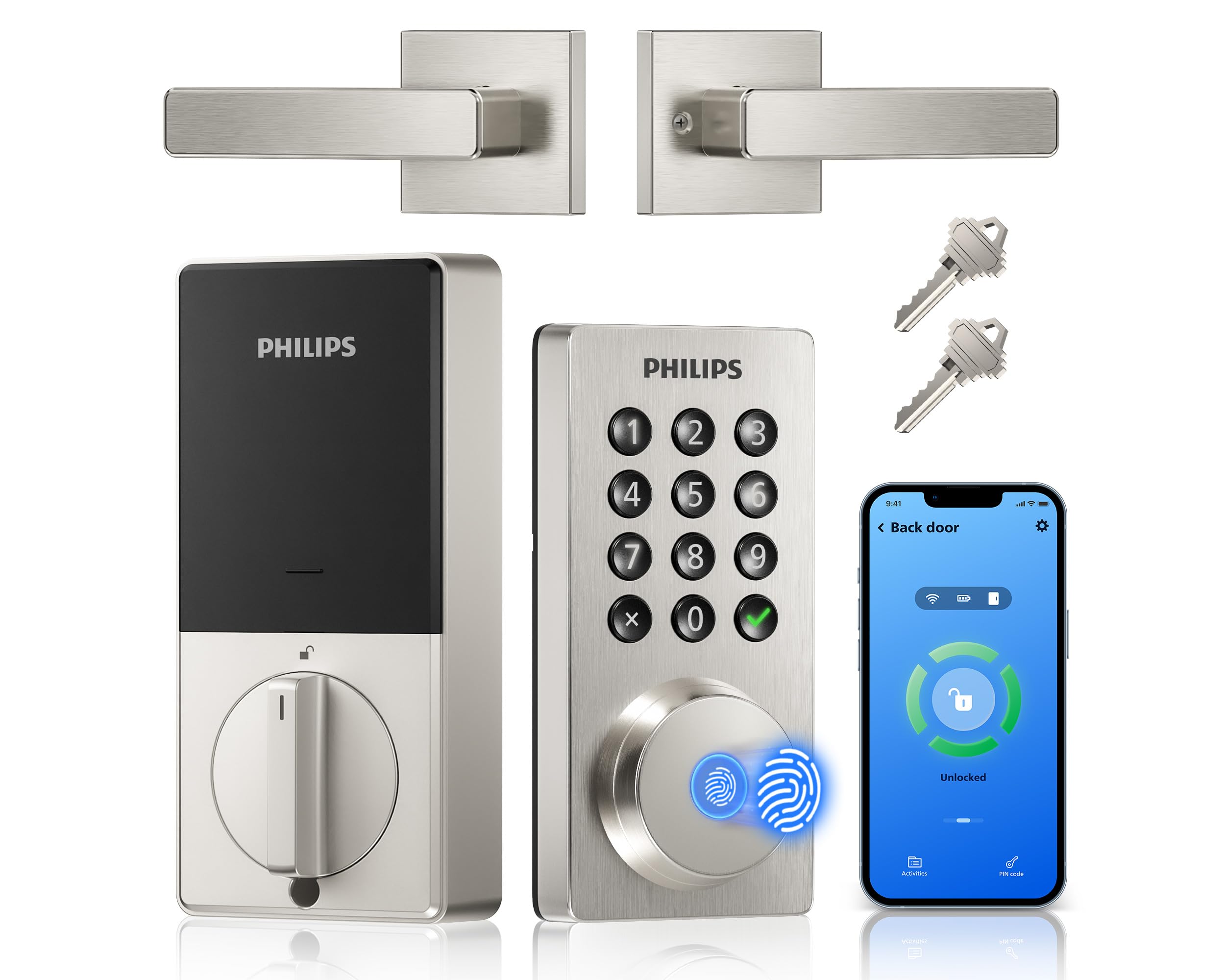
We recommend this lock for older adults who want several simple entry options and remote control without adding a separate hub.
Pros
- Fingerprint, PIN, key, and app access
- Built-in Wi-Fi supports remote control
- Auto-lock and access alerts add peace of mind
Cons
- Requires eight AA batteries, sold separately
- Wi-Fi setup may take extra time
- Door measurements must match before installation
When we used this lock, the fingerprint reader gave us the quickest way to open the door. The backlit keypad also helped in low light, and the raised buttons felt easier to locate than a flat touchscreen.
The Philips Home Access app lets us check the lock from a phone, create different PINs, and review access history. We also liked the option to set auto-lock, which helps when someone forgets to lock the door. Alexa and Google Assistant support add hands-free control, though users should confirm the lock’s status before relying on voice commands.
Installation was manageable with a screwdriver, but we would measure the door first. The lock fits doors from 1-3/8 to 1-3/4 inches thick and needs eight AA alkaline batteries. We would keep spare batteries available because some users report faster battery drain with lower-quality cells.
The included handle creates a complete matching set, which avoids buying extra exterior hardware. Overall, this lock suits households that value flexible entry methods, but the app and battery needs may require occasional help for some older users.
Yamiry Fingerprint Smart Lock

We recommend this lock for older adults who want several simple entry options, especially fingerprint access and a keypad.
Pros
- Fast fingerprint entry
- Multiple backup unlocking methods
- Straightforward setup for many standard doors
Cons
- Some doors may need minor fitting
- Remote control requires a separate Wi-Fi gateway
- Bluetooth connection may be unreliable for some users
We found the fingerprint reader quick and convenient, especially when carrying groceries or handling packages. The keypad, key fob, physical key, and phone app also give household members several ways to get inside.
Installation uses a screwdriver and works with many standard American doors, but fit can vary. Some users needed to adjust the strike plate, so we recommend checking the door alignment before buying.
The app connects through Bluetooth and can store multiple codes and fingerprints. Remote access requires Yamiry’s separate Wi-Fi gateway, and reports about Bluetooth reliability are mixed. The auto-lock feature helps reduce the chance of leaving the door unlocked, although the controls may take a little practice.
Philips Wi-Fi Smart Deadbolt

We recommend this lock for older adults who want several simple entry options, remote access, and voice control without adding a separate hub.
Pros
- Fingerprint, keypad, app, key, and voice entry
- Remote control through built-in Wi-Fi
- Auto-lock and temporary access codes
Cons
- Batteries are not included
- Works only with 2.4 GHz Wi-Fi
- Does not include a door-position sensor
During installation, we found the lock straightforward to fit with a screwdriver. The process took about 20 minutes when replacing a standard deadbolt, but careful cable placement matters. We recommend checking the door thickness and latch fit before buying.
The fingerprint reader and backlit keypad give us convenient choices when keys are difficult to handle. We can also create codes for family members, caregivers, or visitors. One-time and scheduled codes help limit access without sharing a permanent password.
The built-in Wi-Fi lets us lock or unlock the door from the app while away. Alexa and Google Assistant add hands-free control, though voice features require account setup and a stable connection. The lock supports only 2.4 GHz Wi-Fi, and the router should stay within about 65 feet for reliable remote access.
Automatic locking can activate after 10 to 180 seconds, which helps when we forget to lock the door. The app also records access activity and sends alerts. We should note that the lock cannot confirm whether the door itself remains open because it has no door sensor.
Use AA alkaline batteries only, since batteries are not included. Overall, the Philips lock suits households that value flexible entry methods, simple installation, and remote control, provided the door and Wi-Fi setup meet its requirements.
eufy Security FamiLock C32
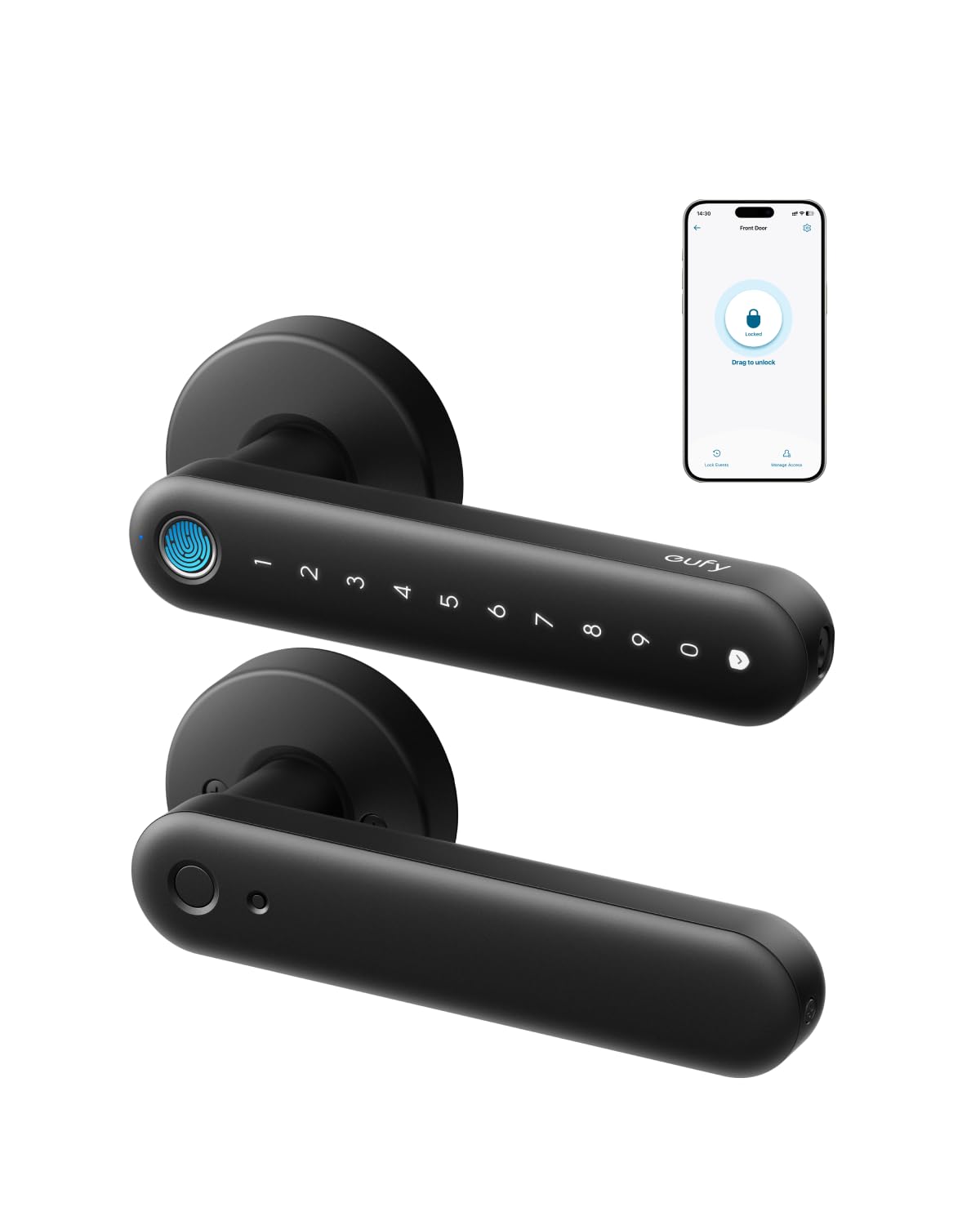
We recommend this lock for interior doors when we want fingerprint access, remote control, and simple installation in one device.
Pros
- Fingerprint, PIN, app, and key entry
- Built-in Wi-Fi for remote access
- Quick installation with a screwdriver
Cons
- Designed for interior doors, not main entry doors
- Wi-Fi performance may vary
- Fingerprint reading can be inconsistent for some users
We found the installation straightforward and completed it with basic tools. The handle feels solid, and the matte finish helps hide fingerprints. Its design works well for bedrooms, offices, garages, and storage areas.
Fingerprint entry makes daily use easier for older adults who may find phone apps or small keys difficult. We could also use a PIN, physical key, or app, which gives family members several ways to enter.
The built-in Wi-Fi lets us manage access from a distance and send entry permissions when needed. Auto-lock adds convenience, although we would test the timing carefully before using it with anyone who needs more time to pass through the door.
Battery life should last several months with normal use. If the batteries run out, a USB-C power bank can provide emergency power. We would choose this model for an interior door, but we would not use it as a front-door replacement because eufy does not recommend it for that purpose.
Philips Wi-Fi Fingerprint Smart Lock
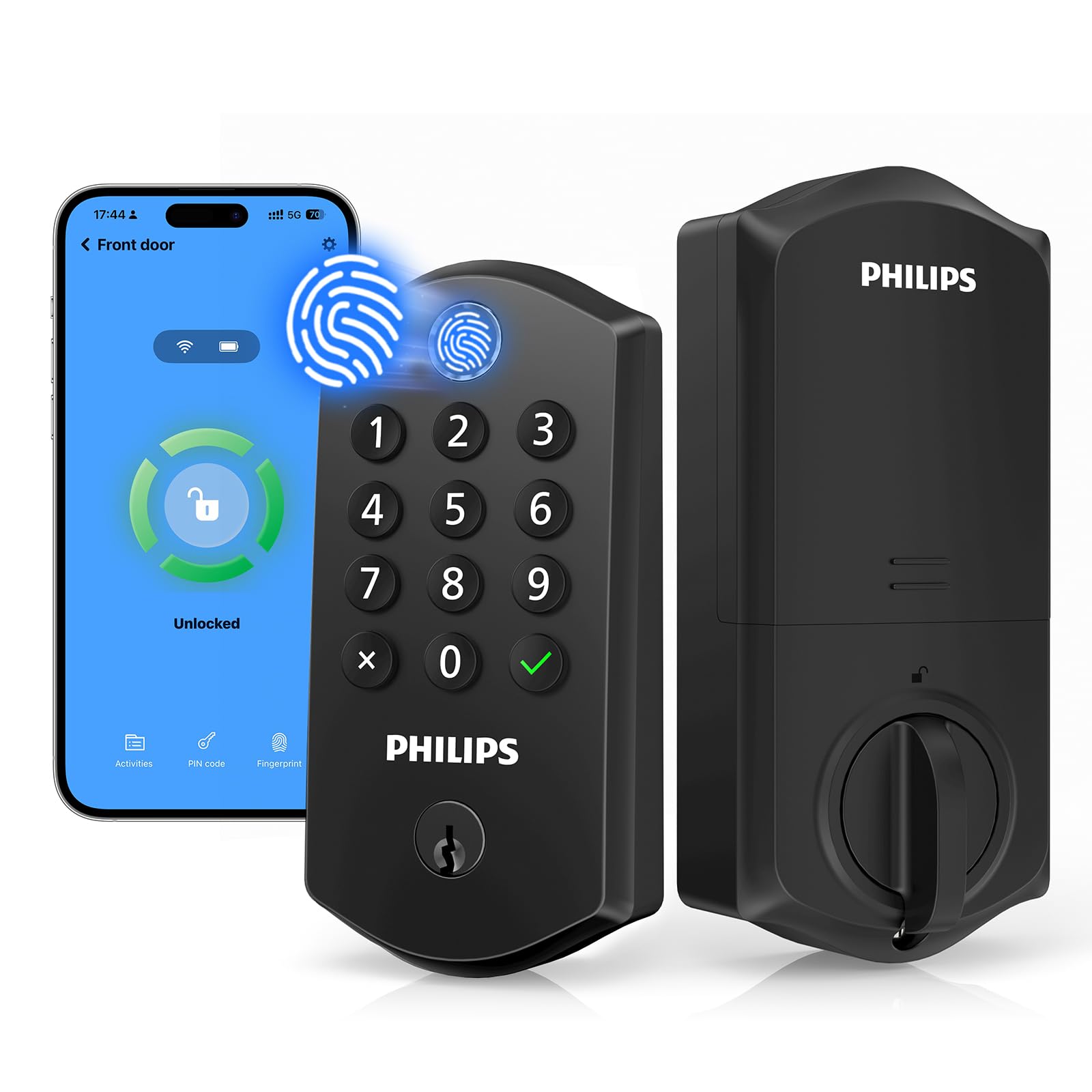
We recommend this lock for older adults who want simple fingerprint access, automatic locking, and several backup entry methods.
Pros
- Fingerprint access reduces the need to remember codes.
- Supports app control, voice commands, codes, keys, and fingerprints.
- Auto-lock and temporary codes add convenience for family and caregivers.
Cons
- Battery life may be shorter than expected.
- The app can be difficult when adding users.
- Wi-Fi connection issues may limit remote and voice control.
We found the fingerprint reader easy to reach because it sits at the top of the lock. It allowed us to unlock the door with one motion, which can help users who find small buttons or keys difficult to manage.
The keypad provides another useful option. We could create personal codes for family members and temporary codes for visitors. The anti-peeping feature also lets users enter extra numbers around the real code for added privacy.
Remote control worked well when the connection stayed active. We could check the lock, receive activity alerts, and lock the door from the app. However, some users report trouble keeping the lock connected, and the app may feel less convenient when managing several people.
Auto-lock gives this model a practical advantage for anyone who forgets to lock the door. We could set the delay between 10 and 180 seconds, while the physical key offers a dependable backup.
Installation fits many standard doors, but we would keep fresh 1.5-volt AA alkaline batteries available. Reports of fast battery drain make regular battery checks important, especially for older adults who rely on fingerprint or remote access.
Yamiry Keypad Door Knob

We recommend this lock for older adults who want simple code entry, easy installation, and backup keys without managing a phone app.
Pros
- Quick installation with a screwdriver
- Backlit keypad and large number of access codes
- Adjustable auto-lock and two backup keys
Cons
- The knob may feel tight on some doors
- Keypad visibility can be weak before the lights activate
- Some users report inconsistent operation after several months
We found the Yamiry easy to install as a replacement for a standard door knob. The included parts and adjustable latch help simplify setup, which can reduce the need for outside help.
The keypad offers a practical option for older users who may find keys difficult to handle. We can create separate codes for family members and a temporary code for guests. The two physical keys provide another way inside if the batteries run low.
A backlight turns on when we use the keypad, making nighttime entry easier. However, the numbers may look faint before activation. We also noticed that the handle can feel stiff on some doors, so careful alignment matters.
The adjustable auto-lock timer adds convenience, but users should choose the setting carefully. Some reported that the lock became unreliable after several months, so we recommend testing it often and keeping a backup key available.
Evanshow Smart Fingerprint Door Knob
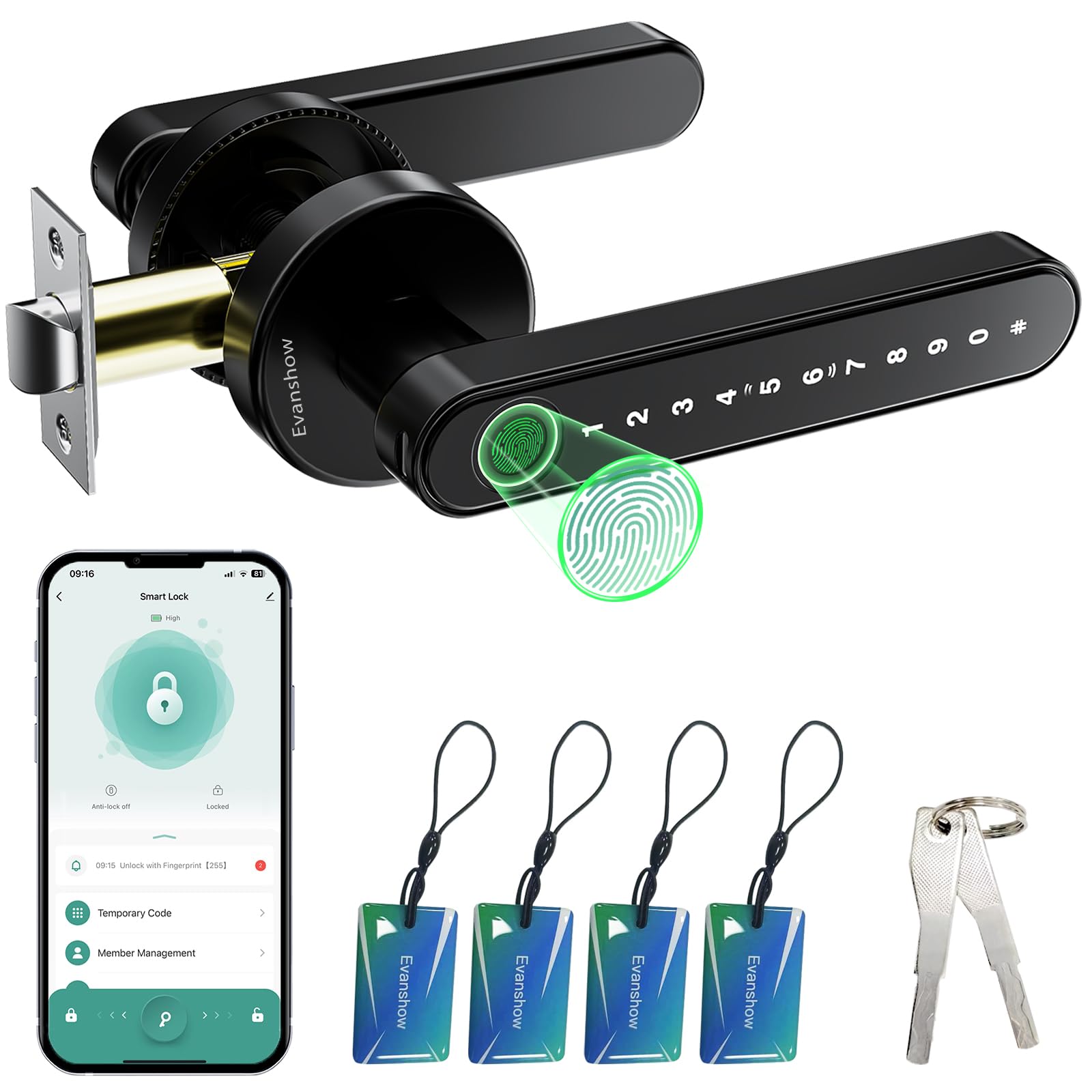
We recommend this lock for older adults who want several simple ways to enter without carrying keys.
Pros
- Fingerprint, keypad, card, app, and key access
- Easy installation on compatible wooden doors
- Auto-lock and temporary access codes
Cons
- Setup instructions can feel confusing
- Some users report a loose or weak handle
- The administrator fingerprint must be registered first
We found the fingerprint reader quick and convenient for daily use. A keypad and mechanical key provide useful backups, while NFC cards may work well for family members who do not want to use the app.
The Tuya app lets us create temporary codes, review entry activity, and manage access from a phone. These features can help caregivers allow entry without giving out a permanent key. The auto-lock setting also reduces the chance of leaving the door unlocked.
Installation does not require wiring or professional help when the door fits the stated size range. However, we would complete the setup carefully because any fingerprint may unlock the door before an administrator fingerprint gets registered.
The lock earned 4.0 stars from more than 2,000 ratings. We would choose it for a bedroom, apartment, or lower-risk entry, but reports of fragile handles mean we would avoid relying on it where stronger physical security matters most.
Buying Guide
We should choose a smart door lock that matches the user’s comfort, strength, and daily routine. A simple design, clear instructions, and easy access methods can make regular use less stressful.
| Feature | What we should look for |
|---|---|
| Access methods | Keypad, fingerprint, phone app, or a physical key backup |
| Ease of use | Large buttons, clear status lights, and simple controls |
| Power | Long battery life, low-battery alerts, and an emergency power option |
| Safety | Automatic locking, secure encryption, and strong tamper resistance |
| Installation | Compatibility with the existing door and a setup process we can manage |
| Support | Clear manuals, reliable customer service, and available replacement parts |
We should give priority to keypad entry if remembering or carrying keys may be difficult. Fingerprint access can also help, but we should check whether the system supports several users and works reliably for them.
Remote access can help family members or caregivers manage entry from a distance. We should review privacy settings, user permissions, and whether the lock requires an ongoing subscription.
Before buying, we should measure the door, check the lock type, and confirm Wi-Fi or Bluetooth requirements. We should also make sure a trusted person can access the home if the batteries fail or the phone is unavailable.
Editor’s Choice
We choose the Schlage Encode Smart WiFi Deadbolt as our editor’s pick for older adults. It connects directly to a home Wi-Fi network, so users do not need a separate hub. Its built-in keypad also lets residents unlock the door without carrying keys or using a phone.
The lock supports app control, remote access, and temporary entry codes. We value the large, backlit numbers and clear status indicators, which can make daily use easier for people with limited vision or reduced dexterity.
| Feature | Why it helps |
|---|---|
| Keypad entry | Avoids the need to find or carry keys |
| Built-in Wi-Fi | Enables remote control without an extra hub |
| One-touch locking | Makes securing the door simple |
| Backup key | Provides access if the battery runs low |
| Temporary codes | Lets family or caregivers enter without sharing keys |
We recommend professional installation for users who may have trouble handling tools or adjusting the door alignment. We also suggest pairing the lock with a simple routine, such as locking it at the same time each evening.
Conclusion
We should choose a smart door lock based on the user’s comfort, safety, and daily needs. Large buttons, clear alerts, simple controls, and reliable access methods can make the lock easier for older adults to use.
Key features to consider include:
- Keypad entry for people who may forget or lose keys
- Fingerprint access when entering a code feels difficult
- Auto-lock settings to secure the door without extra steps
- Mobile alerts that help family members monitor access
- Backup keys or batteries for power or connection problems
We should also check the door’s condition and the lock’s installation requirements before buying. A professional installation may help prevent alignment problems and ensure the lock works smoothly.
The best choice should match the person’s abilities and routines. We can improve safety by choosing a simple model, setting up emergency access, and teaching all regular users how to operate it.
FAQS
Are smart locks safe for older adults?
We consider smart locks safe when users choose strong passwords, enable automatic updates, and keep the lock’s backup key secure. A keypad or fingerprint reader can also reduce the need to handle small keys.
What type of smart lock is easiest to use?
We usually recommend a lock with a large keypad, clear buttons, and simple controls. Models that support voice guidance or a companion app can offer extra help, but users should still have a physical key or another backup method.
Do smart locks work during a power or internet outage?
Most battery-powered locks continue working without home power. Some features, such as remote unlocking, may require internet access. We recommend choosing a model with low-battery alerts and an accessible emergency power option.
Can family members unlock the door remotely?
Many smart locks let owners create temporary or permanent access codes. Wi-Fi-enabled models may also allow remote unlocking through an app. We advise giving access only to trusted people and removing codes when they are no longer needed.
How often do we need to replace the batteries?
Battery life varies by model and usage. Many locks run for several months to more than a year, but we should check the battery level regularly and replace batteries when the lock sends an alert.
Will a smart lock fit our door?
We should measure the door, check the lock type, and review the installation requirements before buying. Some models replace only the interior thumb turn, while others replace the entire deadbolt.