
10 Best Smart Door Locks for Arthritis: Easy-Access Options for Every Home


Book Holder Stand

Non-Slip Slippers

Kindle E-Reader
Smart door locks can replace a traditional key with a keypad, smartphone app, fingerprint reader, or voice control. For people with arthritis, these features may reduce the need to grip, twist, or turn a small key. Some models also let you unlock the door remotely or keep a physical key as a backup.
The best smart door locks for arthritis have easy-to-use controls, simple installation, and a handle or thumb turn that requires little force. We also look for large, readable buttons, reliable app controls, long battery life, and compatibility with the existing door hardware. A lock should improve access without creating new tasks or requiring painful hand movements.
We evaluated smart door locks with these needs in mind to find the models that make entering and securing a home easier.
Best Smart Door Locks for Arthritis
We selected these smart door locks for their easy controls, simple installation, and helpful access options. Our list includes models with keypad entry, smartphone control, voice commands, and fingerprint access to reduce the need to grip and turn a key.
Yamiry Fingerprint Smart Lock

We recommend this lock for people with arthritis who want several low-effort ways to open a door without turning a stiff key.
Pros
- Fingerprint, keypad, app, fob, and key access
- Simple screwdriver installation
- Remote passcodes through the app
Cons
- Remote control requires a separate Wi-Fi gateway
- App setup may take patience
- Fingerprint access may not work every time
We found the fingerprint reader quick and useful for reducing hand strain. The keypad also offers a practical backup, since entering a code can be easier than gripping and turning a key.
Installation uses the existing door hardware in many standard wooden doors. We would still check the door measurements first, especially if the current lock has an unusual handle or latch.
The app lets us create temporary or permanent codes and review entry records. Bluetooth handles nearby control, while remote access and Alexa features require the separately sold Wi-Fi gateway.
Two key fobs and two mechanical keys come with the lock. That gives our household backup options, but the handle still requires some physical movement, so users with limited grip strength may prefer fingerprint or keypad entry.
Sifely Fingerprint Smart Lock

We recommend this lock for households that want several easy entry options, though users with hand pain may still need the keypad, app, or key fob when fingerprint access is unreliable.
Pros
- Fingerprint entry reduces the need to turn a key.
- Keypad, app, fob, and key options add flexibility.
- The reversible handle supports many standard doors.
Cons
- Remote access requires the optional Wi-Fi gateway.
- Some doors may need extra drilling or adjustments.
- The lock may not support rekeying.
We found the fingerprint reader quick and convenient during daily use. When it did not recognize a finger, the backlit keypad and app gave us simple backup options. These choices can help people with arthritis avoid gripping and twisting a key.
The installation felt manageable on a compatible wood door, and the handle worked on either door side. However, fit matters. Some doors may need a larger hole or extra drilling, especially nonstandard doors or certain uPVC doors.
Bluetooth lets us manage users and view access records nearby. To unlock the door from elsewhere or connect the lock with Alexa or Google Assistant, we need the separate Sifely Wi-Fi Gateway.
The lock includes physical keys, key cards, and automatic locking. We also noticed a limitation: the lock may not be rekeyable, so buyers should check their existing key setup before ordering.
eufy Security FamiLock C32
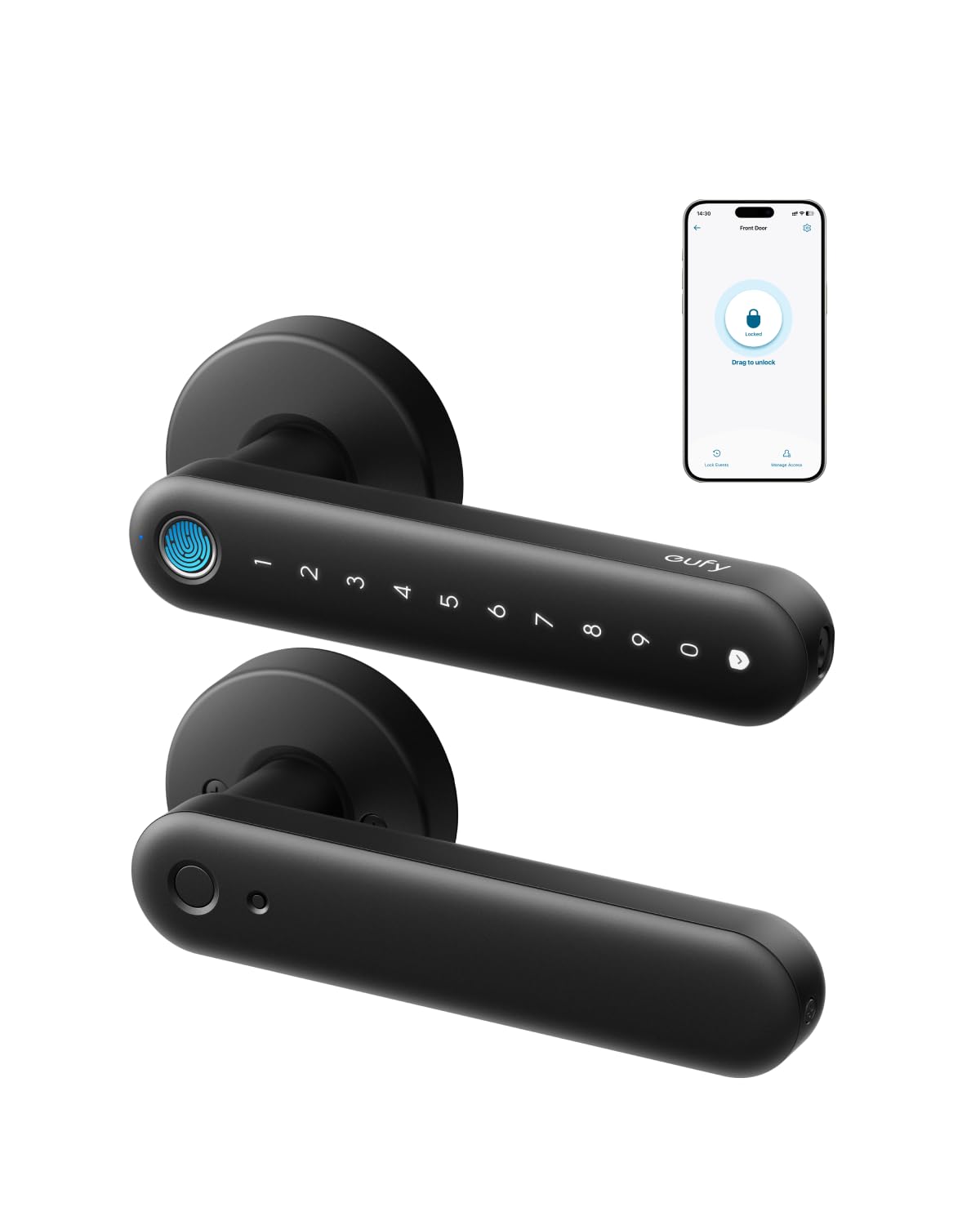
We recommend this interior-door lock for users with arthritis because fingerprint access and remote control reduce the need to turn a key or press small buttons.
Pros
- Large fingerprint reader offers quick, simple entry
- Built-in Wi-Fi supports remote access and user management
- USB-C backup power helps when the batteries run out
Cons
- Not designed for front-door use
- Fingerprint scans may not work perfectly every time
- Rekeying is not supported
We found the fingerprint reader easy to use and more comfortable than twisting a traditional key. The lock also accepts a PIN, app commands, or physical keys, giving us several backup options.
Installation was straightforward with a screwdriver and took less than 30 minutes. The handle felt solid, and the auto-lock feature helped secure the door without requiring us to turn the lock by hand.
The built-in Wi-Fi lets us manage access from the app and unlock the door for visitors. Battery life should last several months, while the USB-C port provides an emergency option with a power bank.
We would use this model for a bedroom, office, storage room, or garage entry. Since eufy does not recommend it for front doors, we would choose another lock for a primary exterior entrance.
Wyze Palm Lock

We recommend the Wyze Palm Lock for people with arthritis who want touch-free entry, flexible access codes, and backup power options.
Pros
- Contactless palm scanning reduces the need to grip or press.
- Keypad, app, voice, and mechanical key access add flexibility.
- Dual batteries and USB-C emergency charging help prevent lockouts.
Cons
- Palm scanning may take practice to position correctly.
- Wi-Fi and app features depend on a reliable connection.
- Installation must stay properly aligned for smooth operation.
We found the palm reader comfortable to use because it does not require twisting a key or pressing a small fingerprint sensor. Hovering a hand over the reader felt easier on sore fingers, while the illuminated keypad gave us another simple option.
The auto-lock feature helped us avoid manual locking, and the door-ajar alert added useful feedback. We also liked the backup battery and USB-C charging port, since either feature can help when the main battery runs low.
Setup and palm enrollment were straightforward in our testing. The Wyze app supports remote control, alerts, guest codes, Alexa, and Google Assistant. However, the lock needs careful installation and alignment, and some users may prefer the keypad or key when palm recognition does not read immediately.
Yamiry Fingerprint Smart Lock

We recommend this lock for people with arthritis who want several low-effort ways to unlock a standard door.
Pros
- Fingerprint, code, key fob, app, and key access
- Bright keypad and simple everyday operation
- Straightforward installation with a screwdriver
Cons
- Bluetooth connection may be unreliable for some users
- Fit can require extra work around the strike plate
- Locking the door manually may take practice
We found the fingerprint reader especially useful because it avoids gripping and turning a key. The keypad also gives us a backup option when the reader does not recognize a finger.
Installation feels manageable on a compatible American standard door. However, some doors may need adjustments around the strike plate, so we would check the fit before buying.
The lock supports up to 50 fingerprints, passwords, and key fobs. We like having separate access options for family members, but remote control requires the optional Wi-Fi gateway.
Reports from users are mostly positive, with a 4.3-star rating from more than 2,000 reviews. Still, some users report Bluetooth failures and early product problems, so we would keep the physical keys available.
Evanshow Fingerprint Smart Door Knob
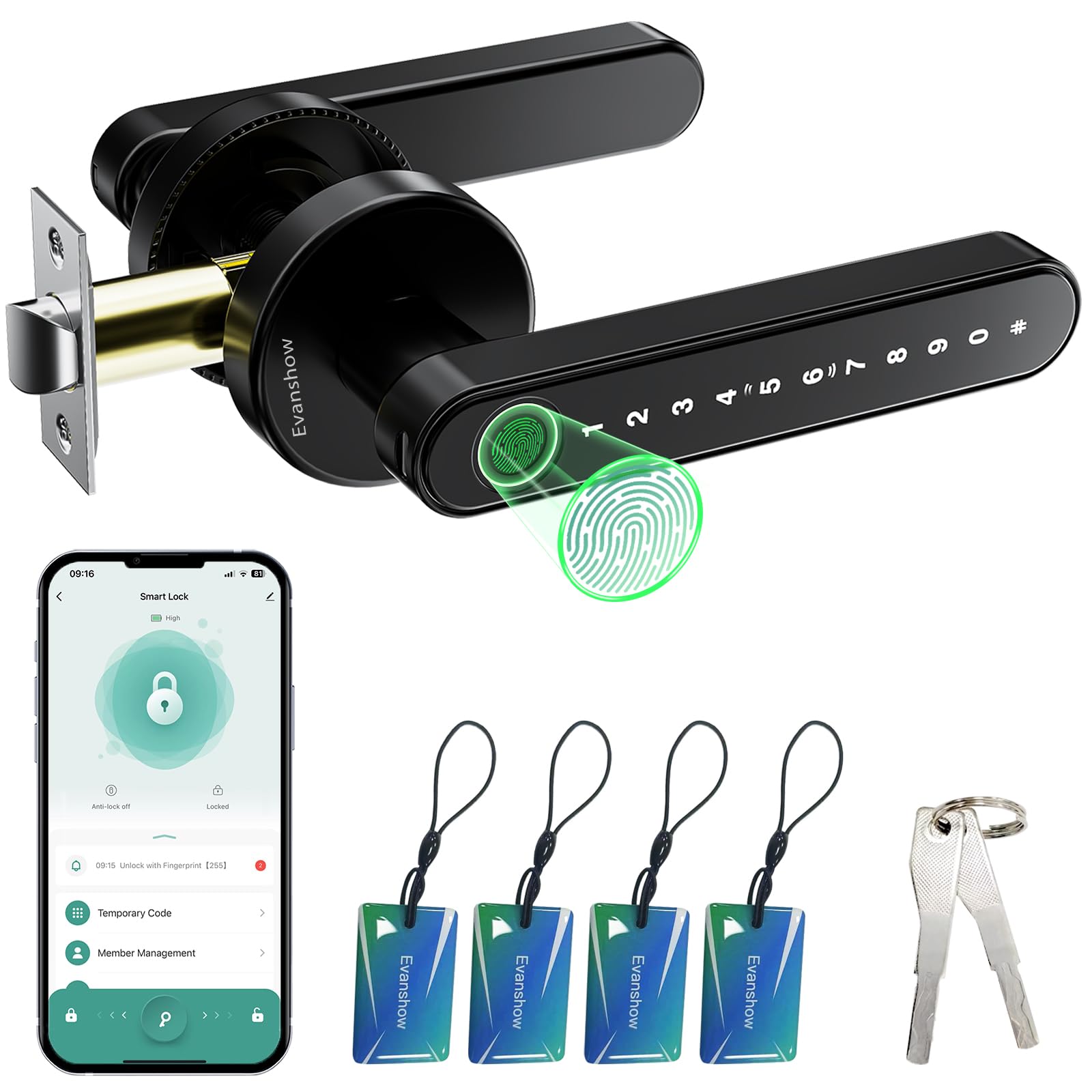
We recommend this lock for people with arthritis who want several low-effort ways to open an indoor door without turning a key.
Pros
- Fingerprint access reduces the need to grip or twist.
- The keypad, app, NFC card, and key provide useful backup options.
- Installation does not require drilling or wiring.
Cons
- Setup instructions can be difficult to follow.
- Some users report a loose or fragile handle.
- We must register an administrator fingerprint before normal use.
We found the fingerprint reader convenient during daily use. Pressing a finger against the knob felt easier than turning a traditional key, especially when our hands were stiff. The keypad and app also helped when the scanner did not read a print on the first try.
The lock supports temporary and permanent passcodes through the Tuya app. We could also review entry activity and turn on auto-lock. These features add convenience, but app setup takes some patience, and the instructions may not feel clear to everyone.
Installation was quick on a compatible wooden door, and the reversible handle supports either swing direction. We would still handle the lock carefully because several users reported that the handle became loose or broke under force. This model works best for bedrooms, apartments, and other indoor areas rather than locations that need heavy-duty protection.
Philips 4200 Series WiFi Smart Lock
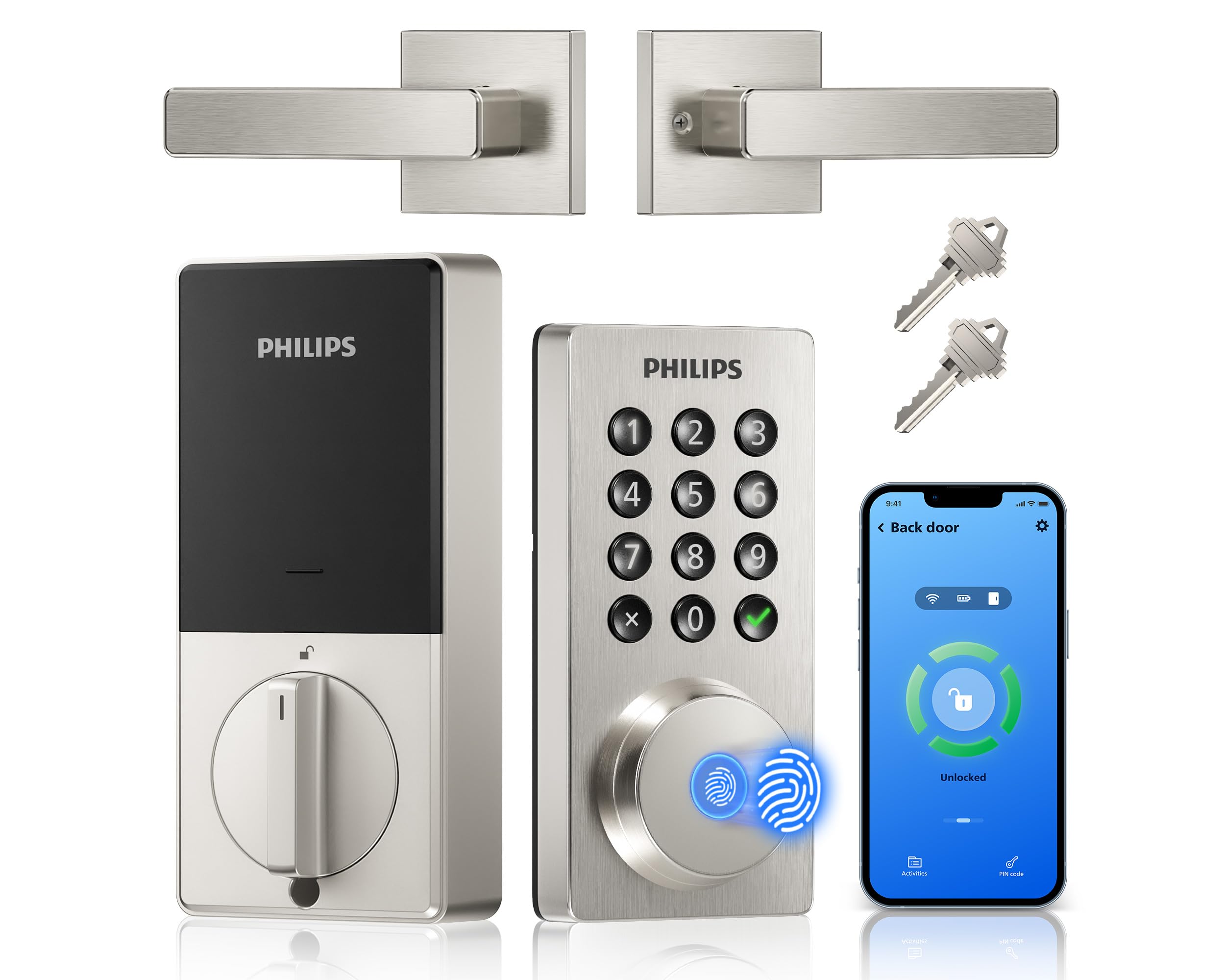
We recommend this lock for people with arthritis because fingerprint access, voice control, and the app reduce the need to turn a key or press small buttons.
Pros
- Fingerprint access and voice control limit hand strain
- Remote locking and status checks through the app
- Includes a matching lever handle
Cons
- Requires eight AA batteries, which are not included
- WiFi setup uses only a 2.4GHz network
- Installation may require careful door-size checks
We found the fingerprint reader especially useful because it avoids twisting a key or entering a PIN. The backlit keypad also helps when we need another entry option, while the lever handle takes less effort than a round knob.
The Philips Home Access app lets us lock or unlock the door remotely, create temporary codes, and review access activity. We also liked checking the lock status from a phone, although setup requires a compatible 2.4GHz WiFi network.
Auto-lock can help when arthritis, pain, or a busy routine makes it easy to forget the door. Voice commands through Alexa or Google Assistant add another hands-free option, but we would still keep a physical key available for emergencies.
Installation uses a screwdriver and fits doors between 1⅜ and 1¾ inches thick. We would measure the door first and keep premium AA alkaline batteries ready, since one user reported low-battery warnings after less than two weeks with lesser batteries.
Philips Wi-Fi Smart Deadbolt

We recommend this lock for people with arthritis who want several low-effort ways to unlock the door, including fingerprint access, voice control, and remote app control.
Pros
- Fingerprint and voice options reduce the need to turn a key.
- Built-in Wi-Fi supports remote access without an extra hub.
- Auto-lock and temporary codes make daily use easier.
Cons
- Batteries are not included.
- It supports only 2.4 GHz Wi-Fi.
- The lock has no door sensor to confirm whether the door is fully closed.
During installation, we found the lock fairly manageable with only a screwdriver. It took about 20 minutes to replace an older deadbolt, but correct cable routing and latch alignment matter. We should also check that our door measures between 1⅜ and 2 inches thick.
For arthritis relief, the fingerprint reader stands out because it avoids gripping and turning a key. The backlit keypad offers another choice, while the app lets us unlock the door from a phone. Voice control through Alexa or Google Assistant can help when our hands are full, though it requires a stable connection and account setup.
The built-in Wi-Fi allows remote locking, unlocking, alerts, and access history. We can create up to 100 custom codes, including temporary or scheduled codes for guests. The app works only on a 2.4 GHz network, and Philips recommends using AA alkaline batteries.
Auto-lock can activate after 10 to 180 seconds, which helps prevent missed locking. However, since the lock lacks a door sensor, we still need to check that the door closed properly before relying on the lock.
GHome Smart Fingerprint Door Lock

We recommend this lock for people with arthritis who want several low-effort ways to open an indoor door.
Pros
- Fingerprint entry reduces the need to grip and turn a key.
- Keypad, app, and backup key provide useful alternatives.
- Installation usually takes about 20 minutes with a screwdriver.
Cons
- The app works through Bluetooth, not Wi-Fi.
- Users must recharge the battery periodically.
- Door fit and alignment can affect operation.
We found the fingerprint reader quick and convenient during daily use. It helped us avoid twisting a key or applying much pressure to a small knob. The keypad also worked well when our fingers were wet or the reader did not recognize a print.
Setup felt manageable for a standard door, and the included hardware covered the basic installation needs. We would still check the door thickness and existing latch measurements before ordering, since fit can vary.
The lock supports temporary codes, access management, auto-lock, and silent mode through the app. However, Bluetooth range limits remote control, so we could not unlock the door from outside the home without being nearby.
Battery life depends on use, and some customer reports mention charging or reliability concerns. The mechanical keys provide a backup, but users with limited hand strength may find them less convenient than fingerprint or keypad entry.
Veise VE017 Fingerprint Smart Door Lock
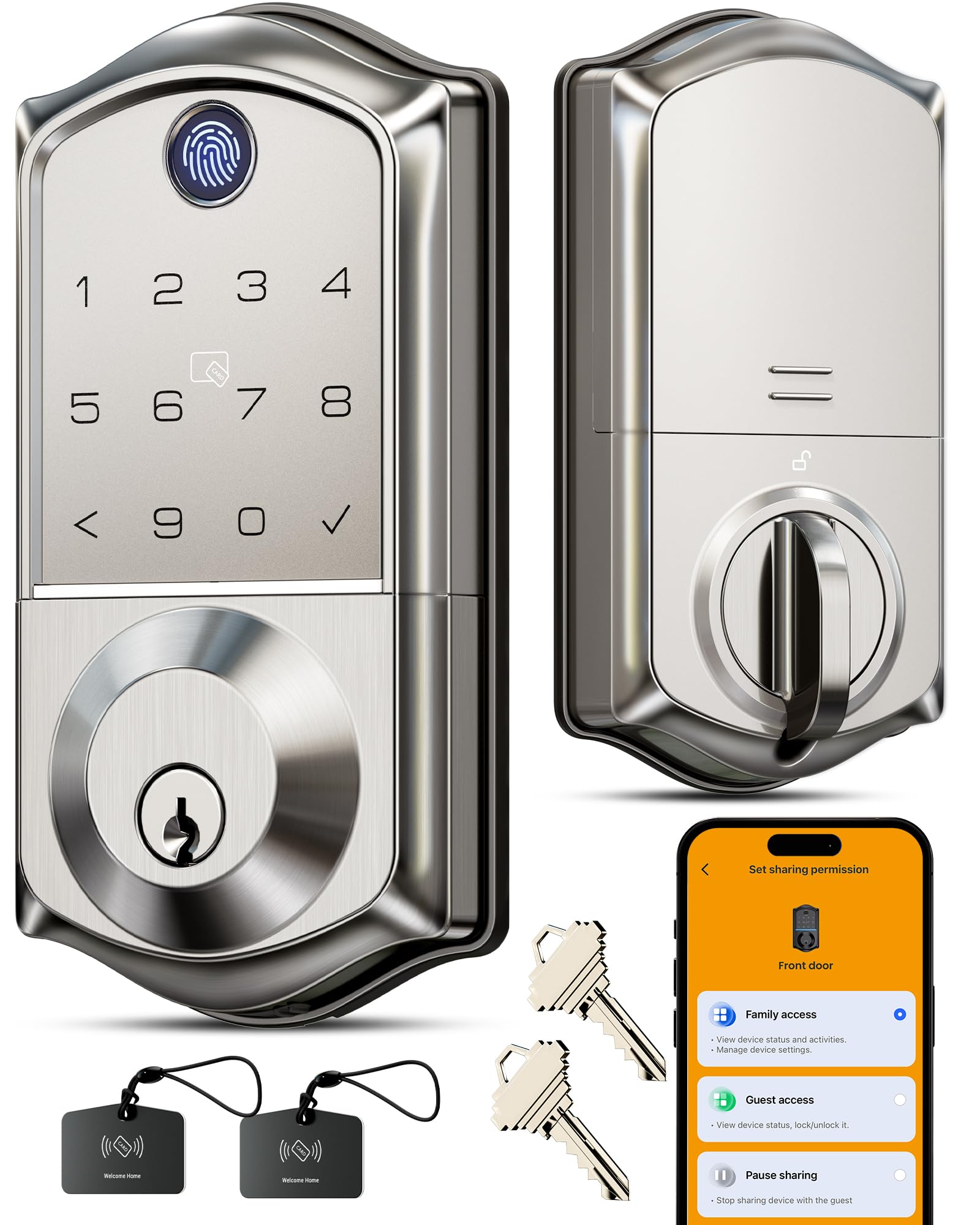
We recommend this lock for people with arthritis who want several low-effort ways to open a door, especially fingerprint access and app control.
Pros
- Fingerprint entry reduces the need to turn a key.
- The touchscreen accepts codes, cards, and app commands.
- Auto-lock and temporary codes simplify daily access.
Cons
- Remote control requires the separate G1 gateway.
- The four AA batteries are not included.
- Installation needs careful latch alignment.
We found the fingerprint reader helpful because it avoids gripping and twisting a key. The keypad, card, and app provide useful backups when the reader does not recognize a finger.
The KK Home app lets us add users, remove access, and review entry records. One-time, recurring, and permanent codes work well for family members, caregivers, and service providers. The anti-peeping feature also lets us enter extra numbers around the real PIN.
Installation uses the existing deadbolt opening and requires only a screwdriver. We would take extra care to align the latch with the strike plate, since a tight or uneven door can make any smart lock harder to operate.
The lock includes a USB-C emergency power port and low-battery alerts. We should note that app-based remote locking, unlocking, voice control, and status checks need the optional Veise G1 gateway.
Buying Guide
When choosing a smart door lock for arthritis, we should focus on controls that require little grip strength, twisting, or finger pressure. Look for keypad, touch-screen, voice, or smartphone access so we can use more than one entry method.
| Feature | What we should look for |
|---|---|
| Easy physical controls | A large, smooth thumb turn or lever |
| Keypad | Large, well-spaced numbers with clear feedback |
| App access | Simple controls and reliable remote unlocking |
| Voice control | Compatibility with our existing smart-home system |
| Auto-unlock | Settings that reduce the need to handle keys |
| Battery alerts | Early warnings before power runs low |
| Backup entry | A physical key, external battery contact, or both |
We should check how much force the lock needs to operate. A motorized deadbolt can help, but the door must align correctly with the frame; otherwise, the lock may still require extra pressure.
Installation also matters. We should confirm that the lock fits our door thickness, deadbolt type, and existing hardware. If bending, reaching, or tightening screws causes pain, professional installation may be useful.
We should review the app’s accessibility features, including text size, screen-reader support, and simple navigation. We should also check security settings, user permissions, encryption claims, and whether the lock provides activity alerts.
Finally, we should consider battery life, weather resistance for exterior parts, warranty coverage, and continued app support. A lock with several entry methods gives us a practical backup if one control becomes difficult to use.
Editor’s Choice
We choose the Schlage Encode Plus Smart WiFi Deadbolt for people with arthritis. Its keypad lets us unlock the door without turning a key, and the built-in Wi-Fi supports remote control through the Schlage Home app.
The lock also works with Apple Home and other smart-home systems. We can create unique access codes for family, caregivers, or service workers and remove them when needed.
| Feature | Why it helps |
|---|---|
| Keypad entry | Reduces the need to grip and twist a key |
| One-touch locking | Locks the door with a button press |
| Built-in Wi-Fi | Allows control without an extra hub |
| Access codes | Supports hands-free entry for approved users |
We should check the door’s fit and the lock’s battery level before installation. The keypad still requires enough finger movement to press buttons, so users with limited reach may prefer a model that supports voice control or smartphone access.
Conclusion
We should choose a smart door lock that reduces twisting, pinching, and force. Key features include hands-free entry, voice control, a large keypad, and an easy-to-grip design.
Before buying, we should check the lock’s fit with our existing door and deadbolt. We also need to consider battery access, phone compatibility, and backup entry options, such as a physical key or external power port.
A lock with remote control can help us avoid reaching for keys when our hands hurt. Auto-lock settings and activity alerts can also make daily use simpler, while temporary codes can support family members or caregivers.
The best choice depends on our range of motion, home layout, and comfort with smartphone apps. We should select the model that offers reliable access with the fewest difficult hand movements.
FAQS
What makes a smart lock suitable for arthritis?
We look for locks that reduce twisting, gripping, and key use. Key features include a large thumb-turn, keypad entry, phone control, voice control, and simple installation.
Are keypad locks easier to use than key locks?
They can be. We can enter a code with light finger pressure instead of turning a small key. A backlit keypad also helps us see the buttons in low light.
Do smart locks require a phone?
Not always. We can use a keypad, fingerprint reader, or physical key on some models. Phone access adds convenience but should not be the only entry method if hand movement is difficult.
Can we unlock a door without touching the lock?
Yes. Some locks support automatic unlocking through a phone, a wireless keypad, or voice assistants. We should check whether the feature requires a separate hub or subscription.
What installation features should we check?
We should choose a lock that fits our existing deadbolt and includes clear instructions. A model that replaces only the inside thumb-turn may reduce installation time and avoid changes to the outside door hardware.
What happens if the batteries die?
Most smart locks provide a backup option, such as a physical key, an emergency power connection, or a removable battery pack. We should test this method before an emergency occurs.
Are smart locks secure?
Smart locks use different security systems, so we should select a model with strong encryption, regular software updates, and access alerts. We should also create a unique code and remove old user access.