
Amazon Fire TV vs NVIDIA Shield Streaming Device for Seniors: Which?


GPS Tracker for Elderly

LED Magnifying Glass

Indoor Security Camera
Amazon Fire TV vs NVIDIA Shield streaming device for seniors comes down to two different styles of streaming. The Fire TV Stick 4K Max is a small stick with Alexa and a simple remote. The NVIDIA SHIELD TV Pro is a larger streaming box with more power and extra features.
For many older adults, the easier setup and familiar voice controls may matter more than advanced features. But users who want better local media support, expandable storage, or gaming features may prefer the SHIELD TV Pro.

Quick Comparison
The Fire TV Stick 4K Max is the simpler choice for seniors who mainly want Netflix, Prime Video, YouTube, and other streaming apps. It has a small design, Alexa voice search, 16GB of storage, and Wi-Fi 6E.
The NVIDIA SHIELD TV Pro is better suited to users who want more advanced features. It has 16GB of storage, two USB 3.0 ports, Gigabit Ethernet, AI upscaling, Dolby Vision, Dolby Atmos, and GeForce NOW support.
Simple rule: Choose Fire TV for simple everyday streaming. Choose SHIELD TV Pro when advanced features matter.
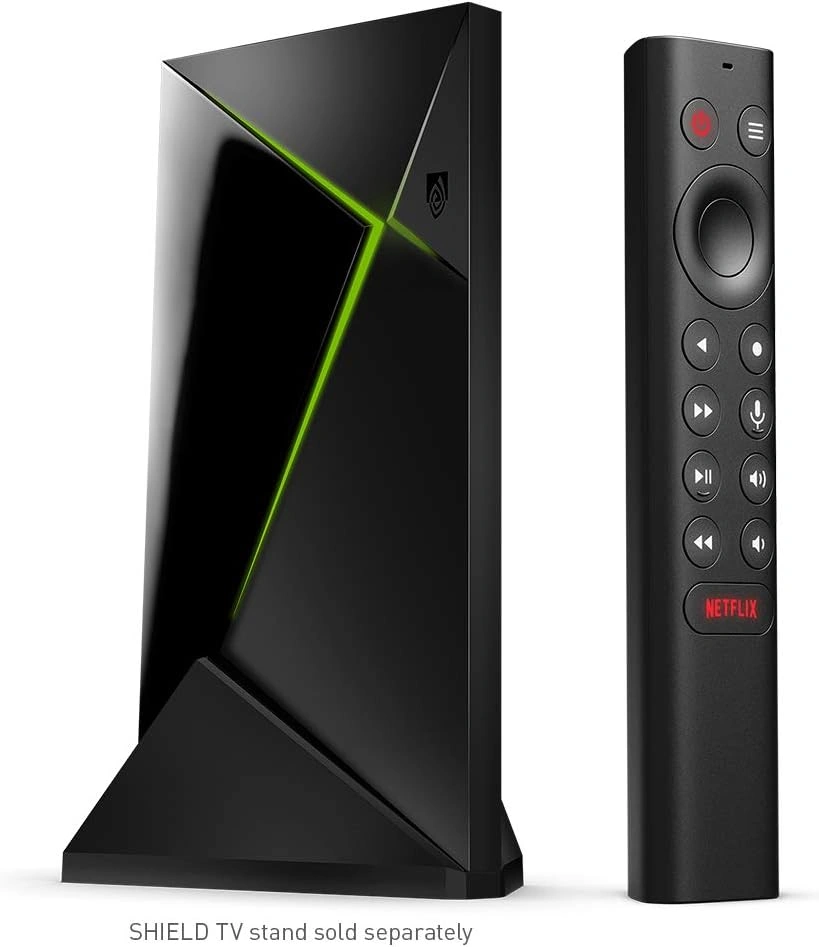
Amazon Fire TV vs NVIDIA Shield At a Glance
Both can deliver 4K streaming and support voice control. The main difference is how much control and hardware flexibility each device gives you.
| Feature | Fire TV Stick 4K Max | NVIDIA SHIELD TV Pro |
|---|---|---|
| Design | Small streaming stick | Streaming box |
| 4K video | Yes | Yes |
| Dolby Vision | Yes | Yes |
| Dolby Atmos | Yes | Yes |
| Storage | 16GB | 16GB |
| Expandable storage | No built-in expansion | USB storage support |
| Wi-Fi | Wi-Fi 6E | Wi-Fi 5 |
| Ethernet | External adapter | Built-in Gigabit Ethernet |
| Voice control | Alexa | Google Assistant and Alexa compatibility |
| Gaming | Cloud gaming support | GeForce NOW and Android gaming |
| AI upscaling | No | Yes |
| Remote locator | No | Yes |
Amazon lists the Fire TV Stick 4K Max 2nd Gen with 16GB storage, Wi-Fi 6E, Dolby Vision, HDR10+, Dolby Atmos, and an Alexa Voice Remote Enhanced. NVIDIA lists the SHIELD TV Pro with 16GB storage, Gigabit Ethernet, two USB 3.0 ports, AI-enhanced upscaling, Dolby Vision, and Dolby Atmos.
Amazon Fire TV Stick 4K Max Review
The Fire TV Stick 4K Max is appealing if the main goal is easy access to streaming apps. Its small stick design also keeps the setup neat around the TV.
Ease of Use
The Alexa Voice Remote Enhanced has dedicated buttons for power, volume, and channel control on compatible equipment. It also has a microphone button for Alexa voice control.
This can help seniors who do not want to type long movie or show names with an on-screen keyboard.
The Fire TV Stick also supports 4K video and major HDR formats, including Dolby Vision and HDR10+.
Key Strengths
- Small and easy to place behind a TV
- Alexa voice search
- 16GB storage
- Wi-Fi 6E support
- Dolby Vision
- Dolby Atmos support
- Simple remote with TV controls
- Fire TV Ambient Experience
Potential Drawbacks
- No built-in Ethernet port
- No USB ports for storage expansion
- Alexa voice control is mainly remote-based unless paired with a compatible Echo setup
- The Fire TV interface can offer many content and app choices, which may feel busy to some users
NVIDIA SHIELD TV Pro Review
The SHIELD TV Pro is designed more like a small home entertainment computer. It offers more connection options and advanced video features than a basic streaming stick.
Ease of Use
The SHIELD remote includes voice search, backlit buttons, an IR blaster, and a remote locator. The backlit buttons can be useful in a darker room.
The remote locator is another small but practical feature. It can help when the remote gets misplaced.
The trade-off is that SHIELD offers more settings and features. A senior who only wants to open Netflix and watch TV may not need all of them.
Key Strengths
- AI-enhanced 4K upscaling
- Dolby Vision and Dolby Atmos
- Built-in Gigabit Ethernet
- Two USB 3.0 ports
- Expandable storage
- Backlit remote buttons
- Remote locator
- Google Assistant
- GeForce NOW support
- Plex Media Server support
Potential Drawbacks
- Larger than a streaming stick
- More advanced features can mean a higher learning curve
- Costs more at NVIDIA’s listed price
- Gaming and media-server features may be unnecessary for simple streaming
NVIDIA currently lists the SHIELD TV Pro at $199.99 on its U.S. SHIELD page.
Which Is Easier for Seniors to Use?
For simple streaming, the Fire TV Stick 4K Max has a clear practical advantage. It is small, uses a familiar remote layout, and offers Alexa voice search.
The SHIELD TV Pro is still senior-friendly in several ways. Its remote has backlit buttons and a remote locator. It also supports voice control.
| Ease Factor | Fire TV Stick 4K Max | SHIELD TV Pro |
|---|---|---|
| Voice search | Alexa | Google Assistant |
| Backlit remote | Not highlighted in current specs | Yes |
| Find lost remote | No | Yes |
| Simple streaming | Very suitable | Suitable |
| Advanced setup | Less needed | More options |
| Ethernet setup | Adapter needed | Built in |
A senior who mainly watches streaming services may find Fire TV easier. Someone who enjoys technology may appreciate the extra control offered by SHIELD.
Performance Comparison
Both devices support 4K streaming and modern HDR formats. Fire TV Stick 4K Max uses a 2.0 GHz quad-core processor and Wi-Fi 6E.
SHIELD TV Pro uses NVIDIA’s Tegra X1+ processor with 3GB RAM. It also supports AI-enhanced upscaling up to 4K at 60 fps.
| Performance Area | Fire TV Stick 4K Max | SHIELD TV Pro |
|---|---|---|
| 4K streaming | Yes | Yes |
| Dolby Vision | Yes | Yes |
| HDR10+ | Yes | HDR10 listed |
| AI upscaling | No | Yes |
| Ethernet | External adapter | Built in |
| Gaming | Cloud gaming | GeForce NOW and Android gaming |
For normal TV and movie streaming, both offer strong performance. SHIELD has more tools for users who want advanced media playback or gaming.
Comfort, Accessibility, and Senior-Friendly Design
A streaming device does not require much physical effort, so remote design and interface simplicity matter more than weight.
The Fire TV Stick is tiny and stays behind the TV. This can reduce cable clutter. Its voice search can also reduce the need to type with the remote.
The SHIELD remote has motion-activated backlit buttons and a remote locator. These are useful touches for everyday use.
For a senior with limited dexterity, voice search may be especially convenient. However, the best option depends on which voice assistant and TV controls the user already knows.
Features Comparison
The two devices have different strengths. Fire TV focuses on convenient streaming, while SHIELD adds more advanced media and connectivity features.
| Feature | Fire TV Stick 4K Max | SHIELD TV Pro |
|---|---|---|
| Voice assistant | Alexa | Google Assistant |
| Storage | 16GB | 16GB |
| USB expansion | No | Yes |
| Ambient display | Yes | No |
| AI upscaling | No | Yes |
| Plex Media Server | No | Yes |
| Remote finder | No | Yes |
| Cloud gaming | Yes | Yes |
The SHIELD TV Pro can also work with Alexa through a compatible Amazon Echo device.
Price, Maintenance, and Long-Term Value
Price is one of the biggest differences. NVIDIA currently lists SHIELD TV Pro at $199.99 in the U.S.
The Fire TV Stick 4K Max is generally positioned as the lower-cost option. Current pricing can change, so shoppers should check the price at the time of purchase rather than relying on an old sale price.
| Cost Factor | Fire TV Stick 4K Max | SHIELD TV Pro |
|---|---|---|
| Upfront cost | Lower | Higher |
| Storage | 16GB | 16GB |
| Storage expansion | No | Yes |
| Ethernet | Extra adapter | Built in |
| Subscription needs | Depends on apps | Depends on apps |
| Maintenance | Low | Low |
For simple streaming, Fire TV can offer enough features without paying for hardware that may never be used.
SHIELD can make more sense when USB storage, Ethernet, Plex, or advanced video features are important.
Who Should Choose Amazon Fire TV?
- Choose Fire TV if simple streaming is the main goal.
- Choose Fire TV if Alexa voice search is useful.
- Choose Fire TV if a compact device is preferred.
- Choose Fire TV if Wi-Fi 6E is useful for the home network.
- Choose Fire TV if advanced media-server features are not needed.
Who Should Choose NVIDIA SHIELD TV Pro?
- Choose SHIELD if advanced picture processing matters.
- Choose SHIELD if AI upscaling is useful.
- Choose SHIELD if built-in Ethernet is important.
- Choose SHIELD if USB storage expansion is needed.
- Choose SHIELD if GeForce NOW or Android gaming is useful.
- Choose SHIELD if a remote locator would be helpful.
Amazon Fire TV vs NVIDIA Shield — Final Verdict
For a senior who mainly wants simple streaming, the Amazon Fire TV Stick 4K Max is the more straightforward fit. Its compact design, Alexa voice search, 4K support, and simple remote make it well suited to everyday TV use.
The NVIDIA SHIELD TV Pro is a better match for a senior who wants a more advanced streaming system. Its AI upscaling, USB ports, Ethernet, remote locator, and gaming features give it much more flexibility.
The key question is not simply which device has more features. It is whether those extra features will actually be useful.
Scoring Summary
The scores below are practical editorial comparisons based on the documented features above, not laboratory test results.
| Category | Fire TV Stick 4K Max | SHIELD TV Pro |
|---|---|---|
| Ease of Use | 9/10 | 8/10 |
| Senior-Friendly Design | 9/10 | 8/10 |
| Streaming Performance | 9/10 | 9/10 |
| Advanced Features | 8/10 | 10/10 |
| Maintenance | 9/10 | 9/10 |
| Value for Simple Streaming | 9/10 | 7/10 |
How We Evaluate Products
This comparison focuses on features that can affect everyday senior use. We look at ease of setup, remote controls, voice features, streaming performance, accessibility, maintenance, connectivity, and long-term value.
The comparison does not claim hands-on testing. Product specifications are based on current manufacturer information. Amazon identifies the Fire TV Stick 4K Max 2nd Gen as a 2023 model, while NVIDIA’s current SHIELD TV Pro specifications describe its hardware and features.
Senior-Specific Buying Considerations
Controls
Look for a remote that feels easy to understand. Voice search can reduce typing and scrolling.
Setup
Check the TV’s HDMI connection and the home’s Wi-Fi before buying. SHIELD also gives you the option of wired Ethernet.
Connectivity
If Wi-Fi is strong, either device can work well. If a wired connection is preferred, SHIELD has built-in Gigabit Ethernet.
Features
Do not pay extra for features that will not be used. A senior who only watches movies and TV shows may not need gaming or media-server tools.
Remote
Think about where the remote will be used. SHIELD’s backlit buttons and remote finder may be useful in everyday situations.
Common Buying Mistakes
- Choosing based only on the number of features
- Ignoring the remote design
- Paying for gaming features that will not be used
- Forgetting to check Wi-Fi strength
- Assuming every Fire TV model has the same specifications
- Comparing an older SHIELD model with a newer Fire TV model without checking the exact generation
Safety
Both devices are powered electronic products and should be used according to their supplied instructions.
Keep power cables tidy and avoid placing adapters where they can be pulled or create a trip hazard.
Amazon also notes that Fire TV Stick 4K Max uses radio-frequency technology and advises users with personal medical devices to check with their physician or device manufacturer if they have concerns about interference.
Conclusion
Amazon Fire TV Stick 4K Max and NVIDIA SHIELD TV Pro serve different types of users. Fire TV focuses on simple streaming, Alexa control, and a compact design. SHIELD adds advanced video processing, more connectivity, USB expansion, and gaming features.
For a senior who wants straightforward daily streaming, Fire TV’s simpler approach may be a better fit. For someone who wants a more powerful home entertainment device, SHIELD TV Pro offers more flexibility. The right choice depends on how much control and extra functionality the user actually needs.
