
Apple TV vs Google TV Streaming Device for Seniors: Which?


Upright Walker

Sudoku Puzzle Book

Toilet Seat Bidet Attachment
Apple TV vs Google TV streaming device for seniors is mainly a choice between two different approaches to TV streaming. For this comparison, Apple TV 4K is compared with the Google TV Streamer (4K), the current standalone Google streaming device. Both support 4K HDR streaming and voice control, but their remotes, interfaces, smart-home features, and accessibility tools differ.
For older adults, the biggest question is not simply which device has more features. It is which one feels easier to control every day. Remote design, voice commands, accessibility settings, setup, and the user’s existing phone ecosystem can all matter.

Quick Comparison
Apple TV 4K is a strong fit for seniors who already use an iPhone or other Apple devices. Its Siri Remote, VoiceOver, Zoom, and other accessibility tools can make everyday use easier.
Google TV Streamer is a strong alternative for people who use Android phones or Google Home products. Its Voice Remote includes a customizable button and Find My Remote, while Google TV supports TalkBack and other accessibility features.
The simpler choice depends heavily on the user’s existing devices and how they prefer to control the TV.
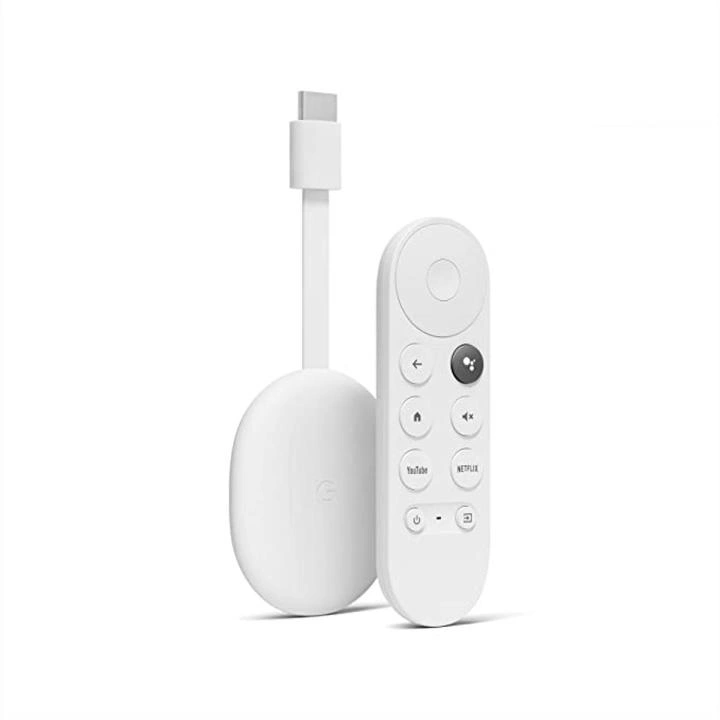
Apple TV vs Google TV At a Glance
Here is the practical difference between the two current devices.
| Feature | Apple TV 4K | Google TV Streamer |
|---|---|---|
| Resolution | Up to 4K HDR | Up to 4K HDR |
| Voice control | Siri Remote | Google Assistant/Gemini features |
| Remote | Rechargeable, USB-C | 2 AAA batteries |
| Storage | 64GB or 128GB | 32GB |
| Ethernet | 128GB model | Built in |
| Accessibility | VoiceOver, Zoom, captions, Switch Control | TalkBack, captions, Switch Access |
| Smart home | Apple Home | Google Home, Matter, Thread |
| Remote finder | Via iPhone | Built-in Find My Remote |
| Ecosystem | Apple | Google/Android |
Apple TV 4K uses the A15 Bionic chip and includes a USB-C rechargeable Siri Remote. Google TV Streamer has 4GB memory, 32GB storage, Ethernet, and a Voice Remote with two AAA batteries.
Apple TV 4K for Senior-Friendly Streaming
Apple TV 4K offers a polished setup for people already familiar with Apple products. The current device comes with a Siri Remote and supports 4K, HDR, Dolby Vision, and Dolby Atmos.
Ease of Use
The Siri Remote has a touch-enabled clickpad, dedicated playback controls, volume control, and a Siri button. A senior can also use voice commands for tasks such as pausing a program, skipping back, or turning on subtitles.
The rechargeable remote is convenient because there is no need to keep spare AAA batteries around. Apple says its battery provides months of typical daily use between charges.
Key Strengths
- Excellent integration with iPhone and other Apple devices
- Rechargeable Siri Remote
- Strong accessibility features
- Voice control through Siri
- 64GB or 128GB storage options
- Ethernet available on the 128GB model
- Useful smart-home integration
Potential Drawbacks
- The touch-enabled remote may take some practice.
- Some useful features work best within the Apple ecosystem.
- HDMI cable is sold separately.
- The higher-capacity configuration costs more than some basic streaming devices.
Google TV Streamer for Senior-Friendly Streaming
Google TV Streamer focuses on a broad streaming interface and Google smart-home integration. It supports up to 4K HDR with Dolby Vision and Dolby Atmos, and Google lists 32GB of storage and built-in Ethernet.
Ease of Use
The Google TV Voice Remote includes a customizable button. It also has a Find My Remote feature, which can be useful when a remote gets misplaced. The remote uses two AAA batteries.
Google TV also supports voice commands, and the device can be controlled through compatible Google smart speakers or displays.
Key Strengths
- Simple access to streaming apps
- 32GB storage
- Built-in Ethernet
- Customizable remote button
- Find My Remote feature
- Strong Google Home integration
- TalkBack accessibility support
- Matter and Thread support
Potential Drawbacks
- The interface can feel busy to someone who wants a very simple TV menu.
- AAA batteries need periodic replacement.
- Some Google features depend on compatible Google services or devices.
- HDMI cable is sold separately.
Which Is Easier for Seniors to Use?
The answer depends on the user’s habits.
Apple TV may be easier for a senior who already owns an iPhone. The Siri Remote can control the TV, and an iPhone can also help locate a misplaced remote. Apple TV includes VoiceOver, Zoom, larger text options, contrast controls, captions, and other accessibility tools.
Google TV may be easier for someone who already uses Android and Google Home. Its remote has a customizable button and Find My Remote, while TalkBack can read information on the screen aloud.
For seniors with limited vision, both platforms offer meaningful accessibility options. Apple provides VoiceOver and adjustable display features, while Google TV provides TalkBack and accessibility shortcuts.
Performance Comparison
Both devices are designed for modern 4K streaming, so everyday streaming performance should be more than enough for most households.
| Performance Area | Apple TV 4K | Google TV Streamer |
|---|---|---|
| Maximum resolution | 4K HDR | 4K HDR |
| HDR formats | Dolby Vision, HDR10+ | Dolby Vision, HDR10+, HDR10, HLG |
| Audio | Dolby Atmos supported | Dolby Atmos supported |
| Processor | A15 Bionic | Faster Google TV processor |
| Storage | 64GB / 128GB | 32GB |
| Wired networking | 128GB model | Built-in Ethernet |
Google says the Google TV Streamer has a 22% faster processor than its predecessor, while Apple TV 4K uses the A15 Bionic chip.
For normal movie and TV streaming, the difference is unlikely to be the main buying factor. Remote comfort and ecosystem compatibility may matter more.
Comfort, Accessibility, and Senior-Friendly Design
A streaming device is used from the couch, so small design details can make a real difference.
Apple’s VoiceOver reads items on the screen aloud. Apple TV also offers Zoom, Hover Text, contrast controls, Reduce Motion, captions, audio descriptions, and Switch Control.
Google TV supports TalkBack, closed captions, Switch Access, and other accessibility features. Google also provides an accessibility shortcut for quickly activating supported features.
For someone who often loses the remote, Google TV Streamer has a particularly practical feature: the remote can be located using the button on the back of the streamer or by voice.
Features Comparison
The main differences are easier to see when the useful senior-focused features are placed side by side.
| Feature | Apple TV 4K | Google TV Streamer |
|---|---|---|
| Screen reader | VoiceOver | TalkBack |
| Voice control | Siri | Google voice features |
| Remote charging | USB-C rechargeable | 2 AAA batteries |
| Remote finder | iPhone | Built into device |
| Smart home | Apple Home | Google Home/Matter |
| Zoom | Yes | Accessibility options vary |
| Closed captions | Yes | Yes |
| Ethernet | 128GB model | Built in |
| Storage | 64GB or 128GB | 32GB |
Apple’s accessibility tools are integrated directly into tvOS, while Google TV provides accessibility options through Android TV OS.
Price, Maintenance, and Long-Term Value
Price can change by country and retailer, so the figures below should be treated as current reference points rather than permanent prices.
Google’s U.S. store currently lists the Google TV Streamer at $99.99, while Apple’s current Apple TV 4K pricing can vary by configuration and market. Apple’s UK store, for example, lists the 64GB Wi-Fi model at £199 and the 128GB Wi-Fi + Ethernet model at £249.
Apple’s remote has a rechargeable battery, so there is no regular battery replacement. Google includes two AAA batteries with its Voice Remote.
Neither device requires routine cleaning beyond normal dusting and care. The bigger long-term consideration is compatibility with the user’s other devices and services.
Who Should Choose Apple TV 4K?
Choose Apple TV 4K if:
- The senior already uses an iPhone or iPad.
- VoiceOver or advanced accessibility features are important.
- A rechargeable remote is preferred.
- Apple Home devices are already part of the home.
- You want 64GB or 128GB storage options.
- You value tight integration with Apple services.
Who Should Choose Google TV Streamer?
Choose Google TV Streamer if:
- The senior already uses Android phones or Google services.
- Google Home devices are used around the house.
- Finding a misplaced remote is a common problem.
- Built-in Ethernet is important.
- You want a customizable remote button.
- You prefer Google’s streaming interface.
Apple TV vs Google TV — Final Verdict
For seniors already invested in Apple’s ecosystem, Apple TV 4K offers a very cohesive experience with Siri, iPhone integration, a rechargeable remote, and extensive accessibility tools.
For seniors who prefer Google or Android, Google TV Streamer offers strong accessibility, a useful remote finder, customizable controls, Google Home integration, and built-in Ethernet.
The most important difference is therefore not simply streaming quality. It is which interface and ecosystem feel more familiar to the person using the TV.
Scoring Summary
These scores are a practical editorial summary based on the documented features above, not laboratory test results.
| Category | Apple TV 4K | Google TV Streamer |
|---|---|---|
| Ease of Use | 9/10 | 8/10 |
| Senior-Friendly Design | 9/10 | 9/10 |
| Performance | 9/10 | 9/10 |
| Accessibility | 10/10 | 9/10 |
| Maintenance | 9/10 | 8/10 |
| Value | 8/10 | 9/10 |
The scores should be read as a guide, not as an objective laboratory ranking. The right choice can change based on the user’s phone, smart-home setup, accessibility needs, and preferred interface.
How We Evaluate Products
This comparison focuses on practical factors that can affect everyday senior use.
These include:
- Ease of navigation
- Remote design
- Voice control
- Accessibility
- Setup
- Streaming performance
- Smart-home compatibility
- Maintenance
- Storage
- Long-term practicality
- Overall value
No hands-on testing is claimed here. The comparison is based on current manufacturer specifications and official accessibility documentation.
Senior-Specific Buying Considerations
Before choosing either streaming device, consider these points.
Physical Controls
Check whether the remote’s buttons and navigation style feel comfortable. A touch-enabled clickpad may suit some users, while physical controls may feel more familiar to others.
Voice Control
Voice commands can reduce the need to navigate many menus. Check which voice assistant fits the user’s existing devices.
Accessibility
For vision or hearing needs, check screen readers, captions, text size, contrast, and audio description options before buying.
Setup
Both devices require a compatible TV, HDMI connection, internet access, and account setup. Google TV Streamer requires an HDMI 2.1 cable that is sold separately.
Smart Home
If the TV will also control lights, cameras, or other devices, choose the platform that matches the existing smart-home system.
Common Buying Mistakes
Avoid these common mistakes:
- Choosing only by streaming resolution
- Ignoring the remote design
- Buying into an ecosystem the user does not already use
- Forgetting to check accessibility settings
- Overlooking the cost of required accessories
- Assuming every voice feature works in every country or language
Apple notes that some features vary by country or region, and Google also limits certain features by availability.
Safety
Streaming devices have relatively low physical risk, but normal electrical and cable safety still matters.
Keep power cables and HDMI cables arranged so they do not create a trip hazard. Place the streaming box where it has suitable ventilation and avoid blocking its ports.
For seniors with vision difficulties, accessibility tools such as VoiceOver or TalkBack can also reduce the need to navigate unfamiliar visual menus.
Conclusion
Apple TV 4K and Google TV Streamer are both capable 4K streaming devices, but they suit different ecosystems. Apple TV 4K has strong accessibility features and close integration with Apple devices, while Google TV Streamer offers Google Home integration, a customizable remote, remote finding, and built-in Ethernet.