
Roku vs Amazon Fire TV Streaming Device for Seniors: Which?


Indoor Security Camera
Tablet for Seniors

LED Clip Reading Light
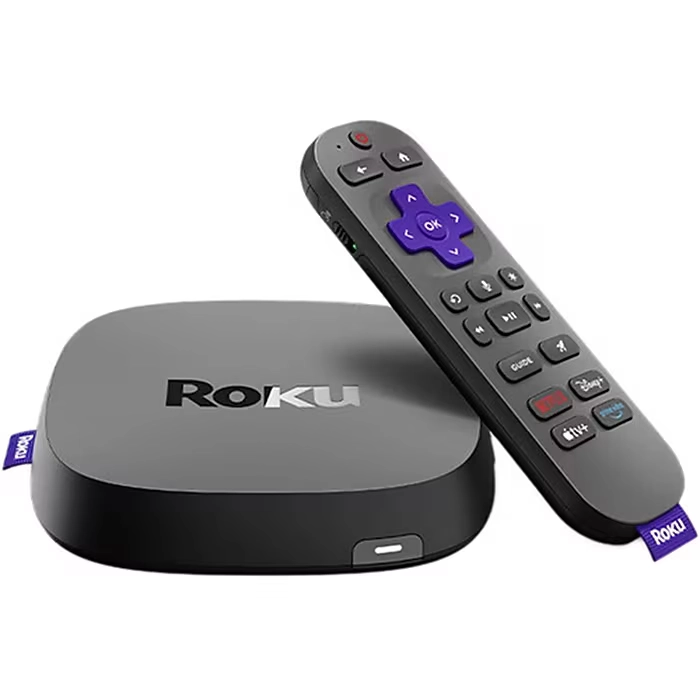
Roku vs Amazon Fire TV streaming device for seniors is a useful comparison when simple TV controls, voice search, and easy access to streaming apps matter. Both platforms can turn a compatible TV into a smart streaming center.
Roku focuses on a simple streaming interface, while Fire TV connects closely with Amazon Alexa and other Amazon services. The better choice depends on how much simplicity, voice control, and smart-home integration the user wants.
Quick Comparison
For seniors who mainly want simple navigation and straightforward streaming, Roku may be easier to learn. Its interface is focused on apps and streaming content, and Roku provides voice search and accessibility tools.
Fire TV can be a better fit for someone who already uses Alexa or other Amazon devices. Its accessibility options include VoiceView, Screen Magnifier, Adaptive Display, and closed captions.
The biggest difference is not just the streaming quality. It is how each platform handles navigation, voice control, accessibility, and smart-home features.

Roku vs Amazon Fire TV At a Glance
Both brands offer several streaming devices, so exact hardware features vary by model. The table below focuses on the platform experience rather than one specific device.
| Feature | Roku | Amazon Fire TV |
|---|---|---|
| Ease of use | Simple, focused interface | Feature-rich interface |
| Voice control | Available on compatible remotes | Alexa voice control |
| Screen reader | Roku Screen Reader | VoiceView |
| Screen magnification | More limited platform options | Screen Magnifier |
| Large interface text | Depends on device/settings | Adaptive Display available |
| Setup | Generally simple | Simple, but Amazon account integration adds steps |
| Smart-home integration | Available on supported Roku devices | Strong Alexa integration |
| Best suited to | Simple streaming | Streaming plus Alexa features |
Roku Review for Senior-Friendly Streaming
Roku is built around a straightforward streaming experience. Current Roku streaming players connect to a TV through HDMI and guide users through internet and device setup.
For seniors who do not want a complicated smart-TV ecosystem, Roku’s focused approach can be appealing.
Ease of Use
Roku’s home experience centers on streaming apps and basic navigation. Compatible Roku voice remotes can also search for shows, launch apps, control playback, and perform some TV controls by voice.
This can reduce the number of button presses needed for common tasks.
Key strengths
- Simple streaming-focused interface
- Voice search on compatible remotes
- Easy access to installed streaming apps
- Screen reader support
- Straightforward remote navigation
- Some remotes can help locate a misplaced remote
Potential drawbacks
- Voice features vary by remote and model
- Accessibility features can vary by device and region
- Advanced smart-home features may not be as central as they are on Fire TV
Roku’s screen reader can read menus and on-screen text aloud. Roku says its current US and Canada players and Roku TVs support the feature, subject to the required software.
Amazon Fire TV Review for Senior Streaming
Fire TV combines streaming with Amazon’s Alexa ecosystem. Compatible Fire TV devices can use Alexa through the remote to find, launch, and control content.
That can be useful for seniors who already use Alexa for other household tasks.
Ease of Use
Fire TV provides voice search through compatible Alexa Voice Remotes. A user can press the Alexa button and ask for content instead of typing a title with the directional pad.
Amazon also provides several accessibility features. VoiceView reads on-screen information aloud, while Screen Magnifier and Adaptive Display can make parts of the interface easier to see.
Key strengths
- Alexa voice control
- VoiceView screen reader
- Screen Magnifier
- Adaptive Display
- Closed captions
- Strong integration with compatible Alexa devices
Potential drawbacks
- More features can mean a busier experience
- Some accessibility functions depend on the specific Fire TV device
- Amazon account integration may feel less simple to someone who wants only basic streaming
Amazon notes that Fire TV accessibility features and language support can vary by device.
Which Is Easier for Seniors to Use?
For many seniors, the key issue is not how many features a streaming device has. It is how quickly the user can understand the remote and find the programs they want.
Roku’s simple streaming-focused design may suit users who want fewer distractions. Fire TV can be very convenient when Alexa voice control is already part of the household.
| Usability Area | Roku | Fire TV |
|---|---|---|
| Basic navigation | Simple | More feature-rich |
| Voice search | Available | Alexa-based |
| Screen reader | Yes | Yes |
| Visual assistance | Basic accessibility options | Screen Magnifier and Adaptive Display |
| Voice control | Strong on compatible devices | Strong Alexa integration |
| Learning curve | Often straightforward | May require learning more features |
Roku may be easier for someone who mainly wants to open Netflix, YouTube, or another streaming app and start watching.
Fire TV may make more sense for someone comfortable saying commands to Alexa or already using Alexa around the home.
Performance Comparison
Both Roku and Fire TV devices are available in different hardware configurations. Performance therefore depends heavily on the specific model rather than the brand alone.
Current Roku options include HD and 4K streaming devices. Roku describes its Streaming Stick 4K as supporting 4K, HDR, Dolby Vision, and stronger Wi-Fi than its entry-level HD Streaming Stick.
Fire TV also has multiple streaming devices, including HD, 4K, and 4K Max models. Amazon’s compatibility information lists several current and previous Fire TV streaming devices and compatible Alexa remotes.
For everyday senior use, look for:
- Fast menu response
- Reliable Wi-Fi
- A suitable resolution for the TV
- Easy remote navigation
- Good voice-search support
- Reliable access to the streaming apps the user actually watches
Do not choose based only on the brand name. The exact Roku or Fire TV model can make a meaningful difference.
Comfort, Accessibility, and Senior-Friendly Design
Accessibility is one area where both platforms have useful tools.
Roku’s Screen Reader can read menus and other on-screen items aloud. Compatible Roku voice controls can also help users search for content and control playback without typing.
Fire TV offers VoiceView, Screen Magnifier, Adaptive Display, captions, and other accessibility features. Adaptive Display can enlarge text, menus, and icons within supported Fire TV screens.
| Senior Need | Roku | Fire TV |
|---|---|---|
| Hearing support | Closed captions | Closed captions |
| Vision support | Screen Reader | VoiceView and visual tools |
| Voice search | Compatible voice remote/app | Alexa remote |
| Large interface elements | More limited | Adaptive Display |
| Voice navigation | Available on supported devices | Alexa-based |
For a senior with low vision, Fire TV’s combination of VoiceView, Screen Magnifier, and Adaptive Display may be worth considering.
For someone who simply wants easier voice searching and uncomplicated navigation, Roku may provide enough accessibility without the extra features.
Features Comparison
The platforms overlap in basic streaming functions, but their ecosystems differ.
| Feature | Roku | Amazon Fire TV |
|---|---|---|
| Voice search | Yes, on supported devices | Yes |
| Screen reader | Screen Reader | VoiceView |
| Magnification | Device-dependent | Screen Magnifier |
| Large interface | More limited | Adaptive Display |
| Smart-home control | Supported features vary | Strong Alexa integration |
| Remote accessibility | Voice remotes available | Alexa Voice Remotes |
Fire TV’s Alexa integration is particularly useful if the household already has compatible Echo or other Alexa devices. Amazon also supports compatible Alexa Voice Remotes across multiple Fire TV streaming products.
Price, Maintenance, and Long-Term Value
Pricing changes frequently, and each brand sells several models. For that reason, comparing a single temporary sale price does not give a reliable picture of long-term value.
Instead, consider the total ownership experience:
- Device price
- Required accessories
- Remote replacement
- Wi-Fi requirements
- Subscription services
- Compatibility with the existing TV
- Availability of preferred streaming apps
- Accessibility features
- Expected software support
Roku’s current entry-level Streaming Stick HD is positioned as a simple HD option, while the company also offers higher-resolution streaming products. Roku notes that its older Roku Express is no longer available for purchase and identifies the Streaming Stick HD as the updated comparable choice.
Fire TV similarly offers different hardware levels, so buyers should compare the exact model rather than assuming every Fire TV Stick performs the same way.
Who Should Choose Roku?
Choose Roku if:
- Simple navigation is the main priority.
- The user mainly wants streaming apps.
- A straightforward remote is preferred.
- Voice search would be useful but Alexa is not important.
- The household wants a focused streaming experience.
- A simple interface matters more than a large smart-home ecosystem.
Roku can be particularly practical for a senior who wants to spend less time learning the device and more time watching TV.
Who Should Choose Amazon Fire TV?
Choose Fire TV if:
- The household already uses Alexa.
- Voice commands are important.
- The user may benefit from VoiceView.
- Screen magnification or larger interface elements are useful.
- Alexa smart-home control is part of the household setup.
- The user wants more than basic streaming features.
Fire TV can make sense when streaming is only one part of a broader Amazon smart-home setup.
Roku vs Amazon Fire TV — Final Verdict
Roku and Amazon Fire TV are both capable streaming platforms, but they emphasize slightly different experiences.
Best for simple streaming: Roku
Best for Alexa integration: Amazon Fire TV
Best for built-in visual accessibility options: Amazon Fire TV
Best for straightforward navigation: Roku
Best for an Alexa-centered smart home: Amazon Fire TV
These are category-specific conclusions rather than a single universal winner. A senior who wants simple streaming may value Roku’s focused interface, while someone already comfortable with Alexa may benefit more from Fire TV.
Scoring Summary
The scores below are editorial comparisons of the platforms based on senior-oriented usability factors. They are not laboratory measurements.
| Category | Roku | Amazon Fire TV |
|---|---|---|
| Ease of Use | 9/10 | 8/10 |
| Senior-Friendly Design | 9/10 | 9/10 |
| Accessibility | 8/10 | 9/10 |
| Voice Control | 8/10 | 9/10 |
| Performance | 9/10 | 9/10 |
| Value | 9/10 | 8/10 |
Actual experience can vary by model, remote, TV, software version, and household setup.
How We Evaluate Products
For senior-focused comparisons, the most useful features are practical ones rather than long specification lists.
We consider:
- Ease of navigation
- Accessibility
- Voice control
- Setup
- Remote usability
- Performance
- Maintenance
- Compatibility
- Long-term practicality
- Overall value
We do not treat marketing claims as independent testing results. Specific features can also vary by model and region.
Senior-Specific Buying Considerations
Physical Effort
Consider whether the remote has controls that are easy to press and understand. Voice commands can reduce the need for repeated button presses.
Controls
Look for a remote that the user can identify easily. A simple button layout may matter more than having many extra shortcuts.
Visibility
If the user has difficulty reading small text, check the platform’s accessibility options before buying. Fire TV offers Adaptive Display and Screen Magnifier, while Roku provides a Screen Reader for spoken navigation.
Setup
Make sure the TV has a compatible HDMI connection and that the home Wi-Fi network is reliable.
Compatibility
Check that the device supports the streaming services the senior actually uses. There is little value in paying for features that will never be used.
Common Buying Mistakes
Avoid these mistakes when choosing between Roku and Fire TV:
- Buying based only on the cheapest price
- Ignoring the exact device model
- Assuming every remote has the same features
- Forgetting to check accessibility options
- Buying 4K hardware for a TV that cannot use 4K
- Choosing a platform without checking preferred streaming apps
Safety
Streaming devices have few physical risks, but basic electrical and cable safety still matters.
Keep power cables arranged so they do not create a tripping hazard. Place the streaming device where it has adequate ventilation and follow the manufacturer’s setup instructions.
If a senior has significant vision or dexterity limitations, check the accessibility features before purchase rather than assuming a particular platform will meet their needs.
Frequently Asked Questions
Is Roku easier for seniors than Fire TV?
Roku may be easier for seniors who want a simple, streaming-focused interface. Fire TV can be equally useful for seniors who are comfortable with Alexa and its broader features.
Does Fire TV have a screen reader?
Yes. Fire TV includes VoiceView, which reads on-screen text and menu options aloud.
Does Roku have accessibility features?
Yes. Roku includes a Screen Reader that can read menus and other on-screen information aloud.
Can seniors use voice commands on Roku?
Yes, on compatible Roku voice remotes and through the Roku mobile app. Voice commands can search for shows, launch apps, and control playback.
Is Fire TV good for seniors with low vision?
Fire TV offers several accessibility tools that may help, including VoiceView, Screen Magnifier, and Adaptive Display. The exact availability can vary by device.
Should I buy Roku or Fire TV?
Choose based on the user’s needs. Roku may suit someone who wants simple streaming, while Fire TV may be a better fit for someone who already uses Alexa or wants more visual accessibility options.
Conclusion
Roku vs Amazon Fire TV streaming device for seniors comes down mainly to simplicity, accessibility, and ecosystem preferences. Roku offers a focused streaming experience with voice and accessibility features, while Fire TV combines streaming with Alexa and several useful accessibility tools.
For a senior who wants straightforward TV streaming, Roku is worth considering. For someone already using Alexa or who may benefit from Fire TV’s visual accessibility tools, Amazon Fire TV offers a strong alternative. The exact model and remote should always be checked before buying.
