
Roku vs Google TV Streaming Device for Seniors: Which?


Hearing Aid Cleaning Kit

Digital Blood Pressure Monitor
Medical Alert System
Roku vs Google TV streaming device for seniors is a useful comparison for anyone who wants simple TV streaming without a complicated setup. Both can bring popular streaming services, voice controls, and 4K content to a compatible TV.
The main difference is the approach. Roku focuses on a simple streaming interface with a broad choice of players. Google TV Streamer offers stronger smart-home features, more storage, and deeper integration with Google services.
Quick Comparison
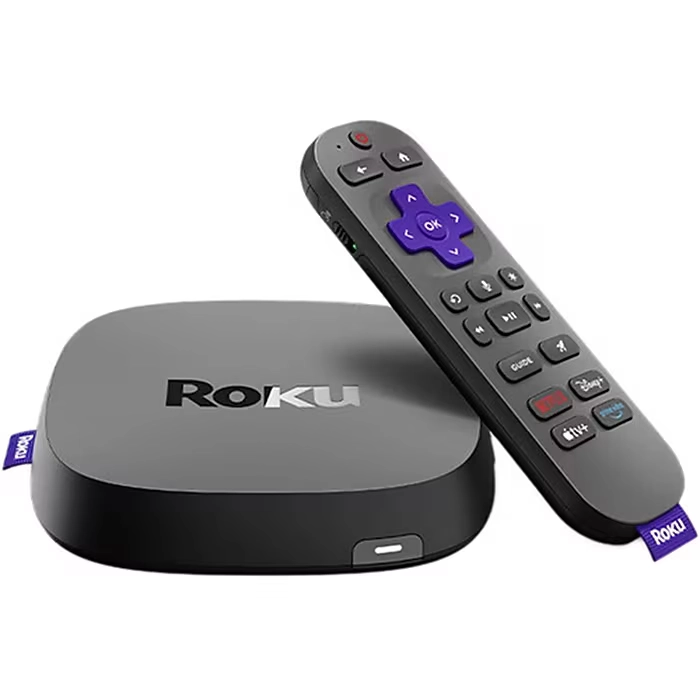
For seniors who want a simple interface and straightforward streaming, Roku is the easier choice to consider. Roku’s current streaming players include voice remotes and are designed around a simple home-screen experience.
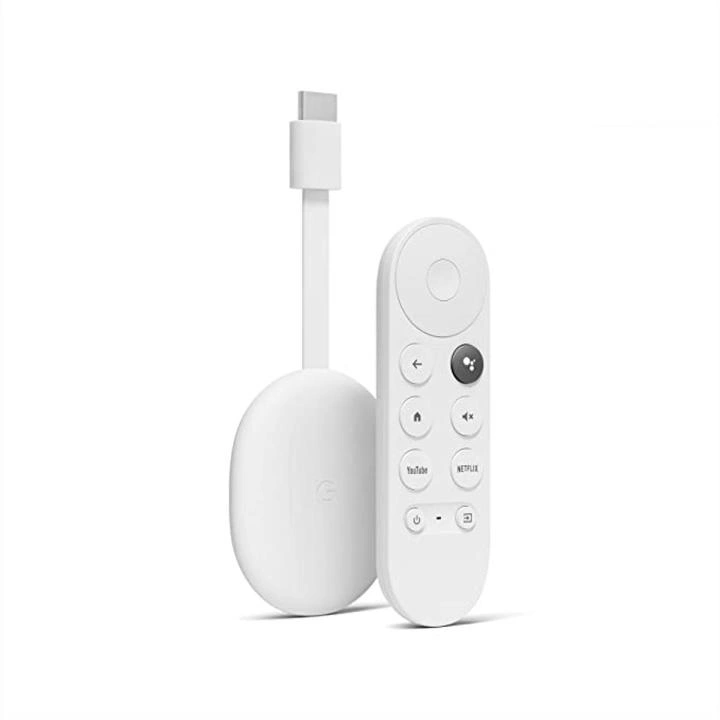
Google TV Streamer is more suitable for someone who wants extra storage, Ethernet, Google Home integration, and a more feature-rich smart-TV platform. It has 32GB of storage, 4GB of memory, and built-in Ethernet.
Simple streaming: Roku
More advanced smart-home features: Google TV Streamer
Roku vs Google TV At a Glance
The two options are not exactly the same type of product. Roku sells several streaming players, while Google’s current dedicated device is the Google TV Streamer (4K). The comparison below focuses on Roku’s current streaming-player range versus Google TV Streamer.
| Feature | Roku | Google TV Streamer |
|---|---|---|
| Setup | Simple HDMI setup | HDMI setup |
| Maximum resolution | Up to 4K on compatible models | Up to 4K HDR |
| Voice remote | Available | Included |
| Storage | Varies by model | 32GB |
| Ethernet | Available on Roku Ultra | Built in |
| Smart-home control | Roku smart-home support | Google Home, Matter, Thread |
| Interface | Roku OS | Google TV |
| Best fit | Simple streaming | Streaming + smart home |
Roku’s range includes HD and 4K players, while Google TV Streamer supports up to 4K HDR, Dolby Vision, Dolby Atmos, Ethernet, and smart-home connectivity.
Roku Is Simple and Easy to Navigate
Roku is appealing for seniors who want to turn on the TV and quickly find their streaming apps. Current Roku players use a simple interface, and the company emphasizes a fast, user-friendly experience.
Ease of Use
Roku’s setup is designed around a few basic steps. Connect the player to an HDMI port, connect power, pair the remote, connect to Wi-Fi, and follow the on-screen instructions.
The Roku Voice Remote can also control compatible TV power and volume. Voice search can reduce the need to type long show or movie names with the remote.
Key Strengths
- Simple home-screen layout
- Several player choices
- Voice remote options
- HD and 4K models available
- Easy HDMI setup
- Mobile remote app available
- Headphone Mode on compatible devices
Roku also offers a mobile app that can act as a remote and provides private listening features on supported devices.
Potential Drawbacks
- Features vary between Roku models
- Some advanced remote features require a higher-end remote
- Not every Roku player offers the same picture or networking features
- Users wanting deep Google smart-home integration may prefer Google TV
Google TV Streamer Offers More Smart Features
Google TV Streamer is designed for people who want streaming combined with a broader connected-home experience. It supports 4K HDR, Dolby Vision, Dolby Atmos, 32GB of storage, Ethernet, Matter, and a Thread border router.
Ease of Use
The Google TV Streamer includes a voice remote and brings streaming services together on one screen. Google also describes it as offering personalized recommendations and smoother navigation.
For a senior already familiar with Google services, this can feel natural. For someone who only wants Netflix, YouTube, live TV, and a few other apps, however, some of its extra features may not be necessary.
Key Strengths
- 32GB storage
- 4GB memory
- Up to 4K HDR
- Dolby Vision support
- Dolby Atmos support
- Built-in Ethernet
- Google Home integration
- Matter and Thread support
- Voice remote
Potential Drawbacks
- More expensive than entry-level Roku players
- Larger than Roku’s compact streaming sticks
- Advanced smart-home features may add complexity
- Some users may not need 32GB of storage
Which Is Easier for Seniors to Use?
For basic streaming, Roku has a strong simplicity advantage. Its current players are built around direct access to streaming services, while its voice remotes can make searching easier.
Google TV Streamer can also be easy to operate, especially for someone already comfortable with Google. Its extra smart-home functions may be useful for some households but unnecessary for others.
Seniors who prefer fewer settings may appreciate Roku’s straightforward approach. Seniors who already use Google Home and connected devices may find Google TV Streamer more convenient.
Performance Comparison
Both platforms can provide high-quality streaming, but the hardware options differ.
Roku offers several players. The Roku Streaming Stick 4K supports 4K, HDR10+, Dolby Vision, and long-range Wi-Fi. Roku Ultra adds features such as Wi-Fi 6, Ethernet, USB, and Dolby Atmos.
Google TV Streamer supports up to 4K HDR at 60 FPS, Dolby Vision, HDR10+, HLG, Dolby Atmos, and Ethernet. Google also lists 4GB of memory and 32GB of storage.
| Performance Area | Roku | Google TV Streamer |
|---|---|---|
| 4K | Available on selected players | Yes |
| Dolby Vision | Selected models | Yes |
| Ethernet | Selected models | Yes |
| Storage | Varies | 32GB |
| Wi-Fi | Varies by player | Wi-Fi 5 |
| Dolby Atmos | Supported on selected models | Yes |
The exact Roku experience depends on which player you choose, so comparing a basic Roku stick with Roku Ultra is not the same as comparing Google TV Streamer with one specific Roku model.
Comfort, Accessibility, and Senior-Friendly Design
A streaming device does not require much physical effort, so remote design and interface clarity matter more than weight.
Roku offers voice remotes with TV controls, and its Voice Remote Pro adds features such as backlit buttons, hands-free controls, and a lost-remote finder.
Google TV Streamer’s remote includes a customizable button and Find My Remote support.
For someone who has trouble seeing small buttons, a backlit remote may be useful. For someone who frequently misplaces the remote, a remote-finding feature can also be helpful.
Features Comparison
The biggest difference is not basic streaming. It is what each platform adds around streaming.
| Feature | Roku | Google TV Streamer |
|---|---|---|
| Voice control | Yes | Yes |
| Private listening | Supported on compatible devices | Bluetooth support |
| Smart-home control | Roku ecosystem | Google Home |
| Matter | Roku ecosystem varies | Yes |
| Thread | — | Yes |
| Find remote | Selected remote | Yes |
| 32GB storage | — | Yes |
Google TV Streamer is particularly strong if the TV is part of a larger smart-home setup. It can act as a Matter hub and Thread border router.
Price, Maintenance, and Long-Term Value
Roku offers a wider range of prices. Current Roku players listed by the company include the Streaming Stick at $39.99, Streaming Stick Plus at $59.99, Streaming Stick 4K at $79.99, and Roku Ultra at $149.99.
Google TV Streamer is listed by Google at $149.99.
That makes the comparison highly dependent on the Roku model. An entry-level Roku costs much less than Google TV Streamer, while Roku Ultra is in the same listed price range.
For long-term value, think about what features will actually be used. Paying more for Ethernet, extra storage, and smart-home functions may make sense in a connected home. For basic streaming, those extras may not matter.
Who Should Choose Roku?
Choose Roku if:
- You want a simple streaming interface.
- The senior mainly watches streaming apps.
- You want several price and hardware options.
- Voice search would make searching easier.
- You want a compact streaming stick.
- You prefer a simple setup.
- You do not need advanced Google smart-home features.
Who Should Choose Google TV Streamer?
Choose Google TV Streamer if:
- You already use Google Home.
- You want built-in Ethernet.
- You want 32GB of storage.
- You want Dolby Vision and Dolby Atmos.
- You plan to connect smart-home devices.
- You want Matter and Thread support.
- You prefer a more feature-rich streaming platform.
Roku vs Google TV — Final Verdict
Best for simple streaming: Roku
Best for Google smart-home integration: Google TV Streamer
Best for a wider range of price options: Roku
Best for built-in Ethernet and storage: Google TV Streamer
Best for a simple senior-focused setup: Roku
There is no single choice for every senior. Roku makes more sense when simple streaming and easy navigation are the main goals. Google TV Streamer becomes more attractive when smart-home control, storage, Ethernet, and advanced video and audio support matter.
Scoring Summary
These scores are a practical comparison of the current platform features and senior-focused usability factors, not laboratory test results.
| Category | Roku | Google TV Streamer |
|---|---|---|
| Ease of Use | 9/10 | 8/10 |
| Senior-Friendly Design | 9/10 | 8/10 |
| Performance | 8/10 | 9/10 |
| Smart Features | 8/10 | 10/10 |
| Value | 9/10 | 8/10 |
Because Roku sells multiple streaming devices, its exact performance and features depend on the model selected. Google TV Streamer is a more specific hardware comparison.
How We Evaluate Products
We compare streaming devices using factors that can affect everyday senior use.
These include:
- Ease of setup
- Remote control design
- Voice control
- Interface simplicity
- Streaming performance
- Accessibility
- Smart-home features
- Maintenance
- Connectivity
- Price and long-term value
This comparison does not claim hands-on testing. Product specifications and current features were checked against manufacturer information.
Senior-Specific Buying Considerations
Controls
Look for a remote with clear buttons and useful TV controls. Voice search can also reduce the need for typing.
Setup
Check that the TV has a compatible HDMI connection and that the person using it can connect the device to Wi-Fi.
Smart Features
Do not pay extra for smart-home features unless they will actually be used.
Remote Finding
A lost-remote feature can be useful in a busy household.
Display and Audio
If picture and sound quality matter, check support for 4K, HDR, Dolby Vision, and Dolby Atmos on the specific device and TV.
Common Buying Mistakes
- Comparing a basic Roku stick with Roku Ultra without checking the model
- Paying for features that will never be used
- Ignoring the TV’s resolution
- Forgetting to check Wi-Fi strength
- Assuming every Roku model has the same features
- Choosing advanced smart-home functions when simple streaming is the real goal
Safety
Streaming devices have relatively few physical safety concerns, but basic electrical and cable safety still matters.
Keep power cables arranged so they do not create a trip hazard. Use the supplied or compatible power equipment, and follow the manufacturer’s setup instructions.
If the device is being installed behind a wall-mounted TV, make sure cables are routed safely and remain accessible.
Conclusion
Roku vs Google TV streaming device for seniors comes down mainly to simplicity versus additional smart features. Roku offers a broad selection of easy-to-use streaming players, including compact sticks and higher-end models.
Google TV Streamer offers more built-in storage, Ethernet, and Google smart-home features. For a senior who mainly wants easy access to streaming apps, Roku may be the more straightforward fit. For someone already invested in Google Home and connected devices, Google TV Streamer provides more smart-home functionality in one device.