
Eufy vs Blink Security Camera for Seniors Guide


Easy Grip Kitchen Utensils

Shiatsu Neck Massager

Hearing Aid Cleaning Kit
Eufy vs Blink security camera for seniors is a useful comparison if you want home monitoring without making the system hard to manage. Both brands offer wireless cameras, app-based viewing, motion alerts, and options for local or cloud storage.
The main difference is how each brand handles storage and ongoing costs. Eufy puts more emphasis on local storage with no required cloud subscription, while Blink offers a simple cloud-based system with optional local storage through compatible Sync Modules.
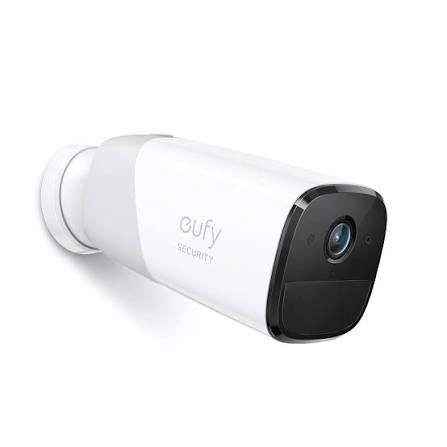
Quick Comparison
For seniors who want simple local storage and fewer recurring costs, Eufy has a clear practical advantage. Many Eufy cameras can record locally without a subscription, although storage methods vary by model.
Blink may suit seniors who prefer a straightforward camera system and are comfortable using the Blink app and, when needed, a subscription or Sync Module for additional storage features.
The right choice depends less on the brand name and more on how the senior will use the camera.
Eufy vs Blink At a Glance
Here is a simple view of the main differences. Exact features can vary between camera models.
| Feature | Eufy | Blink |
|---|---|---|
| Local storage | Common on many models | Available on compatible models |
| Required cloud subscription | No for basic local recording | No, but some features use a plan |
| Cloud storage | Optional on supported models | Available with Blink plans |
| App viewing | Yes | Yes |
| Motion alerts | Yes | Yes |
| AI features | Available on selected models | Available on selected models/plans |
| Setup | Usually wireless and app-based | Wireless and app-based |
| Long-term storage cost | Can be low with local storage | Can be low with local storage setup |
| Best fit | Local-storage focused users | Simple cloud/app users |
Eufy’s current lineup includes cameras with built-in, microSD, or HomeBase-based local storage, depending on the model. Blink supports local storage on compatible cameras through Sync Module 2 or Sync Module XR.
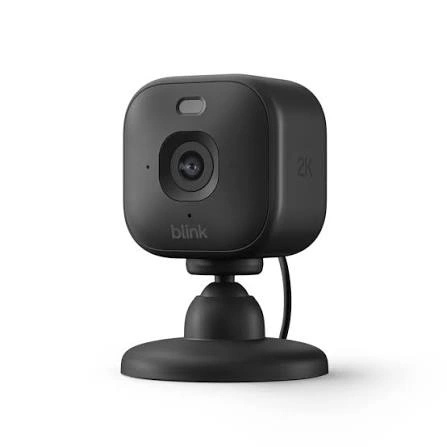
Eufy Security Cameras for Senior Home Use
Eufy offers a broad range of indoor and outdoor cameras. Many models are designed around local storage, and Eufy says recording does not require a cloud subscription.
Ease of Use
Eufy’s system can be attractive for seniors who want to avoid another monthly service. Depending on the model, recordings can be stored on the camera, a microSD card, or a HomeBase.
The Eufy Security app can be used to view, download, and delete recordings. Eufy also supports shared users, which can be useful when a family member or caregiver needs access.
Key Strengths
- Local recording is available on many models.
- No subscription is required for basic recording.
- Some models offer expandable local storage.
- Family members can be given shared access.
- Some cameras offer advanced detection features.
- Solar-powered options can reduce charging work on compatible outdoor models.
Potential Drawbacks
- Features differ considerably between Eufy camera models.
- Some setups use a HomeBase or storage device.
- Optional cloud features can add another layer to the system.
- More advanced models may have more settings than some seniors need.
Blink Security Cameras for Senior Home Use
Blink focuses heavily on simple wireless cameras and app-based monitoring. Current compatible models can use cloud storage through Blink plans or local storage with supported Sync Modules.
Ease of Use
Blink cameras are controlled through the Blink app, making it possible to check live video and receive motion notifications from a phone. Basic live view and motion notifications are available without a Blink plan.
For a senior who wants cloud storage, a Blink subscription can simplify access to recorded clips. For someone who wants local storage, however, the setup may require a compatible Sync Module and USB drive or microSD card, depending on the system.
Key Strengths
- Straightforward app-based monitoring.
- Motion notifications are available without a subscription.
- Compatible systems support local storage.
- Sync Module 2 can manage multiple compatible cameras.
- Cloud storage is available through Blink plans.
- Alexa integration is supported on compatible cameras.
Potential Drawbacks
- Some useful features depend on a subscription.
- Local storage may require additional hardware.
- Storage options vary between Blink camera models.
- A senior may need help setting up a Sync Module and USB storage.
Which Is Easier for Seniors to Use?
For basic daily monitoring, both can be relatively simple once installed.
Eufy may be easier for seniors who:
- Want local recording without a monthly fee.
- Prefer to keep recordings at home.
- Want family members to have shared access.
- Do not want to manage a cloud subscription.
Blink may be easier for seniors who:
- Already use the Blink app.
- Prefer cloud-based video storage.
- Want a simple wireless camera setup.
- Are comfortable with a family member helping with the initial setup.
The biggest usability issue is often initial configuration, not daily viewing. A caregiver or family member can set up the camera, connect Wi-Fi, adjust alerts, and explain the main app controls.
Performance Comparison
Security cameras should be judged by the features that affect everyday monitoring.
| Performance Area | Eufy | Blink |
|---|---|---|
| Video monitoring | Strong options across current lineup | Strong options across current lineup |
| Motion alerts | Available | Available |
| Person detection | Available on selected models | Available on selected models/plans |
| Night viewing | Available on selected models | Available on selected models |
| Local recording | Strong focus | Available on compatible systems |
| Remote viewing | Yes | Yes |
Eufy offers models with resolutions up to 4K, while its current lineup also includes AI detection and local storage options. Blink’s feature set varies by model and subscription plan, with person and vehicle detection available on supported cameras and plans.
Comfort, Accessibility, and Senior-Friendly Design
A security camera does not require much physical effort during normal use. The bigger concern is how much work is needed during installation and maintenance.
Eufy’s solar-powered cameras can reduce the need for frequent battery attention in suitable outdoor locations.
Blink also offers battery-powered cameras, and its Outdoor 4 can use an optional battery extension pack for four AA lithium batteries.
For a senior with limited dexterity, it may be helpful to have someone else handle mounting, battery changes, storage setup, and Wi-Fi troubleshooting.
Features Comparison
The storage system is one of the biggest differences between these brands.
| Feature | Eufy | Blink |
|---|---|---|
| Local video | Common on many models | Supported on compatible systems |
| Cloud backup | Optional on supported models | Available through plans |
| Monthly fee for basic local recording | Not required | Not required with compatible local storage |
| Family access | Shared users supported | Account/app-based access |
| Storage hardware | Varies by model | Sync Module 2/XR may be required |
Eufy states that local recording can work without a cloud backup subscription. Blink’s local storage uses a USB drive with Sync Module 2 or a microSD card with Sync Module XR on supported systems.
Price, Maintenance, and Long-Term Value
Security camera prices change often, so it is better to look at ownership costs rather than one temporary sale price.
Eufy can offer lower ongoing costs when a camera’s local storage meets your needs. Some current Eufy systems are designed around local storage without a mandatory monthly fee.
Blink can also operate without a subscription when compatible local storage is used. However, cloud storage and certain premium features require a Blink plan.
| Cost Factor | Eufy | Blink |
|---|---|---|
| Monthly cloud cost | Optional on supported systems | Optional, depending on features |
| Local storage | Often built in or model-dependent | Requires compatible storage setup |
| Replacement items | Depends on model | Batteries/storage hardware may add cost |
| Maintenance | Model dependent | Model dependent |
| Long-term value | Strong for local-storage users | Strong for simple setups |
Who Should Choose Eufy?
Choose Eufy if:
- You want local video storage.
- You want to avoid a required monthly cloud fee.
- Privacy and keeping recordings at home are important.
- A family member can help with initial setup.
- You want options such as solar power or expandable storage.
- You plan to use several cameras.
Who Should Choose Blink?
Choose Blink if:
- You want a simple wireless camera system.
- You prefer using the Blink app.
- Cloud storage is convenient for you.
- You are comfortable paying for additional cloud features.
- You want local storage but do not mind adding compatible storage hardware.
- You already use Alexa or other compatible Blink integrations.
Eufy vs Blink Security Camera — Final Verdict
For seniors who place a high value on local storage and avoiding recurring fees, Eufy has a strong practical advantage. Its current security lineup emphasizes local storage, while cloud backup is optional on supported products.
Blink makes more sense for users who prefer its app-based system and are comfortable choosing between cloud storage and compatible local-storage options. The choice can also depend heavily on the exact Blink model and Sync Module included.
Scoring Summary
These scores are a practical editorial comparison of the brand-level features discussed above, not laboratory test results.
| Category | Eufy | Blink |
|---|---|---|
| Ease of Use | 9/10 | 9/10 |
| Senior-Friendly Design | 9/10 | 8/10 |
| Performance | 9/10 | 8/10 |
| Maintenance | 9/10 | 8/10 |
| Value | 9/10 | 8/10 |
Exact results can change when comparing specific camera models rather than the brands as a whole.
How We Evaluate Products
This comparison focuses on practical factors that matter when a security camera is used by an older adult or caregiver.
We consider:
- Ease of setup
- App usability
- Storage
- Alerts
- Physical maintenance
- Privacy
- Reliability features
- Long-term cost
- Family or caregiver access
We do not treat marketing claims as independent test results. Product features can also change between models and generations.
Senior-Specific Buying Considerations
Setup
Check whether the camera requires a hub, storage device, or extra equipment.
Controls
The main app should be easy to open and understand. Too many settings can make daily use harder.
Maintenance
Think about battery changes, storage devices, Wi-Fi problems, and cleaning.
Storage
Decide whether you prefer local recordings or cloud storage before choosing the camera.
Family Access
If a caregiver or family member will help, check whether the system supports appropriate shared access.
Privacy
Understand where recordings are stored and which features send video or thumbnails to the cloud. Eufy, for example, states that local storage is its default approach on many security products, while optional cloud services can send selected data to the cloud.
Common Buying Mistakes
Avoid these mistakes when choosing between Eufy and Blink:
- Choosing a camera without checking its storage method.
- Assuming every model from a brand has the same features.
- Ignoring subscription requirements for desired features.
- Forgetting the cost of batteries or storage hardware.
- Installing the camera where Wi-Fi is weak.
- Buying advanced features that the senior will rarely use.
Safety
Security cameras are electrical devices, so use the manufacturer’s installation instructions. Outdoor cameras should be installed according to their weather-resistance rating.
If mounting a camera requires a ladder or difficult outdoor work, it is safer to have another person handle installation rather than asking a senior to take unnecessary physical risks.
Conclusion
Eufy and Blink can both work well for senior home monitoring, but they take different approaches to storage and ongoing costs. Eufy is particularly suited to seniors and families who want local recording without a required cloud subscription.
Blink is a practical option for users who like its simple app-based system and want the flexibility of cloud storage, with local storage available on compatible setups.
The most important step is to compare the specific camera model, storage method, setup requirements, and subscription features before buying.
