
Arlo vs Wyze Security Camera for Seniors: Which?


Orthopedic Pillow

Glucose Monitor Kit

Spill-Proof Travel Mug
Arlo vs Wyze security camera for seniors is mainly a choice between a more polished security system and a more flexible, budget-friendly camera setup. Both brands offer useful features such as motion alerts, two-way audio, night vision, and smartphone viewing.
For older adults, the important question is not simply which camera has more features. Setup, app simplicity, alert quality, storage options, and the amount of ongoing maintenance can matter more in daily use.
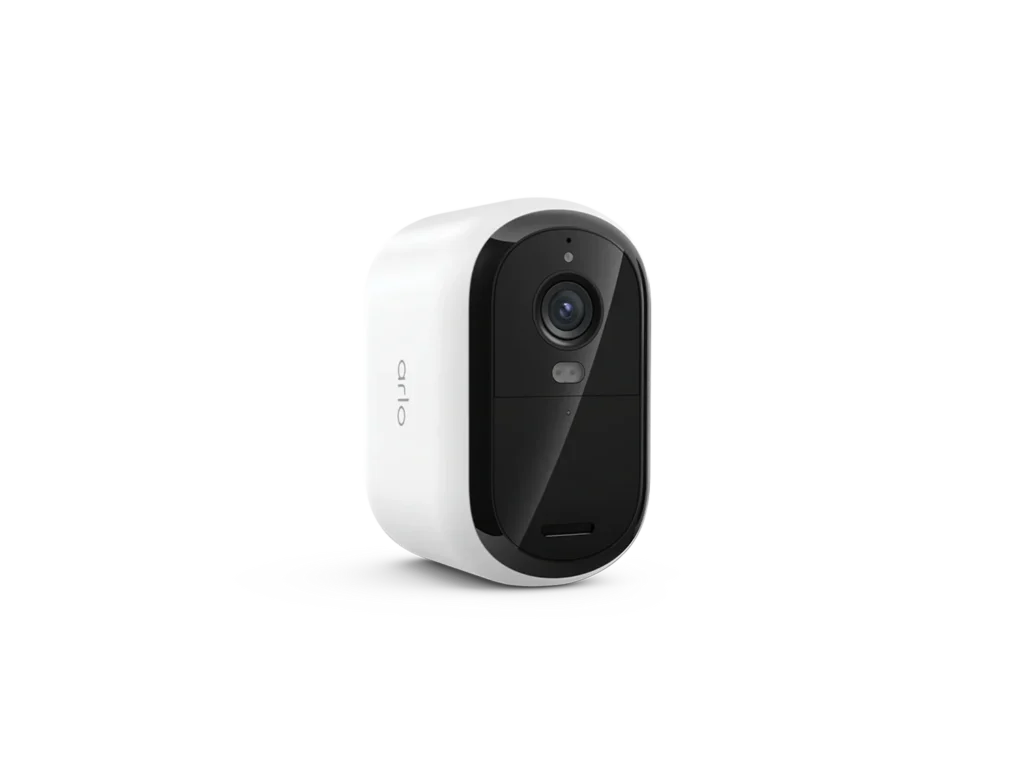
Quick Comparison
For most seniors who want a simple security system with strong app-based monitoring, Arlo may be easier to manage, especially when paired with its current Essential cameras and Arlo Secure service.
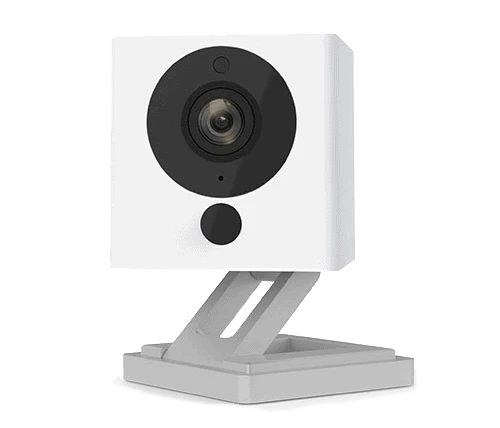
Wyze may be a better fit for seniors or caregivers who want lower-cost cameras and local storage. The Wyze Cam v4 supports 2.5K video, color night vision, Wi-Fi 6, and microSD recording.
The biggest difference is the approach. Arlo leans more toward a complete security ecosystem, while Wyze offers inexpensive cameras with flexible local recording.
Arlo vs Wyze At a Glance
The table below focuses on features that can affect everyday use for older adults.
| Feature | Arlo | Wyze |
|---|---|---|
| Video options | Up to 2K on many current Essential models | 2.5K on Cam v4 |
| Night vision | Color night vision on many models | Color night vision |
| Alerts | Motion and audio alerts; advanced AI with subscription | Motion/sound alerts; Edge AI on Cam v4 |
| Two-way audio | Yes | Yes |
| Local storage | Depends on camera/hub setup | microSD supported on Cam v4 |
| Cloud recording | Arlo Secure subscription for many recordings | Optional Wyze services |
| Indoor/outdoor choices | Wide range | Wide range |
| Setup | Designed for relatively simple installation | Simple, but options vary |
| Best fit | Complete security ecosystem | Flexible, lower-cost setup |
Arlo’s current Essential range includes 2K models, while Wyze Cam v4 offers 2.5K QHD video and local microSD recording.
Arlo Security Cameras Review
Arlo offers several camera families, so this comparison focuses mainly on its current Essential security cameras rather than treating every Arlo model as identical.
Arlo’s Essential 2 cameras offer features such as 2K video, wide viewing angles, color night vision, two-way audio, motion detection, and app-based monitoring.
Ease of Use
Arlo is designed around smartphone control through the Arlo Secure app. That can be useful for seniors who prefer checking cameras from a phone rather than dealing with complicated hardware.
A current Essential 2 plug-in camera also supports dual-band Wi-Fi, which can help with flexible home networking.
The main catch is that Arlo’s feature set can become more complicated when subscriptions, cloud recording, and additional security features are added.
Key Strengths
- Clear video on current Essential models
- Color night vision on supported models
- Wide viewing angles
- Two-way audio
- Strong app-based security ecosystem
- Several indoor and outdoor camera choices
- AI-powered alerts available with compatible Arlo Secure plans
Potential Drawbacks
- Some useful recording and AI features require a subscription
- The Arlo lineup has many models and generations
- Some advanced setups can be more complicated than a basic camera
- Long-term cost can increase when paid services are added
Wyze Security Cameras Review
Wyze takes a different approach. Its Cam v4 is a useful reference point because it combines 2.5K QHD video, color night vision, Wi-Fi 6, two-way audio, a spotlight, and local microSD storage.
Ease of Use
Wyze Cam v4 uses the Wyze app and supports Bluetooth-based setup. It also has a built-in spotlight and a loud 99 dB siren.
Local recording can be especially useful for caregivers who want recordings without depending entirely on a cloud subscription. Wyze says Cam v4 supports continuous recording to a microSD card without a subscription.
Still, Wyze has many settings and optional services. A senior who wants only basic monitoring may need help during the initial setup.
Key Strengths
- 2.5K QHD video on Cam v4
- Color night vision
- Built-in spotlight
- Two-way audio
- Local microSD recording
- Wi-Fi 6 support
- Indoor/outdoor IP65 design
- Edge AI person detection
Potential Drawbacks
- More settings can mean a slightly steeper learning curve
- microSD recording requires purchasing and managing a card
- Some advanced AI features require Wyze services
- The ecosystem can feel less straightforward when several Wyze products are combined
Which Is Easier for Seniors to Use?
Both can work well, but the better choice depends on how the camera will be used.
Arlo may suit someone who wants a more structured security system and prefers cloud-based monitoring. Its current Essential cameras are designed for quick installation and smartphone access.
Wyze may suit someone who wants a straightforward camera with local recording. Cam v4’s microSD support means a user can record continuously without relying on a subscription for that local recording option.
For a senior, fewer daily decisions can be just as important as having more features.
If a caregiver will manage the system, either option can work. The caregiver’s familiarity with the app may be more important than small differences in camera specifications.
Performance Comparison
For security cameras, video quality, alerts, night vision, audio, and connectivity matter most.
Arlo Essential 2 cameras can provide 2K video, 130-degree viewing on the referenced outdoor model, color night vision, and two-way communication.
Wyze Cam v4 goes to 2.5K QHD resolution. It also has a wide field of view, color night vision, WDR, Wi-Fi 6, and Smart Focus.
| Performance Area | Arlo | Wyze |
|---|---|---|
| Video resolution | Up to 2K on relevant Essential models | 2.5K on Cam v4 |
| Night vision | Color on supported models | Color |
| Field of view | Up to 130° on referenced Essential 2 outdoor model | 115.8° diagonal on Cam v4 |
| Two-way audio | Yes | Yes |
| Spotlight | Available on some models | Built into Cam v4 |
| Smart detection | Available with compatible services | Edge AI person detection on Cam v4 |
The higher resolution of Wyze Cam v4 does not automatically make it the better security system. Placement, Wi-Fi reliability, notification settings, and how easily the user can review footage also matter.
Comfort, Accessibility, and Senior-Friendly Design
Security cameras do not require the same physical effort as many household products, but installation and maintenance still matter.
For seniors who have difficulty climbing ladders or reaching high mounting points, installation may be the biggest practical issue. A caregiver or installer may be useful for outdoor placement.
Arlo’s range includes plug-in and wireless options, while Wyze Cam v4 uses a power cable.
For everyday monitoring, smartphone readability and simple alert settings matter more than physical camera weight.
Features Comparison
The biggest differences become clearer when looking at recording and smart features.
| Feature | Arlo | Wyze Cam v4 |
|---|---|---|
| 2K/2.5K video | 2K on relevant Essential models | 2.5K QHD |
| Local recording | Depends on compatible camera/hub setup | microSD supported |
| Cloud recording | Arlo Secure plans | Optional Wyze services |
| Person detection | Available through compatible plans/models | Edge AI person detection |
| Spotlight | Model dependent | Built in |
| Wi-Fi | Dual-band on referenced Essential 2 | Wi-Fi 6 |
| Smart Focus | Model dependent | Yes |
Arlo states that 2K recording requires an Arlo Secure plan for its applicable cameras. Wyze Cam v4, meanwhile, supports local microSD recording without a subscription.
Price, Maintenance, and Long-Term Value
Prices change often, so comparing a temporary sale price would not give a reliable long-term picture.
The bigger cost difference can come from storage and subscription needs. Arlo’s 2K cloud recording requires an applicable Arlo Secure plan.
Wyze gives Cam v4 owners the option of local microSD recording without a subscription. A microSD card does add a small upfront cost, and users must manage the card and recordings.
| Cost Factor | Arlo | Wyze |
|---|---|---|
| Camera cost | Varies by model | Often positioned as a lower-cost option |
| Cloud services | Important for advanced recording/features | Optional |
| Local storage | More dependent on setup | Simple microSD option |
| Maintenance | App, power/battery, subscription | App, power, microSD |
| Long-term cost | Can rise with subscriptions | Can stay lower with local storage |
Who Should Choose Arlo?
- Choose Arlo if you want a dedicated security ecosystem.
- Choose Arlo if cloud-based monitoring is important.
- Choose Arlo if color night vision and wide viewing angles are priorities.
- Choose Arlo if a caregiver will manage the security app.
- Choose Arlo if you prefer a range of camera types within one ecosystem.
Who Should Choose Wyze?
- Choose Wyze if local recording is important.
- Choose Wyze if you want 2.5K video from Cam v4.
- Choose Wyze if avoiding a cloud subscription is a priority.
- Choose Wyze if you want a low-cost way to add cameras around the home.
- Choose Wyze if features such as a built-in spotlight and microSD recording are useful.
Arlo vs Wyze — Final Verdict
There is no single choice that fits every senior household.
For a more structured security ecosystem: Arlo may make more sense.
For local recording and flexible low-cost monitoring: Wyze is worth considering.
For video resolution: Wyze Cam v4 has an advantage on paper with 2.5K QHD video, while relevant Arlo Essential models provide 2K video.
For cloud-based security features: Arlo has a stronger subscription-centered approach.
The key decision is whether the household values a managed security ecosystem or more control over local recording and ongoing costs.
Scoring Summary
These scores are a practical editorial comparison based on the features discussed above, not laboratory test results.
| Category | Arlo | Wyze |
|---|---|---|
| Ease of Use | 9/10 | 8/10 |
| Senior-Friendly Design | 9/10 | 8/10 |
| Performance | 9/10 | 9/10 |
| Maintenance | 8/10 | 8/10 |
| Value | 7/10 | 9/10 |
The scores should be viewed as a quick summary, not a substitute for checking the specific camera model and service plan.
How We Evaluate Products
We focus on factors that matter in everyday senior use:
- Ease of setup
- App usability
- Accessibility
- Video quality
- Alerts
- Night vision
- Maintenance
- Storage options
- Subscription requirements
- Long-term value
This comparison is based on current manufacturer information and product documentation. It does not claim hands-on testing.
Senior-Specific Buying Considerations
Before choosing a security camera, check these points.
Setup
Make sure the camera can be installed where it provides a useful view without requiring the senior to climb or reach awkward areas.
Controls
Look for an app that the user or caregiver can understand without constantly changing complicated settings.
Storage
Decide whether you prefer cloud recordings or local storage. Wyze Cam v4 supports microSD recording, while Arlo’s 2K cloud recording requires an applicable subscription.
Alerts
Too many notifications can become annoying. Set motion zones and alert types carefully.
Maintenance
Consider battery charging, cable placement, microSD management, and app updates before buying.
Common Buying Mistakes
- Choosing only by video resolution
- Forgetting about subscription costs
- Ignoring Wi-Fi coverage
- Installing the camera too high to maintain easily
- Turning on too many unnecessary alerts
- Forgetting to consider who will manage the app
Safety
Security cameras are generally low-risk devices, but installation deserves attention.
Avoid loose power cables across walking areas. For outdoor cameras, follow the manufacturer’s installation instructions and use appropriate weather-resistant equipment.
If an outdoor camera requires a high mounting position, having another person handle installation can reduce the risk of falls.
Frequently Asked Questions
Is Arlo or Wyze easier for seniors?
Arlo may feel more straightforward for someone who wants a dedicated security ecosystem. Wyze can be attractive for users who want more control over local storage.
Does Wyze Cam v4 need a subscription?
No. Wyze says Cam v4 can record continuously to a compatible microSD card without a subscription.
Does Arlo require a subscription?
Basic live streaming and some basic alerts can work without a subscription on supported cameras, but Arlo says 2K cloud recording requires an applicable Arlo Secure plan.
Which has better video quality?
Wyze Cam v4 has 2.5K QHD resolution, while the referenced current Arlo Essential cameras offer 2K. Resolution alone, however, does not determine overall security performance.
Can caregivers monitor these cameras?
Both ecosystems are designed for smartphone-based monitoring. The exact sharing and account features depend on the specific camera, app, and service plan.
Is local storage important for seniors?
It can be useful if the household wants recordings without depending entirely on cloud storage. It also means someone needs to manage the storage card and recordings.
Conclusion
Arlo vs Wyze security camera for seniors comes down to priorities. Arlo offers a more security-focused ecosystem with current Essential cameras, app monitoring, and subscription-based advanced features. Wyze Cam v4 offers higher 2.5K resolution, local microSD recording, color night vision, and a strong feature set at a generally budget-oriented position.
For a senior who values a managed security experience, Arlo is worth considering. For someone who wants local recording and greater control over ongoing costs, Wyze may be the more practical fit. The best choice depends on the exact camera model, installation location, and who will manage the system.
