
Yale vs August Smart Lock for Seniors: Which Wins?


Fall Detection Smart Watch

Bedside Commode Chair

Adjustable Walker with Wheels
Yale vs August smart lock for seniors is a useful comparison for older adults who want easier home access without relying only on traditional keys. Both brands offer app-based control, automatic locking, and ways to share access with family or caregivers.
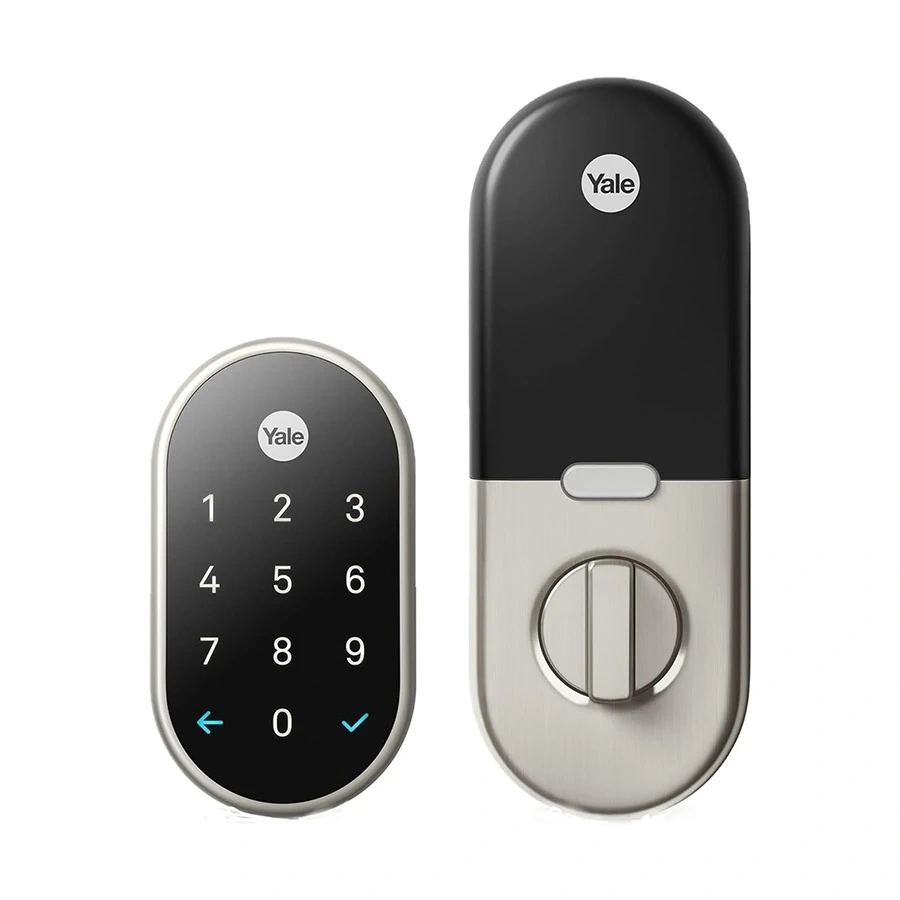
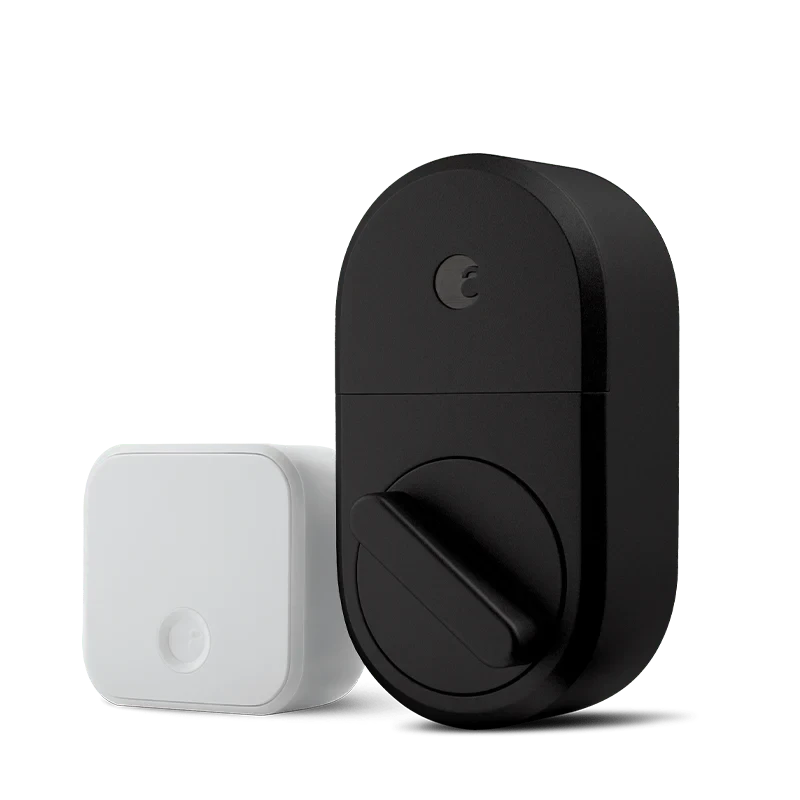
The biggest difference is how the lock is installed and operated. Yale offers smart locks with built-in keypad entry, while August’s Wi-Fi Smart Lock is designed to fit over an existing single-cylinder deadbolt and can be paired with a keypad.
Quick Comparison
For seniors who prefer entering a code instead of using a phone, a Yale lock with a built-in keypad can be simpler. Yale’s Assure range offers touchscreen keypad entry, while some Yale models also support app-based access and auto-unlock.
August may be more convenient for someone who wants to keep the existing exterior lock and keys. Its Wi-Fi Smart Lock installs on the inside of a compatible single-cylinder deadbolt and has built-in Wi-Fi.
Yale vs August Smart Lock At a Glance
The two brands take different approaches, so the right choice depends on how the senior prefers to unlock the door.
| Feature | Yale | August |
|---|---|---|
| Keypad access | Built into many models | Available with keypad |
| Phone control | Yes | Yes |
| Auto-lock | Available | Yes |
| Auto-unlock | Available on supported models | Yes |
| Existing keys | Depends on model | Yes |
| Installation | Often replaces deadbolt | Retrofit design on compatible deadbolt |
| Remote access | Depends on model/module | Built into Wi-Fi model |
| Voice control | Depends on model/setup | Alexa, Google, Siri/HomeKit on supported models |
Yale Smart Lock Review for Seniors
Yale’s smart-lock range includes models with keypad entry, app control, activity monitoring, and automatic locking or unlocking. The exact features vary by model and region.
Ease of Use
A major advantage for some seniors is the physical keypad. A user can enter a PIN rather than open a smartphone app.
Yale’s Assure locks use backlit keypad numbers, and supported models can provide one-touch locking. Yale also offers app-based access and guest access on compatible products.
This can be helpful for someone who:
- Prefers a PIN over a smartphone
- Wants key-free entry
- Has family members who need separate access codes
- Wants to lock the door without finding a physical key
Key Strengths
- Built-in keypad on many Assure models
- App control on compatible models
- Guest access and activity monitoring
- Auto-lock and auto-unlock on supported models
- Some models retain a mechanical key option
Potential Drawbacks
- Features vary between Yale models
- Some connected functions require an additional module or hub
- Installation involves replacing the existing deadbolt on many models
- Compatibility should be checked before purchase
August Smart Lock Review for Seniors
August takes a different approach. Its Wi-Fi Smart Lock fits over an existing single-cylinder deadbolt, leaving the exterior lock and existing keys in place.
Ease of Use
August gives users several ways to control the door. The August app can lock and unlock the door, while auto-lock and auto-unlock can reduce the need to operate the lock manually. Apple Watch access is also supported.
For a senior who already has a compatible deadbolt, the retrofit design may be attractive because the exterior hardware does not need to be replaced.
Key Strengths
- Keeps the existing keys
- Fits over a compatible existing deadbolt
- Built-in Wi-Fi on the current Wi-Fi Smart Lock
- Remote lock and unlock
- Auto-lock and auto-unlock
- Guest access
- Voice-assistant support on compatible platforms
Potential Drawbacks
- A smartphone is required for app-based operation
- Keypad entry is an additional accessory rather than the basic lock
- Existing deadbolt compatibility must be checked
- More app-based features can mean more setup for users who prefer simple physical controls
Which Is Easier for Seniors to Use?
Ease of use depends heavily on the preferred access method.
Yale may be easier for seniors who prefer a keypad. The built-in keypad on compatible Yale locks lets the user enter a code directly at the door.
August may be easier for seniors who prefer their existing keys or smartphone. Its retrofit installation leaves the outside of the deadbolt unchanged, while the app provides remote control and automatic functions.
If a senior dislikes smartphone apps, look closely at keypad availability before choosing a model.
Performance Comparison
For smart locks, performance is less about speed and more about reliable access, connectivity, and everyday operation.
| Performance Area | Yale | August |
|---|---|---|
| PIN entry | Built into many models | Available with keypad |
| App control | Available | Yes |
| Auto-unlock | Supported on compatible models | Yes |
| Remote control | Model-dependent | Built into Wi-Fi model |
| Guest access | Supported | Supported |
| Door status | DoorSense on supported models | DoorSense included |
August’s current Wi-Fi Smart Lock includes DoorSense and supports remote access, guest keys, and automatic locking and unlocking. Yale also offers DoorSense, guest access, activity monitoring, and auto-lock/unlock on supported Assure models.
Comfort, Accessibility, and Senior-Friendly Design
A smart lock can reduce the need to carry and turn a traditional key. But the best design depends on the user’s preferred method.
A Yale keypad can be useful for someone who wants a straightforward PIN entry. Backlit numbers can also help when entering a code at night.
August can be appealing to someone who prefers automatic operation. Its auto-unlock feature can unlock the door when the user approaches, while auto-lock can secure it after the door is closed or after a selected period.
Features Comparison
The most meaningful differences are access method, installation style, and how much extra hardware is needed.
| Feature | Yale | August |
|---|---|---|
| Built-in keypad | Many models | No on basic Wi-Fi lock |
| Optional keypad | Available for some systems | Available |
| Smartphone app | Yale Home/App on supported models | August app |
| Existing key | Model-dependent | Yes |
| Built-in Wi-Fi | Model-dependent | Yes on Wi-Fi Smart Lock |
| Guest access | Yes on supported models | Yes |
| Activity history | Supported | Yes |
| Voice assistants | Model-dependent | Alexa, Google, Siri/HomeKit on supported models |
August’s current Wi-Fi model does not require a separate Wi-Fi bridge, while older August configurations can use a Connect bridge.
Price, Maintenance, and Long-Term Value
Current manufacturer pricing can change, so it is better to compare the ownership setup rather than rely on a temporary sale price.
August currently lists its Wi-Fi Smart Lock at $199.99 on its U.S. site. The Yale Keypad is also sold separately for compatible systems, which shows why the complete setup cost can vary.
| Cost Factor | Yale | August |
|---|---|---|
| Main lock cost | Varies by model | Varies by model |
| Keypad | Built into many models | Optional |
| Wi-Fi hardware | Depends on model | Built into Wi-Fi model |
| Batteries | Model-dependent | 2 CR123 in Wi-Fi model |
| Warranty | Model-dependent | 1 year on current Wi-Fi model |
The best value depends on whether the user needs a keypad, remote access, or additional smart-home hardware.
Who Should Choose Yale?
- Choose Yale if PIN entry is important.
- Choose Yale if a built-in keypad is preferred.
- Choose Yale if the user wants access codes for family or caregivers.
- Choose Yale if activity monitoring and app access are important.
- Choose Yale if the specific model matches the existing door and desired smart-home setup.
Who Should Choose August?
- Choose August if keeping the existing keys matters.
- Choose August if a retrofit installation is preferred.
- Choose August if built-in Wi-Fi is important.
- Choose August if smartphone and automatic access are preferred.
- Choose August if the existing deadbolt is compatible with the lock.
Yale vs August Smart Lock for Seniors — Final Verdict
There is no single winner for every senior.
For keypad-first access: Yale has an advantage on compatible Assure models because the keypad is integrated into the lock.
For keeping existing keys: August has a clear practical benefit because its Wi-Fi Smart Lock installs over the existing deadbolt and leaves the exterior lock unchanged.
For automatic access: Both brands offer automatic locking and unlocking on supported systems, so the specific model matters more than the brand name.
Scoring Summary
A simple score can hide important model differences, so these should be treated as practical comparisons rather than laboratory ratings.
| Category | Yale | August |
|---|---|---|
| Ease of Use | 9/10 | 9/10 |
| Senior-Friendly Access | 9/10 | 8/10 |
| Installation Flexibility | 8/10 | 9/10 |
| Smart Features | 9/10 | 9/10 |
| Long-Term Practicality | 9/10 | 9/10 |
How We Evaluate Products
This comparison focuses on features that can affect everyday senior use:
- Ease of operation
- Keypad and app access
- Installation
- Accessibility
- Automatic locking
- Remote access
- Maintenance
- Compatibility
- Safety
- Long-term practicality
The comparison is based on available manufacturer information rather than personal hands-on testing. Yale and August both offer several models, so exact features can differ between versions and regions.
Senior-Specific Buying Considerations
Before choosing either lock, check these points.
Physical Effort
Consider whether the user prefers turning a key, entering a PIN, using a phone, or relying on automatic unlocking.
Controls
A keypad may be simpler for someone who does not want to use a smartphone every time.
Maintenance
Check the battery type and remember that smart locks still need periodic battery replacement.
Setup
Confirm the lock fits the existing door and deadbolt before purchasing.
Safety
Keep a backup access method available. Also make sure automatic unlocking is configured carefully so the door does not unlock unexpectedly.
Common Buying Mistakes
Avoid these common problems:
- Buying without checking deadbolt compatibility
- Assuming every Yale or August model has the same features
- Forgetting the cost of a separate keypad
- Choosing app-only access when the user prefers a PIN
- Ignoring battery replacement
- Assuming remote access works without the required Wi-Fi setup
Safety
Smart locks still depend on batteries, electronics, and correct installation. Follow the manufacturer’s installation instructions and check compatibility before fitting the lock.
For seniors, automatic unlocking should be configured with care. A simple PIN or physical backup method can also be useful if the phone battery dies or the smart-lock system becomes unavailable.
Frequently Asked Questions
Is Yale or August easier for seniors?
It depends on the access method. Yale may suit seniors who prefer a built-in keypad, while August may suit those who prefer existing keys, smartphone control, or automatic access.
Can seniors use August without a phone?
Yes, if the August system has a compatible keypad or the user continues using the existing physical key. The basic August Wi-Fi Smart Lock itself is designed around app access and existing keys.
Does August keep the existing key?
Yes. The August Wi-Fi Smart Lock installs on the inside of a compatible existing single-cylinder deadbolt, allowing the original exterior lock and keys to remain.
Does Yale have a keypad?
Many Yale Assure models have built-in keypads. Yale describes its Assure locks as using touchscreen or keypad entry, depending on the model.
Can family members get access?
Yes. Both ecosystems support guest or shared access on compatible models. Yale supports guest access, while August allows virtual guest keys through its app.
Do Yale and August work with voice assistants?
Compatible Yale systems and August locks can work with smart-home platforms, but compatibility varies by model and setup. August’s current Wi-Fi Smart Lock supports Alexa, Google Home, and Apple HomeKit/Siri.
Conclusion
Yale and August can both work well for seniors, but they emphasize different access styles. Yale is especially appealing when keypad entry is the priority, while August is attractive for users who want a retrofit lock that keeps their existing keys and adds app-based or automatic access.
Before choosing, check the exact model, door compatibility, keypad requirements, battery setup, and preferred access method. Those details matter more than the brand name alone.