
Ring vs Wyze Video Doorbell for Seniors: Which?


Foot Massager Machine

Electric Kettle with Auto Shutoff

Shower Chair for Elderly
Ring vs Wyze video doorbell for seniors is a useful comparison if you want simple front-door security without a complex setup. Both brands offer doorbells with live video, motion alerts, two-way talk, and smart-home support.
The main difference is the way each brand handles features and storage. Ring puts a lot of its advanced features into Ring Protect plans. Wyze offers local microSD storage on its current Battery Video Doorbell and also offers cloud features through Cam Plus.
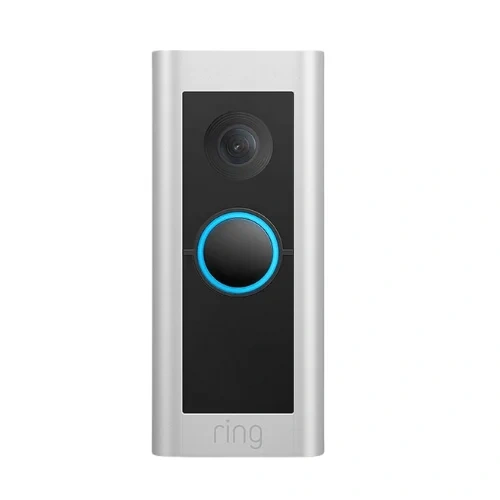
Quick Comparison
For most seniors, Ring is the better fit for a polished smart-home system and simple app-based security. Its current battery doorbells offer clear video, motion detection, two-way talk, and flexible power options.
Wyze is a strong choice for seniors who want flexible setup and local storage. The Wyze Battery Video Doorbell can run on battery power or existing wiring. It also supports microSD storage.
The better choice depends on whether ease of the wider Ring system or storage flexibility matters more.
Ring vs Wyze At a Glance
Here is the short version. The exact features can vary by model, so check the model name before you buy.
| Feature | Ring | Wyze |
|---|---|---|
| Battery option | Yes, on battery models | Yes |
| Wired option | Yes, on supported models | Yes |
| Video | Up to 2K or 4K on newer models | 1536 × 1536 on Battery Doorbell |
| Two-way talk | Yes | Yes |
| Night vision | Yes | Yes |
| Local microSD | Not the main storage method | Yes |
| Cloud storage | Ring Protect | Cam Plus |
| Smart alerts | Person, package, vehicle on supported plans/models | Person, package, vehicle and pet with Cam Plus |
| Smart-home support | Alexa and Ring ecosystem | Alexa, Google Home and other integrations |
Ring’s current battery models include 2K and 4K options. Wyze’s Battery Video Doorbell offers 1536 × 1536 video, a 150° × 150° view, and local microSD storage.

Ring Doorbell Review for Senior Use
Ring has a broad doorbell range. For a simple senior setup, a battery model can be easier because it does not need a new wired connection.
Ease of Use
Ring is built around the Ring app. A user can view the door, talk to visitors, and respond to alerts from a phone or tablet.
Current Ring battery models also use quick-release batteries. Some models can be trickle-charged through existing doorbell wires or solar accessories.
That can be helpful for a senior who does not want to deal with complex wiring.
Key strengths
- Clear live video
- Two-way talk
- Person and package alerts on supported plans
- Battery and wired options on supported models
- Large Ring ecosystem
- Good choice for caregivers who also need access
Potential drawbacks
- Advanced features may require a subscription.
- The Ring range has many models, which can make choosing harder.
- Recorded video requires a Ring subscription.
Wyze Doorbell Review for Senior Use
Wyze takes a different approach. Its Battery Video Doorbell is made for wire-free use but can also use existing wiring.
It has 1536 × 1536 video, a 150° × 150° field of view, two-way audio, motion detection, and a rechargeable battery. Wyze lists up to six months of battery life under normal use, although real battery life can vary with use and settings.
Ease of Use
Wyze can be a good fit for seniors who want a simple doorbell with flexible installation.
The battery model also supports USB-C charging. Wyze says it can be installed without a technician.
Key strengths
- Wire-free or wired setup
- Wide head-to-toe view
- USB-C charging
- Local microSD storage
- Two-way audio
- Quick response messages
- Motion detection zones
Potential drawbacks
- Some smart detection features need Cam Plus.
- The Wyze app has many features, which may take some time to learn.
- Battery life depends on use and conditions.
Which Is Easier for Seniors to Use?
Both can be easy to use after setup. The bigger question is what happens after installation.
Ring may be easier for someone who wants a well-known doorbell system with a clear focus on alerts, live viewing, and cloud video. Ring also allows a device to be managed from multiple phones or tablets.
Wyze may be easier for someone who wants more control over storage. Its Battery Video Doorbell supports local microSD storage of up to 256GB.
For a senior with limited dexterity, both battery models can reduce the need for new wiring. But battery charging is still a task to plan for.
Performance Comparison
Video quality matters most when trying to see a visitor or package.
Ring has a wider range of video options. Its Battery Doorbell 2K offers 1920 × 1920 video and a 173° diagonal field of view. Higher-end Ring models now go up to 4K.
Wyze Battery Video Doorbell records at 1536 × 1536. Its square image is designed to show more of the area close to the door. It has a 150° horizontal and vertical view.
| Performance Area | Ring | Wyze |
|---|---|---|
| Video choice | More model choices | 1536 × 1536 on Battery Doorbell |
| Close door view | Strong | Strong |
| Night viewing | Yes | Yes |
| Two-way talk | Yes | Yes |
| Motion zones | Supported | Yes |
| Local recording | Not the main option | Yes |
For basic front-door monitoring, both can provide enough detail to identify normal visitors and deliveries.
Comfort, Accessibility, and Senior-Friendly Design
A doorbell camera has one big advantage for some seniors: you do not need to walk to the door to see who is there.
Both brands support two-way talk. This lets the user speak with a visitor from the phone.
Wyze offers quick responses on its Battery Video Doorbell. A user can send a preset response instead of speaking each time.
Ring also supports two-way talk and remote viewing. Its ecosystem can be useful when family members or caregivers need shared access.
A good senior-friendly setup should reduce unnecessary trips to the door, not add another complicated device to manage.
Features Comparison
The biggest feature difference is storage and subscription use.
| Feature | Ring | Wyze |
|---|---|---|
| Live view | Yes | Yes |
| Two-way talk | Yes | Yes |
| Local microSD | No main local-storage option | Yes |
| Cloud video | Ring Protect | Cam Plus |
| Smart detection | Available on supported plans/models | Available with Cam Plus |
| Quick responses | Available on supported models | Yes |
| Smart-home links | Ring/Alexa ecosystem | Alexa/Google Home and others |
Ring Protect adds video history and smart alerts. Current Ring plans can provide up to 180 days of video history, depending on plan and settings.
Wyze Cam Plus provides cloud event recording and AI detection. Wyze lists person, pet, vehicle, package, and sound detection among its Cam Plus features.
Price, Maintenance, and Long-Term Value
Price can change often. The device price is only part of the cost.
Ring’s current Ring Protect Solo plan is listed at $4.99 per month or $49.99 per year in the US. It adds video recording and smart alerts for one device.
Wyze also has paid Cam Plus plans. Wyze states that its US Cam Plus annual price became $29.99 from March 2026.
Wyze has one extra advantage here: its Battery Video Doorbell supports local microSD recording. That gives users another way to store video.
For long-term value, check:
- Doorbell price
- Subscription cost
- Battery charging needs
- Storage needs
- Replacement parts
- Number of users
- Existing smart-home devices
Who Should Choose Ring?
Choose Ring if:
- You want a mature doorbell-focused ecosystem.
- You want strong cloud recording options.
- You want easy sharing with family members.
- You already use Ring or Alexa devices.
- You want more choices in video quality and doorbell models.
- You prefer a system with many optional security features.
Ring may make more sense for a senior whose family wants to help manage the system remotely.
Who Should Choose Wyze?
Choose Wyze if:
- You want local microSD storage.
- You want a flexible battery or wired setup.
- You want a wide head-to-toe view.
- You want a lower-cost entry point.
- You already use Wyze cameras.
- You want smart detection without relying only on basic motion alerts.
The Wyze Battery Video Doorbell is especially useful when flexible installation matters.
Ring vs Wyze — Final Verdict
Best for a broader smart-home system: Ring
Best for local storage: Wyze
Best for flexible installation: Wyze
Best for model choice: Ring
Best for seniors who want family-assisted monitoring: Ring
There is no single choice for every home. Ring is a better match for a senior who wants a polished doorbell system with strong cloud features. Wyze is a better match for someone who values local storage, flexible installation, and a lower-cost approach.
Scoring Summary
These scores are a practical comparison based on the features discussed above. They are not laboratory test scores.
| Category | Ring | Wyze |
|---|---|---|
| Ease of Use | 9/10 | 8/10 |
| Senior-Friendly Design | 9/10 | 9/10 |
| Video Features | 9/10 | 8/10 |
| Storage Flexibility | 7/10 | 9/10 |
| Setup Flexibility | 9/10 | 9/10 |
| Value | 8/10 | 9/10 |
How We Evaluate Products
This comparison focuses on daily use.
We look at setup, controls, alerts, video, storage, maintenance, and long-term cost. We also consider how easy the doorbell may be for a senior to use without adding extra work.
The comparison is based on current manufacturer information. It does not claim hands-on testing.
Senior-Specific Buying Considerations
Before choosing a smart doorbell, check these points.
Physical Effort
A battery model avoids some wiring work. But the battery still needs charging.
Controls
Look for an app that feels clear. Large, simple actions are easier for many users.
Maintenance
Check how the battery is charged and how often it may need attention.
Storage
Decide whether you want cloud recording, local storage, or both.
Setup
Check Wi-Fi strength near the front door. A good doorbell cannot work well with a poor connection.
Safety
If wiring is needed, follow the manufacturer’s installation instructions. Do not work on electrical wiring if you are not comfortable doing so.
Common Buying Mistakes
Avoid these common mistakes:
- Choosing only by camera resolution
- Forgetting subscription costs
- Ignoring battery charging
- Assuming every model has the same features
- Buying a wired model when the home needs a battery model
- Forgetting to check Wi-Fi strength
Safety
Smart doorbells are generally low-effort devices, but installation still matters.
Battery models can reduce wiring work. If you use existing doorbell wiring, check the required voltage and installation instructions for that exact model.
Also review privacy settings. Camera placement should avoid unnecessary views into neighboring private areas.
Frequently Asked Questions
Is Ring or Wyze easier for seniors?
Both can be simple after setup. Ring may suit users who want a focused security ecosystem. Wyze may suit users who want flexible storage and installation.
Does Wyze have local storage?
Yes. The Wyze Battery Video Doorbell supports microSD storage up to 256GB.
Does Ring require a subscription?
No for basic live use, but recorded video and several advanced features require a Ring Protect plan.
Can Wyze work without Cam Plus?
Yes. Wyze provides basic features without Cam Plus. Paid plans add cloud recording and smart AI detection features.
Which is better for caregivers?
Ring can be a good fit when family members need shared access and cloud video history. Ring says its devices can be managed from multiple phones or tablets.
Conclusion
Ring and Wyze both offer useful video doorbells for seniors, but they take different approaches. Ring is a strong fit for a wider smart-home and security system. Wyze stands out for local storage, flexible installation, and a simple battery option.
For most buyers, the key question is not just which camera looks better. Think about who will manage the app, how the doorbell will be powered, whether cloud storage is wanted, and how much ongoing maintenance is acceptable.