
Kwikset vs Ultraloq Smart Lock for Seniors: Which Wins?


Anti-Glare Reading Glasses

Non-Slip Slippers

Large Display Clock with Date
Kwikset vs Ultraloq smart lock for seniors is a useful comparison if you want keyless entry without making the door hard to use. Both brands offer smart locks with phone apps, codes, and other ways to unlock the door.
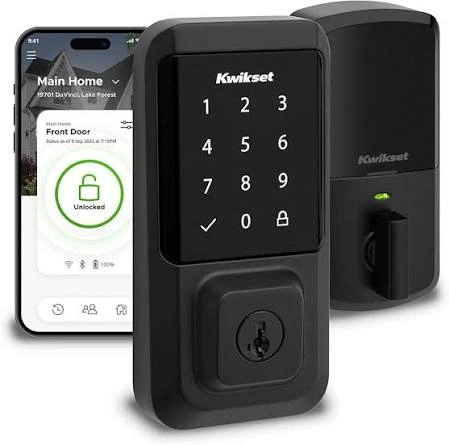
The main difference is in the access options and model choices. Kwikset Halo models focus on simple Wi-Fi control, keypads, and fingerprint access on Halo Touch. ULTRALOQ offers models such as the U-Bolt Pro WiFi with fingerprint access, keypad entry, app control, and a door sensor.
Quick Comparison
For many seniors, Kwikset may be easier if simple controls and familiar lock hardware matter most. Halo locks also offer a physical key as a backup.
ULTRALOQ may suit seniors who want more ways to unlock the door, especially with a U-Bolt Pro WiFi model that combines fingerprint access, Bluetooth, Wi-Fi, and a door sensor.
The better choice depends on how the lock will be used each day.
Kwikset vs Ultraloq At a Glance
The table below focuses on practical features that can affect everyday use.
| Feature | Kwikset | ULTRALOQ |
|---|---|---|
| App control | Yes | Yes |
| Keypad access | Available on Halo models | Available |
| Fingerprint access | Halo Touch | U-Bolt Pro WiFi |
| Built-in Wi-Fi | Halo models | Selected models |
| Physical key backup | Available on Halo | Model dependent |
| Door sensor | Model dependent | U-Bolt Pro WiFi includes one |
| Smart home support | Available | Available |
| Access sharing | Yes | Yes |
Kwikset Halo can manage access codes, lock activity, and remote control through the Kwikset app. ULTRALOQ’s U-Bolt range varies by model, so checking the exact version is important before buying.

Kwikset Smart Locks for Senior-Friendly Use
Kwikset has several smart-lock options. The Halo range includes keypad and touchscreen models, while Halo Touch adds fingerprint access.
Ease of Use
Kwikset Halo is built around simple entry choices. A user can use an access code, the Kwikset app, or a key on supported Halo models.
Halo Touch adds fingerprint access. This can be useful for someone who does not want to remember a code or carry a phone.
Kwikset also offers one-touch locking on Halo models. Auto Lock can lock the deadbolt after a preset delay.
Key Strengths
- Simple keypad and app options
- Fingerprint access on Halo Touch
- Physical key backup on Halo Touch
- Remote access through Wi-Fi
- Scheduled access codes
- Lock activity history
- No separate hub required for Halo Wi-Fi models
Potential Drawbacks
- Features vary between Halo models
- App setup still requires a smartphone
- Fingerprint access may not work well with every finger
- Wi-Fi setup adds another step compared with a basic keypad lock
Kwikset notes that fingerprint enrollment can be affected by damaged or very dry skin. A different finger can be enrolled when needed.
ULTRALOQ Smart Locks for Senior-Friendly Use
ULTRALOQ has several versions of its U-Bolt line. The U-Bolt Pro WiFi is one of the more feature-rich versions, with fingerprint access, Bluetooth, built-in Wi-Fi, and a door sensor.
Ease of Use
ULTRALOQ gives users several ways to enter the home. Depending on the model, this can include a code, fingerprint, smartphone, or other supported access methods.
That flexibility can be helpful for a household with different users.
However, more options can also mean more settings to learn. For a senior who wants only a simple keypad and does not care about extra smart-home features, some of ULTRALOQ’s advanced options may be unnecessary.
Key Strengths
- Multiple entry methods
- Fingerprint access on U-Bolt Pro WiFi
- Built-in Wi-Fi on selected models
- Door sensor on U-Bolt Pro WiFi
- App-based access management
- Smart-home compatibility on supported models
Potential Drawbacks
- Model differences can be confusing
- Wi-Fi setup needs attention
- Some versions need an additional bridge
- More features can mean a longer learning curve
ULTRALOQ states that U-Bolt WiFi and U-Bolt Pro WiFi have built-in Wi-Fi, while some other U-Bolt versions require a ULTRALOQ Bridge for Wi-Fi features.
Which Is Easier for Seniors to Use?
Ease of use depends more on the exact model than the brand name.
Kwikset has a strong case for simple everyday operation. A Halo user can use a code or key, while Halo Touch adds fingerprint access. The app can also handle access codes and lock activity.
ULTRALOQ offers more entry choices on models such as the U-Bolt Pro WiFi. That can be useful when different family members prefer different methods.
More features are not always better if the user only needs a simple way to unlock the door.
For a senior who prefers fewer settings, a straightforward Kwikset keypad model may be easier to learn. For someone comfortable with smart-home technology, ULTRALOQ’s extra options may be useful.
Performance Comparison
Smart-lock performance is less about speed and more about dependable daily access.
Kwikset Halo supports remote locking and unlocking, access codes, activity history, and scheduled codes through the app. It also uses four AA batteries and provides low-battery alerts.
ULTRALOQ’s U-Bolt Pro WiFi combines several access methods and includes a door sensor. Its Wi-Fi setup uses a 2.4 GHz network, so the home network needs to meet the setup requirements.
| Performance Area | Kwikset | ULTRALOQ |
|---|---|---|
| Remote control | Yes on Halo Wi-Fi | Yes on Wi-Fi models |
| Fingerprint | Halo Touch | U-Bolt Pro WiFi |
| Access codes | Yes | Yes |
| Activity features | Yes | Yes |
| Door status sensing | Model dependent | Included on U-Bolt Pro WiFi |
Comfort, Accessibility, and Senior-Friendly Design
A smart lock can reduce the need to carry and insert a traditional key. That can be useful for people who prefer keypad or fingerprint entry.
Kwikset Halo Touch offers fingerprint entry and a physical key backup. ULTRALOQ U-Bolt Pro WiFi offers several access methods, which may help when one method is inconvenient.
For seniors with limited finger dexterity, the important question is not simply whether a lock has fingerprint access. Fingerprint enrollment and recognition should also be considered.
A keypad may be a better fit for someone who prefers a familiar button-based method.
Features Comparison
The biggest difference is the range of features available within each brand’s current product lines.
| Feature | Kwikset | ULTRALOQ |
|---|---|---|
| Fingerprint access | Halo Touch | U-Bolt Pro WiFi |
| Wi-Fi | Halo models | Selected models |
| Physical key | Available on Halo Touch | Model dependent |
| Scheduled access | Yes | Supported |
| Door sensor | Model dependent | U-Bolt Pro WiFi |
| Smart-home options | Supported models | Supported models |
Kwikset’s Halo Touch can store up to 100 fingerprint scans for up to 50 users, while Halo supports up to 250 access codes.
Price, Maintenance, and Long-Term Value
Smart-lock prices can change often, and both brands sell several models. The exact model matters more than the brand name when comparing cost.
Kwikset Halo uses four AA batteries. The app and lock provide low-battery alerts.
ULTRALOQ also uses battery-powered smart-lock designs, but battery requirements and features can vary by model.
For long-term value, look beyond the purchase price. Check:
- Battery type
- Replacement parts
- App requirements
- Wi-Fi or bridge requirements
- Warranty
- Door compatibility
- Installation needs
A cheaper lock may not be better value if it requires accessories that you do not already have.
Who Should Choose Kwikset?
- Choose Kwikset if simple daily operation matters most.
- Choose it if you want keypad access.
- Choose Halo Touch if fingerprint access is useful.
- Choose it if a physical key backup is important.
- Choose it if you want scheduled access codes.
- Choose it if you prefer a familiar lock design.
Who Should Choose ULTRALOQ?
- Choose ULTRALOQ if you want several entry methods.
- Choose it if fingerprint access is important.
- Choose the U-Bolt Pro WiFi if a door sensor is useful.
- Choose it if you want broader smart-home options on a supported model.
- Choose it if you are comfortable with app and Wi-Fi setup.
- Choose it if different household members need different entry methods.
Kwikset vs Ultraloq Smart Lock — Final Verdict
For simple senior use: Kwikset can be a practical fit, especially when the goal is straightforward keypad, app, or fingerprint access.
For flexible access: ULTRALOQ can make sense when several entry methods and smart features are important.
Neither brand is automatically right for every senior. The exact model matters. A simple keypad may be easier for one person, while fingerprint access and a door sensor may be more useful for another.
Scoring Summary
Scores are not used here because the brands contain several different models. Giving one fixed score to each brand could hide important model differences.
Instead, compare the exact two locks you plan to install.
| Category | What to Check |
|---|---|
| Ease of Use | Code, fingerprint, key, and app controls |
| Accessibility | Physical effort and control layout |
| Performance | Reliable locking and unlocking |
| Maintenance | Batteries and cleaning |
| Value | Price, features, and long-term costs |
How We Evaluate Products
This comparison focuses on practical factors that can affect senior use.
These include:
- Ease of use
- Access options
- Setup
- Accessibility
- Smart features
- Maintenance
- Safety
- Long-term value
No hands-on testing is claimed. Product details are based on available manufacturer information, with the exact model kept in mind. This follows the source requirement not to invent testing or personal experience.
Senior-Specific Buying Considerations
Physical Effort
Check whether the deadbolt turns smoothly after installation. A smart lock cannot fully solve a door that is difficult to close or has alignment problems.
Controls
Look for a keypad or access method that feels easy to understand. If using an app, make sure the senior is comfortable with smartphone controls.
Maintenance
Check battery access and low-battery warnings. Also consider who will replace the batteries when needed.
Setup
Confirm that the existing door and deadbolt are compatible. Wi-Fi models may also need a suitable home network.
Safety
Keep a backup entry method in mind. Never depend on a smart lock without understanding how it behaves when batteries are low or the network is unavailable.
Common Buying Mistakes
- Choosing only by brand name
- Ignoring the exact model
- Assuming every model has fingerprint access
- Forgetting to check door compatibility
- Ignoring Wi-Fi requirements
- Buying features the user will never use
Safety
A smart lock is part of the home’s entry system, so installation matters.
Make sure the deadbolt moves fully and the door closes correctly after installation. Keep batteries fresh and pay attention to low-battery warnings.
If the lock has a physical key backup, keep the key in a safe and accessible place.
Conclusion
Kwikset vs Ultraloq smart lock for seniors comes down to simplicity versus flexibility. Kwikset offers straightforward keypad, app, and fingerprint options across its Halo range, while ULTRALOQ offers models with several access methods and features such as a door sensor.
For seniors who want simple everyday access, a straightforward Kwikset model may be easier to manage. For users who want more access choices and smart features, an appropriate ULTRALOQ model may be a better fit. The most important step is to compare the exact models, not just the two brand names.