
Google Nest vs Bose Smart Speaker for Seniors: Which?


Non-Slip Bathroom Mat

Kindle E-Reader

Puzzle Book for Seniors
Google Nest vs Bose smart speaker for seniors is a useful comparison when simple voice control and clear sound matter most. Both brands offer hands-free control, music streaming, and smart-home features, but they take different approaches.
Google focuses more on the smart-home experience and Google Home ecosystem. Bose puts more emphasis on sound quality and flexible audio options. For many seniors, the better choice depends on whether smart features or richer sound matters more.
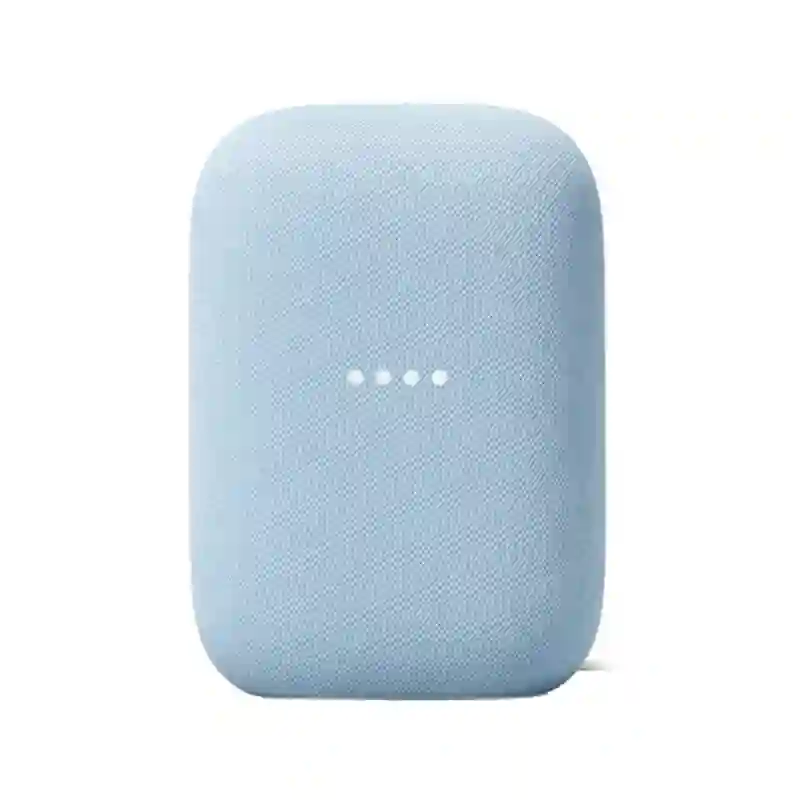
Quick Comparison
For most seniors who want an easy smart-home speaker, Google Nest is the better overall choice. Google speakers are designed around Google Home and offer simple voice, touch, and app controls.
Bose is the better choice for seniors who care more about music quality. Bose smart speakers also support voice assistants, Bluetooth, Wi-Fi, and app control, but the Bose lineup is more audio-focused.
The best choice depends less on age and more on what the person wants the speaker to do every day.
Google Nest vs Bose At a Glance
The table below focuses on practical differences that can affect everyday senior use.
| Feature | Google Nest | Bose |
|---|---|---|
| Main strength | Smart-home features | Sound quality |
| Voice control | Google Assistant/Gemini for Home, depending on model | Google Assistant or Alexa on supported models |
| App | Google Home | Bose app |
| Touch controls | Yes, model dependent | Yes, model dependent |
| Bluetooth | Available on current models | Available on supported models |
| Wi-Fi | Yes | Yes |
| Smart-home integration | Strong Google Home and Matter support on current Google Home Speaker | Good, with Bose ecosystem and supported assistants |
| Portability | Mostly plug-in speakers | Portable Smart Speaker has battery power |
| Best for | Simple smart-home control | Music and audio quality |
Google’s current Google Home Speaker supports Wi-Fi 6, Bluetooth 5.4, Matter, Google Home, Voice Match, and Gemini for Home. It also has capacitive touch controls and a hardware microphone mute switch.
Bose currently sells several home and smart audio products. Its Portable Smart Speaker supports Google Assistant or Amazon Alexa, Bluetooth, Wi-Fi, Apple AirPlay 2, Spotify Connect, and Bose app control.
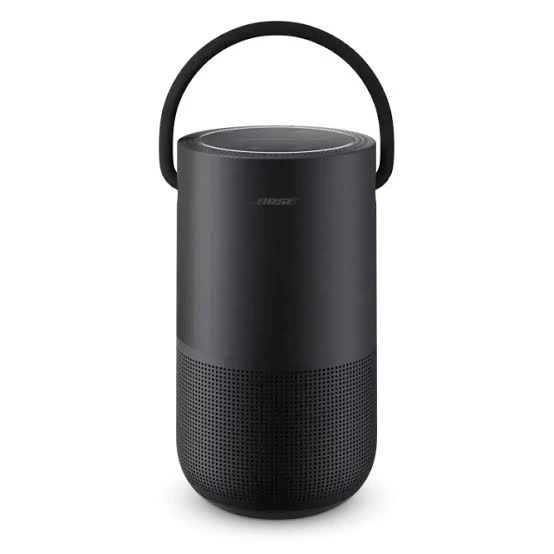
Google Nest Smart Speaker Review
Google Nest speakers appeal to seniors who want voice control without learning many complicated controls. The Google Home system also makes sense for households that already use Google services.
Ease of Use
Google gives users several ways to control compatible speakers. Voice commands can change volume, play media, and perform other tasks. The Google Home app provides another control method when using a phone or tablet.
On Nest Audio, for example, tapping the right side increases volume and tapping the left side lowers it. Each tap changes volume by 5%.
This can be helpful for seniors who prefer physical controls instead of relying entirely on voice commands.
Key Strengths
- Simple voice-based operation
- Strong Google Home integration
- Useful smart-home control
- Physical touch controls on supported speakers
- Voice Match support
- Current Google Home Speaker supports Matter
- Hardware microphone mute on the current Google Home Speaker
Potential Drawbacks
- The Google ecosystem works best for people already comfortable with Google services.
- Some features vary between speaker generations.
- Smart-home setup can still require a phone and the Google Home app.
- People who mainly want premium music sound may prefer Bose.
Bose Smart Speaker Review
Bose takes a different approach. Its smart speakers combine voice control with a strong focus on audio performance.
Ease of Use
Supported Bose smart speakers can use either Google Assistant or Amazon Alexa, depending on the model and setup. Bose says its smart speakers can be controlled through voice commands, the Bose app, and physical controls.
That flexibility can be useful for seniors who want voice control but also like having buttons available.
The Bose Portable Smart Speaker adds another practical advantage. It has a rechargeable battery, so it can move around the home without staying connected to a wall outlet.
Key Strengths
- Strong focus on sound quality
- Voice assistant support on compatible models
- Bluetooth and Wi-Fi connectivity
- Bose app control
- Portable Smart Speaker has battery power
- AirPlay 2 and Spotify Connect on supported models
- Multi-room Bose compatibility
Potential Drawbacks
- The Bose ecosystem can be more complicated if the user mainly wants simple smart-home control.
- Voice assistant features vary by Bose model and region.
- Some older Bose smart speakers are no longer current products.
- Premium Bose audio products can cost more than basic smart speakers.
Which Is Easier for Seniors to Use?
Both can be easy, but Google Nest has the edge for simple smart-home control.
Google’s system is built around the Google Home app and voice commands. Compatible speakers can also respond to touch controls. This gives users more than one way to perform basic tasks.
Bose is also easy to use once configured. However, choosing between Google Assistant and Alexa and managing Bose-specific settings may add another layer for some users.
For a senior who mainly wants to ask for music, weather information, timers, or smart-home commands, Google is usually the simpler ecosystem.
Performance Comparison
Sound performance is where Bose becomes more attractive.
Bose says its Smart Speaker 500 uses two drivers aimed in opposite directions to create a wider soundstage. Bose also describes it as its best-sounding smart speaker compared with its other smart-speaker options.
Google’s current Home Speaker is designed more as a smart-home speaker. It uses an omnidirectional 58 mm full-range driver and three far-field microphones.
| Performance Area | Google Nest | Bose |
|---|---|---|
| Voice control | Excellent | Excellent on supported models |
| Smart-home control | Excellent | Good |
| Music focus | Good | Excellent |
| Room-filling sound | Good | Very good to excellent, model dependent |
| Portable listening | Limited by model | Strong with Portable Smart Speaker |
| Multi-room audio | Strong Google ecosystem | Strong Bose ecosystem |
If music is the main reason for buying a smart speaker, Bose deserves serious consideration.
Comfort, Accessibility, and Senior-Friendly Design
For seniors, simplicity matters more than a long specification sheet.
Google’s current Home Speaker has three touch areas and a physical microphone mute switch. Its compact design and 0.9-pound weight may also make it easier to move when needed.
Bose offers physical controls on supported models, and its Portable Smart Speaker can be carried from room to room because it uses a battery.
For someone with limited dexterity, voice control may be easier than repeatedly pressing small buttons. For someone who prefers physical controls, both brands offer useful alternatives.
Features Comparison
The biggest difference is not the number of features. It is how those features fit together.
| Feature | Google Nest | Bose |
|---|---|---|
| Voice assistant | Google ecosystem | Google Assistant or Alexa on supported models |
| Smart-home control | Strong | Good |
| Voice Match | Yes on supported Google devices | Not the same Google Home experience |
| Bluetooth | Yes on current models | Yes |
| App control | Google Home | Bose app |
| Matter | Supported on current Google Home Speaker | Depends on product |
| Portable battery | Model dependent | Yes on Portable Smart Speaker |
Bose’s smart speakers can also work with Google Assistant for music, information, reminders, calls, and smart-home commands on supported products.
Price, Maintenance, and Long-Term Value
Price varies widely by model, so it is better to compare the specific speaker rather than assume one brand is always cheaper.
Google’s current Home Speaker is listed at $99.99 in Google’s U.S. store.
Bose’s current smart-speaker lineup is more varied. Its Portable Smart Speaker is listed at $349, while older Bose Home Speaker models may still appear through support or resale channels.
This makes Google the stronger value choice for someone who wants basic smart-speaker functions without spending heavily on audio hardware.
Bose may provide better value for someone who will use the speaker mainly for music and wants stronger audio performance.
Who Should Choose Google Nest?
- Choose Google Nest if smart-home control is important.
- Choose it if the user already uses Google services.
- Choose it if simple voice commands matter most.
- Choose it if keeping the initial cost lower is important.
- Choose it if the speaker will mainly handle everyday questions, music, timers, and smart-home tasks.
- Choose it if Matter compatibility is useful for the household.
Who Should Choose Bose?
- Choose Bose if music quality is the top priority.
- Choose Bose if richer room-filling sound matters.
- Choose the Portable Smart Speaker if moving the speaker between rooms is useful.
- Choose Bose if the household already uses Bose audio products.
- Choose Bose if Bluetooth and broader audio connectivity are important.
- Choose Bose if the user prefers a speaker designed with audio performance as a major priority.
Google Nest vs Bose — Final Verdict
Best for most seniors: Google Nest
Best for music quality: Bose
Best for smart-home control: Google Nest
Best for portability: Bose Portable Smart Speaker
Best value for basic smart-speaker use: Google Nest
Best for an audio-focused user: Bose
Google Nest is the better all-around choice for a senior who wants a simple smart speaker that can also become part of a connected home.
Bose is the better fit for someone who sees the smart speaker primarily as a high-quality music system.
Scoring Summary
The scores below are editorial estimates based on senior usability, ecosystem simplicity, features, and practical value. They are not laboratory test results.
| Category | Google Nest | Bose |
|---|---|---|
| Ease of Use | 9/10 | 8/10 |
| Senior-Friendly Design | 9/10 | 8/10 |
| Smart Features | 9/10 | 8/10 |
| Audio Performance | 8/10 | 9/10 |
| Maintenance | 9/10 | 8/10 |
| Value | 9/10 | 7/10 |
How We Evaluate Products
This comparison focuses on factors that can affect everyday senior use. These include ease of setup, controls, voice operation, accessibility, sound quality, maintenance, connectivity, and long-term value.
No hands-on laboratory testing is claimed here. Product capabilities can also vary by model, generation, region, and software updates.
Senior-Specific Buying Considerations
Before choosing either speaker, check these points.
Physical Effort
Voice control can reduce the need to reach for a phone or repeatedly operate small controls.
Controls
Check whether the senior prefers voice commands, physical touch controls, or app-based controls.
Setup
A family member or caregiver may need to help with Wi-Fi, accounts, voice assistants, and smart-home devices during initial setup.
Maintenance
Both types of speakers require little physical maintenance, but software, Wi-Fi, and account settings may occasionally need attention.
Hearing and Volume
Choose a speaker that provides enough volume and clear speech for the user’s environment. A smart speaker should not be treated as a hearing device.
Privacy
Both Google and Bose smart speakers can use microphones for voice control. Seniors and caregivers should understand how microphone controls and account settings work before setup.
Common Buying Mistakes
- Choosing based only on the brand name
- Paying for premium sound when simple voice control is the real need
- Ignoring the importance of the smartphone app
- Assuming every Bose or Google speaker has the same features
- Forgetting to check compatibility with existing smart-home devices
- Buying an older model without checking current support
Safety
Keep the speaker on a stable surface where it will not be knocked over. Keep power cables away from walking paths to reduce trip hazards.
For seniors who may have difficulty managing small controls, voice operation can reduce some physical effort. However, voice assistants should not be relied on for emergency communication or critical medical needs.
Frequently Asked Questions
Is Google Nest easier for seniors than Bose?
Usually, yes, when the main goal is simple smart-home and voice control. Bose can be just as easy for basic music playback, especially once it has been configured.
Is Bose better than Google Nest for music?
Bose is generally the stronger choice for users who place a high value on audio performance. Its smart speakers are designed with sound quality as a major focus.
Can Bose smart speakers use Google Assistant?
Yes, supported Bose smart speakers can use Google Assistant. Availability and features can vary by model and country.
Does Google Nest work with smart-home devices?
Google’s current Home Speaker supports Google Home and Matter, making it well suited to compatible smart-home setups.
Which is better for a senior who wants portability?
The Bose Portable Smart Speaker is the stronger option because it has a rechargeable battery and can be moved around the home without staying plugged in.
Should I buy based on sound quality or smart features?
Choose based on the main daily use. Pick Google Nest when smart-home control and simplicity matter most. Pick Bose when music quality and audio performance matter more.
Conclusion
Google Nest and Bose both offer useful smart-speaker options for seniors, but their strengths are different. Google Nest is the better fit for simple smart-home control, voice commands, and overall value.
Bose makes more sense for seniors who care strongly about music and want better audio performance. The most important step is to choose the specific model carefully, because features and capabilities can vary across each brand’s lineup.
