
10 Best Fall Detection Devices for Apartments in 2026


Heated Blanket

Lap Desk for Reading

Voice Assistant Smart Speaker
Falls can happen quickly, especially in apartments where a person may live alone or have limited access to help. Fall detection devices use sensors, buttons, or motion tracking to identify a possible fall and connect the user with family, caregivers, or an emergency response service.
For apartment living, the best devices are usually compact and easy to wear indoors. Some use a pendant or wrist button, while others combine automatic fall detection with GPS, two-way voice calls, or smartphone alerts. The most important factors are reliable fall detection, strong indoor coverage, comfortable design, and a response plan that works inside the apartment.
We compared fall detection devices for their accuracy, ease of use, monitoring options, battery life, and apartment-friendly design to find the models that provide dependable support at home.
Best Fall Detection Devices for Apartments
We evaluated fall detection devices for apartment living, focusing on accurate alerts, easy setup, and reliable emergency support. Our list includes options for different needs, budgets, and levels of independence.
CallToU Bed Exit Alarm
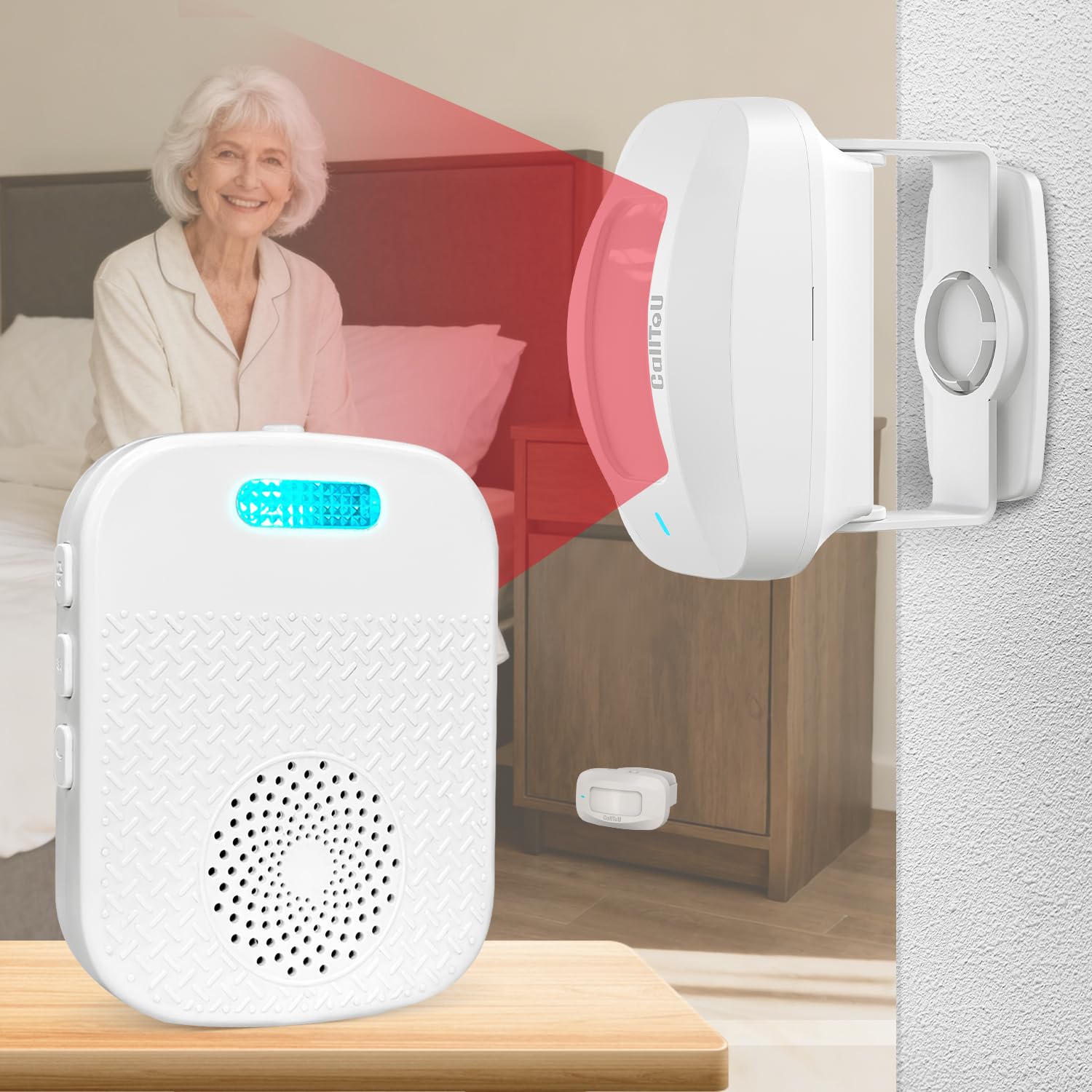
We recommend this portable alarm for apartment caregivers who need quick bed or chair movement alerts without installing a large floor mat.
Pros
- Detects movement before the user fully stands
- Offers sound, silent, and vibration alerts
- Portable receiver works during power outages
Cons
- The sensor uses replaceable AAA batteries
- Sensitive placement may cause unwanted alerts
- Some users report early product failure
We found setup simple: place the motion sensor beside the bed or chair, then carry the receiver with us. Its short detection range suits apartments because alerts stay focused on the nearby room instead of covering an entire home.
The receiver gives us several volume levels and ringtone choices. At night, vibration or silent mode can reduce noise for other residents, while the bright alert light adds another notification method.
The sensor also rotates, which helps limit alerts from small movements in bed. However, placement still matters. Reviews mention both false alarms from slight shifts and units that stopped working after a short time, so we would test it regularly.
For apartment use, the compact design and rechargeable receiver make this easier to move between rooms than a fixed alarm system. It supports fall prevention and bed-exit awareness, but it should not replace direct supervision or emergency care.
Seculife Medical Alert Pendant
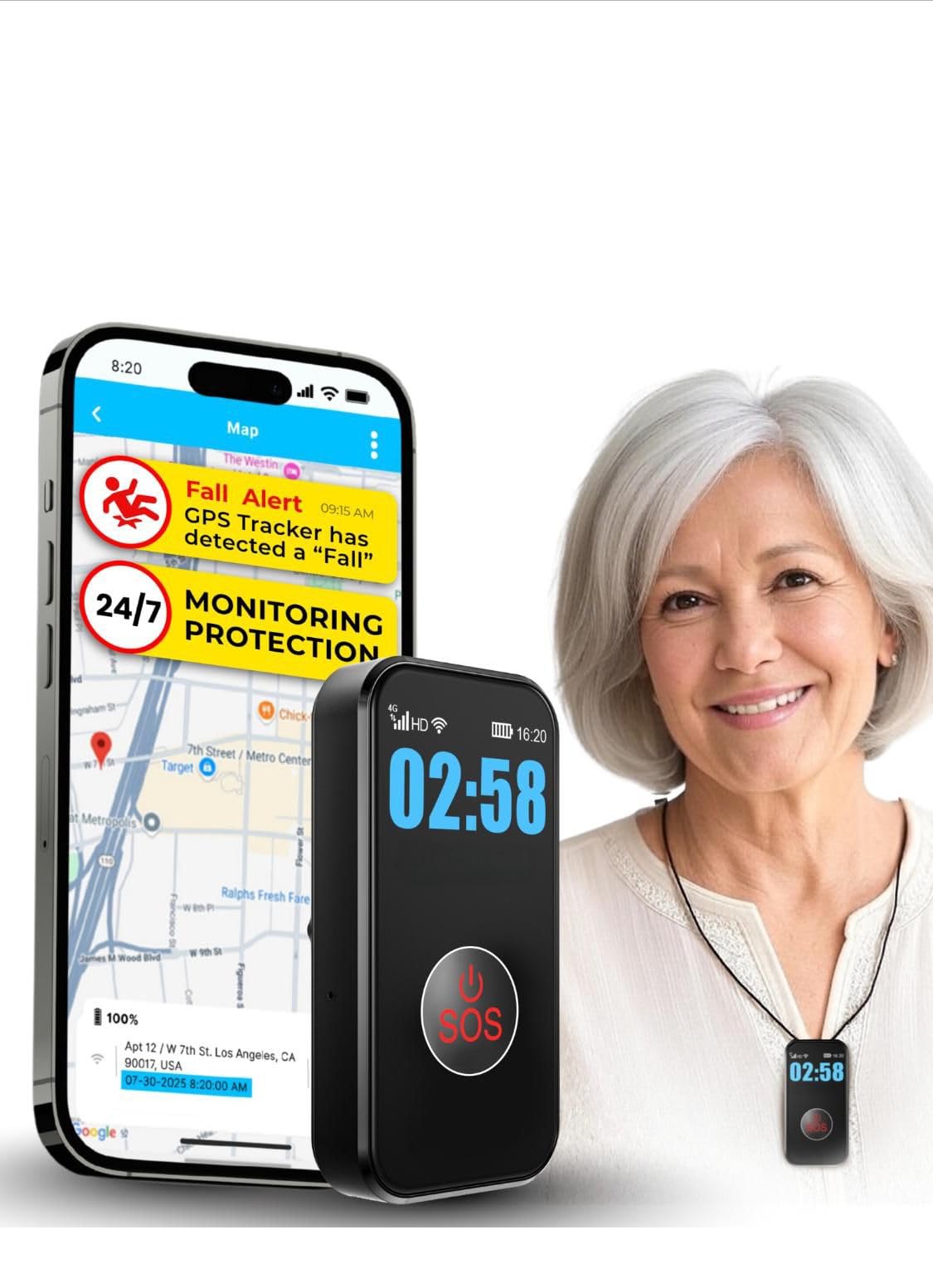
We recommend this pendant for apartment residents who want fall alerts, GPS tracking, and direct contact with family through one wearable device.
Pros
- Automatic fall detection and a large SOS button
- Two-way calling with hands-free answering
- Waterproof design with GPS and safe-zone alerts
Cons
- Requires a $20 monthly subscription
- Fall detection may not recognize every fall
- Setup and activation can require support
We found the pendant simple to wear and use around an apartment. The large SOS button felt easy to locate, while the display showed basic details such as battery and signal status. Its cellular connection also allowed us to use it without relying on home Wi-Fi.
The two-way calling feature worked well for speaking with a caregiver without reaching for a phone. Family members can also call the pendant, which helps when the wearer cannot answer a mobile phone. GPS tracking and geofence alerts add useful support for people who sometimes leave home alone.
The waterproof build makes it suitable for wearing in the shower, where many household falls happen. Battery life should cover several days, but tracking settings and signal strength can affect how often we need to charge it.
This device does require a $20 monthly plan for calling, alerts, tracking, and support. We also recommend testing the fall detection after setup because automatic detection can miss some falls or trigger a false alert.
Smart Caregiver Floor Mat Alarm
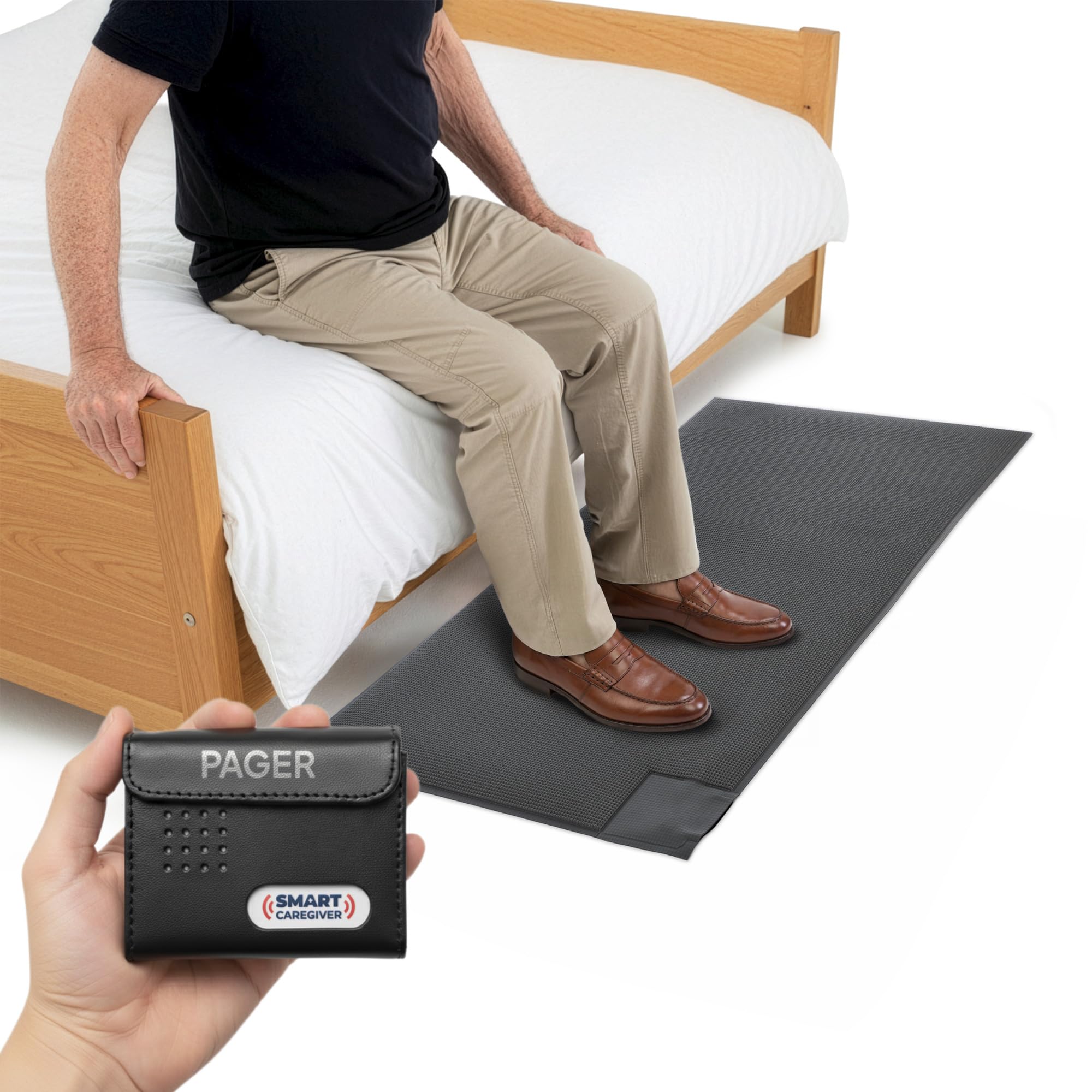
We recommend this system for apartments when caregivers need a simple alert if someone steps out of bed or approaches an exit.
Pros
- Sends alerts to a portable pager
- Offers sound or vibration modes
- Works without a loud alarm in the resident’s room
Cons
- Pager batteries are not included
- The mat may take up much of a bedside walkway
- It detects pressure but does not prevent a fall
We placed the mat beside the bed and found the setup easy after pairing the pager. When we stepped on the sensor, the pager responded quickly. Its vibration mode worked well when we wanted to avoid waking others in the apartment.
The 24-by-48-inch mat fits beside many beds, but smaller rooms may feel crowded. We would measure the available floor space before buying, especially in a narrow bedroom or hallway.
The pager can alert us from up to 300 feet away, depending on the apartment layout and walls. We also liked that caregivers can carry it while handling other tasks. The system can connect with compatible Smart Caregiver sensors, but those accessories cost extra.
This device works best as an awareness tool for caregivers. It does not replace supervision, medical support, or changes that make the apartment safer.
Nomo Smart Care Fall Detection System
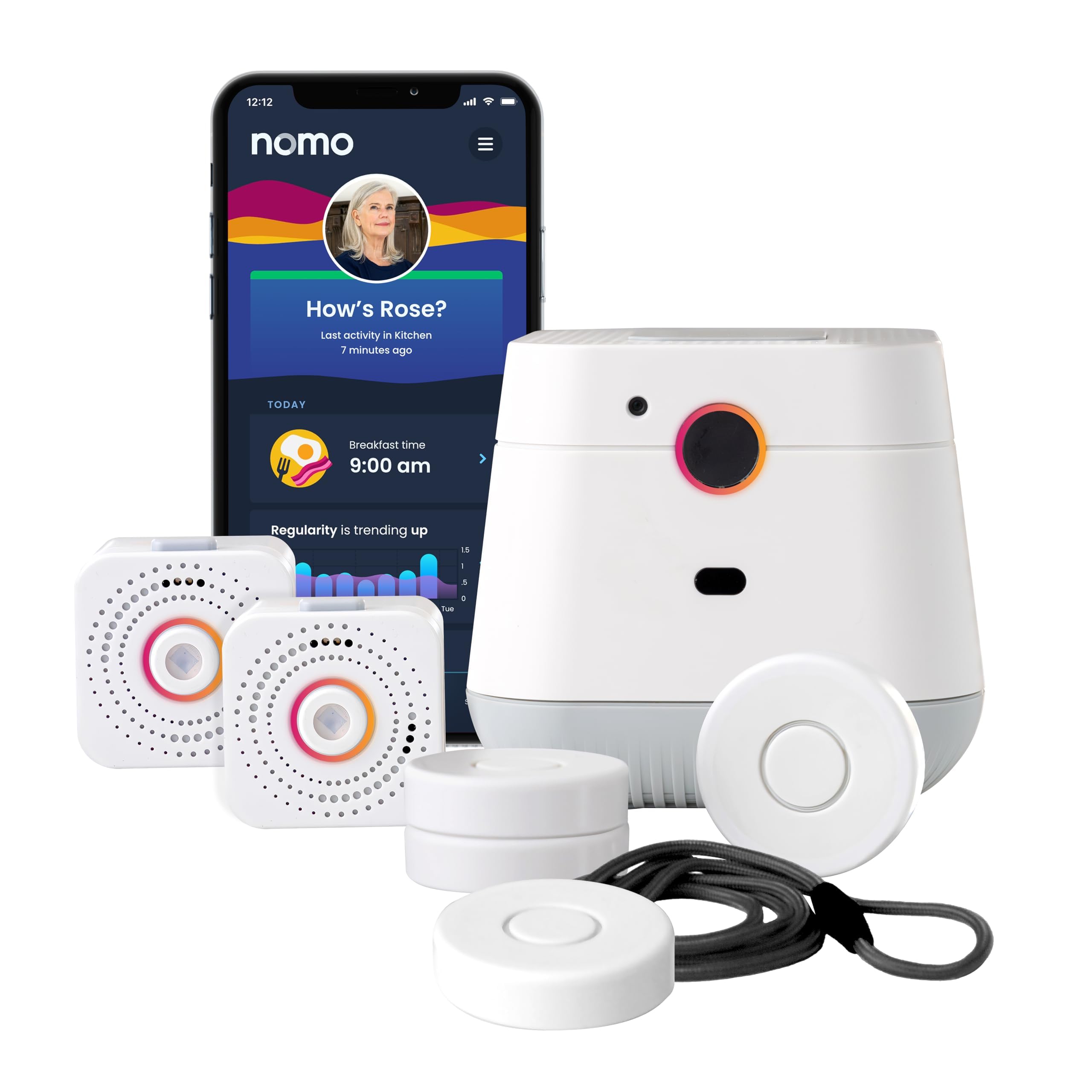
We recommend this system for apartment residents who want camera-free activity monitoring, caregiver alerts, and two-way emergency communication in one setup.
Pros
- Camera-free monitoring supports privacy.
- Motion sensors and Smart Tags track activity around the home.
- The Hub offers two-way voice communication.
Cons
- Automatic fall detection may not work reliably in every situation.
- The system requires 2.4 GHz Wi-Fi.
- Continued monitoring costs $19.99 per month after the trial.
We found the setup straightforward: plug in the Hub and Satellites, connect them to Wi-Fi, and place the Smart Tags where they matter most. This works well in an apartment because it avoids wiring, a landline, and professional installation.
The system does more than send fall alerts. We could use the tags on doors, cabinets, or medication areas to watch daily routines and notice changes. That added context may help caregivers spot problems before an emergency occurs.
The Hub’s two-way voice feature gives residents a direct way to speak with caregivers or request help. We also liked the camera-free design, especially for bedrooms and bathrooms. However, reported user experiences suggest that automatic fall detection can be inconsistent, so we would treat it as an extra safety layer rather than a replacement for a wearable alert button.
The 60-day app trial includes 24/7 monitoring and RapidSOS emergency response. Afterward, the paid plan continues monthly, so buyers should include that cost in their decision.
Nesthao Bed Sensor Alarm

We recommend this alarm for apartment caregivers who need a simple way to know when someone gets out of bed or leaves a room.
Pros
- Detects movement without a bed pad
- Sends alerts to a separate pager
- Offers adjustable volume and backup power options
Cons
- Requires careful sensor placement and testing
- May need pairing again after being switched off
- Does not detect a fall after it happens
We found the floor sensor easy to place under a bed or near a doorway. It alerts the pager when someone moves into its detection area, which lets us respond before a possible fall. The separate pager also keeps the alarm from startling the person in the room.
The signal worked well across an apartment during testing, though walls and furniture may reduce its range. We recommend testing the sensor from several angles before securing it with the included tape or screws.
The pager offers five volume levels and uses light and sound alerts. We liked having both battery power and a Micro USB option, especially when the device needed to run for long periods.
This product works as a movement alert, not a complete fall detection system. It cannot call emergency services or confirm that a person has fallen, so we would use it with regular check-ins and other safety measures.
Lunderg Wireless Bed Alarm

We recommend this bed alarm for apartment caregivers who want quiet, wireless alerts before a loved one leaves bed.
Pros
- Sends alerts to a portable pager instead of sounding beside the bed
- Hip-level pad can detect movement before the person stands
- Simple setup with no Wi-Fi, app, or tools
Cons
- Works only when the person uses the monitored bed
- The pad may need careful placement to reduce false alerts
- Battery-powered parts require regular checks
We found the Lunderg easy to set up in an apartment bedroom. The sensor pad pairs with the pager without an app or internet connection, which keeps the system simple and useful during outages.
The pager gave us several alert choices, including sound and vibration. We could carry it around the apartment or place it nearby, and the reported range gave us flexibility across rooms and floors.
The pad sits near the hips rather than under the shoulders. That placement helped limit alerts from normal shifting while still warning us when someone began moving toward the edge of the bed.
Its soft surface wiped clean easily, and the included clips helped keep it in place. Still, we would check the pad often because bedding, movement, and bed position can affect performance.
This device does not replace supervision or other fall-prevention steps. We would choose it for apartments where a caregiver needs a private, portable alert without installing a wired alarm system.
Smart Caregiver Wireless Motion Sensor Alarm

We recommend this system for apartment caregivers who need a quiet alert when someone gets out of bed or moves through a monitored area.
Pros
- Sends alerts to a portable pager instead of making noise at the bedside
- Covers spaces up to about 300 feet away
- Works well for bed and doorway monitoring
Cons
- Sensitive detection can cause false alerts
- Batteries are required, and replacements may become a routine cost
- The optional adjustable mounting bracket costs extra
We found the setup simple: place the motion sensor near the bed or doorway, then carry the pager while moving around the apartment. The silent alert helped us respond without waking or upsetting the person being monitored.
The sensor picked up movement quickly, which made it useful for nighttime supervision. However, that sensitivity also caused alerts from normal movement and nearby activity. We needed to adjust its position carefully to reduce unnecessary signals.
The pager gave us useful freedom to step into another room while staying connected. The system works on its own, though, so we could not connect it with other Smart Caregiver devices. We also had to supply the required AA batteries, and the short warranty may matter to some buyers.
PILSAMAS Motion Sensor Pager
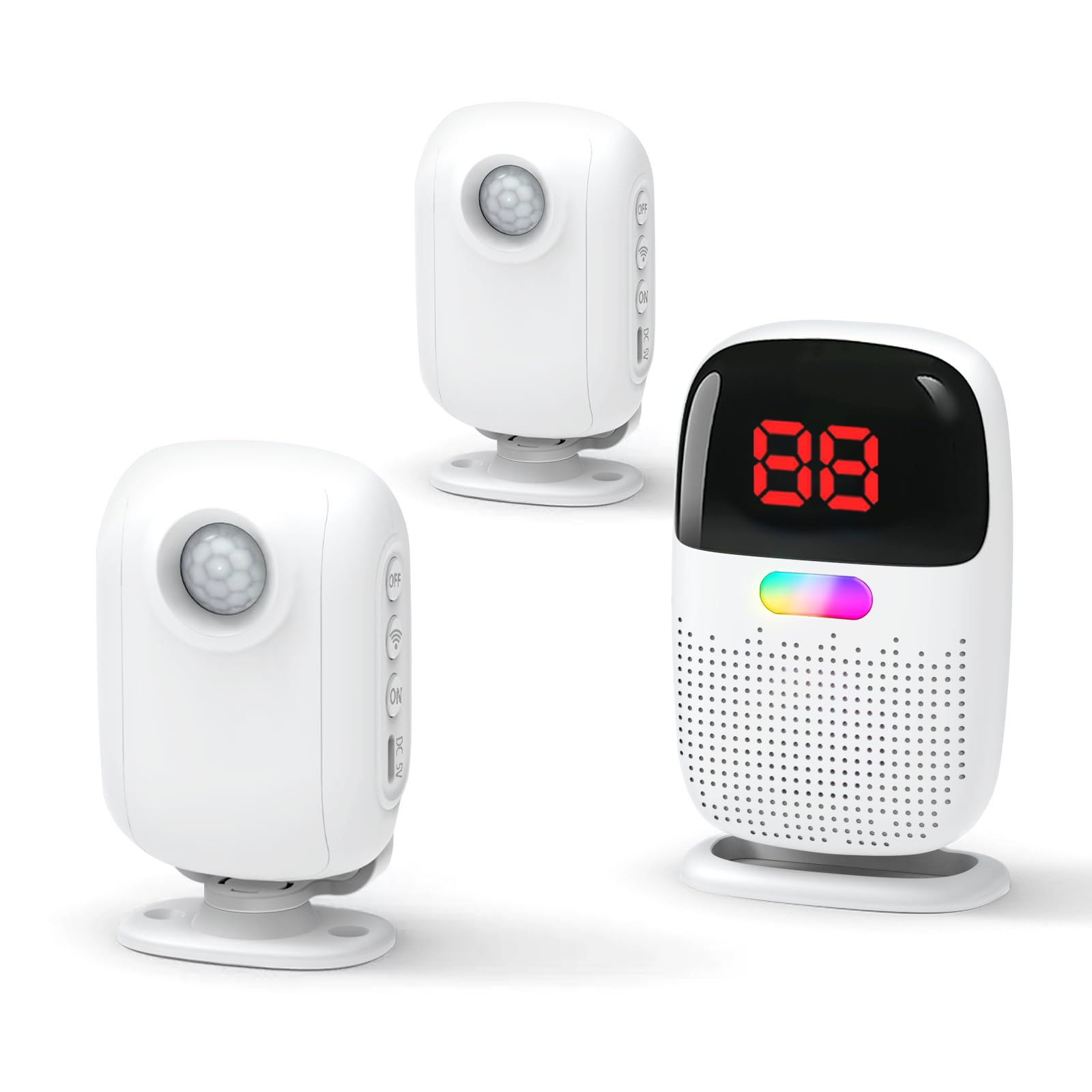
We recommend this set for apartment caregivers who want room-exit alerts without cameras, cloud storage, or monthly fees.
Pros
- Sensor ID helps us identify which room triggered the alert.
- Adjustable chimes, volume, vibration, and light alerts suit different needs.
- Wireless setup covers most apartments and supports multiple sensors.
Cons
- Sensors may need careful placement to limit pet-related alerts.
- The small power switch can be hard to see.
- It alerts to movement rather than confirming an actual fall.
We found the setup simple: we added batteries to the motion sensors and powered the pager. The receiver gave clear alerts, and its screen showed the sensor number so we could tell whether the bedroom or another area needed attention.
The sensors work well near a bed, chair, or apartment doorway. We would mount them about 15 to 20 inches above the floor and test each location, especially in homes with pets or narrow walkways.
The clip-on pager gave us flexibility while moving around the home. Its long stated range should cover most apartments, though walls and building materials can reduce performance. The lack of a subscription also keeps ongoing costs low.
This is a movement and room-exit monitor, not a complete emergency response system. We would pair it with regular check-ins, since it cannot confirm whether someone has fallen or contact emergency services automatically.
Family First Alert Mini Medical Alert Pendant
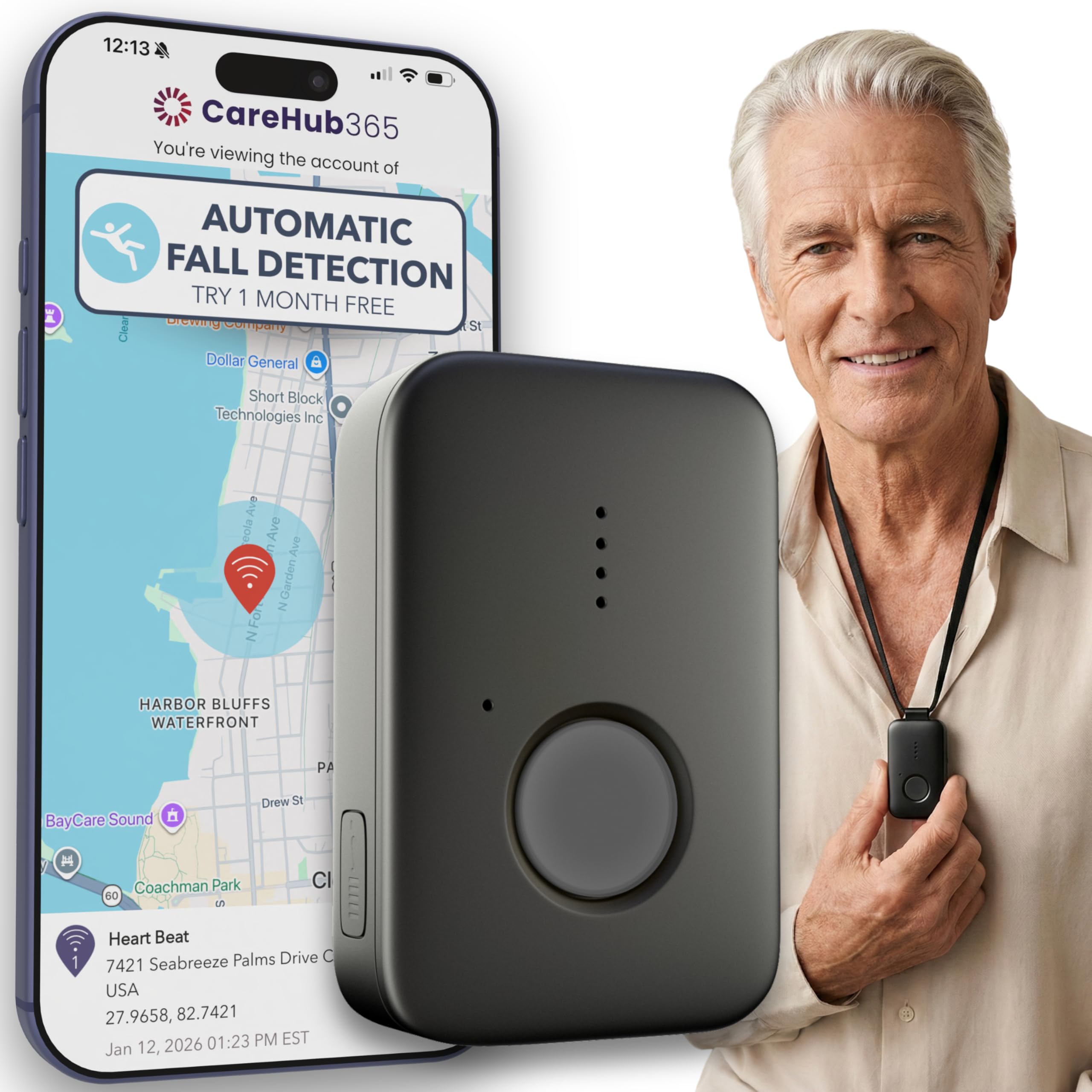
We recommend this pendant for apartment residents who want 24/7 emergency monitoring, GPS support, and optional fall detection in a small device.
Pros
- Lightweight design with several wearing options
- Water-resistant for shower use
- Works on AT&T and Verizon networks
Cons
- Requires a $39.99 monthly monitoring plan
- Fall detection costs an extra $4.99 per month
- Needs regular charging
The compact pendant felt easy to wear without getting in the way. We could use the lanyard or belt clip, which helps when moving between rooms or completing daily tasks.
Pressing the SOS button connects the wearer with a live dispatcher. The device also includes two-way voice communication, so users can speak with the monitoring team without reaching for a phone.
For apartment use, the cellular connection and GPS feature add useful support during emergencies. Coverage still depends on available AT&T or Verizon service inside the building.
The pendant is water-resistant, so we could keep it on in the shower. The battery can last up to five days, but we would charge it daily to avoid gaps in protection.
Fall detection is optional rather than included in the base monthly price. We would factor in both subscription costs before buying, especially since the feature may not detect every fall.
Fajocru V46 Fall Detection Watch
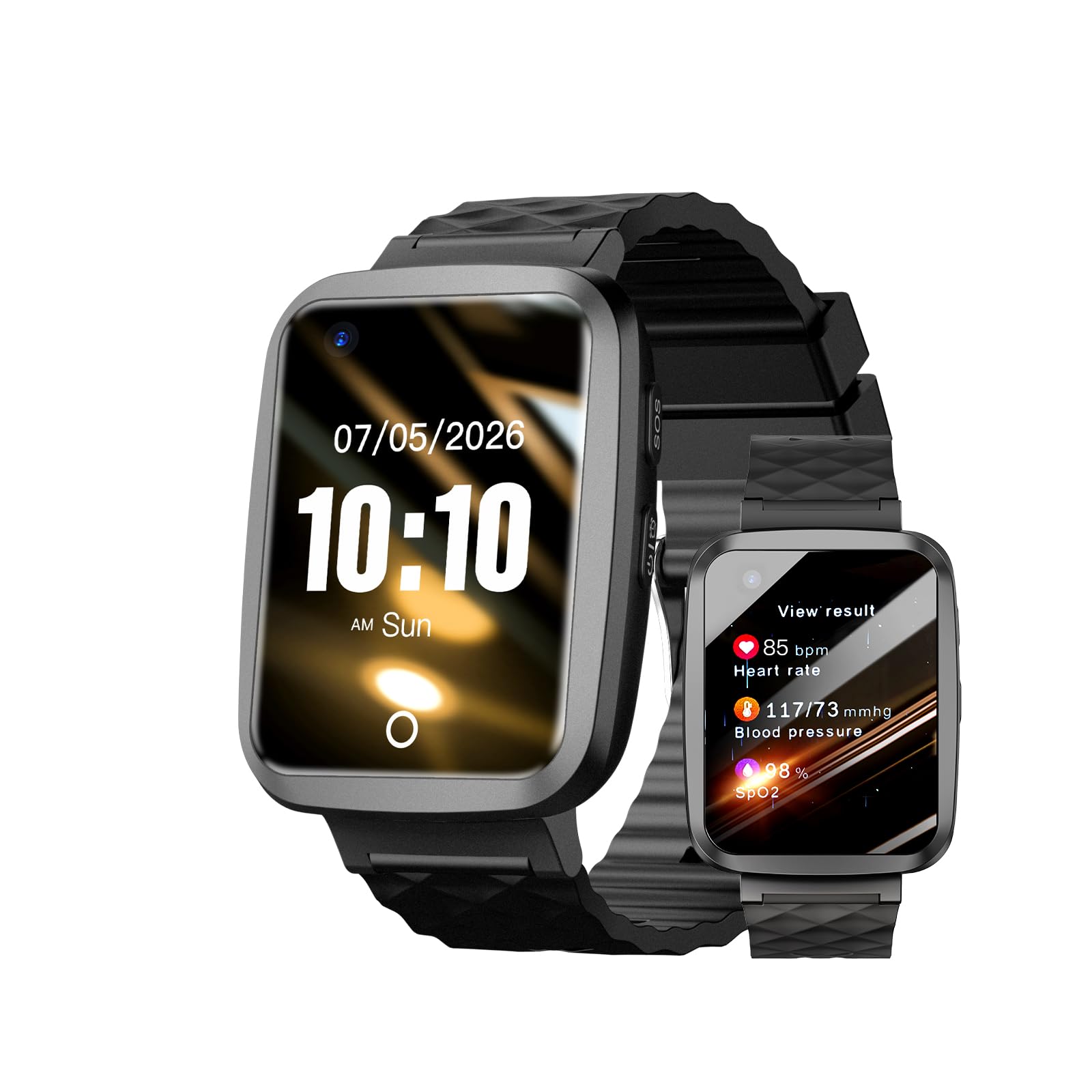
We recommend the Fajocru V46 for apartment residents who want fall alerts, GPS tracking, and two-way calls in one wearable device.
Pros
- Automatic fall alerts and an SOS button
- GPS tracking with location-zone alerts
- Two-way voice calls without a separate phone
Cons
- Setup may take time for some users
- App instructions may not be easy to follow
- Fall detection should not replace direct emergency care
We found the watch useful for staying connected inside and outside an apartment. Its large screen and simple controls make it easier for many older adults to use, while the SOS button provides a clear way to request help.
The GPS feature adds value for family members who worry about wandering. Caregivers can check the wearer’s location and create a safe zone, although the watch needs cellular service and app setup before these features work.
The two-way calling feature worked well for quick check-ins. We also liked the magnetic charger and IP67 water resistance for everyday use, including hand washing and light rain.
Setup may be the main challenge. Some users reported trouble getting started or understanding the instructions, so we recommend testing the watch, app, alerts, and emergency contacts before relying on it. We also would not treat the health readings as medical measurements.
Buying Guide
We should begin with the resident’s needs, apartment layout, and comfort with technology. A wearable device may suit someone who moves often, while a wall-mounted button or room sensor may work better for someone who does not want to wear a device.
| Feature | What we should check |
|---|---|
| Detection method | Whether it detects sudden falls, slow falls, or both |
| Alert process | Whether it contacts a monitoring center, family member, or emergency service |
| Two-way voice | Whether the user can speak through the device after an alert |
| Connection | Whether it uses cellular service, Wi-Fi, or a home base station |
| Battery | Battery life, charging time, and low-battery alerts |
| Coverage | Whether it works in bedrooms, bathrooms, balconies, and shared areas |
| False alerts | Whether users can cancel an alert before help is contacted |
| Privacy | What data the device collects and how it stores that data |
We should check whether the device works throughout the apartment, especially in bathrooms and rooms with thick walls. Devices that depend on a base station may have limited range, while cellular models may require an active service plan.
We should also review setup, ongoing fees, warranty terms, and customer support. Large controls, clear voice prompts, and simple charging can make regular use easier for people with limited vision, hearing, or dexterity.
Before buying, we should confirm that the device detects falls without requiring the user to press a button. We should also check how the system handles missed alerts, accidental alerts, power failures, and loss of network service.
Editor’s Choice
We chose Medical Guardian Mini Guardian as our top pick for apartment living. Its small, wearable design provides fall detection, two-way communication, and access to a 24/7 monitoring team without requiring a home phone line.
The device uses cellular service, so we can use it throughout most apartments and nearby outdoor areas. Its GPS feature can also help responders locate the wearer when they leave home, though coverage depends on the network and location.
| Feature | Details |
|---|---|
| Wearable design | Pendant or belt clip |
| Fall detection | Available with select plans |
| Communication | Two-way voice |
| Best for | People who want indoor and outdoor protection |
We should remember that automatic fall detection may not identify every fall. Users should press the help button whenever possible, and we should check cellular coverage, battery life, equipment fees, and monthly monitoring costs before buying.
For renters, the device avoids permanent installation. We can set it up without drilling, wiring, or placing wall-mounted sensors around the apartment.
Conclusion
We should choose a fall detection device that fits the apartment, daily routine, and level of support needed. Key features include reliable fall sensing, clear alerts, strong battery life, and simple setup.
For residents who spend most of their time at home, a wall-mounted system or wearable device with a home base may work well. Those who leave the apartment often may benefit from a mobile device with GPS and cellular service.
Before buying, we should check:
- Emergency response: Does it contact family, a monitoring center, or emergency services?
- Coverage: Will it work in every room and nearby outdoor areas?
- Comfort: Can the user wear it throughout the day?
- Costs: Are there equipment, activation, or monthly fees?
- Apartment fit: Does it avoid complex installation or damage to walls?
Automatic fall detection can support a faster response, but no device detects every fall. We should treat it as one part of a safety plan that may also include better lighting, clear walkways, accessible phones, and regular check-ins.
FAQs
Do fall detection devices work in apartments?
Yes. Most devices use motion sensors, accelerometers, or wearable sensors to detect sudden changes in movement. In apartments, we should check whether walls, floors, or distance from the base unit affect the signal.
Do we need Wi-Fi?
It depends on the device. Some systems use Wi-Fi, while others use cellular networks or a landline. We should confirm that the device works during power or internet outages.
Can we wear a fall detector in the shower?
Some devices are water-resistant or waterproof, but not all are. We should check the manufacturer’s rating before wearing one in a bathroom or near water.
Will every fall trigger an alert?
No device detects every fall. A person may also need to press a help button after a fall, so we should choose a system with simple controls and clear instructions.
Who receives the alert?
Alerts may go to a monitoring center, family member, caregiver, or emergency contact. We should review the response plan and keep contact information current.
What features matter most for apartment living?
- Two-way voice communication
- A strong indoor range
- Water resistance
- Cellular backup
- Automatic fall detection
- Low monthly fees
We should also check battery life, cancellation terms, and whether the system works throughout the apartment, including bedrooms, hallways, and bathrooms.
