
Apple Watch vs Fitbit Smartwatch for Seniors: Which?


Digital Thermometer

Adjustable Bed Frame

Automatic Jar Opener
Apple Watch vs Fitbit smartwatch for seniors is mainly a choice between a broader smartwatch experience and a simpler fitness-focused approach. The right pick depends on the senior’s phone, health-tracking needs, and comfort with smart devices.
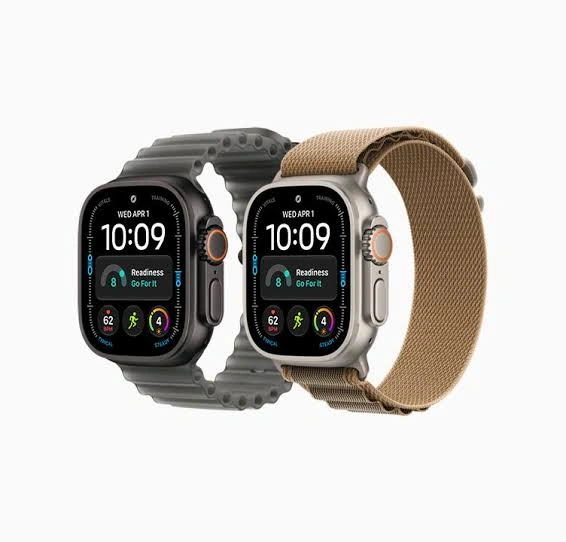
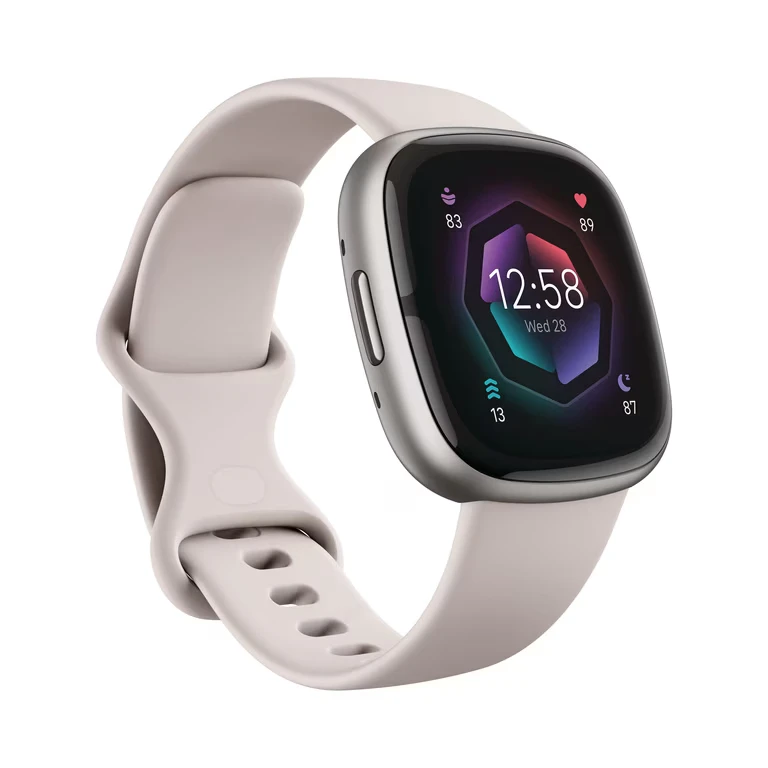
Apple Watch offers a wider mix of health, safety, communication, and smartwatch features. Fitbit models such as the Versa 4 and Sense 2 focus more on fitness, sleep, stress, and long battery life.
Quick Comparison
For a senior who already uses an iPhone and wants strong health and safety tools, Apple Watch offers a broader feature set. Current Apple Watch models include features such as Fall Detection, Emergency SOS, heart-health notifications, ECG, and sleep tracking.
Fitbit can make more sense for someone who wants fewer charging sessions and focuses mainly on activity, sleep, heart rate, and everyday fitness. Fitbit Versa 4 and Sense 2 are rated for 6+ days of battery life.
The biggest difference is not simply the number of features. It is how much smartwatch functionality the user actually needs.
Apple Watch vs Fitbit At a Glance
The two brands overlap in health and fitness tracking, but their overall approach is different.
| Feature | Apple Watch | Fitbit |
|---|---|---|
| Best phone fit | iPhone | iPhone or Android |
| Health tracking | Very extensive | Extensive |
| Safety tools | Strong | More fitness-focused |
| Battery | More frequent charging | 6+ days on Versa 4/Sense 2 |
| Smartwatch features | Broad | More focused |
| Sleep tracking | Yes | Yes |
| GPS | Available on current models | Available on selected models |
| Ease of charging | More frequent | Less frequent |
Fitbit works with compatible iPhones and Android phones, while current Apple Watch models require a compatible iPhone.
Apple Watch Review for Senior Use
Apple Watch is a strong option for seniors who want a smartwatch that does more than track steps and sleep. Current Apple Watch Series 12 adds higher-frequency heart-rate and HRV measurements, a readiness score, and other health features.
Ease of Use
Apple Watch uses a touchscreen, physical controls, apps, notifications, and Siri. This gives users many ways to interact with the watch, but it also means there is more to learn.
A senior who already uses an iPhone may find the Apple ecosystem familiar. Apple Watch pairs with an iPhone through the Apple Watch app.
Key Strengths
- Broad health and fitness tracking
- Fall Detection and Emergency SOS
- ECG on supported models
- Heart-health notifications
- Sleep tracking
- Large smartwatch ecosystem
- Strong iPhone integration
- Voice interaction through Siri
Potential Drawbacks
- Requires a compatible iPhone
- More frequent charging than Fitbit models with 6+ day ratings
- Many features may feel unnecessary for someone wanting only basic fitness tracking
- The wider feature set can create a steeper learning curve
Fitbit Review for Senior Use
Fitbit takes a more fitness-centered approach. The Versa 4, for example, offers activity tracking, sleep information, stress tracking, heart-rate features, reminders to move, and a 6+ day battery rating.
Ease of Use
Fitbit watches still offer a touchscreen and smart features, but their focus can feel more straightforward for someone primarily interested in health and activity information.
Fitbit devices sync with the Google Health app on compatible iPhone and Android phones.
Key Strengths
- 6+ day battery on Versa 4 and Sense 2
- Sleep and activity tracking
- Heart-rate monitoring
- Stress-related features
- Compatible with iPhone and Android
- Lightweight 37.64 g body on Versa 4 and Sense 2
- GPS support on selected models
Potential Drawbacks
- Some advanced features depend on the specific Fitbit model
- Some features may require a subscription
- The smartwatch experience is less broad than Apple Watch
- Fitbit model differences can make comparisons confusing
Which Is Easier for Seniors to Use?
Ease of use depends heavily on the user’s phone and what they want from the watch.
For an iPhone user who wants calls, notifications, health tools, safety features, and apps, Apple Watch can provide a more complete experience. But more functions can also mean more settings to learn.
For someone who mainly wants steps, sleep, heart rate, exercise information, and fewer charging sessions, Fitbit may feel more focused.
The important point is simple:
More features do not automatically mean easier use.
A senior who wants a simple daily routine may benefit from choosing only the functions they will actually use.
Performance Comparison
Apple Watch currently has a strong emphasis on health sensing. Apple says Series 12 uses a new Health Sensing System with optical and electrical heart sensors and measures heart rate every five seconds throughout the day.
Fitbit also provides extensive health and fitness tracking. Versa 4 tracks heart rate, sleep, stress, activity, and other metrics, while Sense 2 adds additional sensors and health-oriented features.
| Performance Area | Apple Watch | Fitbit |
|---|---|---|
| Heart-rate tracking | Advanced | Strong |
| Sleep tracking | Yes | Strong focus |
| Activity tracking | Extensive | Extensive |
| GPS | Available | Selected models |
| Health insights | Extensive | Strong |
| Battery endurance | Model-dependent | 6+ days on Versa 4/Sense 2 |
Fitbit’s long battery life is a practical advantage for seniors who dislike frequent charging.
Comfort, Accessibility, and Senior-Friendly Design
Both brands offer relatively small wearable designs, but comfort depends on wrist size, band choice, display preference, and how often the watch is worn.
The Fitbit Versa 4 and Sense 2 each weigh about 37.64 g without the band.
Apple Watch offers accessibility features and multiple ways to interact with the watch. Current watchOS also includes a single-handed tap gesture that can help users operate certain functions with one hand.
For seniors with limited dexterity, it is worth checking the physical controls, band clasp, screen size, and charging method before buying.
Features Comparison
The biggest feature difference is the overall role of each watch.
| Feature | Apple Watch | Fitbit |
|---|---|---|
| Emergency SOS | Yes | More limited |
| Fall Detection | Yes | Depends on model/features |
| ECG | Supported models | Supported on selected models |
| Sleep tracking | Yes | Yes |
| Stress tracking | Yes | Yes |
| Voice assistant | Siri | Alexa on Versa 4 |
| Phone ecosystem | iPhone | iPhone and Android |
Apple Watch Series 12 includes Fall Detection, Emergency SOS, ECG, heart-health notifications, and sleep-apnea notifications. Fitbit Versa 4 includes Alexa, stress information, sleep tools, and irregular heart-rhythm notifications.
Price, Maintenance, and Long-Term Value
Price changes by model, retailer, and region, so comparing exact prices at one point in time can be misleading.
Fitbit’s Versa 4 and Sense 2 have lower listed prices on Google’s store than the current Apple Watch Series 12 starting price of $399 in the U.S. Apple Watch Series 12 begins at $399, while Google currently lists Sense 2 at $249.95 and Versa 4 at a lower listed price.
Battery life is another long-term consideration. Versa 4 and Sense 2 are rated for 6+ days, which can reduce charging frequency.
Fitbit’s current security documentation lists Sense 2 and Versa 4 for security updates through at least February 2028, although those dates can be extended.
Who Should Choose Apple Watch?
Choose Apple Watch if:
- The senior already uses an iPhone.
- Fall Detection and Emergency SOS are important.
- ECG or broader health features matter.
- The user wants calls, messages, apps, and notifications.
- Family members want a broader smartwatch platform.
- The user is comfortable learning more features.
Apple Watch’s current health and safety feature set makes it particularly relevant when the watch needs to do more than track exercise.
Who Should Choose Fitbit?
Choose Fitbit if:
- Long battery life is a priority.
- The senior uses Android or iPhone.
- Sleep and activity tracking are the main goals.
- The user prefers a fitness-focused watch.
- Frequent charging is inconvenient.
- The user does not need Apple’s wider smartwatch ecosystem.
Fitbit’s 6+ day battery rating on Versa 4 and Sense 2 is one of its clearest practical advantages.
Apple Watch vs Fitbit — Final Verdict
Apple Watch and Fitbit are better suited to different needs rather than being identical alternatives.
Best for broad health and safety tools: Apple Watch
Best for long battery life: Fitbit
Best for iPhone integration: Apple Watch
Best for iPhone and Android flexibility: Fitbit
Best for a fitness-focused experience: Fitbit
Best for a wider smartwatch experience: Apple Watch
For seniors, the most important choice is the one that matches the user’s phone, comfort level, and daily routine.
Scoring Summary
A fixed score can hide important differences between these products, so a simple feature-based summary is more useful.
| Category | Apple Watch | Fitbit |
|---|---|---|
| Ease of Use | Strong | Strong |
| Senior-Friendly Design | Strong | Strong |
| Health Features | Very extensive | Extensive |
| Smartwatch Features | Very extensive | Moderate |
| Battery Convenience | Moderate | Strong |
| Phone Compatibility | iPhone-focused | iPhone + Android |
These comparisons reflect current product information rather than hands-on testing. Features can vary by model and region.
How We Evaluate Products
We focus on factors that can affect everyday senior use:
- Ease of use
- Display and controls
- Comfort
- Health and safety features
- Battery life
- Phone compatibility
- Maintenance
- Long-term practicality
- Price and value
We do not treat manufacturer claims as personal testing or independent laboratory results.
Senior-Specific Buying Considerations
Before choosing either watch, check a few practical details.
Physical Comfort
Make sure the watch and band feel comfortable for all-day wear. Weight and band design can matter more than small feature differences.
Controls
Check whether the senior can comfortably use the touchscreen, buttons, gestures, and voice features.
Charging
Consider who will charge the watch and how often. Fitbit’s longer battery rating can be useful for someone who dislikes daily charging.
Phone Compatibility
This is critical. Apple Watch requires a compatible iPhone, while Fitbit supports compatible iPhone and Android devices.
Health Features
Do not buy a watch based only on a long list of health sensors. Choose features that the user understands and will actually use.
Common Buying Mistakes
Avoid these common mistakes:
- Buying Apple Watch without checking iPhone compatibility
- Choosing Fitbit without checking the exact model
- Focusing only on the number of health features
- Ignoring battery life
- Overlooking band comfort
- Assuming every health feature is available in every country or model
Apple notes that some watchOS features vary by device, language, region, and local requirements.
Safety
Smartwatch health features should not be treated as a diagnosis or a replacement for professional medical care.
Features such as ECG, heart-rate notifications, sleep-apnea notifications, and irregular-heart-rhythm notifications can provide useful information, but users should follow the product guidance and seek appropriate medical advice for health concerns. Apple specifically notes that feature availability can vary by device and region.
Frequently Asked Questions
Is Apple Watch or Fitbit better for seniors?
It depends on the user’s needs. Apple Watch offers a broader smartwatch and safety feature set, while Fitbit emphasizes fitness tracking and longer battery life.
Can Fitbit work with an iPhone?
Yes. Compatible Fitbit devices can be used with compatible iPhones. Google currently lists iOS 16.4 or higher for the Google Health app.
Can Apple Watch work with Android phones?
Apple Watch is designed to pair with compatible iPhones, not Android phones.
Which has better battery life?
Fitbit has the advantage for battery endurance in this comparison. Versa 4 and Sense 2 are rated for 6+ days, although actual battery life varies with settings and use.
Which is better for senior safety features?
Apple Watch has a broader set of dedicated safety features, including Fall Detection and Emergency SOS on supported models.
Should seniors buy a smartwatch with many health features?
Only if those features are useful to the individual. A simpler watch that the user understands and wears regularly can be more practical than a feature-heavy device that feels complicated.
Conclusion
Apple Watch vs Fitbit smartwatch for seniors comes down to priorities. Apple Watch is more suitable for someone who wants a broad smartwatch with extensive health and safety tools, especially when they already use an iPhone.
Fitbit is a practical alternative for seniors who want fitness and sleep tracking, broad phone compatibility, and much longer battery life between charges. The best choice depends on the user’s phone, daily habits, and the features they will actually use.
Source note: The article above uses your supplied SeniorsProTalk article framework and current manufacturer/Google documentation for product facts. Your framework specifically requires the comparison to avoid invented specifications, prices, testing claims, or experience.