
Apple Watch vs Amazfit Smartwatch for Seniors: Which?


Anti-Glare Reading Glasses

Large Button TV Remote
Orthopedic Pillow
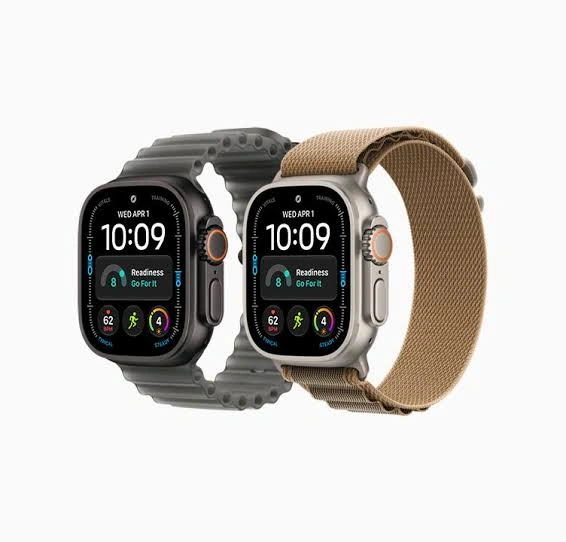
Apple Watch vs Amazfit smartwatch for seniors is a useful comparison if you want a watch that tracks health, shows notifications, and makes daily tasks easier. The two brands take different approaches to smartwatch design.
Apple Watch works especially well within the Apple ecosystem, while Amazfit offers a broad range of watches with strong health and fitness tracking and, on some models, much longer battery life. Apple currently offers models such as the Apple Watch Series 12 and SE 3, while Amazfit’s lineup includes models such as the Balance 2 and Active series.
Quick Comparison
For seniors who already use an iPhone, Apple Watch may be the simpler overall choice because of its close integration with iPhone and Apple’s wider ecosystem.
Amazfit may be more appealing for someone who values long battery life, broad fitness tracking, and fewer charging sessions. For example, Amazfit lists up to 21 days of battery life for the Balance 2.
The better option depends heavily on the senior’s phone, preferred features, and tolerance for frequent charging.

Apple Watch vs Amazfit At a Glance
The biggest differences are ecosystem support, battery life, health features, and the range of models available.
| Feature | Apple Watch | Amazfit |
|---|---|---|
| Phone ecosystem | Best with iPhone | Works with Android and iPhone |
| Ease of use | Strong with Apple devices | Simple for basic daily use |
| Battery | Usually requires more frequent charging | Often much longer |
| Health tracking | Extensive features | Extensive on supported models |
| Fitness tracking | Strong | Very broad on many models |
| Apps | Large Apple ecosystem | Zepp ecosystem |
| Senior value | Strong for iPhone users | Strong for battery-focused users |
Apple Watch Features for Senior Daily Use
Apple Watch has a strong advantage when the senior already owns an iPhone. Apple’s current lineup includes the Series 12, Ultra 4, and SE 3, with different feature and price levels.
Ease of Use
Apple Watch uses a touchscreen, side button, Digital Crown, notifications, and voice features. The combination can make common tasks easy once the user learns the controls.
The main issue is that Apple Watch can offer many features. A senior who only wants basic notifications, activity tracking, and timekeeping may not need all of them.
Key strengths
- Strong iPhone integration
- Clear touchscreen interface
- Voice interaction through Siri
- Calls and notifications on supported models
- Large selection of watch sizes and bands
- Strong accessibility options
Potential drawbacks
- Best experience requires an iPhone
- Many features can take time to learn
- Battery charging is more frequent than on many Amazfit models
- Some advanced features vary by model and region
Amazfit Smartwatch Features for Seniors
Amazfit offers a wide range of smartwatches, from simpler models to advanced devices such as the Balance 2. The current Balance 2 includes a 1.5-inch AMOLED display, sapphire glass, health monitoring, and up to 21 days of battery life under the company’s stated conditions.
Ease of Use
Amazfit watches are designed around the Zepp app and provide health, activity, sleep, and fitness information. Some models offer large displays that can make information easier to view.
For a senior who dislikes charging a watch every day or two, the longer battery life can be a practical benefit.
Key strengths
- Long battery life on many models
- Android and iPhone compatibility
- Wide range of health and fitness features
- AMOLED displays on many current models
- Strong selection of affordable options
Potential drawbacks
- Features vary considerably between models
- The Zepp ecosystem is different from Apple’s
- Some advanced features may be more useful to active users than casual users
- App and notification experiences may differ depending on the phone
Which Is Easier for Seniors to Use?
Ease of use depends less on age and more on the person’s phone, vision, dexterity, and preferred features.
An iPhone user may find Apple Watch easier because the devices are designed to work together. Apple also highlights the close relationship between Apple Watch and iPhone for notifications, calls, Maps, workouts, and other functions.
Amazfit can be easier for someone who wants fewer charging interruptions. Long battery life means less need to remove the watch and remember to charge it.
Simple rule: Choose the ecosystem that matches the phone the senior already uses.
Performance Comparison
Both brands offer strong tracking, but their strengths can feel different in everyday use.
| Performance Area | Apple Watch | Amazfit |
|---|---|---|
| Activity tracking | Strong | Strong |
| Health monitoring | Extensive | Extensive on supported models |
| Sleep tracking | Available | Available |
| Sports tracking | Strong | Very broad on many models |
| Battery endurance | Shorter | Often much longer |
| Smartphone integration | Excellent with iPhone | Cross-platform |
Amazfit’s Balance 2, for example, supports more than 180 sports modes and includes health monitoring for heart rate, sleep, blood oxygen, and stress.
Apple Watch focuses heavily on health, activity, safety, communication, and integration with the Apple ecosystem. The current Apple lineup also includes dedicated accessibility and health-oriented features that vary by model.
Comfort, Accessibility, and Senior-Friendly Design
A smartwatch should not become another device that is difficult to manage.
Apple offers different case sizes, including 42mm and 46mm options for the current Series 12 and smaller 40mm and 44mm sizes for the SE 3.
Amazfit also offers different watch sizes and designs across its lineup. The right choice depends on wrist size and whether the display is comfortable to read.
For seniors with limited dexterity, consider:
- How easy the buttons are to press
- Whether the touchscreen responds reliably
- How easy the watch is to charge
- Whether text is readable
- Whether notifications are easy to understand
- Whether the band is easy to fasten
Features Comparison
The two brands overlap in many areas, but their ecosystems are quite different.
| Feature | Apple Watch | Amazfit |
|---|---|---|
| Calls | Supported on compatible models | Model-dependent |
| Notifications | Strong iPhone integration | Supported through phone connection |
| Health tracking | Extensive | Extensive on supported models |
| Fitness modes | Strong | Very broad |
| Navigation | Strong Apple ecosystem integration | Available on selected models |
| App ecosystem | Apple Watch apps | Zepp ecosystem |
| Battery focus | More frequent charging | Long battery life on many models |
Apple’s current watches are closely integrated with iPhone, including functions such as calls, messages, Maps, music, and notifications.
Amazfit places more emphasis on long endurance and health and fitness tracking. The Balance 2, for example, advertises up to 21 days of battery life.
Price, Maintenance, and Long-Term Value
Price varies greatly because both brands sell several models.
Apple currently lists the Apple Watch SE 3 from $249 and the Series 12 from $399 in its U.S. store.
Amazfit has a wider range of price points. Its U.S. lineup includes the Balance 2 at $299.99, Active 2 from $99.99, and Bip 6 at $79.99.
This makes direct brand-level price comparisons difficult.
For long-term value, consider:
- Initial watch price
- Replacement bands
- Charging accessories
- Battery longevity
- Phone compatibility
- Available software features
- Whether a subscription is required for a desired feature
Who Should Choose Apple Watch?
Choose Apple Watch if:
- The senior already uses an iPhone.
- Easy integration with the phone matters.
- Calls and notifications are important.
- The user wants a mature smartwatch ecosystem.
- Health and safety features are important.
- Frequent charging is not a major concern.
Who Should Choose Amazfit?
Choose Amazfit if:
- Long battery life is a major priority.
- The senior uses Android or wants broader phone compatibility.
- Fitness and activity tracking are important.
- The user wants many features without focusing on Apple’s ecosystem.
- Fewer charging sessions would make daily use easier.
- A wider range of price points is useful.
Apple Watch vs Amazfit — Final Verdict
There is no single winner for every senior.
Best for iPhone users: Apple Watch
Best for long battery life: Amazfit
Best for Apple ecosystem integration: Apple Watch
Best for broad battery-focused value: Amazfit
The most important question is not simply which watch has more features. It is whether those features fit the senior’s phone, routine, and comfort level.
Scoring Summary
Because both brands have several models, a fixed numerical score can be misleading. A senior-focused comparison is more useful when the strengths are shown by use case.
| Category | Apple Watch | Amazfit |
|---|---|---|
| iPhone integration | Excellent | Good |
| Battery endurance | Moderate | Excellent on many models |
| Health tracking | Extensive | Extensive on supported models |
| Fitness tracking | Excellent | Excellent on many models |
| Ease for iPhone users | Excellent | Good |
| Model variety | Strong | Very strong |
| Value flexibility | Moderate to strong | Strong |
How We Evaluate Products
This comparison focuses on practical factors that matter during everyday senior use.
We consider:
- Ease of operation
- Phone compatibility
- Display and controls
- Comfort
- Health and fitness features
- Battery life
- Maintenance
- Long-term value
- Accessibility
- Everyday practicality
This is a specification-based comparison. It does not claim hands-on testing or personal ownership of either brand.
Senior-Specific Buying Considerations
Before choosing either watch, check these points.
Phone Compatibility
Start with the phone. Apple Watch is designed around Apple’s ecosystem, while Amazfit supports a broader range of phones.
Display
Look for a screen that is easy to read in normal lighting. A larger display may be helpful for some users.
Charging
Think about charging habits. A watch that lasts much longer between charges may be easier for someone who does not want to manage another daily charging routine.
Controls
Check whether the senior prefers a touchscreen, physical controls, voice commands, or a combination.
Health Features
Health-related features can vary by model and region. They should not be treated as a substitute for medical care or professional advice.
Common Buying Mistakes
Avoid these mistakes when choosing between Apple Watch and Amazfit:
- Buying an Apple Watch without checking iPhone compatibility
- Choosing a watch based only on the number of features
- Ignoring battery life
- Choosing a case that is uncomfortable on the wrist
- Assuming every Amazfit model has the same features
- Paying for advanced functions the senior will rarely use
Safety
Smartwatches contain batteries and electronic components, so use the manufacturer’s charging equipment and follow the instructions for the specific model.
Health readings from consumer smartwatches can be useful for tracking trends, but they should not automatically be treated as a medical diagnosis. If a health concern is significant, discuss it with an appropriate healthcare professional.
Conclusion
Apple Watch and Amazfit can both work well for seniors, but they suit different priorities. Apple Watch is particularly compelling for seniors who already use an iPhone and want strong integration between their devices.
Amazfit stands out when battery life, broad fitness tracking, and cross-platform compatibility matter more. The best choice is therefore the one that fits the senior’s phone, daily routine, preferred controls, and willingness to charge the watch regularly.