
Wyze vs Blink Security Camera for Seniors: Which?


Easy Grip Knife Set

Cane with LED Light

Memory Foam Seat Cushion
Wyze vs Blink security camera for seniors is a useful comparison when simple home monitoring, clear video, and easy phone access matter. Both brands offer cameras that can send motion alerts and provide live video through a smartphone app.
For this comparison, the focus is on Wyze Cam v4 and Blink Outdoor 4 as representative current models. The exact features can vary across cameras in each brand, so check the model before buying.
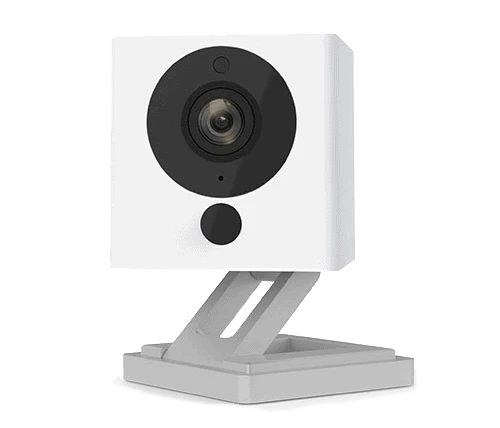
Quick Comparison
Wyze Cam v4 is the stronger fit for seniors who want higher-resolution video, local microSD recording, and more built-in features. It records at 2.5K and supports color night vision, two-way audio, a spotlight, and microSD storage.
Blink is appealing for seniors who prefer a simple battery-powered setup. Blink’s battery cameras offer flexible placement, while the Blink app handles live view and motion alerts.
The biggest difference is simple: Wyze puts more emphasis on image quality and local recording, while Blink emphasizes straightforward wireless placement and a simple security-camera system.
Wyze vs Blink At a Glance
The table below focuses on features that can make daily use easier for older adults.
| Feature | Wyze Cam v4 | Blink Outdoor 4 |
|---|---|---|
| Video | 2.5K QHD | 1080p |
| Night viewing | Color night vision | Night vision |
| Local storage | microSD | Sync Module/local storage |
| Two-way audio | Yes | Yes |
| Outdoor use | IP65 | Weather-resistant |
| App control | Wyze app | Blink app |
| Power | Plug-in | Battery-powered |
| Smart alerts | Available; more with plans | Person detection with eligible plan |
| Alexa support | Yes | Yes |
Wyze Cam v4’s official specifications list 2.5K resolution, color night vision, 99 dB siren, two-way audio, microSD support up to 256GB, Wi-Fi 6, and IP65 weather resistance. Blink supports 1080p video, night vision, motion alerts, live view, and two-way audio on Outdoor 4.
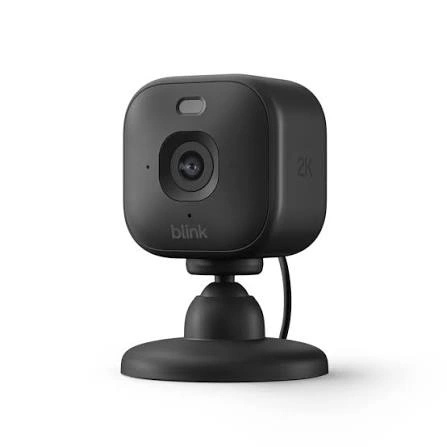
Wyze Cam v4 Is Feature-Rich for Senior Home Security
Wyze Cam v4 is a compact camera with a strong feature set. Its 2.5K resolution can provide more image detail than a 1080p camera, which can be useful when checking a doorway, room, or driveway.
Ease of Use
The Wyze app gives users access to live video, alerts, and camera settings. The camera also supports two-way audio, so a user can communicate through the camera.
One important advantage is local recording. Wyze says compatible cameras with microSD slots can record continuously or record motion events without a subscription.
Key Strengths
- 2.5K QHD video
- Color night vision
- Built-in spotlight
- Two-way audio
- microSD local recording
- Wi-Fi 6 support
- Indoor and outdoor use
- Alexa and Google Assistant support
Potential Drawbacks
- The plug-in design limits placement compared with battery cameras.
- More features can mean more settings to learn.
- Advanced AI features may require a paid Wyze plan.
- Local recordings require compatible microSD storage.
Wyze also states that its cameras can be used without a paid subscription for live streaming, motion detection, and other basic functions.
Blink Offers Simple Wireless Camera Placement
Blink is worth considering when a senior or caregiver wants a camera that can be placed without running a power cable to the camera location.
Ease of Use
Blink cameras can be viewed and managed through the Blink Home Monitor app. Blink supports live view, motion alerts, night vision, and two-way audio on compatible models.
The battery-powered design can be useful for locations where running a power cable would be inconvenient.
Key Strengths
- Wireless battery-powered options
- Simple smartphone monitoring
- Motion alerts
- Night vision
- Two-way audio on compatible models
- Alexa integration
- Local storage options on compatible cameras
Potential Drawbacks
- 1080p video on Outdoor 4 is less detailed than Wyze Cam v4’s 2.5K video.
- Some advanced features require a subscription.
- Local storage can require additional Blink hardware.
- Battery replacement is another maintenance task.
Blink Outdoor 4 supports local storage when connected to a compatible Sync Module, while cloud storage and premium features are available through Blink subscription plans.
Which Is Easier for Seniors to Use?
Both can work well, but the better choice depends on how the camera will be installed.
Wyze may be easier for seniors who:
- Want a camera that stays connected to power.
- Prefer local microSD recording.
- Want detailed video.
- Need color night vision.
- Want several smart-home features in one camera.
Blink may be easier for seniors who:
- Want flexible camera placement.
- Do not want to run a power cable.
- Prefer a simple battery-powered camera.
- Mainly need motion alerts and occasional live viewing.
A simple setup is often more useful than a camera packed with features that the user never needs.
Performance Comparison
Video quality is one of the clearest differences.
Wyze Cam v4 records at 2560 × 1440, or 2.5K QHD. It also has color night vision and a motion-activated spotlight.
Blink Outdoor 4 provides 1080p video, night vision, motion alerts, and live viewing.
| Performance Area | Wyze Cam v4 | Blink Outdoor 4 |
|---|---|---|
| Video detail | 2.5K | 1080p |
| Night viewing | Color night vision | Night vision |
| Alerts | Motion and smart options | Motion alerts |
| Two-way audio | Yes | Yes |
| Spotlight | Built-in | Depends on model/setup |
| Local recording | microSD | Compatible Sync Module |
For a senior checking a front door or driveway, the extra resolution from Wyze can be useful. For basic motion monitoring, Blink can still cover the main need.
Comfort, Accessibility, and Senior-Friendly Design
Security cameras do not require much physical effort once installed. The main accessibility issues are installation, app controls, power, and maintenance.
Wyze’s plug-in design can reduce battery-management tasks. However, the camera needs to be installed near a suitable power source.
Blink’s battery-powered design offers more placement freedom. That can be helpful when a camera needs to be installed away from a wall outlet. The trade-off is that batteries eventually need attention.
For a caregiver managing the system remotely, both brands offer smartphone-based monitoring.
Features Comparison
The most useful features are those that reduce the work needed to check the home.
| Feature | Wyze | Blink |
|---|---|---|
| Local recording | microSD on compatible cameras | Sync Module options on compatible cameras |
| Cloud storage | Available with Wyze plans | Available with Blink plans |
| Person detection | Available with supported services; on-device option on Cam v4 | Available on eligible models with subscription |
| Smart-home support | Alexa, Google Assistant | Alexa, IFTTT |
| Wi-Fi | Wi-Fi 6 on Cam v4 | Model-dependent |
| Continuous local recording | Supported on compatible Wyze cameras | Storage approach varies by model |
Wyze says nearly all of its current cameras have microSD storage, with the exact capacity depending on the model. Blink’s storage options vary by camera and Sync Module, so checking the exact model is important.
Price, Maintenance, and Long-Term Value
Camera prices change often, so the hardware price alone should not determine the choice.
Wyze currently lists Cam v4 at a relatively low hardware price on its U.S. site, while also offering optional paid services for cloud video and advanced AI features.
Blink can also require additional costs depending on the desired storage setup. Outdoor 4 supports local storage through compatible Sync Modules, while subscription plans add cloud storage and advanced features.
| Cost Factor | Wyze | Blink |
|---|---|---|
| Basic use | No paid plan required | Basic use available |
| Local storage | microSD | Compatible Sync Module |
| Cloud features | Optional plan | Optional plan |
| Battery replacement | Usually not needed for plug-in Cam v4 | Relevant for battery models |
| Long-term consideration | microSD and optional plan | Batteries, Sync Module, optional plan |
Who Should Choose Wyze?
Choose Wyze if:
- You want higher-resolution video.
- Color night vision matters.
- You want microSD local storage.
- You prefer a plug-in camera.
- You want more built-in features.
- You want the option to use basic camera functions without a paid plan.
Who Should Choose Blink?
Choose Blink if:
- Flexible placement matters most.
- You prefer a battery-powered camera.
- You want a straightforward security-camera system.
- You mainly need motion alerts and live viewing.
- You already use other Blink cameras.
- Alexa integration fits your smart-home setup.
Wyze vs Blink Security Camera — Final Verdict
For this comparison, Wyze Cam v4 is the better fit for seniors who value video detail, color night vision, and simple local microSD recording. Blink is a better match for users who prioritize flexible battery-powered placement and a straightforward monitoring setup.
There is no universal winner. A senior living in a home with convenient power outlets may appreciate Wyze’s feature set. Someone who needs a camera in a location without easy access to power may find Blink’s battery design more practical.
Scoring Summary
These scores are editorial assessments based on the documented features above, not laboratory test results.
| Category | Wyze Cam v4 | Blink Outdoor 4 |
|---|---|---|
| Ease of Use | 9/10 | 9/10 |
| Senior-Friendly Design | 9/10 | 9/10 |
| Video Performance | 9.5/10 | 8/10 |
| Maintenance | 9/10 | 8/10 |
| Storage Flexibility | 9.5/10 | 8.5/10 |
| Value | 9/10 | 8.5/10 |
How We Evaluate Products
This comparison focuses on practical factors that matter when a senior or caregiver uses a home security camera.
We consider:
- Ease of setup
- App usability
- Video quality
- Night viewing
- Alerts
- Storage
- Physical maintenance
- Power requirements
- Smart-home support
- Long-term value
No hands-on testing is claimed here. The comparison is based on current manufacturer information and documented product specifications.
Senior-Specific Buying Considerations
Before choosing either camera, check these points.
Setup
Make sure the camera can be installed in the desired location without creating a difficult cable or mounting problem.
Controls
The phone app should be comfortable for the person who will actually monitor the camera.
Maintenance
Consider whether changing batteries, checking storage, or managing subscriptions will be easy.
Storage
If you want recordings without depending on cloud storage, check the exact local-storage requirements before buying.
Alerts
Too many unnecessary alerts can become annoying. Look for detection features that help reduce unwanted notifications.
Common Buying Mistakes
Avoid these common mistakes:
- Choosing only by camera price.
- Forgetting the power requirement.
- Ignoring storage costs.
- Assuming every Wyze or Blink camera has the same features.
- Buying a subscription without checking what it adds.
- Installing the camera where Wi-Fi is unreliable.
Safety
A security camera itself has few physical risks, but installation still matters. Avoid placing cables where someone could trip over them.
For outdoor cameras, follow the manufacturer’s installation and weather-resistance instructions. Wyze Cam v4, for example, has an IP65 rating.
Also protect the camera account with a strong password and appropriate account-security settings.
Frequently Asked Questions
Is Wyze or Blink easier for seniors?
Both can be easy to use. Wyze may suit users who want more features and local storage, while Blink may suit users who value simple battery-powered placement.
Does Wyze require a subscription?
No. Wyze says its cameras can be used without a paid subscription for basic functions such as live streaming and motion detection. Paid services add cloud and AI features.
Does Blink require a subscription?
Not for every basic function, but subscription plans add cloud storage and premium features. Compatible Blink cameras can also use local storage with the required hardware.
Which has better video quality?
Wyze Cam v4 has the higher stated resolution at 2.5K, compared with 1080p for Blink Outdoor 4.
Which is better for outdoor use?
Both brands offer outdoor-capable cameras. The exact weather rating and power requirements depend on the model, so check the specific camera before installation.
Can caregivers monitor either camera remotely?
Yes. Both brands provide smartphone apps for viewing and managing compatible cameras.
Conclusion
Wyze and Blink can both work well for senior home security, but they take different approaches. Wyze Cam v4 stands out for higher-resolution video, color night vision, and microSD local recording. Blink is attractive when flexible battery-powered placement and simple monitoring are more important.
The most important choice is not simply the brand. Check the specific model, power setup, storage method, app features, and maintenance needs before buying. Those details will have the biggest effect on everyday use.
