
Schlage vs Kwikset Smart Lock for Seniors Guide


Smart Plug with Alexa

GPS Tracker for Elderly
Electric Heating Pad
Schlage vs Kwikset smart lock for seniors is a useful comparison for anyone looking for easier keyless entry and remote door control. Both brands offer smart locks with phone apps, access codes, and Wi-Fi options.
The better choice depends on the senior’s needs. Some users may prefer Schlage for its broad smart-home support and simple app control. Others may prefer Kwikset for features such as one-touch locking, re-keying options, and fingerprint access on selected models.
Quick Comparison
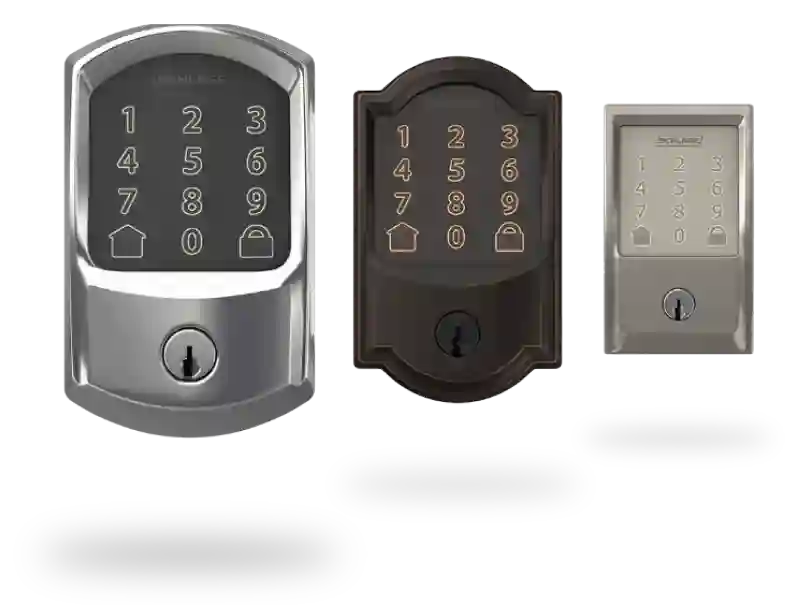
Schlage and Kwikset both offer several smart-lock models, so there is no single model-to-model comparison for every buyer. Schlage’s current range includes the Encode and Encode Plus Wi-Fi deadbolts, while Kwikset offers Halo keypad, touchscreen, and fingerprint models.
For seniors who want simple phone-based control, either brand can work well. The right choice depends more on the lock model, door compatibility, preferred unlocking method, and smart-home setup.
Schlage vs Kwikset At a Glance
The table below focuses on features that can make daily smart-lock use easier for older adults.
| Feature | Schlage | Kwikset |
|---|---|---|
| App control | Schlage Home app | Kwikset app |
| Wi-Fi options | Encode family | Halo family |
| Access codes | Yes | Yes |
| Remote control | Available on Wi-Fi models | Available on Halo Wi-Fi models |
| Fingerprint option | Limited by model | Halo Touch |
| Apple Home Key | Encode Plus | Model dependent |
| Voice control | Supported models | Supported models |
| Re-keying | Model dependent | Available on selected models |
| Keypad/touchscreen | Model dependent | Keypad and touchscreen options |
Schlage’s Encode family provides built-in Wi-Fi on supported models, while Kwikset’s Halo family connects through the home’s Wi-Fi network without requiring a separate smart-home hub.
Schlage Smart Locks for Senior-Friendly Use
Schlage has a broad smart-lock range, but the Encode family is especially relevant for a simple Wi-Fi setup. The Encode Smart WiFi Deadbolt can be controlled through the Schlage Home app without an additional Wi-Fi accessory.
Ease of Use
Schlage’s app lets users lock and unlock compatible locks remotely, create access codes, and monitor lock activity. This can be useful for seniors who want family members or caregivers to have access without handing over a physical key.
The keypad also gives users a way to enter a code instead of using a phone. For someone who does not want to depend on an app every time they enter the home, this can be helpful.
Key Strengths
- Built-in Wi-Fi on several current models
- Remote lock and unlock through the Schlage Home app
- Custom access codes
- Activity history on supported models
- Voice-assistant compatibility
- Apple Home Key support on Encode Plus
- Several trim and finish choices
The Encode Plus adds Apple Home Key support, allowing compatible iPhone and Apple Watch users to tap to unlock.
Potential Drawbacks
- The Schlage range includes several models with different features.
- Some advanced features depend on the specific model.
- Premium models can cost more than basic smart-lock options.
- Users who do not use smartphones may not benefit from all app features.
Kwikset Smart Locks for Senior-Friendly Use
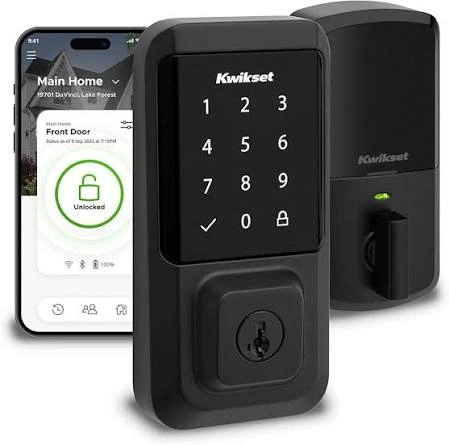
Kwikset’s Halo family focuses on convenient access through the Kwikset app, keypad or touchscreen entry, depending on the model. Halo Wi-Fi locks can be controlled remotely using an existing Wi-Fi connection and the Kwikset app.
Ease of Use
One useful Halo feature is one-touch locking on the keypad models. Kwikset also offers Auto Lock, which can automatically lock the deadbolt after a preset delay.
For seniors who sometimes forget to lock the door, an automatic locking option may reduce the need to remember this step.
Key Strengths
- Wi-Fi models do not require a separate smart-home hub
- Remote control through the Kwikset app
- Custom access codes
- Lock activity history
- One-touch locking on supported models
- Auto Lock
- Fingerprint access on Halo Touch
- Re-keying technology on selected models
Halo Touch is particularly different because it supports fingerprint access. A user can unlock the compatible lock with a registered fingerprint instead of entering a code or using a key.
Potential Drawbacks
- Features vary considerably between Halo models.
- Fingerprint access may not suit every user.
- App-based features depend on the user’s smartphone and network.
- Buyers need to check compatibility before choosing a specific model.
Which Is Easier for Seniors to Use?
Ease of use depends on the preferred unlocking method.
A senior who likes entering a simple code may find a keypad smart lock straightforward. Someone who frequently carries a smartphone may prefer app control. A user who dislikes remembering codes may appreciate fingerprint access on a compatible Kwikset Halo Touch.
Schlage also offers Apple Home Key on Encode Plus. For an Apple user who is comfortable with an iPhone or Apple Watch, tapping the device can be a convenient way to unlock the door.
The simplest smart lock is often the one that matches the user’s preferred way of entering the home.
For seniors with limited hand strength or dexterity, avoid choosing based only on the brand name. Check the physical keypad, thumb turn, handle, and installation requirements for the exact model.
Performance Comparison
Smart-lock performance is less about motor speed and more about dependable everyday access.
Schlage’s Encode models provide remote control through built-in Wi-Fi, while Kwikset Halo provides similar remote management through the Kwikset app and home Wi-Fi.
Both brands also offer access codes, which can be useful for caregivers, family members, cleaners, or other trusted visitors.
Kwikset has an additional option for users who prefer biometric access. Halo Touch uses fingerprint recognition for locking and unlocking.
Schlage has an advantage for Apple users who specifically want Home Key, because Encode Plus supports unlocking with compatible iPhone and Apple Watch devices.
Comfort, Accessibility, and Senior-Friendly Design
Smart locks can reduce the need to carry and insert a traditional key. That can make daily entry simpler for some older adults.
The main question is how the person prefers to operate the lock.
| Senior Need | Schlage | Kwikset |
|---|---|---|
| Phone control | Available | Available |
| Keypad entry | Available on many models | Available |
| Fingerprint entry | Model dependent | Halo Touch |
| Apple Watch/iPhone entry | Encode Plus | Model dependent |
| Automatic locking | Model dependent | Halo supports Auto Lock |
| Remote caregiver access | Available on supported models | Available on Halo |
Neither brand should be considered automatically easier for every senior. Physical comfort, technology experience, hand dexterity, and preferred access method all matter.
Features Comparison
The most meaningful differences are found in the access methods and smart-home features.
| Feature | Schlage | Kwikset |
|---|---|---|
| Remote app control | Yes, supported models | Yes, Halo models |
| Access codes | Yes | Yes |
| Activity history | Supported models | Halo |
| Fingerprint access | Limited/model dependent | Halo Touch |
| Apple Home Key | Encode Plus | Model dependent |
| Built-in Wi-Fi | Encode family | Halo family |
| Voice control | Supported models | Supported models |
Schlage supports major smart-home integrations, including Amazon Alexa and Google Home on compatible models. Kwikset’s Halo range also supports smart-home and voice-assistant features on compatible products.
Price, Maintenance, and Long-Term Value
Price varies by model, trim, and features. Current Schlage listings show the Encode at a lower MSRP than Encode Plus, while more advanced Schlage models cost more.
Kwikset also has several Halo models, so comparing only brand-level prices can be misleading.
For long-term value, consider:
- Battery replacement
- Wi-Fi reliability
- App support
- Replacement keys
- Re-keying needs
- Warranty coverage
- Smart-home compatibility
- Whether advanced features will actually be used
Kwikset’s Halo line includes a patented re-keying system on supported models, which may be useful when a homeowner wants to change the key without replacing the entire lock.
Who Should Choose Schlage?
Choose Schlage if:
- You want a strong selection of Wi-Fi smart locks.
- You already use Apple devices and want Home Key on a compatible model.
- You want Google Home or Alexa compatibility on a supported lock.
- You want remote access through the Schlage Home app.
- You prefer traditional keypad entry.
- You want several design and trim options.
Who Should Choose Kwikset?
Choose Kwikset if:
- You want a Halo Wi-Fi lock without a separate hub.
- You prefer keypad or touchscreen choices.
- Fingerprint access is important to you.
- You like the idea of Auto Lock.
- Re-keying is useful for your household.
- You want remote access and custom codes through the Kwikset app.
Schlage vs Kwikset — Final Verdict
Best for Apple Home Key: Schlage Encode Plus
Best for fingerprint access: Kwikset Halo Touch
Best for simple Wi-Fi control: Both have suitable options
Best for keypad-based entry: Depends on the specific model and the user’s preferred controls
There is no single winner for every senior. Schlage is especially interesting for Apple users and households that want broad smart-home integration. Kwikset is especially useful for users who value features such as fingerprint entry, Auto Lock, and re-keying on compatible models.
Scoring Summary
Scores can make a comparison look more precise than the evidence allows. Because both brands have multiple models, a single brand-wide score would hide important differences.
Instead, use this practical comparison:
| Category | Schlage | Kwikset |
|---|---|---|
| Ease of use | Strong, model dependent | Strong, model dependent |
| Senior-friendly access | Keypad, app, Home Key on selected models | Keypad, app, fingerprint on selected models |
| Smart-home features | Broad support on compatible models | Available on compatible models |
| Maintenance | Battery-based, model dependent | Battery-based, model dependent |
| Value | Depends on model | Depends on model |
How We Evaluate Products
This comparison focuses on practical factors that matter when a senior uses a smart lock every day.
We consider:
- Ease of operation
- Access methods
- Setup
- App usability
- Physical controls
- Smart-home compatibility
- Maintenance
- Security-related features
- Caregiver access
- Long-term practicality
The comparison does not assume hands-on testing. Product features can also change between models and generations.
Senior-Specific Buying Considerations
Physical Effort
Check whether the user can comfortably operate the keypad, thumb turn, or interior lock mechanism.
Controls
Choose an access method that feels familiar. A simple keypad may be better for one person, while another may prefer a phone or fingerprint.
Maintenance
Smart locks use batteries, so make sure the user or a caregiver can replace them when needed.
Setup
Check the existing door before buying. Door thickness, bore dimensions, and existing hardware can affect compatibility.
Safety
A smart lock should not replace basic door safety practices. Keep backup entry options in mind, and pay attention to low-battery warnings.
Common Buying Mistakes
- Choosing the brand instead of the exact model
- Ignoring door compatibility
- Buying advanced features that will never be used
- Forgetting about battery replacement
- Assuming every model supports the same smart-home systems
- Choosing fingerprint access without considering whether it suits the user
Safety
Smart locks are electronic devices, so proper installation matters. Follow the manufacturer’s installation instructions and check that the deadbolt moves freely after installation.
Schlage’s Encode installation documentation describes battery operation and installation using a screwdriver, while Kwikset provides model-specific support resources for its Halo products.
If the lock does not operate smoothly after installation, resolve the mechanical issue before relying on it for everyday entry.
Conclusion
Schlage and Kwikset both offer useful smart-lock choices for seniors, but their strengths differ by model. Schlage stands out for options such as Apple Home Key and broad smart-home integration, while Kwikset offers useful alternatives such as fingerprint access, Auto Lock, and re-keying on selected models.
The best choice is the one that matches the user’s preferred access method, physical comfort, smartphone habits, and door setup. For a senior, simple daily operation is often more important than having the longest list of smart features.
