
Kindle vs NOOK E-Reader for Seniors: Which?


Adjustable Walker with Wheels
Robot Vacuum Cleaner
Audiobook Player
Kindle vs NOOK e-reader for seniors is a useful comparison if simple reading, clear text, and easy controls matter. Both offer glare-free screens, built-in lighting, and long battery life.
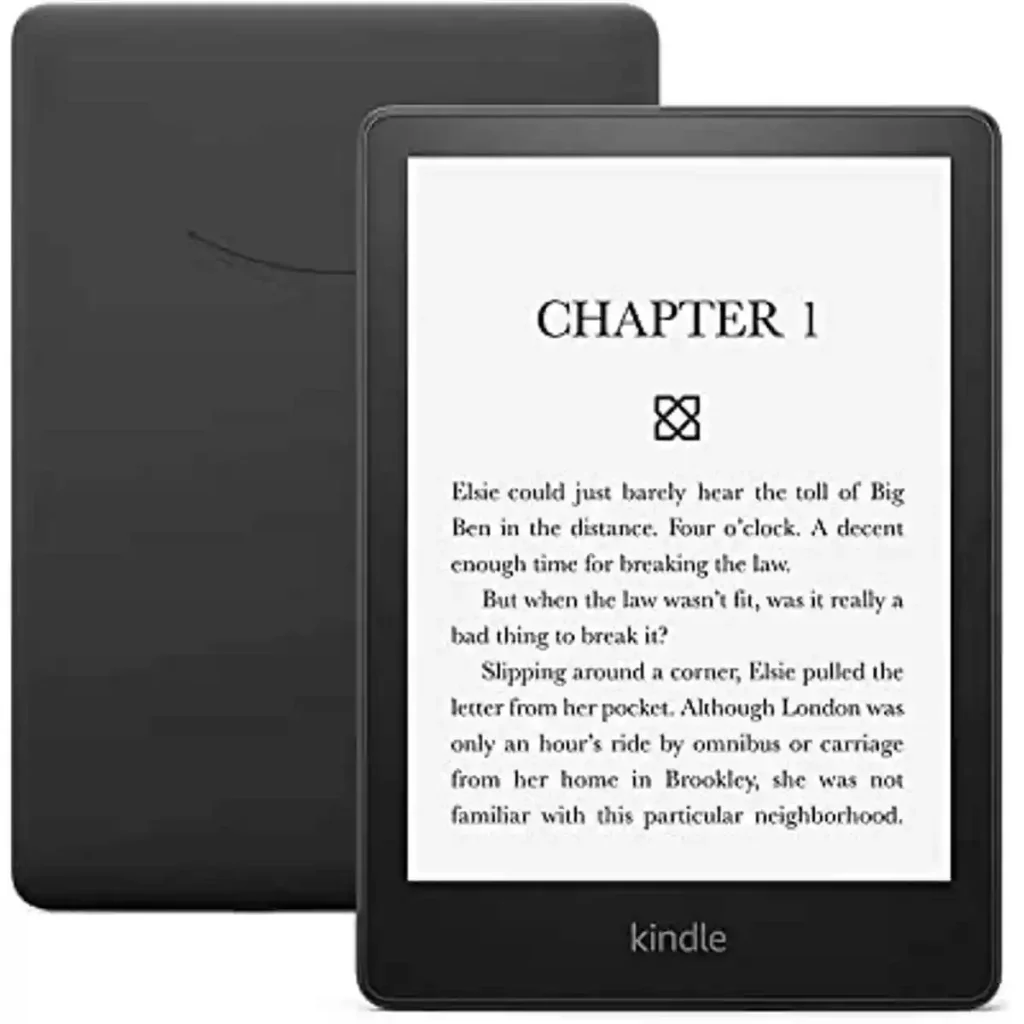
The biggest difference is the reading experience. The Kindle Paperwhite has a larger 7-inch screen, waterproof design, and up to 12 weeks of battery life. The NOOK GlowLight 4 is smaller and lighter, but it adds physical page-turn buttons.
Quick Comparison
For most seniors, the Kindle Paperwhite offers a more complete reading package. Its larger screen, warm light, waterproof build, and long battery life are useful for everyday reading.
The NOOK GlowLight 4 can be a better fit for someone who prefers physical page-turn buttons and a smaller, lighter reader.
The best choice depends less on brand and more on how the reader likes to hold, control, and use the device.

Kindle vs NOOK At a Glance
Here is the basic difference between the two current e-readers used for this comparison.
| Feature | Kindle Paperwhite | NOOK GlowLight 4 |
|---|---|---|
| Screen | 7-inch | 6-inch |
| Resolution | 300 ppi | 300 ppi |
| Storage | 16GB | 32GB |
| Page controls | Touchscreen | Touchscreen + physical buttons |
| Warm light | Yes | Night Mode |
| Waterproof | Yes, IPX8 | No |
| Battery | Up to 12 weeks | About one month under B&N test conditions |
| Weight | About 211g | 170g |
| Charging | USB-C | USB-C |
Amazon lists the current Paperwhite with 16GB storage, adjustable warm light, waterproofing, and up to 12 weeks of battery life. Barnes & Noble lists the GlowLight 4 with 32GB storage, physical page buttons, and a six-ounce weight.
Kindle Paperwhite Is Made for Longer Reading
The Kindle Paperwhite is a strong option for seniors who want a larger reading area and fewer charging worries.
Its 7-inch, 300-ppi display is designed for sharp text. The warm light can also change the screen tone for reading at night. Amazon says the current Paperwhite can last up to 12 weeks on one charge under its test conditions.
Ease of Use
The Paperwhite uses a touchscreen for navigation and page turns. There are no physical page-turn buttons.
That can make the design clean and simple. However, readers who prefer a button they can press may find the NOOK easier.
The Paperwhite also supports VoiceView through Bluetooth, which can be useful for some users who benefit from screen-reading features.
Key Strengths
- Larger 7-inch reading area
- Sharp 300-ppi display
- Adjustable warm light
- Waterproof design
- Up to 12 weeks of battery life
- 16GB storage
- USB-C charging
- VoiceView support
Potential Drawbacks
- No physical page-turn buttons
- Larger than the GlowLight 4
- May cost more depending on current pricing
NOOK GlowLight 4 Keeps Things Simple
The NOOK GlowLight 4 takes a different approach. It has a smaller 6-inch screen but includes physical page-turn buttons on the sides.
That button design may appeal to seniors who do not enjoy tapping the screen for every page. The device also weighs 170g, making it lighter than the Paperwhite.
Ease of Use
The GlowLight 4 supports both touchscreen navigation and physical page-turning buttons.
This is one of its clearest advantages for accessibility. A user can keep a finger on a physical button and turn pages without swiping across the screen.
Barnes & Noble also provides Night Mode, GlowLight illumination, and a glare-free screen for different reading conditions.
Key Strengths
- Physical page-turn buttons
- Lightweight 170g design
- 32GB storage
- 6-inch 300-ppi display
- Built-in GlowLight
- Night Mode
- USB-C charging
- Access to the NOOK book ecosystem
Potential Drawbacks
- Smaller display
- Not waterproof
- Battery life is shorter than the Paperwhite’s advertised maximum
- NOOK device availability may be more limited depending on location
Which Is Easier for Seniors to Use?
Both devices are fairly simple, but they suit different preferences.
The NOOK GlowLight 4 has an advantage for readers who want physical buttons. The buttons can be easier to use for someone who dislikes repeated touchscreen gestures or wants a clear physical control.
The Kindle Paperwhite may feel simpler for readers who prefer a clean touchscreen interface. Its larger screen can also provide more space for text.
For readers who want to change font size, both platforms provide adjustable reading options. The important question is which control method feels more natural.
Performance Comparison
For basic reading, both devices provide sharp text and built-in lighting.
The Paperwhite has a 7-inch, 300-ppi display and Amazon says its latest Paperwhite has 25% faster page turns than the previous generation. It also has a waterproof design and up to 12 weeks of battery life.
The GlowLight 4 has a 6-inch 300-ppi display and 32GB of storage. Barnes & Noble says its battery can last for about a month under specified testing conditions.
| Performance Area | Kindle Paperwhite | NOOK GlowLight 4 |
|---|---|---|
| Text clarity | 300 ppi | 300 ppi |
| Screen size | 7 inches | 6 inches |
| Page controls | Touch | Touch + buttons |
| Battery claim | Up to 12 weeks | About one month |
| Waterproofing | Yes | No |
The Paperwhite has the edge for battery life and outdoor or water-related use. The NOOK has the advantage in storage capacity and physical page controls.
Comfort, Accessibility, and Senior-Friendly Design
Comfort depends on how a person reads.
The NOOK GlowLight 4 weighs 170g, so it may be easier to hold for long periods for readers who prefer a lighter device.
The Paperwhite is heavier, but its 7-inch screen gives more reading space. That can be useful for someone who prefers larger text without making the device physically much larger.
The Paperwhite also offers an adjustable warm light and VoiceView support.
Features Comparison
The two readers focus on different strengths.
| Feature | Kindle Paperwhite | NOOK GlowLight 4 |
|---|---|---|
| Warm/night reading | Adjustable warm light | Night Mode |
| Physical buttons | No | Yes |
| Storage | 16GB | 32GB |
| Waterproof | Yes | No |
| Screen | 7-inch | 6-inch |
| Weight | About 211g | 170g |
The NOOK’s 32GB storage is generous for an e-reader. The Kindle’s 16GB is still enough for a large personal library.
Price, Maintenance, and Long-Term Value
Current prices can change with promotions, bundles, and region. At the time of checking, Barnes & Noble listed the NOOK GlowLight 4 at $149.99. Amazon’s current Paperwhite has also appeared around the $159.99 list-price level, although temporary discounts can change the actual purchase price.
For long-term value, look beyond the device price.
Consider:
- The price of the device
- E-book prices
- Available book selection
- Accessories
- Replacement or repair options
- Battery aging
- Warranty or protection plans
- Whether your existing library works with the platform
Barnes & Noble also offers an optional NOOK Protect plan for the GlowLight 4.
Who Should Choose Kindle Paperwhite?
Choose the Kindle Paperwhite if:
- You want a larger 7-inch screen.
- Long battery life matters.
- You want a waterproof e-reader.
- You prefer touchscreen controls.
- You want an adjustable warm light.
- You want VoiceView support.
- You already use Amazon’s Kindle ecosystem.
Who Should Choose NOOK GlowLight 4?
Choose the NOOK GlowLight 4 if:
- You want physical page-turn buttons.
- A lightweight reader matters.
- You want 32GB of storage.
- You prefer a compact 6-inch reader.
- You already buy books through Barnes & Noble.
- You like having both touchscreen and button controls.
Kindle vs NOOK — Final Verdict
For most seniors who want a larger screen, long battery life, waterproofing, and a modern reading experience, the Kindle Paperwhite is the more complete option. Its 7-inch display and up to 12-week battery claim are especially useful for frequent readers.
The NOOK GlowLight 4 makes more sense for seniors who value a lightweight design and physical page-turn buttons. Those controls are a meaningful difference, not just a small extra feature.
| Category | Kindle Paperwhite | NOOK GlowLight 4 |
|---|---|---|
| Ease of use | Excellent | Excellent |
| Senior-friendly design | Excellent | Excellent |
| Performance | Excellent | Good |
| Maintenance | Low | Low |
| Value | Strong | Strong |
These are editorial comparisons based on published specifications and product features, not hands-on test scores.
How We Evaluate These E-Readers
We focus on features that can affect everyday senior use.
Key areas include:
- Screen readability
- Weight
- Controls
- Lighting
- Battery life
- Storage
- Waterproofing
- Setup
- Accessibility
- Long-term practicality
- Price and value
This comparison does not claim laboratory testing or personal hands-on testing.
Senior-Specific Buying Considerations
Before choosing an e-reader, think about how it will actually be used.
Physical Comfort
Check the weight if the reader will be held for long periods. A lighter device may be easier for some readers.
Controls
Decide whether touchscreen controls or physical buttons feel more natural.
Screen Size
A larger screen may make reading more comfortable when using larger fonts.
Lighting
Look for adjustable front lighting and night-reading options if the device will be used in different rooms or at bedtime.
Battery
A long battery can reduce the need for frequent charging.
Book Access
Check the store and library options before buying. Your preferred books and services may influence the decision more than hardware.
Common Buying Mistakes
Avoid these mistakes when choosing between Kindle and NOOK:
- Choosing only by storage size
- Ignoring physical buttons
- Forgetting screen size
- Looking only at the sale price
- Ignoring the available book ecosystem
- Assuming every Kindle or NOOK model has the same features
Safety
There are few major physical safety concerns with either dedicated e-reader.
Still, use the supplied charging equipment correctly and keep charging ports dry. If using an e-reader around water, remember that waterproof ratings apply only to models specifically designed and rated for that use.
The Paperwhite is listed as IPX8 waterproof by Amazon. The NOOK GlowLight 4 is not listed as waterproof on Barnes & Noble’s comparison page.
Conclusion
Kindle vs NOOK e-reader for seniors comes down to a few important differences. The Kindle Paperwhite offers a larger screen, longer advertised battery life, waterproofing, and warm lighting. The NOOK GlowLight 4 is lighter, has more storage, and provides physical page-turn buttons.
For a senior who wants a larger, feature-rich reader, the Paperwhite is the stronger fit. For someone who values light weight and physical buttons, the GlowLight 4 deserves serious consideration.