
Google TV vs NVIDIA Shield Streaming Device for Seniors: Which?

Electric Mobility Scooter

Memory Foam Seat Cushion

Lightweight Vacuum Cleaner
Google TV vs NVIDIA Shield streaming device for seniors is mainly a choice between simple everyday streaming and a more powerful media setup. For this comparison, Google TV means the current Google TV Streamer (4K), while NVIDIA Shield means the NVIDIA SHIELD TV Pro, since the names otherwise cover different products.
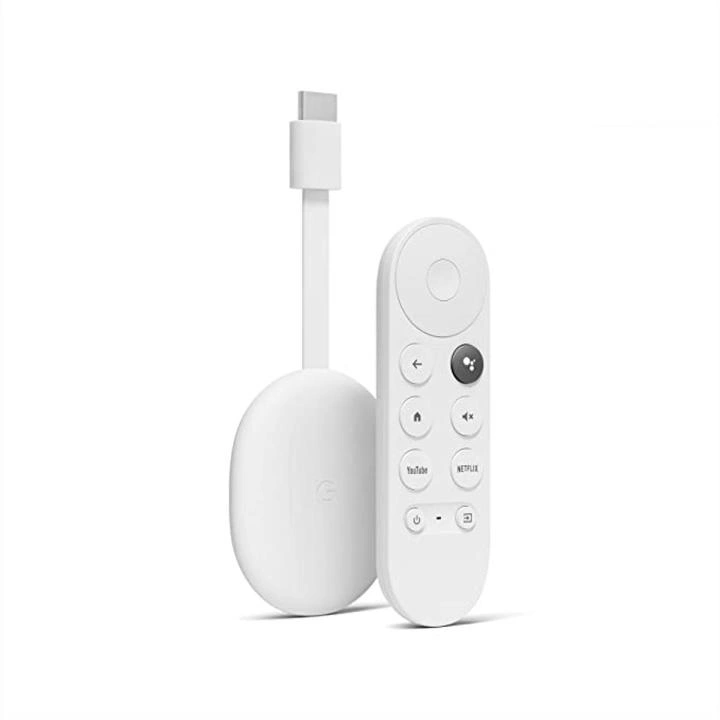
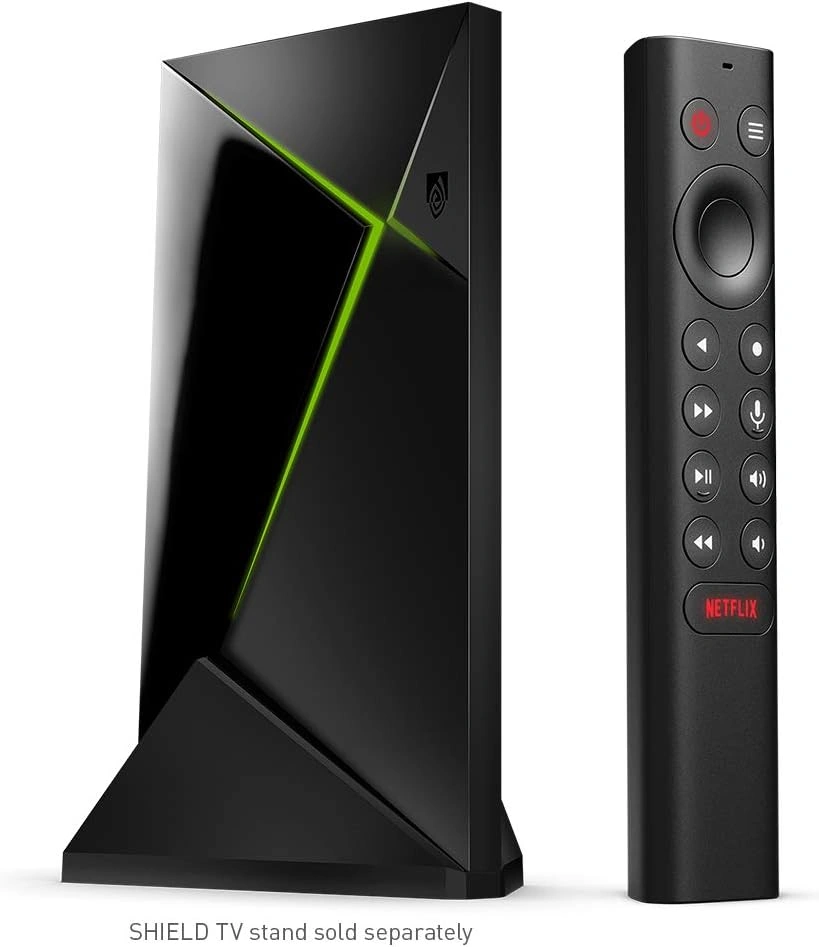
Both support 4K streaming, Dolby Vision, Dolby Atmos, voice control, and a wide range of streaming apps. The bigger difference is focus. Google TV Streamer puts more attention on simple navigation, Google Home features, and a large 32GB storage capacity. SHIELD TV Pro adds stronger media features, AI upscaling, USB expansion, and gaming support.
Quick Comparison
For many seniors who mainly want Netflix, YouTube, Prime Video, and other streaming services, Google TV Streamer is the simpler choice. Its remote has a customizable button and a Find My Remote feature, which can be useful in everyday use.
SHIELD TV Pro is more suitable for seniors who want advanced home-theater features, local media, expandable storage, or cloud gaming. Its remote has backlit buttons, voice control, an IR blaster, and a remote locator.
The important question is not simply which device is more powerful. It is which features the senior will actually use.
Google TV vs NVIDIA Shield At a Glance
Here is the basic difference between the current Google TV Streamer and SHIELD TV Pro.
| Feature | Google TV Streamer | NVIDIA SHIELD TV Pro |
|---|---|---|
| Resolution | Up to 4K HDR at 60 FPS | Up to 4K HDR at 60 FPS |
| Storage | 32GB | 16GB, expandable by USB |
| Memory | 4GB | 3GB |
| Dolby Vision | Yes | Yes |
| Dolby Atmos | Yes | Yes |
| Ethernet | Gigabit | Gigabit |
| Voice control | Google Assistant | Google Assistant, Alexa compatible |
| Remote finder | Yes | Yes |
| AI upscaling | Not listed as a core feature | Yes |
| USB ports | No USB-A storage ports | 2 USB 3.0 |
| Gaming | Google TV apps/games | GeForce NOW and Android gaming |
Specifications are based on current manufacturer information.
Google TV Streamer Is Simple for Daily Streaming
The Google TV Streamer is built around everyday entertainment. It supports up to 4K HDR at 60 FPS, Dolby Vision, HDR10+, HLG, and Dolby Atmos. It also has 4GB of memory and 32GB of storage.
Ease of Use
Google TV offers a straightforward TV interface with recommendations and access to streaming services in one place. Google also provides accessibility options such as TalkBack, closed captions, high-contrast text, and Switch Access.
The Voice Remote can also search across supported apps using voice commands. A customizable button can be configured for tasks such as launching an app or opening the smart-home panel.
Key Strengths
- Simple streaming-focused experience
- 32GB of storage
- 4K HDR with Dolby Vision
- Dolby Atmos support
- Built-in Gigabit Ethernet
- Customizable remote button
- Find My Remote feature
- Google Home and Matter integration
- Useful accessibility settings
Potential Drawbacks
- HDMI cable is sold separately
- Advanced users may want more connectivity
- No USB-A ports for external storage
- Some Google TV features depend on compatible apps, accounts, or regions
The HDMI cable requirement and included accessories are listed by Google.
NVIDIA SHIELD TV Pro Offers More Advanced Features
The SHIELD TV Pro is aimed at users who want more than basic streaming. It uses an NVIDIA Tegra X1+ processor with 3GB of RAM and includes 16GB of storage, with expansion available through USB storage.
Ease of Use
The SHIELD remote has motion-activated backlit buttons. It also includes a microphone for voice search, an IR blaster for controlling compatible TVs and audio equipment, and a remote locator.
SHIELD runs on Android TV and supports accessibility features such as TalkBack and closed captions. Android TV also supports font-size changes and high-contrast text, although available features can vary by device and Android version.
Key Strengths
- Strong 4K HDR support
- Dolby Vision and Dolby Atmos
- AI-enhanced upscaling
- Gigabit Ethernet
- Two USB 3.0 ports
- Expandable storage
- Backlit remote buttons
- IR control
- GeForce NOW cloud gaming
- Plex Media Server support on the Pro model
Potential Drawbacks
- More advanced features may be unnecessary for basic streaming
- 16GB internal storage is smaller than Google TV Streamer’s 32GB
- More connections and settings can add complexity
- Its strengths are more useful to enthusiasts than someone who only watches streaming apps
NVIDIA lists AI upscaling, USB expansion, Plex Media Server, and GeForce NOW among SHIELD TV Pro’s capabilities.
Which Is Easier for Seniors to Use?
For a senior who mainly wants to sit down and watch streaming services, Google TV Streamer has a simpler feature set to live with.
The remote’s customizable button can provide a direct shortcut to an often-used function or app. The Find My Remote feature can also make a misplaced remote easier to locate.
SHIELD TV Pro has a very useful remote too. Its backlit buttons may help in a dark room, while the IR blaster can reduce the need to juggle multiple remotes.
For seniors who already use Google services, Google TV may also feel familiar.
Performance Comparison
Both devices support 4K HDR streaming and Dolby Vision. Google TV Streamer supports up to 4K HDR at 60 FPS and includes 4GB of memory.
SHIELD TV Pro supports up to 4K HDR playback at 60 FPS and adds AI-enhanced upscaling. NVIDIA says this feature can improve lower-resolution video for compatible 4K displays.
| Performance Area | Google TV Streamer | SHIELD TV Pro |
|---|---|---|
| 4K streaming | Excellent | Excellent |
| Dolby Vision | Yes | Yes |
| Dolby Atmos | Yes | Yes |
| AI upscaling | — | Yes |
| Local media flexibility | Good | Strong |
| Gaming features | Basic TV gaming | GeForce NOW + Android gaming |
If the senior simply watches modern streaming services, the extra SHIELD performance may not make much practical difference.
Comfort, Accessibility, and Senior-Friendly Design
Accessibility matters because different seniors have different needs.
Google TV supports TalkBack, captions, high-contrast text, and Switch Access. The Google TV Streamer can also be controlled by voice through its remote or compatible Google smart-home devices.
Android TV, which powers SHIELD, supports TalkBack, captions, audio descriptions, font-size settings, and high-contrast text.
For a senior who has difficulty seeing small buttons, the SHIELD remote’s motion-activated backlighting may be useful. For someone who often misplaces the remote, both systems offer a way to locate it.
Features Comparison
The main difference is the type of features each device emphasizes.
| Feature | Google TV Streamer | SHIELD TV Pro |
|---|---|---|
| Storage | 32GB | 16GB + USB expansion |
| Remote | Voice remote | Backlit voice remote |
| Remote finder | Yes | Yes |
| Smart home | Matter + Google Home | Google Assistant compatible |
| AI upscaling | — | Yes |
| USB storage | — | 2 USB 3.0 ports |
| Gaming | Google TV apps | GeForce NOW |
| Plex Media Server | — | Yes |
Google lists Matter and Thread support on the Google TV Streamer, while NVIDIA lists USB expansion and Plex Media Server support for SHIELD TV Pro.
Price, Maintenance, and Long-Term Value
Google lists the Google TV Streamer at $99.99 on its U.S. product pages currently surfaced in search, although prices can vary by market and change over time.
NVIDIA currently lists SHIELD TV at $149.99 and SHIELD TV Pro at $199.99 on its U.S. site. Since this comparison uses SHIELD TV Pro, its listed price is the relevant figure here.
| Cost Factor | Google TV Streamer | SHIELD TV Pro |
|---|---|---|
| Device cost | Lower on current U.S. listings | Higher |
| Internal storage | 32GB | 16GB |
| External storage | Limited | USB expansion |
| Subscription | Depends on streaming services | Depends on streaming services |
| Maintenance | Low | Low, but more advanced options |
For a basic streaming setup, paying more for SHIELD may not provide much extra value. For a senior who will use its advanced media and gaming features, the additional capability may matter more.
Who Should Choose Google TV Streamer?
Choose Google TV Streamer if:
- The main goal is simple streaming.
- The user wants a straightforward TV experience.
- 32GB of internal storage is useful.
- The household already uses Google Home.
- Finding a lost remote is important.
- Smart-home control is useful.
- Accessibility features such as TalkBack or high-contrast text matter.
Who Should Choose NVIDIA SHIELD TV Pro?
Choose SHIELD TV Pro if:
- Picture enhancement is important.
- The user has a large 4K home-theater setup.
- AI upscaling is useful.
- External USB storage is needed.
- The user has a large local media collection.
- Plex Media Server is useful.
- Gaming is an important part of the setup.
- Backlit remote buttons would help in a dark room.
Google TV vs NVIDIA Shield — Final Verdict
Best for simple everyday streaming: Google TV Streamer
Best for advanced media features: NVIDIA SHIELD TV Pro
Best for remote-finding convenience: Google TV Streamer
Best for expandable storage: NVIDIA SHIELD TV Pro
Best for AI upscaling: NVIDIA SHIELD TV Pro
Best for Google smart-home integration: Google TV Streamer
There is no need to choose the more powerful device if those extra features will not be used. For many seniors, the easier-to-understand streaming experience is more important than having every advanced media feature.
Scoring Summary
The scores below are editorial estimates based on the documented features above, not laboratory test results.
| Category | Google TV Streamer | SHIELD TV Pro |
|---|---|---|
| Ease of Use | 9/10 | 8/10 |
| Senior-Friendly Design | 9/10 | 8/10 |
| Streaming Performance | 9/10 | 9/10 |
| Advanced Features | 8/10 | 10/10 |
| Storage Flexibility | 8/10 | 10/10 |
| Value for Basic Streaming | 9/10 | 7/10 |
These scores are meant to summarize the comparison criteria, not replace the individual needs of the user.
How We Evaluate Products
We focus on features that can affect everyday use by older adults.
Our comparison considers:
- Ease of setup
- Remote controls
- Accessibility
- Voice control
- Streaming performance
- Picture and sound features
- Storage
- Connectivity
- Maintenance
- Long-term practicality
- Price and value
We do not claim hands-on testing or laboratory testing. The comparison is based on current manufacturer information and official support documentation.
Senior-Specific Buying Considerations
Physical Effort
Both are small streaming boxes. Physical handling should not be a major concern, but the remote matters more during daily use.
Controls
Look for a remote that feels easy to understand. Backlit buttons may help some users, while a customizable shortcut may be more useful to others.
Accessibility
Check TalkBack, captions, text settings, and other accessibility options before choosing. Google TV and Android TV both provide several accessibility tools.
Setup
Google TV Streamer requires an HDMI connection and either Wi-Fi or Ethernet. Google also supports phone-based setup on supported devices.
Storage
If the user installs many apps or keeps a local media collection, storage becomes more important. Google offers 32GB internally, while SHIELD TV Pro offers 16GB with USB expansion.
Common Buying Mistakes
Avoid these mistakes when choosing between the two:
- Paying for advanced features that will never be used
- Ignoring remote-button design
- Forgetting about accessibility settings
- Assuming every 4K device offers the same picture processing
- Overlooking storage needs
- Forgetting that the Google TV Streamer requires an HDMI cable sold separately
- Choosing based only on processor performance
Safety
These devices do not have major physical hazards during normal use. Still, keep power cables organized and avoid placing the device where ventilation can be blocked.
For older adults who may have difficulty managing cables, a clean setup can also reduce unnecessary clutter around the TV.
Frequently Asked Questions
Is Google TV easier for seniors than NVIDIA Shield?
For basic streaming, Google TV Streamer may be easier because its feature set is more focused on everyday entertainment and Google services.
Does NVIDIA Shield have better picture quality?
SHIELD TV Pro has a notable advantage in AI-enhanced upscaling. Both support 4K HDR and Dolby Vision, so the difference depends partly on the source video and TV.
Can both devices use voice control?
Yes. Google TV Streamer supports voice commands through its Voice Remote and compatible Google devices. SHIELD TV Pro also has built-in voice control and Google Assistant support.
Which has more storage?
Google TV Streamer has 32GB of internal storage. SHIELD TV Pro has 16GB but supports USB expansion.
Which is better for gaming?
SHIELD TV Pro is the more gaming-focused option because NVIDIA supports GeForce NOW and Android gaming on the device.
Can I find a lost remote?
Yes. Google TV Streamer has Find My Remote, and SHIELD TV Pro’s remote also includes a remote locator.
Conclusion
Google TV Streamer and NVIDIA SHIELD TV Pro can both provide a strong 4K streaming experience. The main difference is their focus. Google TV Streamer emphasizes simple streaming, Google smart-home integration, accessibility, and convenient remote features. SHIELD TV Pro adds AI upscaling, USB expansion, advanced media capabilities, and gaming features.
For a senior who mainly wants easy access to movies and TV shows, Google TV Streamer is the more straightforward fit. For someone who enjoys home-theater features, local media, or gaming, SHIELD TV Pro offers more tools to explore.