
Glucose Meter vs CGM: Which Fits Seniors Best?

Medical Alert System

Slow Cooker Crock Pot

Hands-Free Neck Magnifier
Glucose Meter vs CGM is a useful comparison for seniors who need to check blood glucose at home. Both can help track glucose, but they work in very different ways. A glucose meter gives a reading from a small blood sample, while a CGM tracks glucose throughout the day with a sensor worn on the body.
The right choice depends on how often glucose needs to be checked, comfort with technology, dexterity, cost, and the type of diabetes treatment being used. For some seniors, a simple meter may be enough. For others, the alerts and trend data from a CGM may offer a more practical way to monitor glucose.

Quick Comparison
A glucose meter is usually the simpler and lower-commitment option. It works well for someone who only needs readings at certain times and is comfortable with fingerstick testing.
A CGM is more useful when ongoing glucose information matters. It can show trends and may provide alerts, but it involves wearing a sensor and learning a digital system. ADA guidance says device selection should reflect the person’s needs, preferences, circumstances, and skills.
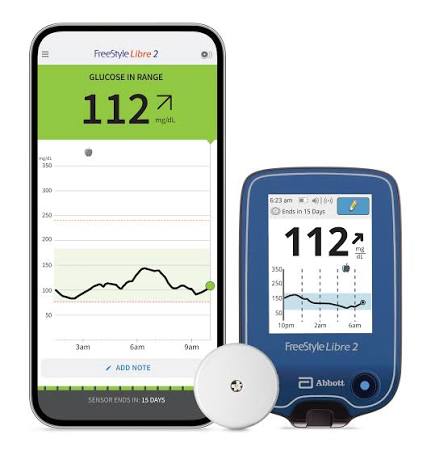
Glucose Meter vs CGM At a Glance
The main difference is simple: one gives a point-in-time blood glucose reading, while the other continuously estimates glucose and records trends.
| Feature | Glucose Meter | CGM |
|---|---|---|
| How it works | Fingerstick blood sample | Sensor under or on the skin |
| Reading style | Single reading | Ongoing readings and trends |
| Fingersticks | Required for testing | May still be needed in some situations |
| Alerts | Usually limited or none | Many systems offer alerts |
| Setup | Simple | More involved |
| Wearable | No | Yes |
| Data trends | Limited | Strong |
| Caregiver sharing | Usually limited | Available on some systems |
| Ongoing supplies | Strips and lancets | Sensors and related supplies |
CGMs estimate glucose from interstitial fluid and can update readings every few minutes. Many systems also show trend arrows, charts, and high or low alerts.
Glucose Meter Review for Senior Daily Use
A glucose meter appeals to seniors who value simplicity. The basic process is familiar: use a lancet, place a blood sample on a test strip, and read the result on the meter.
Ease of Use
A meter has fewer parts to learn than a CGM system. There is no sensor to wear, no app to understand, and usually no wireless connection to manage.
That can be helpful for a senior who wants a direct answer without reviewing graphs or trend information. The main challenge is the physical fingerstick process. Small strips, lancets, and meter buttons may also require good vision and fine motor control.
Key Strengths
- Simple point-in-time glucose readings
- No sensor worn on the body
- Usually easier to understand
- Useful as a backup when using a CGM
- No smartphone is required for basic testing
Potential Drawbacks
- Requires fingerstick testing
- Provides less information about glucose trends
- Requires strips and lancets
- Frequent testing can become inconvenient
- Reading quality depends on proper technique and supplies
The ADA recommends using accurate, approved meters with unexpired strips that are stored correctly.
CGM Review for Senior Everyday Use
A CGM is designed for ongoing glucose monitoring rather than occasional checks. A small sensor measures glucose in interstitial fluid and sends information to a receiver, smartphone, or other compatible device, depending on the system.
Ease of Use
The biggest advantage is that there is no need to perform a fingerstick every time a reading is wanted. The user can look at current glucose levels and, with many systems, see whether glucose is rising or falling.
The trade-off is setup. A senior must learn how to apply or replace the sensor, use the display or app, understand alerts, and manage supplies.
Key Strengths
- Ongoing glucose information
- Trend arrows and charts
- Alerts on many systems
- Less frequent fingerstick testing for many users
- Some systems can share data with caregivers
Potential Drawbacks
- Requires wearing a sensor
- More technology to learn
- Sensors need replacement
- Some systems depend on a phone or receiver
- Costs can be higher over time
- A blood glucose meter should still be available
NIDDK notes that some CGM users may need to compare readings with a standard meter when readings seem inaccurate, during certain system issues, or when glucose is changing rapidly.
Which Is Easier for Seniors to Use?
For basic testing, a glucose meter is often easier to understand. There are fewer steps and less technology involved.
A CGM may be easier for a senior who checks glucose often. Instead of repeated fingersticks, the person can view readings on a compatible device. Alerts can also reduce the need to keep checking manually.
The easier device is often the one that matches the user’s daily routine, not the one with the most features.
For seniors with limited dexterity, both devices have different challenges. A meter requires handling strips and lancets. A CGM requires sensor placement, device management, and attention to alerts.
Performance Comparison
The two devices are not really competing in the same way. They answer different monitoring needs.
| Performance Area | Glucose Meter | CGM |
|---|---|---|
| Current reading | Strong | Strong |
| Long-term trend view | Limited | Strong |
| High/low alerts | Usually limited | Often available |
| Overnight monitoring | Manual checks | Automatic monitoring on compatible systems |
| Data history | Basic to moderate | Detailed |
| Rapid changes | Shows the tested value | Shows direction and trends |
A glucose meter is useful when a specific blood glucose reading is needed. A CGM adds context by showing how glucose changes over time. NIDDK describes trend information as one of the main benefits of CGM use.
Comfort, Accessibility, and Senior-Friendly Design
Comfort is an important difference.
A glucose meter does not require anything to remain attached to the body. That may appeal to someone who dislikes wearing medical devices.
A CGM stays on the body for a period of time and uses an adhesive sensor. Some people may find this convenient because it avoids repeated fingersticks, while others may dislike the sensation or the need to protect the sensor.
Visibility matters too. Large, clear numbers on a meter can be easier for some users. On the other hand, a CGM app may provide larger graphs and more detailed information.
Caregiver support can also matter. Some CGM systems allow glucose information to be shared with another person’s device, although the exact features vary by system.
Features Comparison
The most useful feature depends on the senior’s monitoring routine.
| Feature | Glucose Meter | CGM |
|---|---|---|
| Simple testing | Excellent fit | Less simple |
| Trend information | Limited | Excellent fit |
| Alerts | Limited | Common on many systems |
| Wearability | No device worn | Sensor worn |
| Caregiver data | Limited | Available on some systems |
| Technology needs | Low | Moderate to high |
Not every CGM has the same features. Models differ in sensor life, warm-up time, alarms, apps, receivers, and sharing options, so the exact model should be checked before purchase.
Price, Maintenance, and Long-Term Value
Cost can change the decision.
A glucose meter usually has an initial device cost followed by recurring spending on test strips and lancets. The total cost depends heavily on how often testing is required.
A CGM adds recurring sensor costs. Some systems may also involve a receiver, smartphone compatibility, or other supplies. Insurance coverage varies, and the cost without coverage can be substantial. The CDC notes that CGMs may cost thousands of dollars per year without insurance coverage.
| Cost Factor | Glucose Meter | CGM |
|---|---|---|
| Device | Usually lower | Usually higher |
| Consumables | Strips and lancets | Sensors |
| Ongoing cost | Depends on testing frequency | Depends on sensor replacement |
| Technology cost | Usually minimal | May include compatible device |
| Value | Strong for occasional testing | Strong when continuous data is useful |
The cheaper option is not always the better value. A CGM may provide much more information, but that extra information matters most when it supports the user’s diabetes care plan.
Who Should Choose a Glucose Meter?
- Choose a glucose meter if simple testing is the main goal.
- Choose it if you do not want to wear a sensor.
- Choose it if you prefer fewer technology steps.
- Choose it if fingerstick testing fits your routine.
- Keep one available even if you use a CGM.
Who Should Choose a CGM?
- Choose a CGM if ongoing glucose trends are important.
- Choose it if frequent fingersticks are difficult or inconvenient.
- Consider it if alerts could help with glucose monitoring.
- Consider it if caregiver data sharing would be useful.
- Discuss CGM use with a healthcare professional when diabetes treatment or low-glucose risk is a concern.
The ADA’s 2026 guidance recommends CGM based on the person’s treatment, circumstances, preferences, and needs rather than using one device for everyone.
Glucose Meter vs CGM — Final Verdict
Best for simple testing: Glucose Meter
Best for continuous trend data: CGM
Best for fewer technology demands: Glucose Meter
Best for alerts and ongoing monitoring: CGM
Best backup device: Glucose Meter
There is no universal winner. A glucose meter is often the better fit for a senior who wants simple, direct testing. A CGM can make more sense for someone who benefits from continuous information, trends, and alerts.
Scoring Summary
Because glucose meters and CGMs are broad product categories with major differences between individual models, assigning arbitrary 1–10 scores would create false precision.
| Category | Glucose Meter | CGM |
|---|---|---|
| Ease of basic testing | Strong | Moderate |
| Continuous monitoring | Limited | Strong |
| Technology simplicity | Strong | Moderate |
| Trend information | Limited | Strong |
| Portability | Strong | Strong |
| Ongoing maintenance | Moderate | Moderate |
| Senior fit | Depends on routine | Depends on needs |
How We Evaluate Products
This comparison focuses on practical factors that matter in everyday senior use: ease of use, accessibility, comfort, safety, performance, maintenance, ongoing cost, and long-term practicality.
The comparison does not assume hands-on testing. It also does not treat every senior as having the same physical or technology needs. ADA guidance specifically supports choosing diabetes technology according to individual needs, preferences, circumstances, and skill level.
Senior-Specific Buying Considerations
Physical Effort
A meter requires fingerstick testing and handling small supplies. A CGM reduces routine fingersticks but requires sensor placement and replacement.
Controls
Check whether the display, buttons, app, or receiver are easy for the user to understand.
Maintenance
Consider the recurring work. Meters need strips and lancets. CGMs need sensors and may require app or receiver management.
Setup
A meter usually has a simpler setup. CGMs have more steps and may require training.
Caregiver Support
A CGM may be useful when remote data sharing is an important part of the care routine. Feature availability varies by system.
Safety
Anyone using glucose-monitoring technology should follow the instructions supplied with the device. When CGM readings appear inaccurate, alerts occur, or treatment decisions depend on uncertain readings, a blood glucose meter may be needed for confirmation.
Common Buying Mistakes
- Choosing a device without considering how often it will be used
- Ignoring the recurring cost of strips or sensors
- Buying a CGM without checking phone or receiver compatibility
- Choosing a complicated system when simple testing is enough
- Forgetting to keep a meter available when using a CGM
- Focusing on features without considering the user’s actual diabetes care plan
Conclusion
The biggest difference in Glucose Meter vs CGM is how much information each device provides. A meter gives a direct reading when tested, while a CGM provides ongoing glucose information and trends.
For seniors who value simplicity, a glucose meter may fit better. For those who need frequent monitoring or benefit from trend information and alerts, a CGM may offer more useful daily support. The final choice should match the user’s treatment, routine, comfort with technology, and healthcare needs rather than simply choosing the device with more features.