
Yale vs Kwikset Smart Lock for Seniors: Which Wins?


Anti-Glare Reading Glasses

Glucose Monitor Kit

Non-Slip Slippers
Yale vs Kwikset smart lock for seniors is a useful comparison if easy entry, simple controls, and remote access matter. Both brands offer smart deadbolts with app control, access codes, and smart-home features.
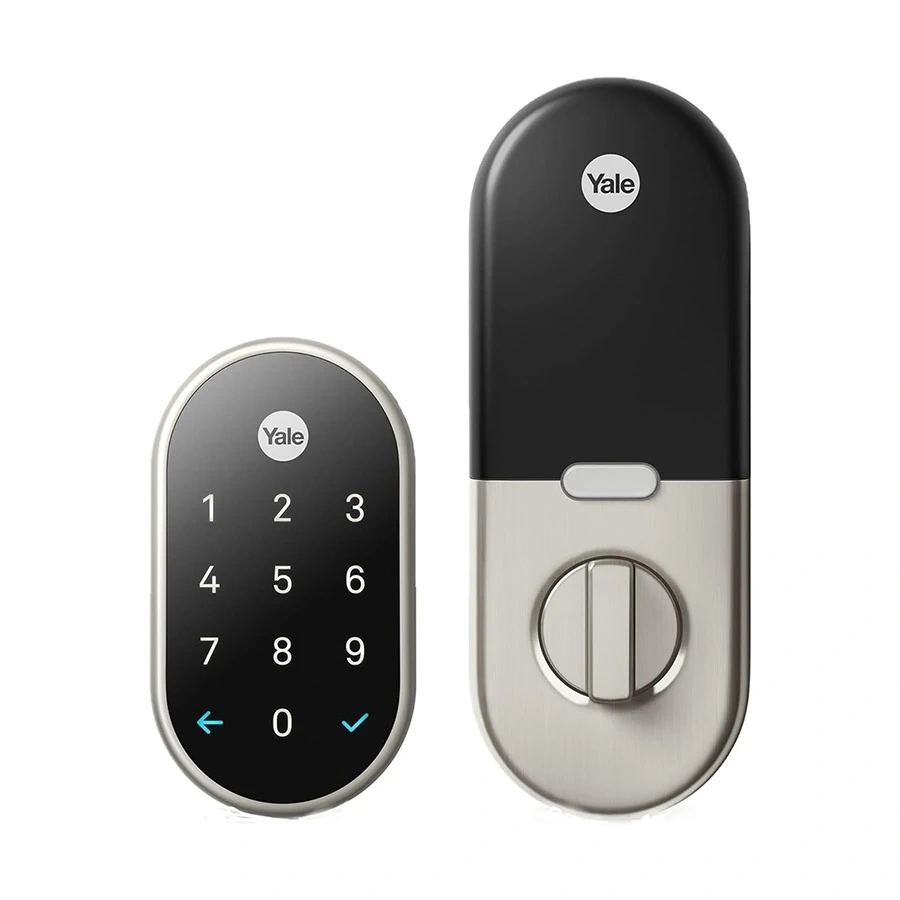
For a clear comparison, this article focuses on the Yale Assure Lock 2 family and the current Kwikset Halo Select touchscreen line. Exact features can vary by model and connectivity option. Yale offers fingerprint access on the Assure Lock 2 Touch, while Halo Select combines Wi-Fi and Matter connectivity with a touchscreen and physical-key backup.
Quick Comparison
Yale may suit seniors who want fingerprint entry or a key-free setup. Kwikset Halo Select may suit users who want built-in Wi-Fi, Matter support, physical keys, and a large number of access codes.
The main difference is flexibility. Yale gives several entry choices across the Assure Lock 2 range, while Halo Select offers a strong combination of touchscreen entry, app control, Wi-Fi, Matter, and traditional key access.
Yale vs Kwikset At a Glance
Here is a simple view of the features that matter most for everyday senior use.
| Feature | Yale Assure Lock 2 | Kwikset Halo Select |
|---|---|---|
| Entry options | Keypad, app; fingerprint on Touch models | Touchscreen, app, physical key |
| Remote access | Available with Wi-Fi models | Built-in Wi-Fi |
| Smart home | Alexa, Google Home, Apple Home and others vary by model | Alexa, Google Home, Apple Home, SmartThings |
| Access codes | Varies by model | Up to 250 |
| Auto-unlock | Available | Available |
| Door status | DoorSense on supported models | Door sensor and alerts |
| Matter | Model dependent | Built in |
| Physical key | Keyed models | Yes |
| Battery | 4 AA on listed models | 4 AA included |
| Fingerprint entry | Assure Lock 2 Touch | Not on Halo Select touchscreen |
Yale Assure Lock 2 Review for Seniors
The Yale Assure Lock 2 range focuses on flexible entry. Depending on the model, users can choose keypad, touchscreen, fingerprint, app, or other smart-home access methods.
Ease of Use
The Assure Lock 2 Touch is especially interesting for seniors who do not want to remember a PIN. It adds fingerprint access to the lock, while Yale’s app can manage access and activity.
Yale also offers Auto-Unlock on compatible configurations. This can reduce the need to take out a phone or enter a code when approaching home.
Key Strengths
- Fingerprint entry is available on the Assure Lock 2 Touch.
- Touchscreen and keypad versions provide familiar code entry.
- Wi-Fi models support remote access.
- Auto-Unlock can simplify arrival at home.
- Works with several major smart-home platforms.
- The Yale Home app provides access management and notifications on supported models.
Potential Drawbacks
- Features vary between Assure Lock 2 versions.
- Wi-Fi capability can change the price and configuration.
- Some advanced functions require choosing the correct module or model.
- A fingerprint model may cost more than a basic keypad version.
Kwikset Halo Select Review for Seniors
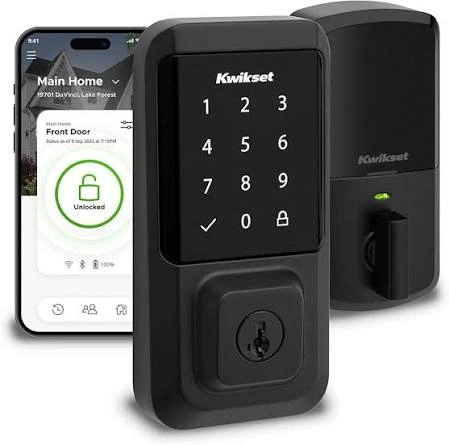
The Kwikset Halo Select takes a different approach. It combines a touchscreen with built-in Wi-Fi and Matter connectivity, so users do not need a separate hub for Wi-Fi remote control.
Ease of Use
The bright backlit touchscreen is designed for code entry during the day and at night. Users can also unlock through the Kwikset app or use a physical key.
For a senior who prefers traditional keys as a backup, this can be useful. The app also supports guest access and activity monitoring.
Key Strengths
- Built-in Wi-Fi requires no separate hub.
- Matter and Thread support add smart-home flexibility.
- Touchscreen has backlit numbers.
- Supports up to 250 access codes.
- Includes physical keys.
- Supports auto-unlock through geofencing.
- Door-status alerts can notify users when the door is left ajar.
- SmartKey technology allows the cylinder to be re-keyed.
Potential Drawbacks
- The touchscreen and app still require some learning.
- Advanced smart-home features may be unnecessary for users who want a basic lock.
- Four AA batteries need periodic replacement.
- More smart-home options can mean more setup choices.
Which Is Easier for Seniors to Use?
Ease of use depends on how the person prefers to enter the home.
A senior who finds PIN codes difficult to remember may prefer the Yale Assure Lock 2 Touch because fingerprint entry removes the need to enter a code. Yale also provides several other access methods depending on the configuration.
A senior who prefers a traditional key as a backup may find the Kwikset Halo Select more familiar. Its touchscreen, app, and physical key provide several ways to operate the lock.
The simplest smart lock is often the one that matches the user’s preferred way to enter the home.
Performance Comparison
Both locks focus on everyday residential access rather than advanced commercial access control.
Yale’s Assure Lock 2 family offers app control, access management, and smart-home integration. Wi-Fi versions can provide remote access and notifications.
Halo Select adds built-in Wi-Fi and Matter. It can also report door status and provide an event log through the Kwikset app.
| Performance Area | Yale Assure Lock 2 | Kwikset Halo Select |
|---|---|---|
| Remote control | Available with Wi-Fi | Built-in Wi-Fi |
| App access | Yale Home app | Kwikset app |
| Auto-unlock | Available | Available |
| Activity history | Supported | Supported |
| Door status | DoorSense on supported models | Door sensor |
| Smart-home flexibility | Broad, model dependent | Wi-Fi + Matter |
Comfort, Accessibility, and Senior-Friendly Design
For seniors, the important issue is not simply how many features a lock has. It is how easily those features can be used.
Yale has an advantage for users who prefer biometric entry because the Assure Lock 2 Touch offers fingerprint access. This may reduce the need to remember or type an access code.
Kwikset offers a bright touchscreen, physical-key backup, and app control. Its door sensor can also alert the user if the door remains ajar.
| Senior Need | Yale | Kwikset |
|---|---|---|
| Avoid remembering codes | Fingerprint on Touch | Code or app |
| Easy nighttime entry | Touchscreen/keypad options | Backlit touchscreen |
| Traditional backup | Keyed versions | Physical keys |
| Remote monitoring | Supported with Wi-Fi | Built-in Wi-Fi |
| Door-left-open alerts | DoorSense on supported models | Door sensor |
Features Comparison
The two product families have different strengths, so the right choice depends on which features will actually be used.
| Feature | Yale Assure Lock 2 | Kwikset Halo Select |
|---|---|---|
| Fingerprint | Yes, Touch model | No |
| Wi-Fi | Available on Wi-Fi models | Built in |
| Matter | Model dependent | Yes |
| Access codes | Model dependent | Up to 250 |
| Auto-unlock | Yes | Yes |
| Physical key | Keyed models | Yes |
| Voice control | Model dependent | Supported through compatible platforms |
Price, Maintenance, and Long-Term Value
Current official pricing varies by configuration. Yale’s Assure Lock 2 Touch is listed from about $209.99 for the Bluetooth version, while Wi-Fi configurations can cost more. Yale also lists other Assure Lock 2 models with different prices and access methods.
Kwikset introduced Halo Select at a $279 retail price, although current retail pricing can vary. Its current product specifications include four AA batteries and built-in Wi-Fi and Matter.
For long-term value, consider the features you will actually use rather than paying for every available smart-home option.
Who Should Choose Yale?
- Choose Yale if fingerprint entry would make daily access easier.
- Choose Yale if you want several Assure Lock 2 configurations.
- Choose Yale if Apple Home or other Yale-compatible ecosystems matter.
- Choose Yale if key-free entry is a priority.
- Choose Yale if a caregiver needs flexible digital access options.
Who Should Choose Kwikset?
- Choose Kwikset if built-in Wi-Fi is important.
- Choose Kwikset if Matter support is useful for your smart home.
- Choose Kwikset if you want a physical key as a backup.
- Choose Kwikset if you need many access codes.
- Choose Kwikset if door-status alerts are useful.
- Choose Kwikset if you prefer a touchscreen with app control.
Yale vs Kwikset Smart Lock — Final Verdict
There is no single choice for every senior.
Best for fingerprint entry: Yale Assure Lock 2 Touch
Best for built-in Wi-Fi and Matter: Kwikset Halo Select
Best for traditional key backup: Kwikset Halo Select or a keyed Yale configuration
Best for flexible Yale configurations: Yale Assure Lock 2
Best for a large number of access codes: Kwikset Halo Select
The important difference is the type of convenience each lock provides. Yale is worth considering when fingerprint or flexible key-free entry matters. Kwikset is worth considering when built-in Wi-Fi, Matter, physical-key access, and many user codes are more important.
Scoring Summary
Scores are best treated as a simple comparison aid, not a laboratory measurement. They reflect the documented features most relevant to senior use.
| Category | Yale Assure Lock 2 | Kwikset Halo Select |
|---|---|---|
| Ease of Use | 9/10 | 9/10 |
| Senior-Friendly Design | 9/10 | 9/10 |
| Smart Features | 9/10 | 10/10 |
| Access Flexibility | 10/10 | 9/10 |
| Maintenance | 8/10 | 8/10 |
| Value | 9/10 | 9/10 |
How We Evaluate Products
This comparison focuses on practical factors that can affect everyday senior use.
We consider:
- Ease of entry
- Control simplicity
- Access flexibility
- Setup
- Smart-home functions
- Door monitoring
- Maintenance
- Battery requirements
- Long-term practicality
- Value
No hands-on testing is claimed here. The comparison is based on current manufacturer information and documented product features.
Senior-Specific Buying Considerations
Before choosing a smart lock, think about how the person will actually use it.
Physical Effort
Check whether the user prefers a keypad, fingerprint sensor, smartphone, or physical key.
Controls
A touchscreen may be useful for some users, while others may prefer fingerprint access or a familiar key.
Maintenance
Smart locks need batteries. Make sure the user or caregiver can check and replace them when needed.
Setup
Check door compatibility before buying. Yale specifically provides a compatibility check for Assure Lock 2.
Caregiver Access
Digital access codes can be useful when family members, caregivers, or trusted guests need entry without receiving a physical key.
Common Buying Mistakes
Avoid these common mistakes when comparing Yale and Kwikset smart locks:
- Buying a model with features the user will never use.
- Assuming every Yale Assure Lock 2 has the same features.
- Ignoring whether Wi-Fi is included.
- Forgetting to check door compatibility.
- Choosing a fingerprint model without considering whether fingerprint entry is preferred.
- Ignoring battery replacement and backup-entry needs.
Safety
Smart locks still depend on batteries and electronic components. Keep battery levels under review and understand the backup-entry method before relying on the lock every day.
For Yale, the exact backup and access options depend on the selected Assure Lock 2 configuration. Kwikset Halo Select includes physical keys as an additional entry method.
Frequently Asked Questions
Is Yale or Kwikset easier for seniors?
Both can be easy to use. Yale may be more convenient for someone who wants fingerprint access, while Kwikset may appeal to someone who prefers touchscreen, app, and physical-key options.
Does Yale Assure Lock 2 have fingerprint access?
Yes. Fingerprint access is available on the Yale Assure Lock 2 Touch.
Does Kwikset Halo Select need a hub?
No. Halo Select has built-in Wi-Fi and does not require a separate hub for Wi-Fi connectivity.
Can family members get access to either lock?
Yes. Both product families support digital access management, although the exact options vary by model. Kwikset Halo Select supports up to 250 temporary, scheduled, or permanent access codes.
Can these locks work with smart-home systems?
Yes. Compatibility depends on the specific model. Yale Assure Lock 2 configurations support platforms such as Apple Home, Google Home, Amazon Alexa, and others. Halo Select supports Apple Home, Google Home, Alexa, and SmartThings, with Matter and Thread connectivity.
Which one has better backup entry?
Kwikset Halo Select includes physical keys. Yale offers keyed and key-free Assure Lock 2 configurations, so buyers should select the version that matches their preferred backup method.
Conclusion
Yale and Kwikset both offer useful smart-lock options for seniors, but their strengths are different. Yale Assure Lock 2 is particularly flexible, with fingerprint access available on the Touch model and several configurations for different smart-home needs.
Kwikset Halo Select focuses on built-in Wi-Fi, Matter support, touchscreen entry, physical-key backup, and extensive access-code management. The best fit depends on whether the senior values biometric entry, traditional keys, smart-home connectivity, or simple everyday access.