
Roku vs Apple TV Streaming Device for Seniors: Which?


Grab Bars for Shower, 2 Pack 16 in Anti Slip Safety Bath Handle

Goodbaby No-Touch Forehead Thermometer for Adults and Kids

Drive Medical Folding Walker
Roku vs Apple TV streaming device for seniors is mainly a choice between simple streaming and a more advanced TV platform. Both can stream popular services, support 4K on compatible models, and offer accessibility tools.
For many older adults, the key question is not which device has more features. It is which one feels easier to control every day. Roku puts a strong focus on simple navigation and flexible streaming devices, while Apple TV 4K offers a powerful interface and deep integration with Apple devices.
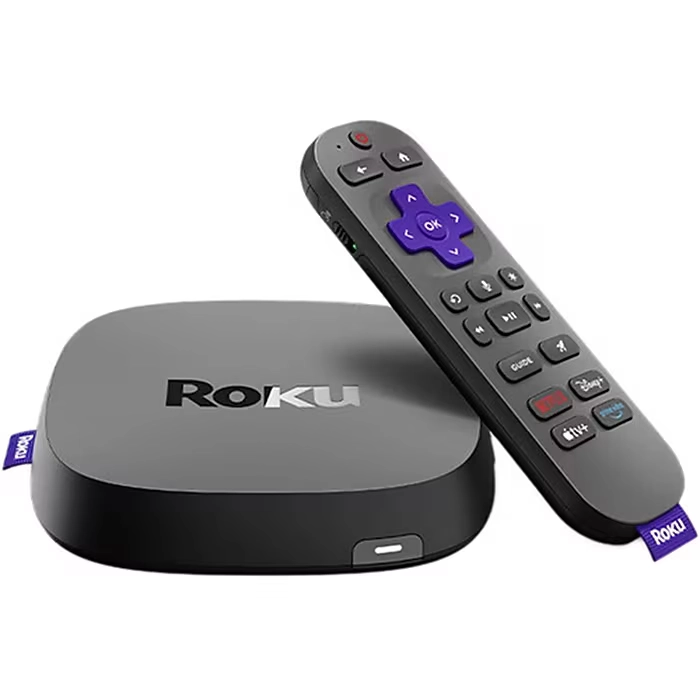
Quick Comparison
Roku is the simpler choice for seniors who want straightforward streaming and a familiar remote. Apple TV 4K is more appealing for seniors who already use an iPhone, iPad, or other Apple products.
The biggest difference is the overall ecosystem. Roku works across many TV brands and offers several streaming player choices. Apple TV 4K is a premium box built around Apple’s services and devices.

Roku vs Apple TV At a Glance
The two platforms take different approaches. Roku focuses on simple TV streaming, while Apple TV 4K adds more advanced hardware and Apple ecosystem features.
| Feature | Roku | Apple TV 4K |
|---|---|---|
| Ease of use | Very simple | Easy after learning |
| Remote | Voice remotes available | Siri Remote |
| 4K streaming | Available on selected models | Yes |
| Voice control | Available on selected remotes | Siri |
| Accessibility | Screen reader, captions | VoiceOver, captions, Zoom |
| Smart home | Works with major platforms | Apple Home hub |
| Storage | Depends on model | 64GB or 128GB |
| Ethernet | Available on selected models | 128GB model |
| Price level | Budget to premium | Premium |
Roku currently sells several streaming players, including the Streaming Stick, Streaming Stick Plus, Streaming Stick 4K, and Roku Ultra. Apple currently lists Apple TV 4K in 64GB Wi-Fi and 128GB Wi-Fi + Ethernet versions.
Roku Review for Senior-Friendly Streaming
Roku is attractive when simple TV control matters most. Its streaming players cover a wide range of needs, from basic HD streaming to premium 4K models.
The Roku interface is built around a straightforward home screen and app layout. That can reduce the learning curve for someone who mainly wants to open Netflix, YouTube, or another streaming service.
Ease of Use
Roku offers remotes with familiar directional controls. Selected models also include voice control, while the Roku Voice Remote Pro adds features such as backlit buttons, hands-free voice control, and a lost-remote finder.
That can be useful for seniors who find small buttons difficult to see or who often misplace the remote.
Key Strengths
- Simple interface
- Many device choices
- Voice remotes are available
- Works with many TV brands
- Several low-cost options
- Strong accessibility features
- Easy app-based voice search
Potential Drawbacks
- Features vary between Roku models
- Some advanced remote features cost extra
- The best performance comes with higher-priced models
- Voice features depend on the compatible device and remote
Apple TV 4K Review for Senior-Friendly Use
Apple TV 4K is a more powerful streaming box. The current model uses an A15 Bionic chip and comes with a Siri Remote featuring a touch-enabled clickpad.
It also connects closely with Apple’s wider ecosystem. That makes it particularly interesting for seniors who already use Apple devices.
Ease of Use
The Siri Remote combines physical buttons with a touch-enabled clickpad. Voice control can also help users search for shows without typing long titles.
However, the touch-enabled controls may take a little practice. A senior who prefers traditional directional buttons may find Roku’s approach more familiar.
Key Strengths
- Fast A15 Bionic processor
- 4K, HDR10+, and Dolby Vision support
- Siri voice control
- Rechargeable remote
- Strong accessibility tools
- Excellent Apple device integration
- Ethernet option on the 128GB model
Potential Drawbacks
- Higher starting price
- Touch-based remote may require practice
- More features can mean more learning
- Some benefits are most useful inside Apple’s ecosystem
Which Is Easier for Seniors to Use?
For basic streaming, Roku has an advantage in simplicity. Its remote design is familiar, and several models offer direct app shortcuts and voice controls.
Apple TV 4K is still easy to use, but the Siri Remote’s clickpad adds a touch-based control method. This may suit users who are comfortable with modern smartphone-style controls.
Simple controls matter more than having the largest number of features.
For seniors with limited dexterity, voice control can reduce the need for repeated button presses. Roku supports voice search through compatible remotes and its mobile app. Apple TV 4K supports Siri and Dictation as accessibility features.
| Senior Need | Roku | Apple TV 4K |
|---|---|---|
| Simple buttons | Strong | Good |
| Voice control | Strong on supported models | Strong |
| Easy app access | Strong | Strong |
| Learning curve | Low | Moderate |
| Remote finding | Available on selected remotes | Can be found with iPhone |
| Familiar controls | Strong | Good |
Performance Comparison
Performance depends heavily on the specific Roku model. The Roku Ultra is currently positioned as Roku’s fastest streaming player, with 4K, HDR10+, Dolby Vision, Dolby Atmos, Wi-Fi 6, and Ethernet.
Apple TV 4K uses the A15 Bionic chip and supports 4K video at up to 60 fps, Dolby Vision, HDR10+, HDR10, and Dolby Atmos.
For normal streaming, both platforms can provide a smooth experience. Apple TV 4K has stronger hardware, while Roku gives buyers more choice across different performance levels.
| Performance Area | Roku | Apple TV 4K |
|---|---|---|
| 4K | Selected models | Yes |
| Dolby Vision | Selected models | Yes |
| HDR10+ | Selected models | Yes |
| Dolby Atmos | Selected models | Yes |
| Ethernet | Selected models | 128GB model |
| High-end performance | Roku Ultra | Apple TV 4K |
Comfort, Accessibility, and Senior-Friendly Design
Accessibility is an important part of the comparison. Roku includes a screen reader that reads menus and other on-screen text aloud. Roku also supports closed captions and voice search.
Apple TV 4K includes VoiceOver, Zoom, Hover Text, increased contrast, reduced motion, closed captions, audio descriptions, Siri, and Switch Control.
For someone with low vision, both platforms provide useful tools. Apple offers a particularly broad set of built-in accessibility controls.
Features Comparison
The feature gap becomes clearer when looking beyond basic streaming. Roku gives users a broad range of streaming devices and remotes. Apple TV 4K puts more emphasis on premium hardware and Apple services.
| Feature | Roku | Apple TV 4K |
|---|---|---|
| Screen reader | Yes | VoiceOver |
| Closed captions | Yes | Yes |
| Voice search | Yes | Siri |
| Smart home | Roku-compatible platforms | Apple Home |
| Remote charging | Selected models | Yes |
| Lost remote finder | Selected Roku remotes | Find with iPhone |
| Storage | Varies | 64GB or 128GB |
Apple says the Siri Remote has a rechargeable battery and can be located using an iPhone.
Price, Maintenance, and Long-Term Value
Price is one of the clearest differences. Roku offers products across several price levels, while Apple TV 4K sits in the premium part of the streaming-device market.
Roku’s current U.S. lineup includes lower-cost streaming sticks and the higher-end Roku Ultra. Apple’s current U.S. store lists Apple TV 4K at $199 for 64GB Wi-Fi and $249 for 128GB Wi-Fi + Ethernet. Prices can vary by country and retailer.
| Cost Factor | Roku | Apple TV 4K |
|---|---|---|
| Entry cost | Lower | Higher |
| Premium option | Roku Ultra | Apple TV 4K |
| Remote battery | Depends on remote | Rechargeable |
| Ethernet | Selected models | 128GB model |
| Subscription needs | Depends on services | Depends on services |
Roku offers better flexibility for someone who wants to spend less. Apple TV 4K may offer better long-term value for a household already invested in Apple devices.
Who Should Choose Roku?
- Choose Roku if simple controls matter most.
- Choose Roku if you want a lower-cost streaming option.
- Choose Roku if you prefer traditional directional buttons.
- Choose Roku if you want several device options.
- Choose Roku if you use different brands of TVs.
- Choose Roku if a simple streaming-focused interface is your priority.
Who Should Choose Apple TV 4K?
- Choose Apple TV 4K if you already use an iPhone or iPad.
- Choose Apple TV 4K if you want premium hardware.
- Choose Apple TV 4K if accessibility features such as VoiceOver are important.
- Choose Apple TV 4K if you want Ethernet on the 128GB model.
- Choose Apple TV 4K if you use Apple’s smart-home ecosystem.
- Choose Apple TV 4K if you are comfortable with a touch-enabled remote.
Roku vs Apple TV — Final Verdict
Roku is the better fit for seniors who want simple streaming at a lower entry cost. Its traditional controls, broad device range, and accessible interface make it a practical choice for everyday TV use.
Apple TV 4K is better suited to seniors who already use Apple products or want a more powerful premium streaming box. Its accessibility tools, Siri Remote, strong hardware, and Apple ecosystem integration add useful benefits.
| Category | Better Fit |
|---|---|
| Simplicity | Roku |
| Lower-cost choice | Roku |
| Traditional controls | Roku |
| Apple ecosystem | Apple TV 4K |
| Premium hardware | Apple TV 4K |
| Accessibility | Both |
| Smart-home integration | Depends on ecosystem |
| Overall flexibility | Roku |
Scoring Summary
Scores below are editorial comparisons based on the features and use cases discussed above, not laboratory test results.
| Category | Roku | Apple TV 4K |
|---|---|---|
| Ease of Use | 9/10 | 8/10 |
| Senior-Friendly Design | 9/10 | 8/10 |
| Performance | 8/10 | 10/10 |
| Accessibility | 9/10 | 9/10 |
| Value | 9/10 | 7/10 |
These scores should be treated as a quick summary rather than a measurement of every model. Roku’s lineup varies considerably, so a budget Roku and Roku Ultra will not offer the same experience.
How We Evaluate Products
We compare streaming devices around the things that can affect everyday senior use.
The main factors are:
- Ease of setup
- Remote controls
- Voice control
- Accessibility
- Navigation
- Streaming performance
- Compatibility
- Maintenance
- Price
- Long-term value
This comparison uses current manufacturer information and official support documentation. It does not claim hands-on testing.
Senior-Specific Buying Considerations
Controls
Look for a remote that feels comfortable and easy to understand. Physical buttons may suit users who prefer traditional controls, while voice commands can reduce the need for repeated button presses.
Setup
Both devices need a compatible TV, internet connection, and account setup. Apple TV 4K requires an HDMI connection, and the HDMI cable is sold separately.
Accessibility
Check the available screen reader, captions, text-size, contrast, and voice features before buying. Both platforms offer meaningful accessibility tools.
Remote Management
A lost remote can be frustrating. Roku’s Voice Remote Pro includes a lost-remote finder, while Apple says the Siri Remote can be located using an iPhone.
Common Buying Mistakes
- Buying a premium model when basic streaming is enough
- Ignoring the remote design
- Choosing based only on processor speed
- Forgetting to check TV compatibility
- Overlooking accessibility settings
- Paying for features that will rarely be used
Safety
Streaming devices have relatively few physical safety concerns. The main issues are electrical connections, cable placement, and keeping power cords safely arranged.
Avoid placing cables where they could create a trip hazard. Keep the streaming device ventilated and follow the manufacturer’s setup instructions.
Conclusion
Roku vs Apple TV streaming device for seniors comes down to simplicity versus premium ecosystem features. Roku offers more flexibility and lower-cost choices, while Apple TV 4K offers stronger hardware and deeper Apple integration.
For a senior who mainly wants easy streaming, Roku is a straightforward option. For someone already comfortable with Apple products, Apple TV 4K can provide a more connected experience. The best choice depends on the user’s preferred controls, existing devices, accessibility needs, and budget.