
Medical Alert vs Life Alert for Senior Safety


HOMLAND Shower Chair with Padded Armrests and Back

Moen 18 Inch Shower Grab Bar

Levoit Classic 300S Cool Mist Humidifier
Medical Alert vs Life Alert is a useful comparison for seniors who want a simple way to call for help during an emergency. Both brands offer wearable help buttons and 24/7 emergency response.
The main differences are in fall detection, device choices, caregiver tools, pricing, and how each system fits daily life. Medical Alert also offers home, mobile, and smartwatch options, while Life Alert focuses on simple emergency buttons, home protection, and an on-the-go GPS device.

Quick Comparison
Medical Alert is the better fit for many seniors who want more device choices and optional automatic fall detection. It also publishes a starting price of $29.95 per month.
Life Alert may suit seniors who prefer a simple system, long-lasting devices, and a traditional live-dispatch model. Its current website uses personalized quotes instead of showing one standard monthly price.
The biggest difference is fall detection. Medical Alert offers it as an optional add-on. Current ConsumerAffairs data lists fall detection as not offered by Life Alert.
The best alert system is the one the wearer can use easily and will keep on every day.
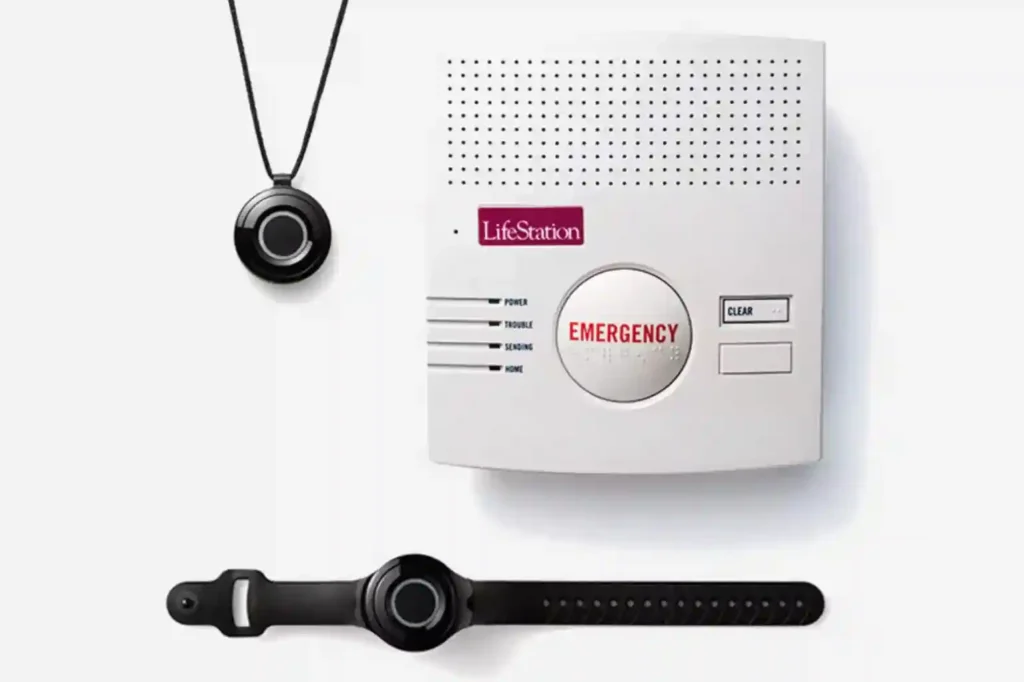
Medical Alert vs Life Alert At a Glance
The table below focuses on features that can affect everyday senior use.
| Feature | Medical Alert | Life Alert |
|---|---|---|
| 24/7 response | Yes | Yes |
| Fall detection | Optional | Not offered |
| Home system | Yes | Yes |
| Mobile option | Yes | Yes |
| GPS | Available on mobile system | Available on GPS device |
| Smartwatch | Yes | No comparable smartwatch listed |
| Caregiver app | Medical Alert Connect | Not highlighted |
| Starting price | From $29.95/month | Personalized quote |
| Help button | Wrist or neck | Wrist, neck, or wall |
| Waterproof options | Yes | Yes |
Medical Alert offers a broader mix of devices and digital features. Life Alert keeps the experience centered on direct contact with a trained dispatcher.
Medical Alert Review for Senior Safety
Medical Alert is designed for seniors who want 24/7 access to a response specialist at home or away from home. Its current lineup includes a Home System, Mobile System, and Smartwatch.
Ease of Use
Medical Alert uses simple help buttons that can be worn around the neck or wrist. The company also offers a mobile device and smartwatch for users who spend more time outside the home.
For seniors who want fewer steps, the basic help-button approach is easy to understand. The smartwatch adds more features, but it also requires more interaction and daily charging. Medical Alert’s setup guide says the smartwatch should be charged daily or when the battery is low.
Key Strengths
- Optional automatic fall detection
- Home, mobile, and smartwatch choices
- Two-way communication
- Waterproof help buttons
- Medical Alert Connect app
- U.S.-based response specialists
- GPS support on the mobile system
Medical Alert says its optional fall detection uses accelerometers, barometric sensors, and an algorithm to identify a possible fall. It also clearly states that fall detection does not detect every fall.
Potential Drawbacks
- Fall detection costs extra.
- Some devices need regular charging.
- A smartwatch may feel more complex than a basic pendant.
- Fall detection is not a replacement for pressing the help button when the wearer can do so.
Life Alert Review for Senior Safety
Life Alert is a long-established emergency response brand. Its current product range includes a Micro Voice Pendant, wristband button, wall-mounted help button, and an On-the-Go + GPS device.
Ease of Use
Life Alert emphasizes one-button access to a live dispatcher. Its On-the-Go + GPS device is designed to work without a smartphone and does not require regular charging.
That can be useful for a senior who does not want to remember another device that needs daily charging. The company also says its wearable devices are waterproof.
Key Strengths
- Simple emergency button operation
- 24/7 U.S.-based dispatchers
- Waterproof devices
- Home and mobile protection
- GPS option for users away from home
- On-the-Go device does not require charging
- Large, easy-to-press button on the GPS device
Potential Drawbacks
- Fall detection is not offered, according to current ConsumerAffairs comparison data.
- Pricing is not shown as one standard rate on Life Alert’s current cost page.
- The system can be less attractive for users who want smartwatch-style features or a broader app experience.
- A personalized quote makes direct price comparison harder.
Which Is Easier for Seniors to Use?
Both systems aim for simple operation. The difference is the type of simplicity.
| Usability Area | Medical Alert | Life Alert |
|---|---|---|
| Basic help button | Simple | Simple |
| Wearable options | Several | Several |
| Mobile use | Yes | Yes |
| Charging | Depends on device | GPS device does not need charging |
| Automatic fall detection | Optional | Not offered |
| Smartwatch option | Yes | Not listed |
| App support | Yes | Less prominent |
Medical Alert may be easier for seniors who want choices. A user can select a basic home unit, mobile device, or smartwatch.
Life Alert may be easier for someone who wants fewer technology features. Its core experience is still based on pressing a button and speaking with a dispatcher.
Performance Comparison
For medical alert systems, performance is less about speed or power and more about communication, coverage, and access to help.
Medical Alert provides 24/7 access to response specialists and supports home, mobile, and smartwatch systems. Its mobile system is designed for protection away from home and includes GPS.
| Performance Area | Medical Alert | Life Alert |
|---|---|---|
| Emergency response | 24/7 | 24/7 |
| Two-way communication | Yes | Yes |
| Home coverage | Yes | Yes |
| GPS | Mobile system | On-the-Go + GPS |
| Automatic fall alert | Available | Not offered |
| Emergency dispatch | Yes | Yes |
Life Alert’s GPS device shares the user’s location with its emergency dispatcher and provides two-way voice communication. Its main unit is advertised with a range of up to 1,000 feet.
Comfort, Accessibility, and Senior-Friendly Design
A medical alert device needs to be worn consistently. Weight, button size, charging, waterproofing, and placement can matter more than extra features.
Medical Alert offers neck and wrist wear, plus a mobile unit and smartwatch. Its help buttons are designed for use in the shower or bath, where waterproofing can be important.
Life Alert also offers wrist and neck options. Its GPS unit has one large button and can be worn or carried, which may help users who prefer a straightforward control.
| Senior Need | Medical Alert | Life Alert |
|---|---|---|
| Simple button | Yes | Yes |
| Waterproof wearable | Yes | Yes |
| Wrist option | Yes | Yes |
| Neck option | Yes | Yes |
| No daily charging | Depends on device | GPS device |
| GPS outside home | Yes | Yes |
Features Comparison
The two brands differ most in how much technology they put around the basic emergency button.
| Feature | Medical Alert | Life Alert |
|---|---|---|
| Fall detection | Optional | Not offered |
| Mobile protection | Yes | Yes |
| GPS | Yes | Yes |
| Smartwatch | Yes | No comparable option listed |
| Caregiver app | Yes | Not prominently offered |
| Two-way voice | Yes | Yes |
| Waterproof button | Yes | Yes |
Medical Alert Connect lets family members receive real-time notifications about emergencies, updates, and alerts. That can be useful when a caregiver wants another way to stay informed.
Price, Maintenance, and Long-Term Value
Price is harder to compare because the brands present pricing differently.
Medical Alert currently lists systems starting at $29.95 per month. Its optional fall detection adds $10 per month. Additional fees may apply depending on the plan and features.
Life Alert’s current cost page does not publish one standard monthly price. Instead, it says cost varies by protection package and asks customers to request a personalized quote. Life Alert also says equipment is included and advertises a price-lock guarantee.
| Cost Factor | Medical Alert | Life Alert |
|---|---|---|
| Published starting price | $29.95/month | Not listed as one standard rate |
| Fall detection | +$10/month | Not offered |
| Equipment | Varies by plan/device | Included, according to Life Alert |
| Quote needed | Not always | Yes |
| Long-term check | Compare plan and add-ons | Request full package cost |
The smart move is to compare the full monthly cost, setup cost, equipment terms, add-ons, and cancellation terms before choosing either system.
Who Should Choose Medical Alert?
- Choose Medical Alert if automatic fall detection is important.
- Choose it if the senior spends time both at home and outside.
- Choose it if GPS support is useful.
- Choose it if a smartwatch is appealing.
- Choose it if family members want app-based notifications.
- Choose it if you want a publicly listed starting price.
Who Should Choose Life Alert?
- Choose Life Alert if simple button-based operation matters most.
- Choose it if the senior does not want to charge a mobile alert device.
- Choose it if direct access to a live dispatcher is the main goal.
- Choose it if a traditional home alert system feels more comfortable.
- Choose it if the On-the-Go + GPS device fits the senior’s daily routine.
- Choose it after reviewing the personalized quote and service terms carefully.
Medical Alert vs Life Alert — Final Verdict
For many seniors, Medical Alert is the more flexible option because it combines home, mobile, and smartwatch choices with optional fall detection and an app for family notifications. Its starting price is also publicly listed.
Life Alert stands out for simple emergency access, long-lasting device operation, waterproof equipment, and its traditional live-dispatch model. Its GPS device also offers on-the-go protection without requiring the user to charge it.
| Category | Better Fit | Why |
|---|---|---|
| Most flexible features | Medical Alert | More device types |
| Fall detection | Medical Alert | Optional automatic detection |
| Simple operation | Life Alert | Button-focused design |
| No charging on GPS device | Life Alert | GPS device does not need charging |
| Caregiver tools | Medical Alert | Connect app |
| Mobile protection | Both | Both offer GPS/mobile options |
| Price transparency | Medical Alert | Starting price is published |
Scoring Summary
These scores are practical editorial scores based on the features discussed above. They are not laboratory test results.
| Category | Medical Alert | Life Alert |
|---|---|---|
| Ease of Use | 9/10 | 9/10 |
| Senior-Friendly Design | 9/10 | 9/10 |
| Performance | 9/10 | 8/10 |
| Maintenance | 8/10 | 9/10 |
| Value | 9/10 | 7/10 |
Medical Alert gets stronger marks for flexibility and fall detection. Life Alert scores well for straightforward operation and its no-charge-needed GPS device.
How We Evaluate Products
We compare medical alert systems using practical factors that matter in daily senior use.
The main areas are ease of use, accessibility, comfort, safety features, emergency response, device choices, maintenance, price, and long-term practicality.
We do not claim hands-on testing or laboratory testing for this comparison. Current product details are checked against manufacturer information and reputable independent sources.
AARP also notes that medical alert systems vary from wearable devices to passive sensors, and that selection should consider mobility, communication ability, and ease of use.
Senior-Specific Buying Considerations
Physical Effort
Look for a button that is easy to press. A senior with limited hand strength may prefer a large, simple control.
Controls
A basic pendant may be easier than a smartwatch with several screens and settings. More features are not always better.
Maintenance
Check whether the device needs daily charging. Medical Alert’s smartwatch, for example, requires regular charging. Life Alert’s On-the-Go + GPS device does not require charging.
Setup
Ask who will set up the system, test it, and explain how it works. A caregiver may want to be involved at the start.
Safety
Waterproofing matters because a device does little good if it must be removed before a shower or bath. Both brands offer waterproof options.
Common Buying Mistakes
- Choosing only by the monthly price.
- Adding features the senior will not use.
- Forgetting to compare equipment and setup costs.
- Ignoring whether the user will remember to charge the device.
- Buying fall detection without understanding its limits.
- Forgetting to check mobile coverage in the places the senior visits.
Safety
Automatic fall detection can add another layer of protection, but it should not be treated as perfect. Medical Alert states that its fall detection does not detect 100% of falls and recommends pressing the help button whenever possible.
A medical alert system also does not diagnose or treat a medical condition. It is an emergency communication tool. Anyone with a medical condition or unusual safety concern should discuss the appropriate level of protection with a qualified healthcare professional.
Conclusion
Medical Alert and Life Alert both provide a basic service that matters: a way to reach trained help during an emergency. The better fit depends on how the senior lives and which features will actually be used.
Medical Alert is a strong choice for seniors who want fall detection, more device options, GPS, or caregiver app features. Life Alert may fit seniors who prefer a simpler button-based system, long-lasting devices, and direct contact with a live dispatcher. The most important step is choosing a system that is comfortable, easy to operate, and likely to be worn every day.