
Medical Alert vs Fitbit for Seniors

Robot Vacuum Cleaner

Hearing Aid Cleaning Kit

Voice Assistant Smart Speaker
Medical Alert vs Fitbit is a useful comparison for seniors who want a wrist-worn device but have different goals. A Medical Alert smartwatch is built around emergency assistance, while Fitbit devices focus mainly on health, activity, and fitness tracking.
The key difference is what happens when something goes wrong. Medical Alert provides a dedicated help button and access to trained response specialists. Fitbit is better suited to tracking daily activity and health data.

Quick Comparison
For seniors who mainly want emergency assistance, Medical Alert is the more direct fit. Its smartwatch has a built-in help button that connects the wearer with a response specialist 24/7/365. Optional fall detection can also trigger a response when a fall is detected.
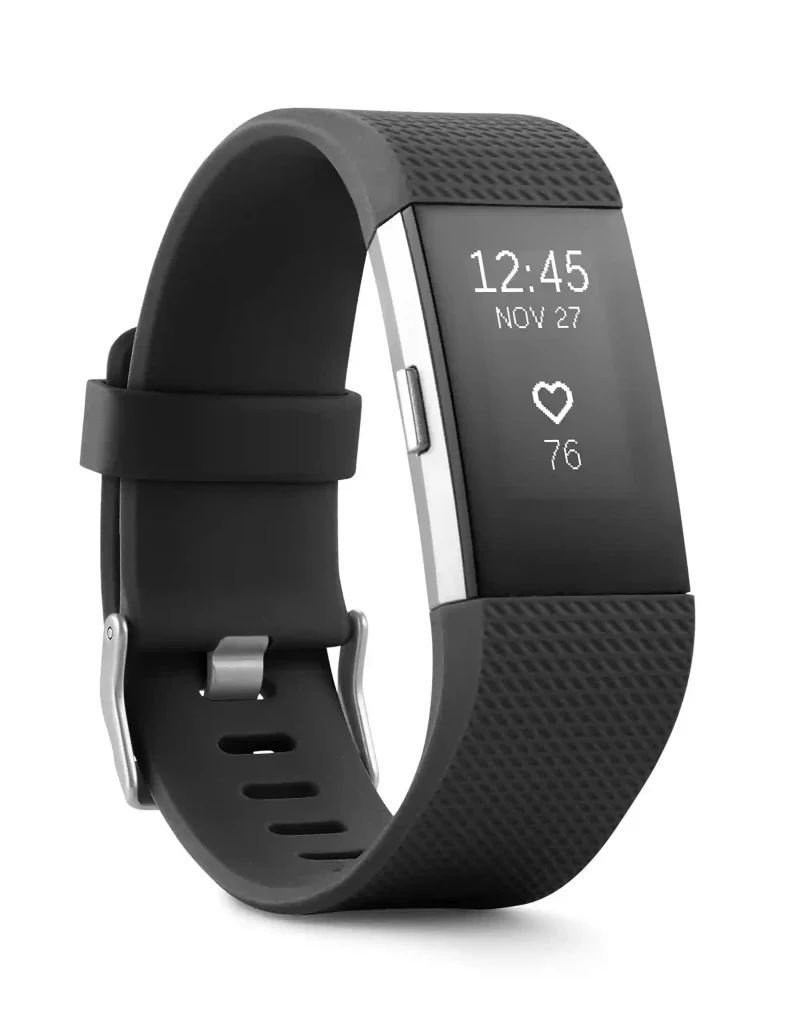
Fitbit is more focused on fitness and wellness tracking. Depending on the model, features can include heart-rate tracking, activity tracking, sleep data, GPS, and other health metrics.
The main choice is simple: emergency response or everyday health tracking?
Medical Alert vs Fitbit At a Glance
These products overlap because both can be worn on the wrist. Their main purposes, however, are quite different.
| Feature | Medical Alert | Fitbit |
|---|---|---|
| Main purpose | Emergency assistance | Health and activity tracking |
| Help button | Yes | Not a standard Fitbit feature |
| 24/7 response center | Yes | No dedicated monitored response center |
| Optional fall detection | Yes | Not a standard Fitbit feature |
| Heart-rate tracking | Yes | Yes, on supported models |
| Step tracking | Yes | Yes |
| GPS | Yes | Available on some models |
| Mobile app | Yes | Yes |
| Daily fitness tracking | Basic | Strong focus |
| Subscription | Service plan | Varies by services/model |
| Best suited for | Emergency protection | Fitness and wellness |
Medical Alert Smartwatch for Seniors
Medical Alert’s smartwatch combines emergency assistance with a few everyday health features. The company says the device includes a help button, GPS location tracking, heart-rate monitoring, step tracking, voice prompts, and optional fall detection.
Ease of Use
The main operation is straightforward. The wearer presses and holds the Help Button for three seconds to start an emergency call. The watch provides voice prompts during the process.
This can be useful for seniors who do not want to depend on a smartphone during an emergency.
The watch does require regular charging. Medical Alert recommends fully charging it daily or when the battery is low. It also requires adequate battery power and cellular signal to make an emergency call.
Key Strengths
- Dedicated emergency Help Button
- 24/7/365 access to trained response specialists
- GPS location technology
- Optional automatic fall detection
- Heart-rate monitoring
- Step tracking
- Voice prompts
- Waterproof design for use in the shower or bath, according to the manufacturer
Potential Drawbacks
- Requires a service plan
- Needs regular charging
- Emergency calling depends on cellular coverage
- Fall detection does not detect every fall
- It is more focused on safety than advanced fitness tracking
Fitbit for Seniors
Fitbit devices are designed mainly for health, activity, and wellness tracking. The current Fitbit range includes products such as Charge 6, Inspire 3, Sense 2, and Versa 4, with features varying by model.
Ease of Use
Fitbit can be appealing to seniors who want one device for everyday activity tracking. Depending on the model, users can view activity, heart rate, sleep information, and other health data through the device and Google Health/Fitbit ecosystem.
Battery life also varies by model. Google lists up to seven days for Charge 6, up to 10 days for Inspire 3, and 6+ days for Sense 2 and Versa 4 under stated conditions. Actual battery life varies with use and settings.
Key Strengths
- Strong focus on daily activity tracking
- Heart-rate monitoring on supported models
- Sleep and wellness tracking
- GPS on selected models
- Different device styles and sizes
- Several days of battery life on many models
- Useful smartphone app and health-data ecosystem
Potential Drawbacks
- Standard Fitbit devices are not a substitute for a monitored medical alert system
- Emergency features vary by device and are not the same as a dedicated response service
- Some advanced health and wellness features may require compatible devices or services
- A smartphone or network connection may be needed for some functions
Which Is Easier for Seniors to Use?
Ease of use depends on the goal.
Medical Alert has a simpler emergency purpose. The wearer can press the dedicated Help Button to connect with a response specialist. That focused design may be easier for someone who mainly wants a clear way to request assistance.
Fitbit offers more health and activity information, but that also means more features to learn. It may suit a senior who enjoys tracking steps, heart rate, sleep, or exercise.
For someone with limited dexterity, a dedicated emergency button may be more useful than navigating several smartwatch features.
Performance Comparison
The products perform well in different areas.
Medical Alert’s performance is centered on emergency communication. Its smartwatch uses cellular communication and GPS/Wi-Fi technology to support emergency calls and location information.
Fitbit’s performance is centered on tracking. Depending on the model, Fitbit can monitor activity, heart rate, sleep, GPS workouts, and other wellness information. Charge 6, for example, has built-in GPS and multiple sensors for health and activity tracking.
| Performance Area | Medical Alert | Fitbit |
|---|---|---|
| Emergency communication | Strong focus | Limited/not the main purpose |
| Health tracking | Basic to moderate | Strong |
| Activity tracking | Basic | Strong |
| GPS | Emergency/location focused | Fitness/location tracking on supported models |
| Fall protection | Optional fall detection | Not standard across Fitbit devices |
| Response service | Yes | No dedicated monitored service |
Comfort, Accessibility, and Senior-Friendly Design
Both devices are worn on the wrist, but their design priorities differ.
Medical Alert keeps emergency access prominent. Its smartwatch includes a physical Help Button, voice prompts, and vibration to communicate important events such as emergency calls and low battery status.
Fitbit offers a broader wearable experience. The best choice may depend on whether the wearer prefers simple emergency controls or a more fitness-oriented device.
For either option, check:
- Screen readability
- Button size
- Wristband comfort
- Charging method
- Battery routine
- Ability to understand alerts
- Smartphone requirements
Features Comparison
The feature gap becomes clearer when the devices are viewed by purpose.
| Feature | Medical Alert | Fitbit |
|---|---|---|
| Emergency Help Button | Yes | No standard equivalent |
| Response specialists | Yes | No |
| Fall detection | Optional | Not a standard Fitbit feature |
| Heart rate | Yes | Yes on supported models |
| Steps | Yes | Yes |
| Sleep tracking | Not a main feature | Yes on supported models |
| Fitness tracking | Basic | Strong |
| GPS | Yes | Some models |
| Voice prompts | Yes | Varies by model |
| Health ecosystem | Medical Alert app | Fitbit/Google Health |
Price, Maintenance, and Long-Term Value
Medical Alert uses a service-based model. Its Smartwatch is currently advertised from $34.95 per month, with monthly and annual plan options. Fall detection is an optional add-on listed at an additional $10 per month.
Fitbit follows a different cost structure. You generally purchase the device, while some Google Health/Fitbit services may involve additional subscription costs. Exact device pricing can vary by model and market.
| Cost Factor | Medical Alert | Fitbit |
|---|---|---|
| Main cost | Service plan | Device purchase |
| Monthly service | Yes | Depends on optional services |
| Fall detection | Optional paid feature | Not standard |
| Charging | Regular charging | Regular charging |
| Long-term focus | Emergency service | Health and activity tracking |
The better value depends on what you actually need. Paying for a Fitbit does not provide the same service as paying for a monitored medical alert system.
Who Should Choose Medical Alert?
Choose Medical Alert if:
- Emergency assistance is the main reason for buying a wearable.
- You want a dedicated Help Button.
- You want access to trained response specialists.
- GPS location during an emergency matters.
- Optional fall detection is important.
- You prefer a safety-focused device over a fitness-focused wearable.
Who Should Choose Fitbit?
Choose Fitbit if:
- Daily activity tracking is your main goal.
- You want detailed fitness and wellness features.
- Heart-rate and sleep tracking matter.
- You want to track exercise and activity trends.
- You prefer a general-purpose fitness wearable.
- You do not need a dedicated monitored emergency response service.
Final Verdict
Medical Alert and Fitbit are not direct substitutes in every situation. Medical Alert is designed around emergency assistance, while Fitbit is designed around health, activity, and fitness tracking.
For a senior whose main concern is having a simple way to request help, Medical Alert provides features specifically built around that need. For a senior who mainly wants activity, heart-rate, sleep, and fitness tracking, Fitbit offers a broader wellness-focused experience.
Scoring Summary
Rather than assigning arbitrary numerical scores, the comparison is clearer when the products are matched to their intended use.
| Category | Medical Alert | Fitbit |
|---|---|---|
| Emergency assistance | Strong | Limited |
| Senior safety focus | Strong | Moderate |
| Fitness tracking | Moderate | Strong |
| Health tracking | Moderate | Strong |
| Dedicated fall detection | Available | Not standard |
| Everyday activity | Basic | Strong |
| Long-term safety service | Strong | Limited |
How We Evaluate Products
This comparison focuses on the features that matter most for senior use. These include ease of operation, accessibility, emergency functions, comfort, health tracking, maintenance, battery needs, cost, and long-term practicality.
The comparison does not assume hands-on testing. Product capabilities are based on current manufacturer and official support information, and features can vary between Fitbit models.
Senior-Specific Buying Considerations
Before choosing either device, consider the actual reason for wearing it.
Emergency Protection
If the main concern is getting help after an emergency, look for a dedicated emergency communication system rather than focusing only on health tracking.
Controls
Check whether the wearer can quickly understand and operate the controls. A simple emergency button can be useful when speed matters.
Charging
Both types of devices need charging. Medical Alert specifically requires sufficient battery charge for emergency calls.
Cellular Coverage
Medical Alert’s smartwatch needs adequate cellular coverage to make an emergency call. Check coverage where the device will normally be used.
Fall Detection
Fall detection can add another layer of protection, but it is not perfect. Medical Alert states that its fall detection does not detect 100% of falls.
Common Buying Mistakes
Avoid these mistakes when comparing Medical Alert and Fitbit:
- Buying a fitness tracker when emergency monitoring is the real need
- Assuming every Fitbit has the same safety features
- Ignoring cellular or phone requirements
- Choosing based only on the initial device price
- Forgetting monthly service costs
- Assuming fall detection catches every fall
- Ignoring the charging routine
- Choosing a device with features the wearer will not use
Safety
A wearable should not be treated as a guarantee of emergency assistance.
Medical Alert states that its emergency smartwatch requires adequate battery charge and cellular signal. Its fall detection can also miss certain types of falls.
For health-related concerns, Fitbit’s health data should not be treated as a diagnosis. Google advises users to consult a healthcare provider for health concerns and to contact emergency services immediately in an emergency.
Frequently Asked Questions
Is Medical Alert better than Fitbit for emergencies?
Medical Alert is specifically designed for emergency assistance and provides access to trained response specialists through its Help Button. Fitbit’s main purpose is health and activity tracking.
Does Fitbit have fall detection?
Fall-detection availability should not be assumed across the Fitbit product line. Google’s current safety documentation describes fall detection for certain Pixel Watch models rather than standard Fitbit trackers.
Does Medical Alert track heart rate?
Yes. The Medical Alert Smartwatch includes an on-demand heart-rate monitor and step tracking.
Can Medical Alert work without a smartphone?
The Medical Alert Smartwatch uses cellular communication for emergency calls, so it does not operate in the same way as a Fitbit that relies on a paired phone for some functions. However, adequate cellular coverage and battery power are required.
Which is better for fitness tracking?
Fitbit is the more fitness-focused option. Its current devices include features for activity, heart rate, sleep, exercise, and other wellness measurements, depending on the model.
Can Fitbit replace a medical alert system?
A standard Fitbit should not automatically be treated as a replacement for a dedicated monitored medical alert system. The two products are built around different primary purposes.
Conclusion
Medical Alert and Fitbit serve different needs. Medical Alert puts emergency assistance, a Help Button, GPS, and optional fall detection at the center of the experience. Fitbit puts health, activity, sleep, and fitness tracking at the center.
For seniors and caregivers, the most important question is not simply which device has more features. It is whether the priority is getting emergency help or tracking everyday health and activity. That distinction makes the choice much easier.