
Apple Watch vs Samsung Watch for Seniors


Electric Mobility Scooter

Compression Socks

Weighted Blanket
Apple Watch vs Samsung Watch is mainly a choice between two smartwatch ecosystems. For seniors, the better option often depends less on the watch itself and more on the phone already being used.
Apple Watch works with iPhone, while the latest Samsung Galaxy Watch9 requires an Android phone and does not support iPhone. That makes phone compatibility the first thing to check.
Both watches offer health, activity, safety, notifications, and everyday smartwatch features. The differences become more important when you look at battery life, health tools, controls, and how easily the watch fits into an existing phone setup.
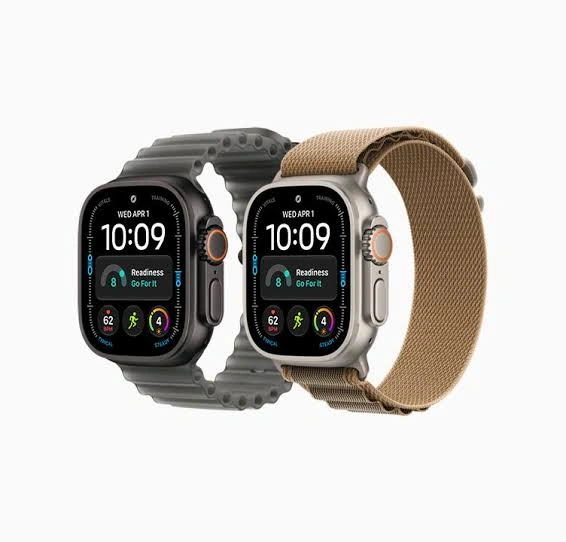
Quick Comparison
For an iPhone user, Apple Watch is the natural choice because the current Apple Watch lineup is designed around the iPhone. For an Android user, Galaxy Watch9 is the more direct option.
Galaxy Watch9 also has a longer advertised battery window than the Apple Watch Series 11, while current Apple Watch models offer a strong set of health and safety features.
The phone you already own may matter more than the watch you prefer.
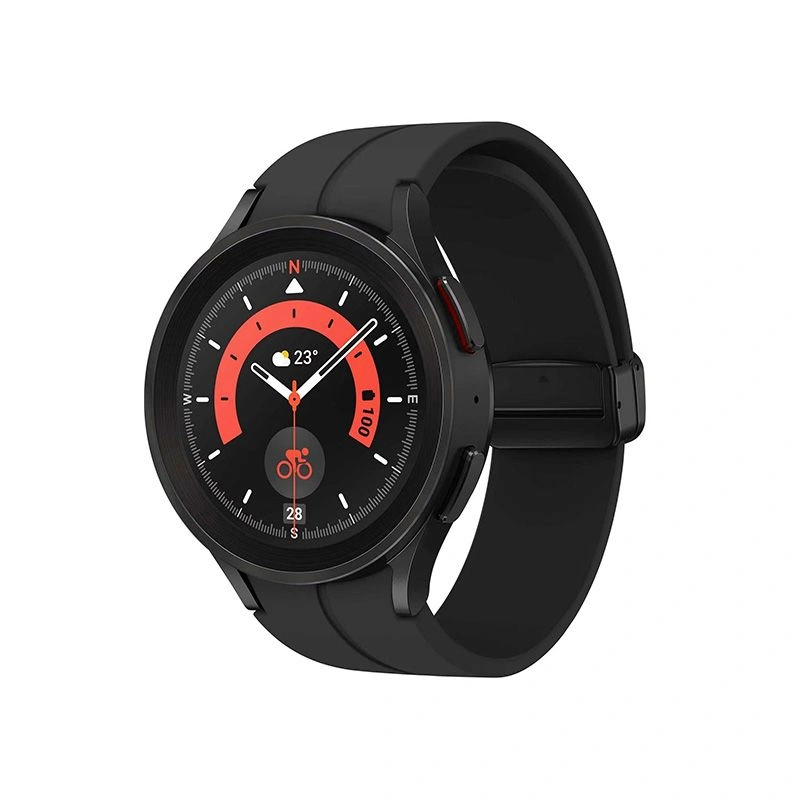
Apple Watch vs Samsung Watch At a Glance
The table below focuses on the factors that can make a real difference for everyday senior use.
| Feature | Apple Watch | Samsung Galaxy Watch |
|---|---|---|
| Phone compatibility | iPhone | Android |
| Current mainstream model | Apple Watch Series 12 | Galaxy Watch9 |
| Health tracking | Extensive | Extensive |
| Fall detection | Available on supported models | Available |
| Emergency features | SOS and safety features | SOS and fall detection |
| Battery | Generally shorter | Generally longer |
| Display | Bright, easy-to-read options | Bright AMOLED display |
| Health platform | Apple Health | Samsung Health |
| Best ecosystem fit | iPhone users | Android users |
| Learning curve | Familiar for iPhone users | Familiar for Android users |
Apple currently lists Series 12, Series 11, SE 3 and Ultra models among its current Watch range, while Samsung’s current Galaxy Watch lineup includes Watch9 and Ultra2.
Apple Watch Review for Senior Everyday Use
Apple Watch is appealing when the senior already uses an iPhone and wants the watch to work closely with it.
Current Apple Watch models provide health, fitness, communication, and safety functions through watchOS. Apple also continues to expand its health features, including newer health sensing and readiness tools.
Ease of Use
The biggest advantage is ecosystem familiarity. Someone already comfortable with an iPhone may find it easier to understand notifications, apps, contacts, and settings on Apple Watch.
The physical controls also provide more than one way to interact with the watch. This can be useful for users who do not enjoy navigating every function through a small touchscreen.
Key Strengths
- Strong integration with iPhone
- Broad health and fitness tracking
- Safety features such as emergency communication and fall detection on supported models
- Large selection of apps and accessories
- Clear integration with Apple’s Health ecosystem
- Several case sizes and models
Potential Drawbacks
- Requires an iPhone for normal setup and use
- Battery life can mean more frequent charging than some Galaxy Watch models
- The large number of settings may feel complicated at first
- Some advanced health features vary by model and region
Apple states that current Apple Watch setup requires a compatible iPhone, with requirements depending on the model.
Samsung Galaxy Watch Review for Senior Everyday Use
Samsung Galaxy Watch is a strong fit for seniors who use Android phones. The latest Galaxy Watch9 was introduced in 2026 and is designed around Samsung’s broader health and Galaxy ecosystem.
Ease of Use
Galaxy Watch9 can provide notifications, calls, apps, health information, and other everyday functions directly from the wrist.
For an Android user, the setup can feel natural because the watch connects through Samsung’s Android-based ecosystem. Samsung also supports Galaxy Watch with non-Samsung Android phones, although some features can vary.
Key Strengths
- Strong Android integration
- Detailed Samsung Health platform
- Sleep and activity tracking
- Fall detection and SOS features
- Bright AMOLED displays
- Longer battery focus than many Apple Watch models
- Multiple sizes and Galaxy Watch models
Potential Drawbacks
- Latest models do not support iPhone
- Some health functions may depend on the phone, model, region, or Samsung ecosystem
- The large number of health metrics may feel overwhelming for some users
- Advanced features can require more setup
Samsung says Galaxy Watch9 requires Android 13 or later with at least 1.5GB of RAM, and iOS is not supported.
Which Is Easier for Seniors to Use?
Neither watch is automatically easier for every senior. The phone already in use is often the deciding factor.
An iPhone user may find Apple Watch easier because the two devices are designed to work together. An Android user may find Galaxy Watch9 more straightforward for the same reason.
For seniors who prefer fewer charging interruptions, Galaxy Watch may have an advantage. Samsung lists up to 30 hours with Always-On Display enabled for certain Galaxy Watch8 configurations, while Apple listed up to 24 hours for Series 11. Actual battery life varies with use and model.
Performance Comparison
Smartwatch performance is not just about processor speed. For seniors, useful performance means reliable notifications, responsive controls, health tracking, and quick access to safety features.
| Performance Area | Apple Watch | Galaxy Watch |
|---|---|---|
| Health tracking | Extensive | Extensive |
| Sleep tracking | Yes | Yes |
| Activity tracking | Strong | Strong |
| Emergency features | Strong | Strong |
| App ecosystem | Broad | Broad |
| Battery flexibility | More frequent charging may be needed | Longer battery options |
| Phone integration | iPhone-focused | Android-focused |
Samsung Health includes sleep data, Sleep Coaching, Energy Score, exercise tracking, heart-related information, and other wellness tools.
Comfort, Accessibility, and Senior-Friendly Design
Comfort depends heavily on case size, band choice, wrist size, and personal preference.
Both brands offer multiple watch sizes, which helps users avoid choosing a case that feels too bulky. Samsung’s current Watch9 is available in 40mm and 44mm sizes, while Apple’s current lineup includes several case sizes across its models.
For someone with limited dexterity, a larger display and simple watch face can make daily interaction easier. A comfortable band is also important because health and sleep tracking work best when the watch is worn consistently.
Features Comparison
The two ecosystems overlap, but each has its own approach to health and smart features.
| Feature | Apple Watch | Samsung Galaxy Watch |
|---|---|---|
| Heart monitoring | Yes | Yes |
| Sleep tracking | Yes | Yes |
| Fall detection | Supported | Supported |
| Emergency SOS | Supported | Supported |
| Health insights | Apple Health | Samsung Health |
| Sleep coaching | Available features vary | Available |
| AI features | Available on supported models | Gemini and Galaxy AI features on supported models |
| Fitness tracking | Extensive | Extensive |
Samsung Galaxy Watch8 and newer models offer features such as Energy Score, sleep tools, vascular-load information, and other health insights. Samsung notes that feature availability varies by model.
Apple’s newer watches also continue to add health-related features, with availability depending on the watch model, iPhone, software version, and region.
Price, Maintenance, and Long-Term Value
Price changes often, so the purchase price should not be the only consideration.
Apple and Samsung both offer several watch models at different price points. Long-term value depends on the phone ecosystem, battery expectations, desired health features, accessories, and how long the watch will remain useful with future software.
| Cost Factor | Apple Watch | Samsung Galaxy Watch |
|---|---|---|
| Entry options | SE line available | Standard Galaxy Watch options |
| Premium models | Ultra line | Ultra line |
| Accessories | Many bands and chargers | Many bands and chargers |
| Replacement bands | Widely available | Widely available |
| Ecosystem cost | Best with iPhone | Best with Android |
| Long-term value | Strong for iPhone users | Strong for Android users |
The cheapest watch is not necessarily the better value. A watch that works naturally with the user’s existing phone may avoid unnecessary setup and compatibility problems.
Who Should Choose Apple Watch?
Choose Apple Watch if:
- The senior already uses an iPhone.
- Family members also use Apple devices.
- Easy iPhone integration is important.
- Health and safety features are a major reason for buying.
- The user wants access to Apple’s broader smartwatch ecosystem.
- They are comfortable charging the watch regularly.
Who Should Choose Samsung Galaxy Watch?
Choose Galaxy Watch if:
- The senior already uses an Android phone.
- Longer battery flexibility is important.
- Samsung Health features are useful to the user.
- The user wants a bright AMOLED display.
- Android integration matters more than Apple ecosystem features.
- The user wants access to Samsung’s newer health and AI features.
Apple Watch vs Samsung Watch — Final Verdict
For most seniors, the deciding factor is phone compatibility rather than brand.
Apple Watch makes more sense for an iPhone owner, while Galaxy Watch9 makes more sense for an Android owner. The two watches offer many overlapping health, fitness, communication, and safety functions, but they are built around different ecosystems.
If longer battery life is a major priority, Samsung’s current Galaxy Watch line deserves close attention. If close integration with an iPhone is the priority, Apple Watch is the more natural fit.
Scoring Summary
Scores below are editorial comparisons based on the senior-focused criteria discussed in this article, not laboratory test results.
| Category | Apple Watch | Samsung Galaxy Watch |
|---|---|---|
| Ease of Use | 9/10 | 9/10 |
| Senior-Friendly Design | 9/10 | 9/10 |
| Performance | 9/10 | 9/10 |
| Maintenance | 8/10 | 8/10 |
| Battery Convenience | 7/10 | 9/10 |
| Ecosystem Integration | 10/10 | 10/10 |
| Overall Value | 8/10 | 9/10 |
These scores should be read in context. Ecosystem integration is effectively tied because each watch works best with its intended phone platform.
How We Evaluate Products
We compare smartwatches around the things that can affect daily senior use.
The main factors are:
- Ease of operation
- Display and controls
- Comfort
- Health and safety features
- Battery convenience
- Phone compatibility
- Reliability
- Maintenance
- Long-term value
- Availability of useful features
This comparison does not claim hands-on testing or laboratory testing.
Senior-Specific Buying Considerations
Before choosing either watch, check these points.
Phone Compatibility
This should come first. Apple Watch is designed for iPhone, while current Galaxy Watch9 does not support iOS.
Controls
Look for a display and control system that feels easy to understand. A simpler watch face can also reduce visual clutter.
Charging
Think about whether the user is comfortable charging the watch regularly. Battery habits can affect how convenient a smartwatch feels.
Safety Features
If fall detection or emergency communication is important, check the exact model and regional availability before buying.
Health Features
Health information from a smartwatch should not be treated as a diagnosis. If a health feature is being considered for a specific medical concern, discuss its use with an appropriate healthcare professional.
Common Buying Mistakes
Avoid these common mistakes:
- Buying a watch without checking phone compatibility
- Choosing a large case that feels uncomfortable
- Paying for advanced features that will not be used
- Ignoring charging requirements
- Assuming every health feature works in every country
- Choosing based only on brand name
Safety
Smartwatches contain batteries and electronic components, so they should be charged according to the manufacturer’s instructions.
Health and safety features can also have model, software, and regional limits. They should be treated as supportive tools rather than replacements for emergency services or professional medical care.
For health-related features, check the manufacturer’s current instructions before relying on them for an important decision.
Conclusion
Apple Watch vs Samsung Watch is less about choosing a universal winner and more about choosing the watch that fits the user’s phone and daily routine. Apple Watch is closely tied to iPhone, while Galaxy Watch9 is designed for Android users.
For seniors, the most important checks are phone compatibility, ease of use, comfort, charging needs, and the specific health and safety features available on the exact model. Choosing around those practical needs can make the smartwatch much easier to use every day.