
Kobo vs PocketBook E-Reader for Seniors: A Guide

Medical Alert System

Long Handle Shoe Horn

Memory Foam Seat Cushion
Kobo vs PocketBook e-reader for seniors is a useful comparison if you want a simple device for reading books without the distractions of a phone or tablet. Both brands offer glare-free E Ink screens, adjustable front lighting, and several screen sizes.
The main difference is the reading ecosystem. Kobo has a strong connection to its own bookstore and library borrowing support in selected countries. PocketBook takes a more open approach, with broad file-format support and features such as text-to-speech and audiobook support on many models.

Quick Comparison
For many seniors, Kobo is easier if you mainly buy books from Kobo or use supported public-library services. Its current readers have simple interfaces, adjustable lighting, and useful accessibility-oriented reading features.
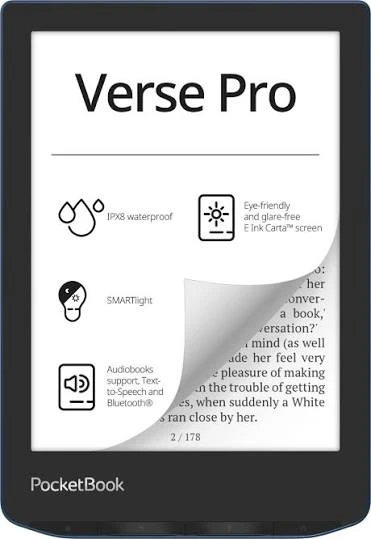
PocketBook may suit seniors who already have books from different sources. Its readers support a particularly broad range of formats, while selected models also include physical page-turn buttons, speakers, Bluetooth, and text-to-speech.
The better choice depends less on age and more on how the reader gets books and which controls they prefer.
Kobo vs PocketBook At a Glance
The two brands overlap, but their strengths are not identical.
| Feature | Kobo | PocketBook |
|---|---|---|
| E Ink readers | Yes | Yes |
| Color models | Clara Colour, Libra Colour | Several color models |
| Front lighting | Yes | Yes |
| Waterproof models | Several current models | Several current models |
| Page-turn buttons | Available on Libra Colour and some larger models | Available across many models |
| Audiobooks | Supported on compatible models | Supported on many models |
| Text-to-speech | Limited compared with PocketBook | Available on selected models |
| File-format flexibility | Good | Very broad |
| Library borrowing | OverDrive/Libby on supported models and countries | Libby app now available on Verse Pro firmware |
| Stylus support | Available on selected models | Available on selected large-screen models |
Kobo’s current range includes 6-inch, 7-inch, 8-inch, and 10.3-inch options. PocketBook also offers several sizes, including compact 6-inch readers and larger models.
Kobo E-Readers for Senior Readers
Kobo offers a fairly focused reading experience. Current options include the 6-inch Clara BW, 6-inch Clara Colour, 7-inch Libra Colour, 8-inch Sage, and 10.3-inch Elipsa 2E.
Ease of Use
Kobo readers are designed around reading rather than general-purpose apps. Current models include adjustable front lighting, and several models provide ComfortLight PRO for adjusting brightness and reducing blue light.
The Kobo Libra Colour is especially interesting for seniors who prefer physical page-turn buttons. Its 7-inch color E Ink screen and ergonomic design can make it easier to hold and operate than a completely touchscreen-based reader.
Key Strengths
- Simple reading-focused interface
- Adjustable front lighting
- Large-text reading options
- Waterproof models
- Page-turn buttons on selected models
- Color screens on selected models
- Stylus support on selected devices
Potential Drawbacks
- Some useful features depend on the model
- Audiobook availability varies by country
- Library integration is not available everywhere
- Users who own many unusual file types may prefer PocketBook’s broader format support
PocketBook E-Readers for Senior Readers
PocketBook has a wider range of devices and puts strong emphasis on an open reading ecosystem. Its current products include Verse, Verse Pro, Era, InkPad models, and several color readers.
Ease of Use
PocketBook offers physical page-turn buttons on many models. The company also supports features such as SMARTlight, touch controls, Bluetooth, and audio on compatible devices.
The PocketBook Era, for example, has a 7-inch E Ink Carta 1200 screen, side control buttons, an ergonomic shape, IPX8 water protection, speakers, Bluetooth, and text-to-speech.
Key Strengths
- Very broad file-format support
- Physical page-turn buttons on many models
- Text-to-speech on compatible readers
- Audiobook and Bluetooth support on selected models
- Several color options
- Many screen sizes
- microSD support on some models
Potential Drawbacks
- The larger range can make model selection confusing
- Some advanced features vary considerably between models
- The interface may feel less focused than Kobo for someone who wants a simple bookstore-centered experience
Which Is Easier for Seniors to Use?
Both can work well, but the right choice depends on the reader.
Kobo may be easier for someone who wants a straightforward reading device with a polished bookstore ecosystem. The Libra Colour’s page-turn buttons can also help readers who prefer not to tap the screen for every page.
PocketBook may be easier for someone who wants more physical controls or already owns books in several formats. Many PocketBook models include mechanical paging buttons, and the brand supports a large number of ebook formats without conversion.
For a senior reader, simple controls and readable text can matter more than having the longest feature list.
Performance Comparison
For normal novels and other text-based books, both brands provide E Ink readers designed for long reading sessions.
Kobo’s current range includes high-resolution screens and both black-and-white and color E Ink options. The Libra Colour uses a 7-inch color E Ink Kaleido 3 display, while the Clara BW uses a 6-inch E Ink Carta 1300 HD screen.
PocketBook offers similar variety. The Era has a 7-inch, 300-dpi E Ink Carta 1200 display, while the InkPad Color 3 provides a larger 7.8-inch color display.
For standard books, screen size and text settings may matter more than small differences in display technology.
Comfort, Accessibility, and Senior-Friendly Design
Comfort depends heavily on the individual reader.
A smaller 6-inch reader can be easier to carry. A 7-inch or larger reader may provide more comfortable page viewing and larger text without requiring as much screen adjustment.
Kobo offers dark mode on several current models, adjustable front lighting, and blue-light control.
PocketBook’s newer software also includes accessibility improvements. Its Verse Pro firmware added adjustable text size, bold text, increased gray-text contrast, a dyslexic font, and screen-reader support.
These features may be particularly useful for readers who want more control over how text appears.
Features Comparison
The biggest differences become clearer when you look beyond basic reading.
| Feature | Kobo | PocketBook |
|---|---|---|
| Color E Ink | Yes | Yes |
| Page-turn buttons | Selected models | Many models |
| Text-to-speech | Less central | Strong feature on selected models |
| Audiobooks | Compatible models | Many compatible models |
| Stylus | Selected models | Selected models |
| File support | Broad | Especially broad |
| Cloud services | Kobo ecosystem | PocketBook Cloud and other services |
Kobo’s current Libra Colour supports stylus input, 32GB storage, page-turn buttons, and audiobook listening through Bluetooth. PocketBook’s Era combines physical controls with audio, Bluetooth, text-to-speech, and broad format support.
Price, Maintenance, and Long-Term Value
Prices change by country and retailer, so a temporary sale should not determine the entire comparison.
As a current U.S. reference, Kobo lists the Clara BW at $159.99, Clara Colour at $179.99, and Libra Colour at $259.99.
PocketBook pricing varies by model and market, so it is better to compare equivalent screen sizes and features rather than simply comparing brand-level prices.
For long-term value, consider:
- Device price
- Protective cover
- Storage capacity
- Audiobook needs
- File-format compatibility
- Library access
- Replacement or repair options
- Whether physical buttons are important
Who Should Choose Kobo?
- Choose Kobo if you mainly buy ebooks through Kobo.
- Choose Kobo if you want a focused reading ecosystem.
- Choose Kobo if you want color reading on a compact or 7-inch device.
- Choose Kobo if page-turn buttons are important and you like the Libra design.
- Choose Kobo if you want a simple interface with adjustable reading comfort features.
Who Should Choose PocketBook?
- Choose PocketBook if you have books in many different formats.
- Choose PocketBook if text-to-speech is important.
- Choose PocketBook if you prefer physical page-turn buttons.
- Choose PocketBook if you want more flexibility in where your ebook files come from.
- Choose PocketBook if audiobook and Bluetooth features are important on your chosen model.
Kobo vs PocketBook — Final Verdict
There is no single winner for every senior reader.
Kobo is a strong fit for seniors who want a simple, reading-focused ecosystem, especially those who buy from Kobo and use compatible library services.
PocketBook is a strong fit for seniors who value flexibility, especially readers with books from different sources or those who want features such as broad file support, physical buttons, and text-to-speech.
The most important question is simple: Do you want a more streamlined ebook ecosystem, or more freedom over your existing digital library?
Scoring Summary
The scores below are editorial comparisons based on the current feature sets and should be treated as a guide, not laboratory measurements.
| Category | Kobo | PocketBook |
|---|---|---|
| Ease of Use | 9/10 | 8.5/10 |
| Senior-Friendly Design | 9/10 | 9/10 |
| Format Flexibility | 8/10 | 10/10 |
| Accessibility Features | 8.5/10 | 9/10 |
| Audio Features | 8/10 | 9.5/10 |
| Overall Value | 9/10 | 9/10 |
The scores can change depending on the specific models being compared.
How We Evaluate Products
This comparison focuses on features that can affect everyday reading for older adults.
We consider:
- Ease of operation
- Screen readability
- Physical controls
- Comfort
- Accessibility
- File compatibility
- Audio features
- Maintenance
- Price and value
- Long-term practicality
This is a specifications-based comparison. It does not claim hands-on testing or personal ownership.
Senior-Specific Buying Considerations
Physical Effort
Check the reader’s weight and size. A larger screen may be easier to read, but a smaller reader may be easier to hold for long periods.
Controls
Look for physical page-turn buttons if tapping a touchscreen repeatedly is inconvenient.
Text Readability
Check whether the reader allows comfortable font-size and display adjustments.
Setup
Consider how books will be added. A simple bookstore workflow may be preferable for some users, while others may value the ability to transfer different file types.
Audio
If listening is important, check Bluetooth, speakers, audiobook support, and text-to-speech on the exact model.
Common Buying Mistakes
Avoid these mistakes when choosing between Kobo and PocketBook:
- Buying based only on screen size
- Ignoring the source of your ebook collection
- Assuming every model has the same features
- Overlooking physical page-turn buttons
- Paying extra for color when you mainly read novels
- Forgetting audiobook or text-to-speech requirements
Safety
E-readers are generally low-risk devices, but normal battery and charging precautions still apply.
Use the supplied or compatible charging equipment and follow the manufacturer’s instructions. For readers with significant visual, motor, or other accessibility needs, it can also help to check the exact device controls before buying.
Conclusion
Kobo and PocketBook both offer capable E Ink readers for seniors, but they take different approaches. Kobo is more appealing to readers who want a focused ecosystem and straightforward reading experience. PocketBook stands out for format flexibility, physical controls, and audio-related features on compatible models.
For the best match, choose the specific model based on screen size, controls, accessibility features, book sources, and audio needs rather than choosing only by brand.