
Google Nest vs Emerson Sensi Smart Thermostat for Seniors


Rollator Walker with Seat

Orthopedic Sandals

Gardening Kneeler Bench
Google Nest vs Emerson Sensi smart thermostat for seniors is a useful comparison for anyone who wants simple temperature control without giving up smart features. Both can be controlled from a phone and support scheduling, but they take different approaches to smart-home control.
For seniors, the main choice is less about having the most features and more about which system feels easier to manage every day. Nest fits especially well for people already using Google Home, while Sensi offers a more traditional thermostat experience with strong scheduling and compatibility options.
Quick Comparison
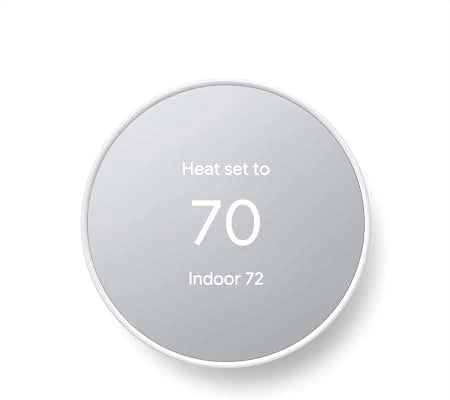
Google Nest is a good fit for seniors who want a clean interface, Google Home integration, and automated energy-saving tools. The Nest Thermostat can be controlled through the Google Home app and can provide Savings Finder suggestions.
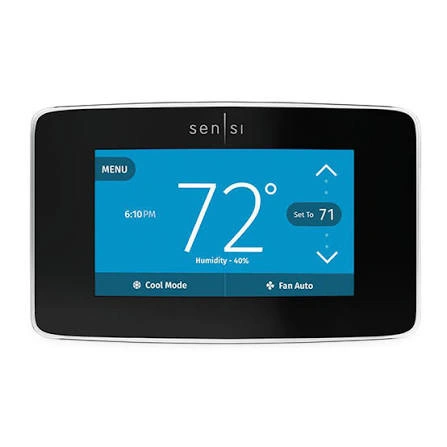
Emerson Sensi is appealing if familiar thermostat controls and flexible scheduling matter more. Its app supports remote control, scheduling, geofencing, and usage information.
Simple choice: Nest leans toward Google-based smart-home automation, while Sensi keeps more of the familiar thermostat approach.
Google Nest vs Emerson Sensi At a Glance
The exact features depend on the model. Here, the comparison focuses on the current Nest Thermostat and Sensi Smart Thermostat product lines.
| Feature | Google Nest | Emerson Sensi |
|---|---|---|
| Main app | Google Home | Sensi app |
| Remote control | Yes | Yes |
| Scheduling | Yes | Yes |
| Geofencing | Home/Eco automation | Yes |
| Smart-home support | Google Home, Matter on newer models | Alexa, Google Home, SmartThings |
| C-wire | Depends on HVAC system | Depends on system/model |
| Display | Color LCD | LED display |
| Usage information | Energy dashboard | Runtime and usage reports |
| Best fit | Google smart-home users | Traditional thermostat users |
Google states that the Nest Thermostat works with many common 24V heating and cooling systems, while Sensi lists compatibility with conventional systems, heat pumps, boilers, and other common HVAC setups.
Google Nest Review for Senior-Friendly Use
Google Nest has a simple physical design and connects closely with the Google Home ecosystem. That can be useful for seniors who already use Google smart-home products.
Ease of Use
Nest can be controlled from the thermostat or the Google Home app. The app allows temperature changes even when the user is away from home.
For a senior who prefers fewer physical interactions, phone-based control can be helpful. Family members can also be given access to a Google Home, making remote assistance possible.
Key Strengths
- Clean, simple thermostat design
- Google Home integration
- Remote temperature control
- Energy-saving suggestions
- Automatic Eco Temperature features
- Useful option for existing Google Home users
Nest can also automatically switch to Eco Temperatures when it detects that nobody is home, depending on the setup.
Potential Drawbacks
- Compatibility must be checked before installation
- Some HVAC systems may need a C wire or additional power solution
- Google Home adds another app ecosystem to learn
- Advanced smart features can be more than some users need
Emerson Sensi Review for Senior-Friendly Use
Emerson Sensi focuses on practical HVAC control while keeping smart features in the background. Its current Sensi Smart Thermostat supports scheduling, geofencing, remote access, and multiple common HVAC configurations.
Ease of Use
Sensi’s app lets users change temperature settings, create schedules, and control the thermostat remotely. Its traditional thermostat footprint can also make replacement installation more straightforward in suitable systems.
For seniors who are comfortable with a conventional thermostat layout, this approach may feel familiar.
Key Strengths
- Familiar thermostat-style operation
- Remote control through the Sensi app
- Flexible weekly scheduling
- Geofencing support
- Alexa, Google Home, and SmartThings compatibility
- Strong HVAC compatibility across the Sensi range
Sensi’s compatibility varies by model. For example, the standard Sensi Smart Thermostat can work with several conventional and heat-pump systems, while C-wire requirements depend on the HVAC configuration.
Potential Drawbacks
- C-wire requirements can vary by model and system
- Some smart features require learning the Sensi app
- Geofencing and scheduling are separate approaches on some Sensi models
- The feature set can vary substantially between Sensi models
Which Is Easier for Seniors to Use?
Both are designed to reduce the need for constant manual adjustment, but their strengths differ.
Nest may be easier for seniors who:
- Already use Google Home
- Prefer app-based control
- Want automated energy suggestions
- Have family members who can help manage the Google Home system
Sensi may be easier for seniors who:
- Prefer a traditional thermostat experience
- Want straightforward weekly schedules
- Like having several smart-home platform options
- Want remote control without moving fully into the Google ecosystem
Sensi also offers keypad lockout on supported models, which can prevent unwanted changes directly at the thermostat.
Performance Comparison
Smart thermostats do not differ like vacuum cleaners or coffee makers. Their main performance question is how reliably and conveniently they control the home’s HVAC system.
Nest supports many 24V heating and cooling systems, including furnaces, air conditioners, boilers, and heat pumps, although compatibility varies by model.
Sensi also supports conventional heating and cooling systems, boilers, radiant systems, and heat pumps, with compatibility depending on the specific Sensi model.
| Performance Area | Google Nest | Emerson Sensi |
|---|---|---|
| Remote control | Google Home | Sensi app |
| Scheduling | Yes | Yes |
| Energy tools | Savings Finder/Eco features | Usage reports/geofencing |
| HVAC compatibility | Broad, model dependent | Broad, model dependent |
| Smart-home integration | Google ecosystem | Alexa, Google, SmartThings |
For either product, HVAC compatibility should come before smart features.
Comfort, Accessibility, and Senior-Friendly Design
A thermostat should be easy to read and adjust without unnecessary steps.
Nest has a color LCD and can be controlled through Google Home. The current Nest Thermostat also includes temperature, humidity, proximity, motion, and ambient-light sensors.
Sensi offers a more traditional thermostat experience, while its app provides remote control and scheduling. Some Sensi models also provide keypad lockout.
For a senior with limited dexterity, remote control from a phone may reduce the need to repeatedly walk to the wall thermostat. That benefit applies to both brands.
Features Comparison
The biggest difference is the software ecosystem rather than basic heating and cooling control.
| Feature | Google Nest | Emerson Sensi |
|---|---|---|
| Mobile control | Google Home | Sensi app |
| Remote access | Yes | Yes |
| Scheduling | Yes | Yes |
| Geofencing | Home/Eco automation | Yes |
| Usage data | Energy dashboard | Runtime/usage reports |
| Voice ecosystem | Google Home/Matter on newer models | Alexa, Google Home, SmartThings |
| Family access | Google Home sharing | App-based control |
Sensi provides daily, weekly, and monthly runtime information, while Google provides energy-related information and tools through Google Home.
Price, Maintenance, and Long-Term Value
Smart thermostats normally require little routine maintenance. The bigger long-term issue is compatibility and installation.
Nest’s current technical information says the Nest Thermostat can work with many 24V systems, but certain systems may require a C wire or Nest Power Connector.
Sensi also varies by model. The standard Sensi Smart Thermostat can use power sharing or hardwire in supported configurations, while some systems require a C wire.
Rather than choosing solely by purchase price, consider:
- Installation cost
- HVAC compatibility
- C-wire requirements
- App simplicity
- Smart-home compatibility
- Long-term software support
- Warranty
- Whether you actually need advanced automation
Who Should Choose Google Nest?
Choose Google Nest if:
- You already use Google Home.
- You want a simple smart-home ecosystem.
- You like app-based temperature control.
- Energy-saving suggestions are useful to you.
- A family member may help manage the thermostat remotely.
- Your HVAC system passes Google’s compatibility check.
Who Should Choose Emerson Sensi?
Choose Emerson Sensi if:
- You prefer a traditional thermostat experience.
- Weekly scheduling is important.
- You want Alexa, Google Home, or SmartThings compatibility.
- You want geofencing.
- You want detailed runtime and usage information.
- Your HVAC system is better suited to the particular Sensi model.
Google Nest vs Emerson Sensi — Final Verdict
For seniors, Google Nest and Emerson Sensi serve slightly different priorities. Nest is particularly convenient for people already invested in Google Home and those who want more automation around temperature management. Sensi is attractive for users who prefer familiar thermostat operation combined with flexible smart controls.
There is no need to choose based only on brand. Check HVAC compatibility first, then compare the controls, app, scheduling, and smart-home features that the senior will actually use.
Scoring Summary
Scores here are a simple editorial summary of the practical differences discussed above, not laboratory test results.
| Category | Google Nest | Emerson Sensi |
|---|---|---|
| Ease of Use | 9/10 | 9/10 |
| Senior-Friendly Design | 9/10 | 9/10 |
| Smart Features | 9/10 | 9/10 |
| HVAC Flexibility | 8/10 | 9/10 |
| Maintenance | 9/10 | 9/10 |
| Value | 8/10 | 9/10 |
These scores should be treated as comparative guidance rather than objective measurements. Model selection and HVAC compatibility can change the practical result.
How We Evaluate Products
For senior-focused thermostat comparisons, the important factors are practical rather than flashy.
We look at:
- Ease of operation
- Display and controls
- App usability
- Setup requirements
- HVAC compatibility
- Remote access
- Scheduling
- Smart-home integration
- Maintenance
- Long-term practicality
This comparison does not claim hands-on testing. Product specifications and current manufacturer documentation were used for the technical comparison.
Senior-Specific Buying Considerations
Before choosing either thermostat, check these points.
Controls
Make sure the person using the thermostat can understand the physical controls and app.
Setup
Check the existing HVAC wiring before buying. C-wire requirements vary between models.
Remote Access
Remote access can be useful when a family member or caregiver needs to help manage temperature settings.
Smart-Home Compatibility
Choose the ecosystem that matches the devices already in the home.
Display
Consider whether the thermostat’s display is easy for the user to see and understand.
Common Buying Mistakes
Avoid these common mistakes:
- Buying before checking HVAC compatibility
- Assuming every Sensi or Nest model has the same requirements
- Choosing based only on smart-home features
- Ignoring C-wire requirements
- Buying advanced features that the user will never use
- Forgetting who will manage the app after installation
Safety
Thermostat installation involves electrical wiring and HVAC equipment. If the homeowner is not comfortable identifying wires or working with the HVAC system, professional installation is the safer choice.
Google specifically recommends checking compatibility and notes that some systems may require professional installation. Sensi likewise provides professional installation options and detailed compatibility guidance.
Frequently Asked Questions
Is Google Nest or Sensi easier for seniors?
Both can be easy to use. Nest may feel more natural for Google Home users, while Sensi can feel more familiar to people who prefer traditional thermostat controls.
Can seniors control either thermostat from a phone?
Yes. Nest can be controlled through Google Home, while Sensi provides remote control through its mobile app.
Does Sensi require a C wire?
It depends on the Sensi model and HVAC system. Some Sensi models can use power sharing in certain systems, while others require a C wire.
Does Google Nest need a C wire?
Not always. Google says the Nest Thermostat works with many systems without one, but some systems require a C wire or Nest Power Connector.
Can family members control a Nest thermostat?
Yes. Google Home allows people to be added to a home and share control of connected devices, including thermostats.
Which one works with more smart-home platforms?
Sensi officially lists Amazon Alexa, Google Home, and Samsung SmartThings compatibility. Newer Nest models work with Google Home and Matter-enabled apps and voice assistants.
Conclusion
Google Nest and Emerson Sensi can both make everyday temperature control easier for seniors. Nest stands out for Google Home integration and automated energy tools, while Sensi emphasizes familiar controls, scheduling, remote access, and broad smart-home compatibility.
The most important step is to check the home’s HVAC system and wiring before choosing a model. Once compatibility is confirmed, the better fit comes down to which app, controls, and smart features are easiest for the individual senior to use.