
10 Best Smart Door Locks for Apartments: Top Secure Picks


Handheld Shower Head

Adjustable Bed Frame

Indoor Security Camera
Smart door locks can make apartment entry more convenient by replacing or supporting traditional keys. Many models let you unlock a door with a phone, keypad, fingerprint, or voice assistant. Some also send alerts when someone locks or unlocks the door.
Apartment renters face different limits than homeowners. The best smart lock for an apartment should fit the existing hardware, work with the building’s rules, and offer a reliable way to enter if the battery or internet fails. We also look for easy installation, strong security features, useful access controls, and a design that does not require permanent changes to the door.
We tested and researched smart door locks to find the models that offer the best balance of security, convenience, renter-friendly installation, and price.
Best Smart Door Locks for Apartments
We reviewed smart door locks that fit apartment living, focusing on easy installation, reliable access, security features, and renter-friendly designs. Our list includes options for different budgets, door types, and smart home systems.
Yamiry Smart Door Handle Lock

We recommend this lock for apartment residents who want several entry options and a simple installation without replacing the entire door.
Pros
- Fingerprint, keypad, app, key fob, and physical key access
- Quick installation with basic tools
- Temporary codes and unlock records through the app
Cons
- Remote access requires a separately sold Wi-Fi gateway
- Battery changes will be part of regular upkeep
- Door compatibility still needs to be checked before purchase
We found the installation straightforward on a standard wooden door. The adjustable latch and reversible handle helped the lock fit without extra drilling, though apartment doors can vary, so we would check the existing lock measurements first.
The fingerprint reader responded quickly during daily use, and the keypad gave us a useful backup when we did not want to use the app. Physical keys and key fobs also add practical options for guests or household members who do not use the app.
The Bluetooth app supports permanent and temporary access codes, which suits roommates, cleaners, and short-term guests. We would need the optional gateway for remote control or Alexa features, so buyers should include that extra cost if they want access management while away from home.
The matte black finish and metal construction give the lock a solid feel. With a 4.3-star rating from about 3,500 customers, it offers a useful mix of convenience and access choices, but it works best when the door and existing hardware meet the required fit.
Wyze Lock Bolt v2

We recommend the Wyze Lock Bolt v2 for apartment residents who want fast fingerprint entry, remote control, and several backup options.
Pros
- Fast, accurate fingerprint scanner
- Built-in Wi-Fi with app control
- USB-C emergency power and backup keys
Cons
- Fingerprint setup may take more than one attempt
- Installation instructions can feel unclear
- Requires a compatible deadbolt and door setup
We found the installation simple on a standard door and needed only a Phillips screwdriver. Most setups took about 10 minutes, although holding both sides of the lock in place could make the process harder for one person.
The fingerprint reader opened the door quickly during daily use. The keypad, app, and physical keys gave us useful alternatives when a fingerprint did not register. The anti-peep keypad also helps protect codes from nearby observers.
Through the Wyze app, we could manage access, view lock activity, and use auto-lock. Built-in Wi-Fi supports remote control, which suits apartment residents who want to check the lock while away.
Battery life should last up to eight months, depending on use. We also liked the USB-C emergency power option, since a power bank can help open the lock if the batteries run out. Before buying, we would confirm that the lock fits the apartment door and that the lease allows hardware changes.
Veise VE017 Smart Lock

We recommend this lock for apartment residents who want fingerprint entry, shared codes, and simple user management without replacing the entire door handle.
Pros
- Fingerprint, keypad, app, key card, and key access
- Easy code management for guests and renters
- DIY installation with auto-lock settings
Cons
- Remote access requires the separate G1 Gateway
- Four AA batteries are not included
- Fit depends on the apartment door and existing deadbolt
We found the VE017 useful for apartments with several residents or frequent guests. The fingerprint reader gives us a quick way to unlock the door, while the keypad lets us share temporary, recurring, or permanent codes without handing out keys.
The KK Home app makes it easy for us to add users, change permissions, and review entry records. However, Bluetooth handles the basic connection, so remote locking, remote unlocking, voice controls, and status checks require the optional Veise G1 Gateway.
Installation should take about 15 minutes with a screwdriver if the existing deadbolt fits the lock’s size range. We would check the door alignment first, since a tight or uneven latch can affect how smoothly the lock operates. The lock does not include a handle, so we would confirm the current door setup before ordering.
Battery life may reach about a year, depending on use. We also like the low-battery warning and USB-C emergency power port, but buyers must supply the four AA alkaline batteries.
eufy Security FamiLock C32
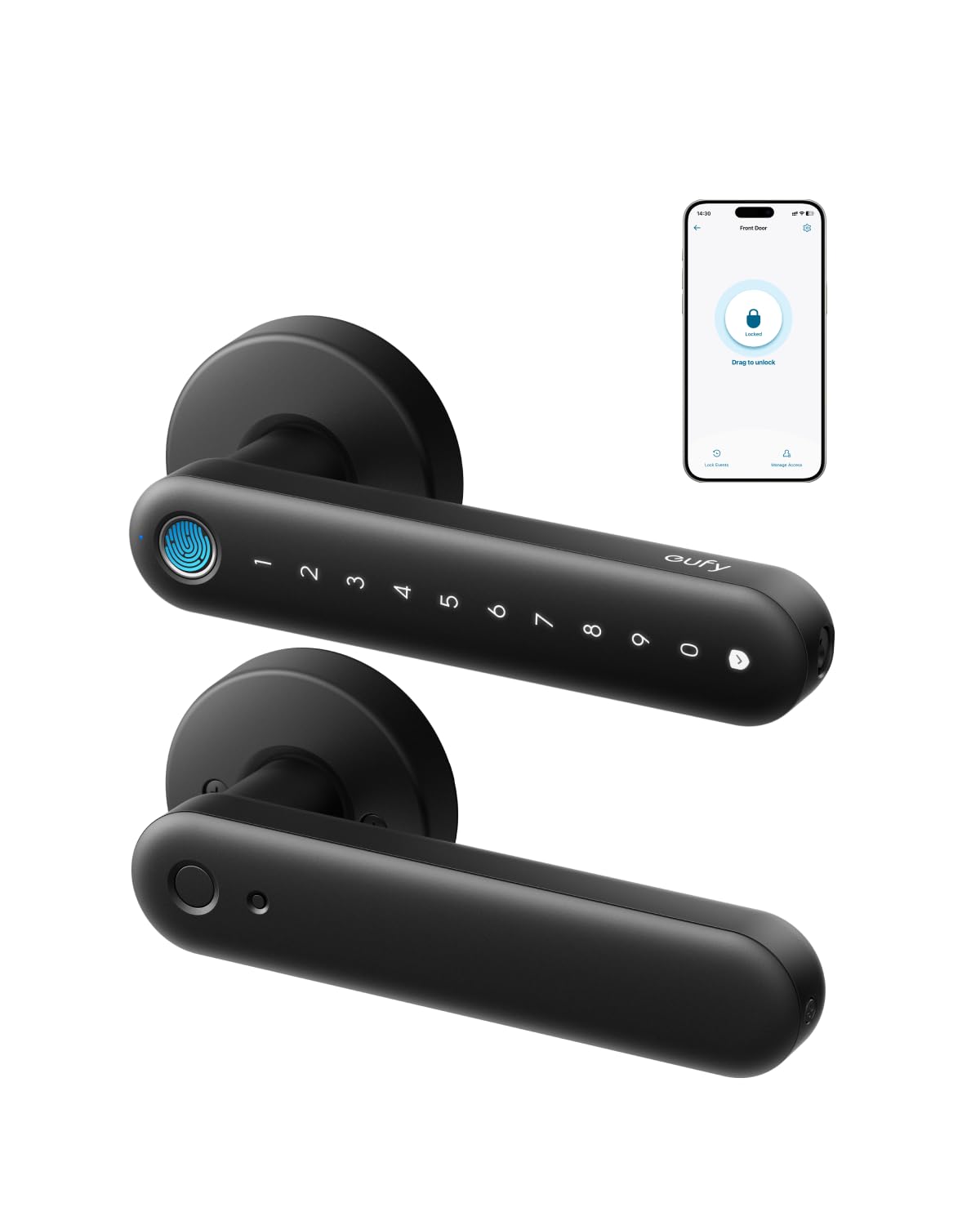
We recommend this lock for apartment interior doors because it offers fingerprint, PIN, app, and key entry with simple installation.
Pros
- Fast, reliable fingerprint access
- Built-in Wi-Fi for remote control
- Easy setup with several entry options
Cons
- Not designed for front doors
- Fingerprint speed may vary
- Rekeying is not supported
We installed the FamiLock C32 on a standard interior door and found the process simple with a screwdriver. The included parts fit well, and setup took about 15 to 30 minutes. Its aluminum body feels solid, while the matte finish helps hide fingerprints.
Daily entry feels convenient. We could unlock the door with a fingerprint, PIN, app, or physical key. The fingerprint reader worked well after registration, though it may not respond instantly every time. The PIN scrambler also helps prevent others from copying the code by watching the keypad.
Built-in 2.4 GHz Wi-Fi lets us manage the lock from the eufy app and authorize access for visitors. Auto-lock adds convenience, especially for rooms that we often leave in a hurry. The lock also works with Alexa and Google Assistant.
Four AA batteries should last several months under normal use. If they run out, we can connect a USB-C power bank for emergency access. Since this model targets bedrooms, offices, storage areas, and other interior doors, we would not choose it as an apartment’s main exterior lock.
Anona Holo Smart Lock
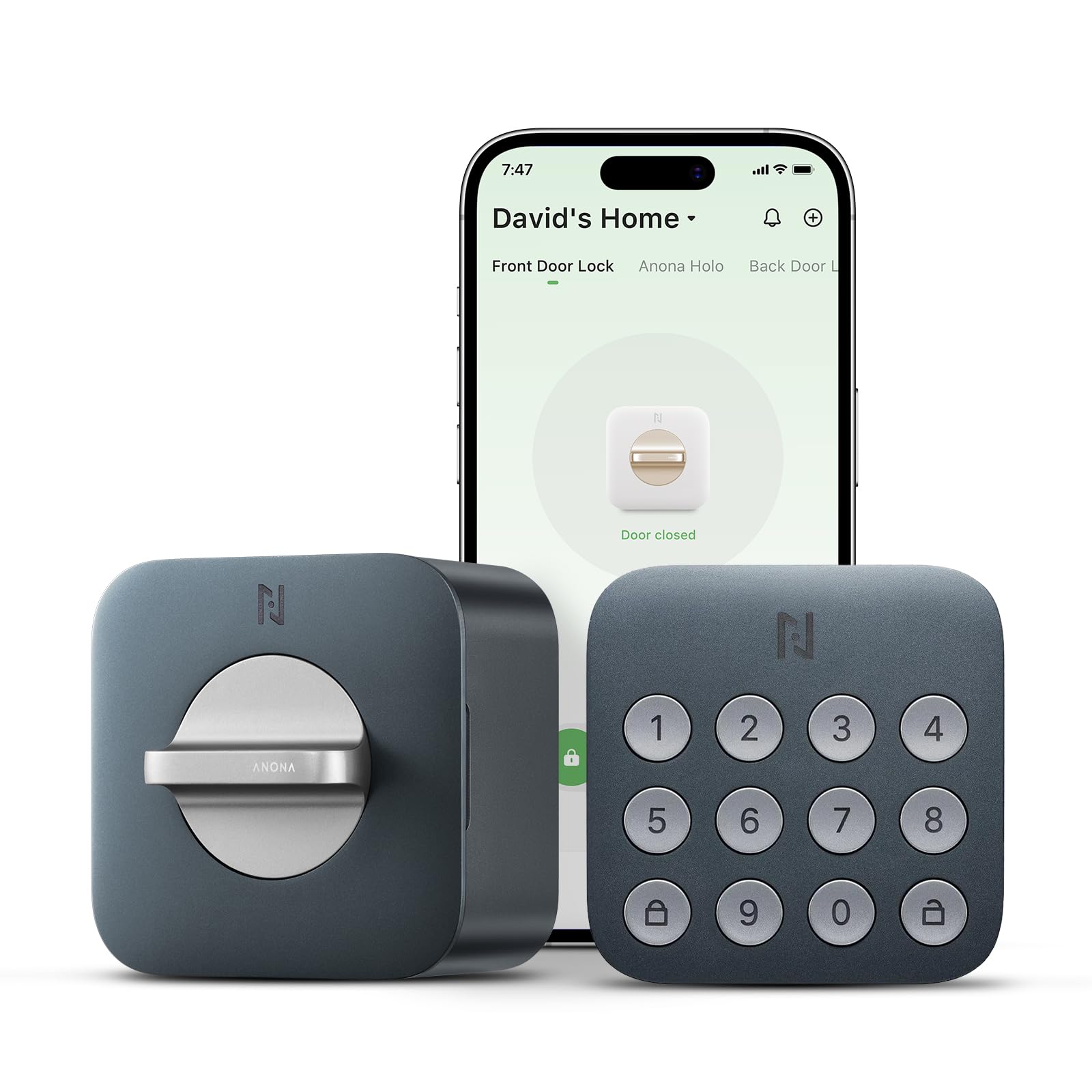
We recommend the Anona Holo for apartment renters who want app control and keypad entry without replacing the existing deadbolt.
Pros
- Fits many single-cylinder deadbolts
- Supports Alexa and Apple HomeKit
- Offers temporary guest codes and auto-locking
Cons
- Battery life may vary
- Matter pairing can be unreliable
- Some users report connection and battery problems
The retrofit design lets us install the lock from the inside of the door with a screwdriver. That makes it useful for renters who cannot make major changes to the door. We would still check the existing deadbolt for compatibility before ordering.
Daily controls are simple. We can lock or unlock the door through the app, use the keypad, and create codes for guests or service workers. Auto-locking and alerts for a jammed or open door add useful security reminders.
Smart-home setup may take more patience. Some owners report trouble pairing the lock with Matter or Alexa, while others found the app easy to use. Battery results also vary, so we would keep spare AA batteries available and watch the app for low-power alerts.
Evanshow Smart Door Lock
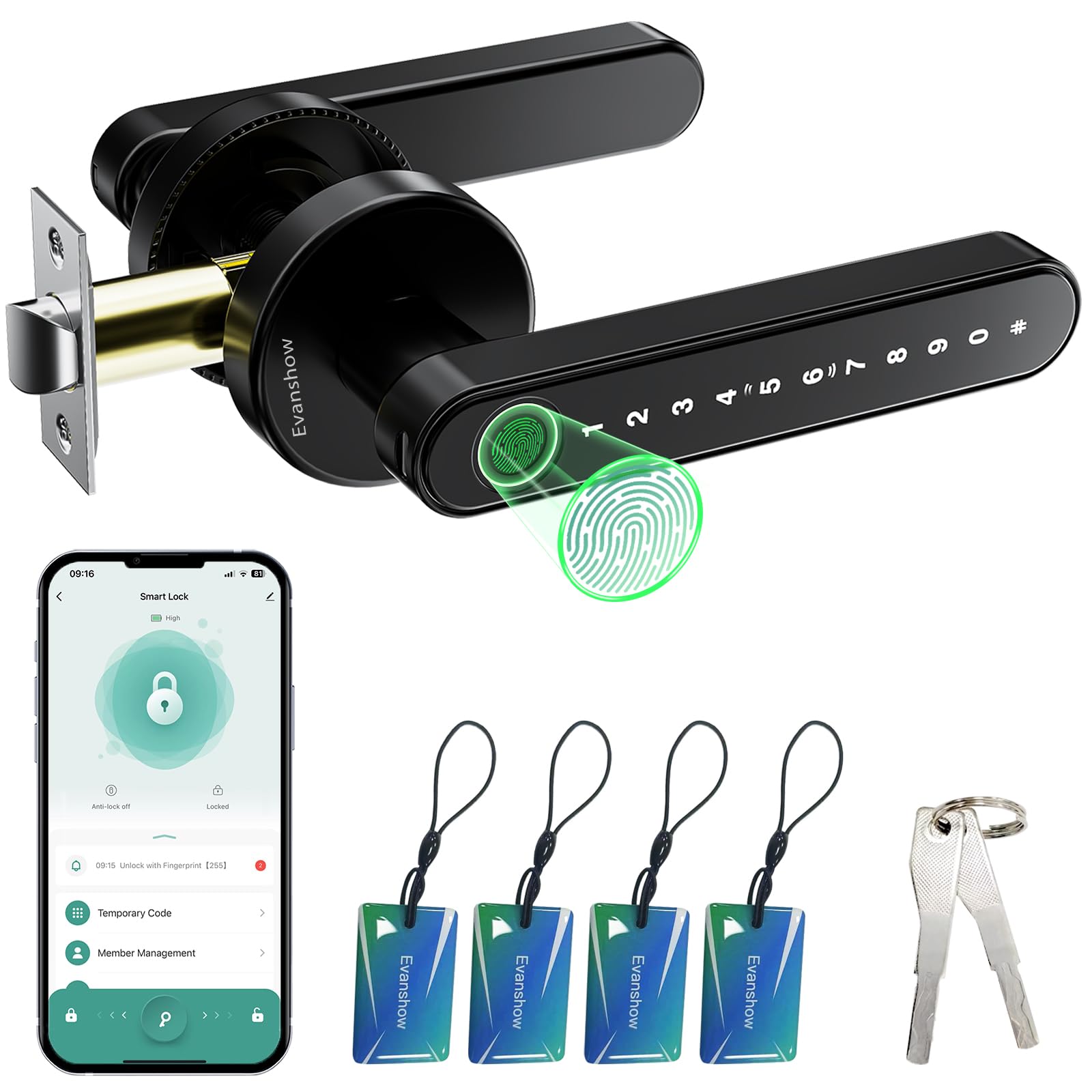
We recommend this lock for apartment residents who want flexible entry methods and simple installation at a low price.
Pros
- Fingerprint, keypad, app, card, and key access
- Quick installation on compatible wooden doors
- Temporary codes and entry logs through the app
Cons
- Setup instructions can be confusing
- Some users report a loose or weak handle
- The administrator fingerprint must be set before use
We found the Evanshow easy to install because it does not require new wiring or drilling. It fits wooden doors between 1.18 and 1.97 inches thick, and its reversible design works with either door swing.
The fingerprint reader responded quickly during daily use, while the keypad and physical key provided useful backups. We also liked having several ways to let family members, guests, or delivery workers enter without sharing our main key.
The Tuya app adds remote code management, entry records, and an auto-lock option. However, setup may take patience, especially for users who are not comfortable with technical instructions.
Before using the lock, we would register an administrator fingerprint immediately. Until that step is complete, any fingerprint may unlock the door. The USB port can provide emergency power from a power bank, but it does not recharge the internal batteries.
The lock feels suitable for bedrooms and standard apartment doors, but reports of flimsy handles and damage from force suggest that it should not replace a stronger security-grade deadbolt.
ULTRALOQ U-Bolt Pro WiFi
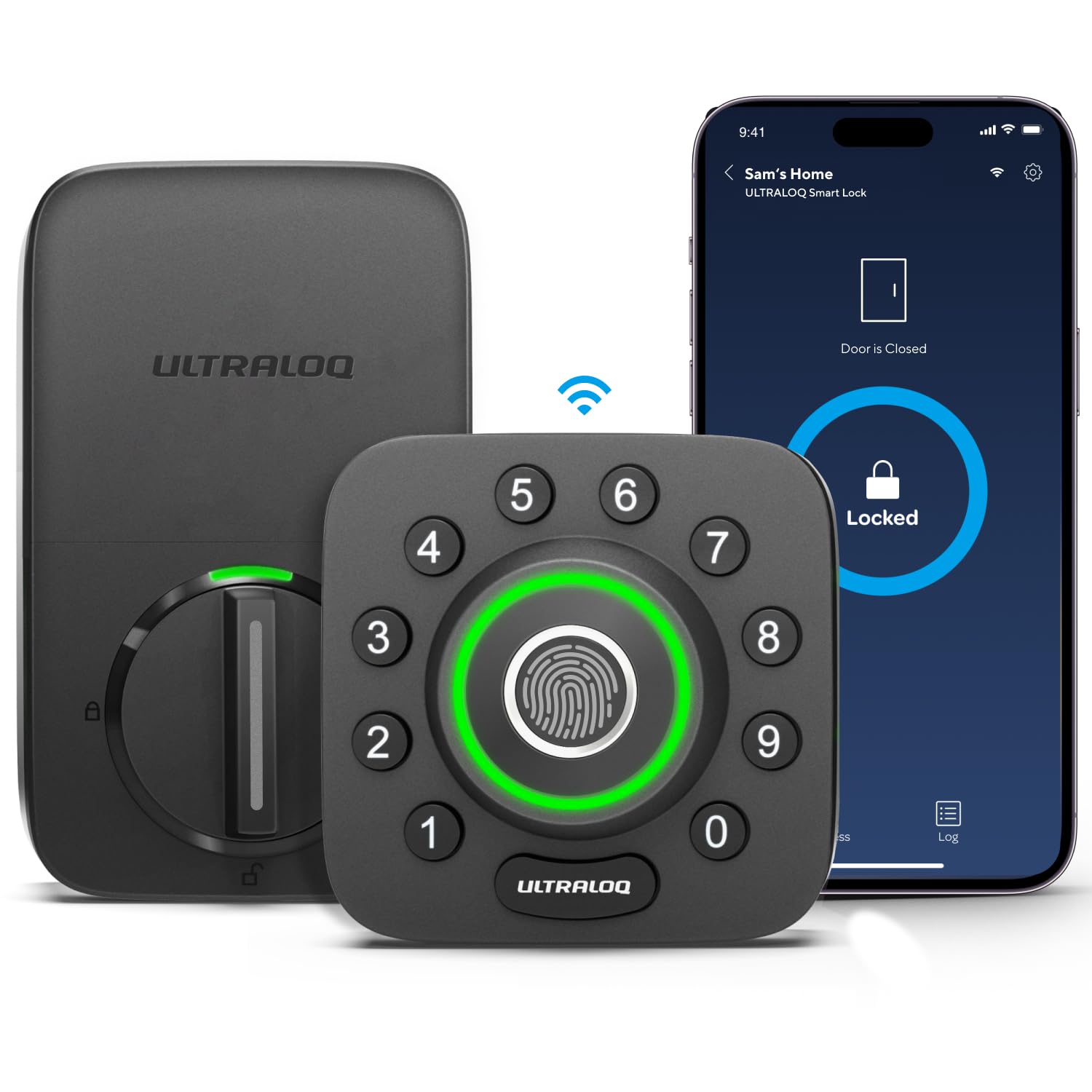
We recommend this lock for apartment renters who want fingerprint entry, remote control, and several ways to share access without adding a separate hub.
Pros
- Fingerprint, keypad, app, voice, and key entry
- Built-in Wi-Fi supports remote access and activity logs
- Door sensor can report open-door status
Cons
- Works only with 2.4GHz Wi-Fi
- App setup and troubleshooting may take patience
- May not fit every apartment door or metal door
We found the fingerprint reader convenient for daily use, especially when carrying bags or groceries. The keypad also gives guests a simple way to enter, while the app lets us send temporary access codes and review entry activity.
Built-in Wi-Fi keeps the setup fairly simple because we do not need an extra bridge. Remote locking and alerts add useful control for apartments, rentals, and shared homes. Voice support for Alexa and Google Assistant gives us another option, although app control remains more practical for most situations.
Installation uses a standard deadbolt layout and usually needs only a screwdriver. Before buying, we would check the apartment door’s measurements and rental rules, since some doors may not fit and permanent lock changes may need approval.
The lock feels solid and carries an ANSI Grade 1 rating. Still, user feedback shows that software and connectivity can require occasional troubleshooting. We would keep the backup keys available and avoid relying on the lock as our only way to enter.
Sifely Fingerprint Smart Lock

We recommend this lock for apartment residents who want quick fingerprint entry, several backup access methods, and an installation that usually requires basic tools.
Pros
- Fingerprint entry feels quick and convenient.
- Supports codes, app control, key fobs, cards, and a physical key.
- Useful for guests, rentals, and shared apartments.
Cons
- The large design may interfere with a screen door.
- Bluetooth access does not provide remote control without the right Wi-Fi setup.
- Some users report occasional glitches or hardware wear over time.
During testing, we found the fingerprint reader easy to use for daily entry. It also gives us practical backup options, since we can use a code, phone app, key fob, card, or regular key when needed.
The app helps manage users and review access activity. That makes the lock useful for roommates, family members, and short-term guests. Alexa and Google Assistant support adds voice control, although we would not rely on it as the main way to secure an apartment.
Installation looks manageable, but we would check the door and nearby trim before ordering. The lock has a tall, bulky profile, and some users needed to adjust the deadbolt position or use longer screws.
We also noticed that performance may depend on proper alignment and battery condition. A few owners reported that the lock became slow or failed to respond after months of use, so we would keep the mechanical key available and test the auto-lock setting after installation.
GHome Smart Fingerprint Door Lock

We recommend this lock for apartment residents who want key, code, fingerprint, and Bluetooth access in one compact doorknob.
Pros
- Four entry methods give us useful backup options.
- Fingerprint access worked quickly during daily use.
- Local fingerprint storage improves privacy.
Cons
- Bluetooth control does not provide Wi-Fi access.
- Battery life may vary with frequent use.
- Buyers must check door size before installation.
The installation felt manageable with a screwdriver, especially when replacing a similar knob. We still recommend checking the door thickness and existing hardware first, since fit affects the setup.
Fingerprint entry made quick trips in and out easier. The keypad offered a practical option for guests, while the backup keys gave us a dependable choice if the battery ran low.
The app lets us manage fingerprints, create codes, review access activity, and turn on auto-lock. Bluetooth limits remote control to nearby use, so this lock will not let us unlock the door from across town.
The rechargeable battery uses USB-C and includes a low-battery warning. Some customer feedback reports shorter battery life than expected, so we would keep the charging cable available. The 4.2-star rating from 1,486 reviews suggests generally positive results, with setup and battery performance varying by user.
Sifely Fingerprint Smart Lock

We recommend this lock for apartment residents who want several keyless entry options and simple guest access, provided their door fits the required design.
Pros
- Fingerprint, keypad, app, key card, fob, and key entry
- Quick DIY setup on many standard doors
- Useful access codes and logs for guests or rentals
Cons
- Remote access requires the optional Wi-Fi gateway
- Some doors may need drilling or other changes
- The lock may not support every existing key system
We found the fingerprint reader quick and convenient for daily use. The backlit keypad also helped when entering at night, while the physical key provided a useful backup.
Installation was straightforward on a compatible wood door, and the reversible handle suited either swing direction. However, we would check the door measurements first because some doors may need a larger opening or extra holes.
The Bluetooth app lets us add users, review access activity, and manage codes nearby. For remote unlocking, Alexa, and Google Assistant controls, we would add the Sifely Wi-Fi Gateway. That extra purchase may matter for apartment hosts or anyone who needs access while away.
Buying Guide
We should start by checking whether the lock fits our apartment door. Measure the door thickness, backset, and available space around the deadbolt. Some rental doors use special hardware or building-wide systems that may limit installation options.
We should also review the lock’s power and access methods:
| Feature | What to check |
|---|---|
| Power | Battery type, expected battery life, and low-battery alerts |
| Entry methods | Keypad, app, physical key, or temporary codes |
| Connectivity | Bluetooth, Wi-Fi, or a separate hub |
| Emergency access | Backup key, external battery contact, or manual override |
| Installation | Whether it replaces the deadbolt or requires new holes |
For apartments, easy installation and removal matter. We should favor models that use existing holes and allow us to keep the original lock hardware when possible. We should also confirm that the landlord or property manager permits smart locks.
Security features deserve close attention. We should look for encrypted communication, automatic locking controls, activity logs, and the ability to remove access codes quickly. A physical key option can provide a useful backup during app, battery, or network problems.
We should choose connectivity based on our needs. Bluetooth can work well for nearby control, while Wi-Fi supports remote access but may use more battery power. A separate hub adds equipment and setup steps, so we should include it when comparing total cost.
Finally, we should check app support, software updates, warranty coverage, and privacy settings. A lock should let us create separate codes, manage users, and receive alerts without making daily use difficult.
Editor’s Choice
We chose the August Wi-Fi Smart Lock as our editor’s pick for most apartments. Its compact design fits over many existing deadbolts, so renters can often install it without replacing the exterior hardware.
The built-in Wi-Fi lets us lock or unlock the door remotely without adding a separate hub. We can create temporary access codes, check the lock’s activity, and connect it with common smart home platforms.
| Feature | Details |
|---|---|
| Installation | Uses many existing deadbolts |
| Remote access | Built-in Wi-Fi |
| Guest access | Virtual keys and temporary codes |
| Best for | Renters who want broad smart home support |
We also value its door-sensing feature, which helps us confirm whether the door remains closed. Battery life depends on usage and Wi-Fi conditions, so we recommend checking the batteries regularly.
Before buying, we should confirm that the lock fits the apartment’s deadbolt and that the landlord allows smart locks. Some buildings also require a key override or specific installation method.
Conclusion
We should choose a smart door lock that fits our apartment door, lease terms, and daily routine. A retrofit model may work well when we want to keep our existing keys, while a full replacement can offer more features and control.
We should also check battery life, app quality, installation needs, and backup entry options. Keypads, physical keys, and emergency power access can help us avoid problems when batteries run low or our phone is unavailable.
Before buying, we should confirm that the lock works with our smart home platform and does not require permanent changes to the door. The best choice balances security, convenience, renter-friendly installation, and reliable access.
FAQS
Do smart locks work on apartment doors?
We should first check the lease and building rules. Many smart locks fit standard deadbolts, but some apartments use mortise locks, narrow frames, or building-controlled systems that need special hardware.
Can we install a smart lock without changing the outside lock?
Yes. Some models attach to the inside of the door and keep the existing exterior keyhole. This option can reduce installation time and make it easier to restore the original lock when we move.
Do smart locks need Wi-Fi?
Not always. Bluetooth models work when we are nearby, while Wi-Fi models allow remote access. Some locks need a separate hub for Wi-Fi connection, which can add cost and setup steps.
What happens if the batteries die?
Most smart locks use standard batteries and provide low-battery alerts. Many also include an outside backup method, such as a physical key, a keypad battery terminal, or emergency power contacts.
Can we give guests temporary access?
Most models let us create personal or temporary codes through an app. We should remove old codes when guests, cleaners, or roommates no longer need entry.
Are smart locks secure?
A reputable lock can provide strong security when we use unique passwords, software updates, and two-factor authentication. We should also keep the door frame, strike plate, and existing deadbolt in good condition.
What should renters look for?
- Removable installation
- Compatibility with the existing deadbolt
- Keypad or physical-key backup
- Low-battery alerts
- Clear return-to-original-hardware terms