
Yale vs Ultraloq Smart Lock for Seniors: Which Wins?


Hearing Aid Cleaning Kit

Button Hook Dressing Aid

Compression Socks
Yale vs Ultraloq smart lock for seniors comes down to a simple choice: do you want a familiar keypad-focused lock or more ways to unlock the door? Both brands offer smart locks that can reduce the need to carry a traditional key.
Yale’s Assure range focuses on keypad entry, app control, auto-unlock, and access sharing. Ultraloq offers models with keypad entry plus options such as fingerprint access, NFC, app control, and physical keys. Exact features vary by model, so the model you choose matters.
Quick Comparison
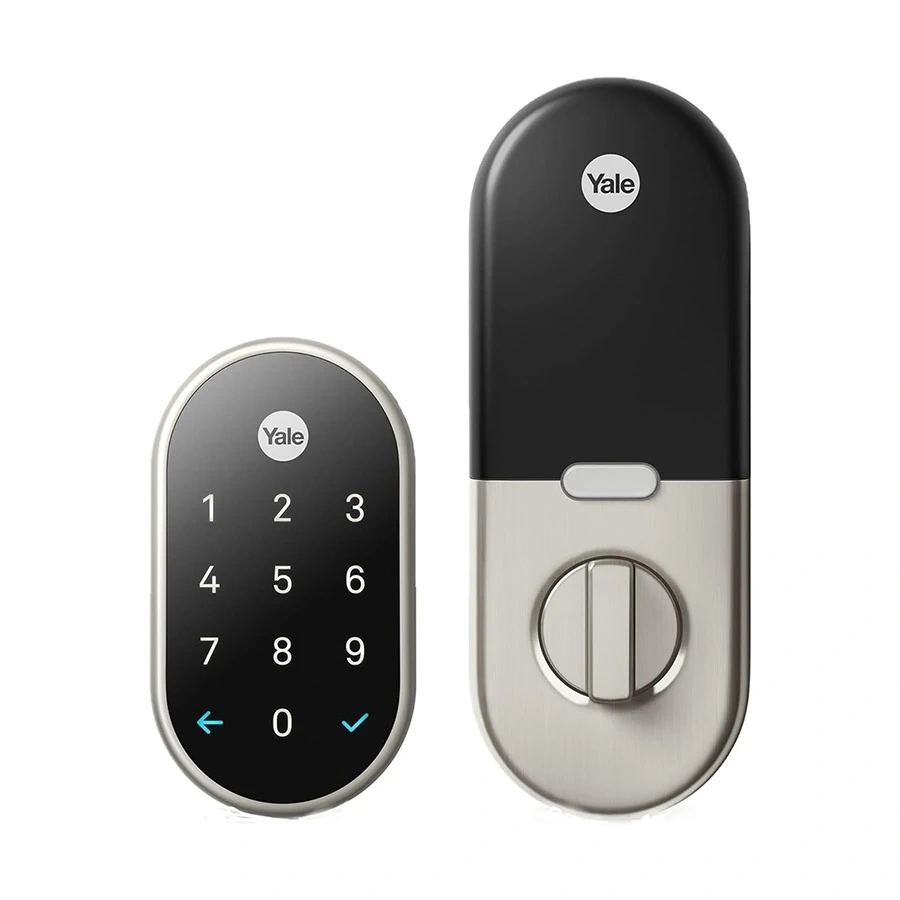
For many seniors, Yale may be easier to understand if keypad entry and a simple app are the main priorities. Its Assure locks offer PIN entry, one-touch locking, app control, and optional remote access depending on the setup.
Ultraloq may suit seniors who want more entry choices. Depending on the model, users can unlock with a fingerprint, PIN, app, NFC or key fob, as well as a physical key.
The biggest difference is not simply “smart features.” It is how the senior prefers to unlock the door every day.

Yale vs Ultraloq At a Glance
The comparison below uses representative current product lines rather than treating every model from either brand as identical.
| Feature | Yale | Ultraloq |
|---|---|---|
| Keypad entry | Yes | Yes |
| App control | Yes | Yes |
| Fingerprint | Available on some Yale models/keypads | Available on many models |
| Physical key | Available on some models | Available on some models |
| Auto-unlock | Available | Available on selected models |
| Remote control | Model/setup dependent | Built-in Wi-Fi on selected models |
| Guest access | Yes | Yes |
| Smart-home support | Apple Home and other integrations vary | Matter, Apple Home, Alexa, Google and others vary by model |
| Installation | Often replaces existing hardware | Designed for DIY installation on compatible doors |
Yale’s current Assure documentation shows keypad access, app control, activity monitoring and auto-lock/unlock features. Ultraloq’s current range includes models with built-in Wi-Fi, fingerprint access and Matter support.
Yale Smart Locks for Senior-Friendly Use
Yale has a long-running smart-lock range, including Assure models. The Assure Lock Keyed, for example, supports PIN entry, Yale Home app control, auto-unlock and a traditional mechanical key.
Ease of Use
The keypad is the main attraction for seniors who want a straightforward way to enter the home.
Yale’s Assure locks use a touchscreen keypad with backlit numbers. One-touch locking is also available on supported models.
For someone who does not want to depend on a smartphone, entering a PIN can be easier than opening an app.
Key Strengths
- Familiar PIN-based entry
- Backlit keypad on supported Assure models
- One-touch locking
- App-based access management
- Guest access
- Auto-lock and auto-unlock on supported models
- Door-status monitoring on compatible setups
Potential Drawbacks
- Yale has many models and configurations
- Some smart features depend on the specific model or module
- Remote access may require an additional hub or bridge on some Assure products
- A touchscreen may not appeal to someone who prefers physical buttons
Yale’s documentation specifically shows that some Assure configurations use an additional Connect Plus hub for remote access.
Ultraloq Smart Locks for Senior-Friendly Use
Ultraloq takes a different approach. Its range includes keypad locks, fingerprint models and newer products with Matter connectivity.
For example, the current Bolt Pro supports fingerprint, PIN, app, tap-to-unlock, key fob and physical-key entry.
Ease of Use
Fingerprint entry can be useful for someone who does not want to remember a PIN or carry a key.
A senior who prefers a traditional backup can still use a physical key on supported models. The number of available entry methods can also help family members use the same door in different ways.
Key Strengths
- Multiple unlocking methods
- Fingerprint access on selected models
- PIN keypad
- Smartphone app
- Physical-key backup on supported models
- Built-in Wi-Fi on selected models
- Matter support on newer models
- Key-fob access on selected models
Potential Drawbacks
- More features can mean more setup choices
- Model differences are significant
- Some older U-Bolt configurations need a bridge for remote access
- Fingerprint access may not be useful for everyone
Ultraloq’s own comparison shows that U-Bolt, U-Bolt Pro, Wi-Fi and Z-Wave versions have different connectivity and access features.
Which Is Easier for Seniors to Use?
If the goal is simple PIN entry, Yale’s Assure approach can be easier to understand.
If the goal is maximum flexibility, Ultraloq has an advantage in the number of access methods available on selected models.
For example:
| Senior Need | Yale | Ultraloq |
|---|---|---|
| Simple PIN entry | Strong option | Strong option |
| Avoid remembering a PIN | Some models support fingerprint | Many models support fingerprint |
| Avoid carrying keys | Yes | Yes |
| Use a smartphone | Yes | Yes |
| Use a physical backup key | Selected models | Selected models |
| Multiple access methods | Model dependent | Strong on selected models |
The important point is that neither brand is automatically easier for every senior. The best fit depends on whether the user prefers a keypad, phone, fingerprint, key or a combination.
Performance Comparison
Smart locks do not have the same performance priorities as appliances or power tools. Here, reliable access, connectivity and smooth everyday operation matter most.
Yale’s Assure range provides motorized locking, keypad entry and app-based control. Some models also provide door-position information through DoorSense.
Ultraloq’s newer Bolt Pro adds Matter over Thread, built-in Wi-Fi, fingerprint access and several other entry methods.
| Performance Area | Yale | Ultraloq |
|---|---|---|
| Everyday keypad access | Excellent fit | Excellent fit |
| Fingerprint access | Model dependent | Available on many models |
| Remote access | Setup dependent | Built-in on selected models |
| Smart-home flexibility | Strong | Strong |
| Entry-method variety | Model dependent | Strong on selected models |
Comfort, Accessibility, and Senior-Friendly Design
A smart lock should reduce daily effort rather than create another complicated device to manage.
For seniors who prefer simple routines, a keypad can remove the need to find a key. Yale’s touchscreen keypad wakes with a touch and uses backlit numbers on supported Assure models.
Ultraloq can reduce the need for a phone or PIN on fingerprint-equipped models. That can be useful when a user prefers biometric entry.
A simple lock that the user understands is often more practical than a lock with features they never use.
Features Comparison
The feature gap becomes clearer when comparing the access methods.
| Feature | Yale | Ultraloq |
|---|---|---|
| PIN | Yes | Yes |
| Fingerprint | Selected products | Selected products |
| App | Yale Home | Xthings Home |
| Activity records | Supported | Supported |
| Guest access | Yes | Yes |
| NFC/tap access | Model dependent | Available on selected models |
| Matter | Model dependent | Available on newer models |
| Physical key | Selected models | Selected models |
Ultraloq’s current Bolt Pro supports Matter over Thread, fingerprint, PIN, app, key fob and physical-key access.
Price, Maintenance, and Long-Term Value
Smart-lock prices change, and Yale and Ultraloq both sell several models. It is therefore better to compare the complete setup rather than one temporary product price.
Yale’s Assure products can require an additional hub or module for certain remote-access configurations.
Ultraloq offers both models with built-in Wi-Fi and models that use a separate bridge. Its current Bolt Pro, for example, has built-in Wi-Fi and does not require a separate hub for Xthings Home remote control.
| Cost Factor | Yale | Ultraloq |
|---|---|---|
| Lock cost | Model dependent | Model dependent |
| Extra hub | Some setups | Some older/specific setups |
| Batteries | Model dependent | Model dependent |
| Replacement parts | Model dependent | Model dependent |
| Smart-home extras | Model dependent | Model dependent |
| Long-term value | Strong for simple use | Strong for flexible access |
Who Should Choose Yale?
Choose Yale if:
- You want a familiar keypad-first experience.
- The senior prefers entering a PIN.
- You want simple access sharing.
- You already use Yale products.
- Door-status monitoring is important.
- You prefer a more traditional smart-lock setup.
Yale’s Assure ecosystem supports app control, guest access, activity monitoring and auto-unlock on compatible products.
Who Should Choose Ultraloq?
Choose Ultraloq if:
- Fingerprint entry is important.
- You want several ways to unlock the door.
- You want built-in Wi-Fi on a compatible model.
- Matter compatibility matters.
- Different family members prefer different access methods.
- You want a physical-key backup on a supported model.
Ultraloq’s current Bolt Pro is particularly feature-rich, with fingerprint, PIN, app, key fob, physical-key and tap-to-unlock options.
Yale vs Ultraloq Smart Lock for Seniors — Final Verdict
Best for simple keypad use: Yale
Best for multiple entry methods: Ultraloq
Best for fingerprint access: Ultraloq on compatible models
Best for a traditional smart-lock experience: Yale
Best for flexible smart-home connectivity: Depends on the specific model
There is no single choice that fits every senior. Yale makes sense when simple keypad access is the priority. Ultraloq becomes more appealing when fingerprint access, multiple unlocking methods or newer smart-home connectivity matters.
Scoring Summary
The scores below are not laboratory ratings. They are a practical comparison based on the features and usability factors discussed above.
| Category | Yale | Ultraloq |
|---|---|---|
| Ease of Use | 9/10 | 9/10 |
| Senior-Friendly Design | 9/10 | 9/10 |
| Access Flexibility | 8/10 | 10/10 |
| Smart Features | 9/10 | 10/10 |
| Maintenance | 9/10 | 8/10 |
| Value | 8/10 | 9/10 |
Because both brands have multiple models, these scores should be treated as a broad brand-level comparison rather than a rating of every lock sold under each name.
How We Evaluate Products
This comparison focuses on practical factors that matter when a senior uses a smart lock every day.
We consider:
- Ease of entry
- Keypad and control simplicity
- Access options
- Physical effort
- Setup
- Smart-home features
- Maintenance
- Backup access
- Remote access
- Long-term practicality
No hands-on testing is claimed here. The comparison is based on current manufacturer information and product documentation.
Senior-Specific Buying Considerations
Before choosing either brand, check these points.
Physical Effort
The lock should not require excessive force to operate. Also check that the existing door and deadbolt move smoothly.
Controls
Look at whether the senior prefers a keypad, fingerprint, phone or physical key.
Maintenance
Check battery access and how easy it will be to replace batteries when needed.
Setup
Confirm that the lock fits the existing door. Ultraloq, for example, specifies compatible door dimensions for its Bolt Pro.
Safety
Keep a backup entry method available when the selected model supports one. Also make sure the door itself closes and latches correctly before relying on automatic locking.
Common Buying Mistakes
Avoid these mistakes when choosing a smart lock:
- Buying by brand name alone
- Ignoring door compatibility
- Choosing features the senior will never use
- Forgetting to check battery access
- Assuming every model has built-in Wi-Fi
- Assuming every Yale or Ultraloq lock has the same features
- Forgetting about backup entry methods
The model difference is especially important with Ultraloq, where Wi-Fi, fingerprint and Z-Wave capabilities vary across the U-Bolt range.
Safety
A smart lock still controls physical access to a home. Before installation, check the door, frame, deadbolt alignment and manufacturer’s installation requirements.
For older adults, simplicity also matters. Avoid setting up a complicated access system if the primary user does not understand how to operate it.
For any installation involving electrical changes or major door modification, professional installation may be appropriate.
Frequently Asked Questions
Is Yale easier to use than Ultraloq for seniors?
Yale can be easier for seniors who prefer straightforward PIN entry. Ultraloq may be easier for someone who prefers fingerprint or another alternative access method.
Does Ultraloq have fingerprint access?
Yes. Several Ultraloq models offer fingerprint access, including current Bolt models and U-Bolt Pro variants.
Can Yale smart locks use a PIN?
Yes. Yale Assure products support PIN or keypad entry on compatible models.
Do Ultraloq locks need a hub?
Not always. Some Ultraloq models have built-in Wi-Fi, while certain U-Bolt versions require an Ultraloq Bridge for remote access.
Which is better if a senior does not use a smartphone?
A keypad-based Yale or Ultraloq model can work well because the user can enter a PIN without opening an app. Some Ultraloq models also offer fingerprint or key-fob access.
Should you compare specific models instead of brands?
Yes. This is especially important with smart locks because features such as fingerprint access, Wi-Fi, Matter and remote control can vary substantially between models.
Conclusion
Yale and Ultraloq can both work well for seniors, but they emphasize different strengths. Yale is a strong fit for someone who wants a familiar keypad and a relatively simple smart-lock routine.
Ultraloq is more attractive when flexibility matters. Fingerprint access, multiple unlocking methods and newer connectivity options can reduce the need to rely on one method every time. The safest choice is to match the specific model to the senior’s preferred way of using the door, rather than choosing by brand alone.
