
TP-Link vs Netgear Wi-Fi Router for Seniors: Which?


Automatic Jar Opener

Smart Plug with Alexa

Motion Sensor Night Lights
TP-Link vs Netgear wi-fi router for seniors is a useful comparison if you want reliable home Wi-Fi without making setup and daily management harder than they need to be.
For this comparison, the TP-Link Archer AX55 and NETGEAR Nighthawk RAX50 provide a clear look at two Wi-Fi 6 options. Both offer strong wireless performance, app-based management, security features, and support for many connected devices.
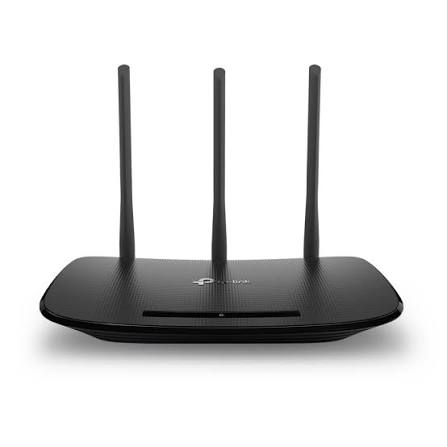
Quick Comparison
The TP-Link Archer AX55 may suit seniors who want a simpler feature set, easy app management, and a flexible way to extend coverage.
The NETGEAR Nighthawk RAX50 is a stronger fit for users who want higher-rated Wi-Fi capacity, more wired ports, and a feature-rich management app.
The biggest difference is not simply speed. It is how much hardware capacity and network-management features you actually need.
TP-Link vs Netgear At a Glance
Here is the basic difference between the two representative Wi-Fi 6 routers.

| Feature | TP-Link Archer AX55 | NETGEAR Nighthawk RAX50 |
|---|---|---|
| Wi-Fi standard | Wi-Fi 6 | Wi-Fi 6 |
| Rated wireless class | AX3000 | AX5400 |
| Dual-band | Yes | Yes |
| App management | TP-Link Tether | Nighthawk App |
| Mesh option | OneMesh / EasyMesh support varies by version | Compatible NETGEAR mesh features vary by model |
| Security | HomeShield, WPA3 | NETGEAR security features, WPA3 |
| Gigabit Ethernet | Yes | 5 total Gigabit ports |
| USB | USB 3.0 | USB 3.0 |
| Voice control | Alexa | Alexa and Google Assistant |
The two routers have different feature levels, so the higher number on the NETGEAR does not automatically mean it is the better choice for every senior.
TP-Link Archer AX55 Review for Seniors
The Archer AX55 is a Wi-Fi 6 router aimed at homes with multiple connected devices.
It offers an AX3000 dual-band design, four external antennas, beamforming, gigabit Ethernet, USB 3.0, OneMesh support, and TP-Link HomeShield features.
Ease of Use
TP-Link provides the Tether app for managing compatible routers from a phone. The app can make common tasks easier than using a traditional web interface.
The AX55 also supports features such as automatic device detection and network management tools. Its current firmware documentation shows continued security and stability updates for the model.
Key Strengths
- Wi-Fi 6 performance for everyday home use
- Four external antennas
- OneMesh support
- HomeShield security features
- Tether app management
- USB 3.0 storage support
- WPA3 security
- Gigabit Ethernet ports
Potential Drawbacks
- Advanced settings may feel unnecessary for a simple home network.
- HomeShield has features that can require additional planning or subscription choices.
- The AX55 is an older Wi-Fi 6 design compared with newer Wi-Fi 7 routers.
NETGEAR Nighthawk RAX50 Review for Seniors
The NETGEAR Nighthawk RAX50 is a 6-stream AX5400 Wi-Fi 6 router with a 1.5 GHz triple-core processor, four external antennas, four LAN ports plus one WAN port, and a USB 3.0 port.
It is designed for homes with several connected devices and demanding activities such as streaming.
Ease of Use
The Nighthawk app provides a dashboard for network status, connected devices, Wi-Fi settings, speed testing, firmware updates, guest Wi-Fi, and other controls.
That can be useful for seniors who prefer managing the router from a phone instead of navigating complicated router menus.
Key Strengths
- Higher AX5400 wireless class
- Six-stream Wi-Fi 6 design
- Four external antennas
- Five Gigabit Ethernet ports
- USB 3.0
- Nighthawk app
- Automatic firmware updates
- WPA3 support
- Voice control support
Potential Drawbacks
- More advanced features can make the system feel more complicated.
- NETGEAR Armor adds a subscription cost after any included trial or promotional period ends on compatible products.
- The larger feature set may be unnecessary for a small home with only a few devices.
Which Is Easier for Seniors to Use?
Both routers can be managed through smartphone apps, which removes much of the need to use a computer for routine settings.
For a senior who mainly wants Wi-Fi for a phone, laptop, smart TV, or tablet, the TP-Link AX55 provides plenty of functionality without requiring the extra capacity of a higher-rated router.
NETGEAR has an especially useful app-based approach. The Nighthawk app provides network information, internet speed testing, device controls, guest Wi-Fi, and firmware management.
For seniors, simple daily management can matter more than maximum wireless speed.
Performance Comparison
Performance depends on the internet plan, home layout, connected devices, interference, and router placement.
The AX55 supports up to 2402 Mbps on 5 GHz and 574 Mbps on 2.4 GHz under its advertised Wi-Fi 6 configuration. It also uses OFDMA and beamforming to improve network capacity and coverage.
The RAX50 is rated AX5400 and uses six-stream Wi-Fi 6, OFDMA, beamforming, and a triple-core 1.5 GHz processor.
| Performance Area | TP-Link AX55 | NETGEAR RAX50 |
|---|---|---|
| Everyday browsing | Strong | Strong |
| HD/4K streaming | Strong | Strong |
| Many connected devices | Good | Higher capacity |
| Wi-Fi 6 class | AX3000 | AX5400 |
| Wired connections | Gigabit | 5 Gigabit ports |
| USB storage | USB 3.0 | USB 3.0 |
For a typical senior household, either router can provide more than enough performance for browsing, video calls, streaming, and smart-home devices.
Comfort, Accessibility, and Senior-Friendly Design
Routers do not have many physical accessibility features, so the main issue is how easy they are to set up and manage.
A smartphone app can be helpful for someone who does not want to work through small browser menus. Both TP-Link and NETGEAR provide app-based management.
TP-Link also supports Alexa control on the AX55, while the RAX50 supports Alexa and Google Assistant.
For seniors who receive help from a family member or caregiver, remote management options can also make troubleshooting easier.
Features Comparison
The most useful features are those that reduce network problems or make routine management simpler.
| Feature | TP-Link AX55 | NETGEAR RAX50 |
|---|---|---|
| Mobile app | Tether | Nighthawk |
| Network security | HomeShield | NETGEAR security |
| WPA3 | Yes | Yes |
| Mesh expansion | OneMesh | NETGEAR-compatible options |
| Guest Wi-Fi | Yes | Yes |
| Firmware updates | Supported | Automatic updates supported |
| Voice control | Alexa | Alexa and Google Assistant |
TP-Link’s AX55 supports OneMesh and HomeShield, while NETGEAR’s RAX50 supports Nighthawk app management and automatic firmware updates.
Price, Maintenance, and Long-Term Value
Router prices change often, so the purchase price should be checked when you are ready to buy.
Long-term value is about more than the initial price. Consider firmware support, security features, app quality, replacement costs, and whether you actually need advanced networking features.
NETGEAR Armor is an important cost consideration. NETGEAR currently offers Armor as a subscription service, with plans listed at $99.99 per year and $149.99 per year for Armor Plus on its U.S. service page.
TP-Link also offers HomeShield features, with some advanced services tied to subscription plans.
If you only need basic router security and Wi-Fi, avoid paying for features you will never use.
Who Should Choose TP-Link?
Choose the TP-Link Archer AX55 if:
- You want strong everyday Wi-Fi 6 performance.
- You prefer a straightforward app-based setup.
- You want OneMesh expansion options.
- You want useful security tools without needing maximum router capacity.
- Your home has a moderate number of connected devices.
- You want USB 3.0 support.
- You prefer a balance between features and simplicity.
Who Should Choose NETGEAR?
Choose the NETGEAR Nighthawk RAX50 if:
- Your home has many connected devices.
- You want a higher-rated AX5400 Wi-Fi 6 router.
- You need several wired Ethernet connections.
- You like the Nighthawk app.
- You want more network-management features.
- You may benefit from NETGEAR’s additional security services.
- You want more wireless capacity for demanding household use.
TP-Link vs Netgear — Final Verdict
For many seniors, the TP-Link Archer AX55 is enough for normal home use. Its Wi-Fi 6 performance, Tether app, OneMesh support, and HomeShield features cover the needs of many households.
The NETGEAR RAX50 makes more sense when a household has many connected devices, wants greater Wi-Fi capacity, or needs several wired Ethernet connections. Its Nighthawk app also puts many controls in one place.
| Category | Better Fit | Why |
|---|---|---|
| Simple everyday use | TP-Link AX55 | Strong features without needing maximum capacity |
| Higher Wi-Fi capacity | NETGEAR RAX50 | AX5400, six-stream design |
| App management | Both | Both provide dedicated mobile apps |
| Mesh expansion | TP-Link AX55 | OneMesh support |
| Many wired devices | NETGEAR RAX50 | Five Gigabit Ethernet ports |
| Security options | Both | Both provide modern security features |
| Simple home network | TP-Link AX55 | Plenty of capacity for common use |
These are comparison categories rather than universal winners. The right choice depends on the home’s size, internet plan, number of devices, and how much network management is actually needed.
Scoring Summary
A simple score can help summarize the practical differences.
| Category | TP-Link AX55 | NETGEAR RAX50 |
|---|---|---|
| Ease of Use | 9/10 | 8/10 |
| Senior-Friendly Design | 9/10 | 8/10 |
| Performance | 8/10 | 9/10 |
| Features | 8/10 | 9/10 |
| Maintenance | 9/10 | 8/10 |
| Value | 9/10 | 8/10 |
These scores are editorial summaries based on the documented features and the senior-focused criteria used in this comparison. They are not laboratory test results.
How We Evaluate These Routers
We focus on the things that can affect everyday senior use.
The comparison considers setup, app management, network performance, security, maintenance, device capacity, accessibility, and long-term practicality.
We do not claim hands-on testing. Product specifications and software features can also vary by hardware version, region, and firmware.
Senior-Specific Buying Considerations
Before choosing a router, check these points.
Setup
Choose a router with an app and clear setup instructions if you want to avoid complicated configuration.
Controls
Check whether the person who will manage the network is comfortable using a smartphone app.
Coverage
A faster router does not automatically solve every coverage problem. Home size, walls, placement, and interference all matter.
Device Count
Count phones, tablets, computers, TVs, cameras, smart speakers, and other connected devices before choosing a router.
Security
Look for current security standards such as WPA3 and regular firmware updates. Both routers support modern security features.
Common Buying Mistakes
Avoid these common mistakes:
- Buying the fastest router without needing the extra capacity.
- Ignoring the number of connected devices.
- Placing the router inside a cabinet.
- Forgetting to check Ethernet port requirements.
- Paying for security subscriptions without using their extra features.
- Assuming a more expensive router will automatically provide better coverage.
Safety and Security
For a home router, cybersecurity is more important than physical safety.
Use a strong Wi-Fi password, keep router firmware updated, and avoid leaving unnecessary remote-access features enabled.
TP-Link’s AX55 supports WPA3 and HomeShield security features. NETGEAR’s RAX50 supports WPA3, automatic firmware updates, and NETGEAR security services.
If you use a paid security service, check the renewal cost before the trial or included subscription period ends. NETGEAR states that Armor requires a subscription after the applicable included period expires.
Conclusion
TP-Link and NETGEAR both offer capable Wi-Fi 6 routers for seniors. The TP-Link Archer AX55 focuses on strong everyday performance, app management, mesh flexibility, and useful security features.
The NETGEAR Nighthawk RAX50 offers greater rated Wi-Fi capacity and more wired connectivity, making it a better fit for homes with heavier networking needs.
For a senior household, the most important question is not simply which router has the bigger number. It is whether the router is easy to set up, simple to manage, secure, and powerful enough for the home’s actual devices.