
TP-Link vs ASUS Wi-Fi Routers for Seniors Guide


Bed Exit Alarm Sensor

Smart Digital Photo Frame

Hands-Free Neck Magnifier
TP-Link vs ASUS wi-fi router for seniors is a useful comparison if you want stable home internet without making router management harder than it needs to be. Both brands offer modern Wi-Fi 7 routers, mesh options, mobile apps, and security features.
The main difference is not simply speed. TP-Link puts strong emphasis on simple setup, EasyMesh support, and its Tether app. ASUS offers a broad Wi-Fi 7 range, AiMesh expansion, the ASUS Router app, and more advanced network-management options on many models.
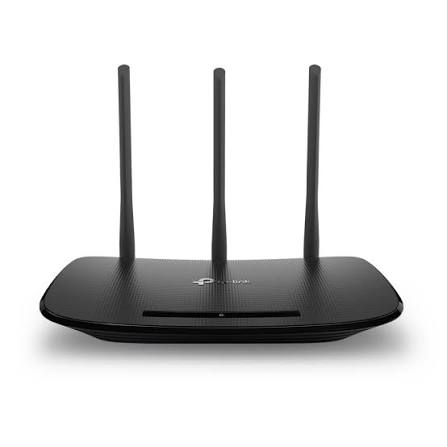
Quick Comparison
For many seniors, TP-Link may be easier to approach, especially if simple setup and straightforward network management are the priority. Current TP-Link Wi-Fi 7 routers use the Tether app and support EasyMesh on many models.
ASUS may suit seniors or families who want more advanced control, particularly for larger homes, mesh networking, VPN features, or detailed network management. ASUS Wi-Fi 7 models support AiMesh, while some models also include advanced security and smart-home features.
The right choice depends more on the user’s home and comfort with technology than on the brand name alone.
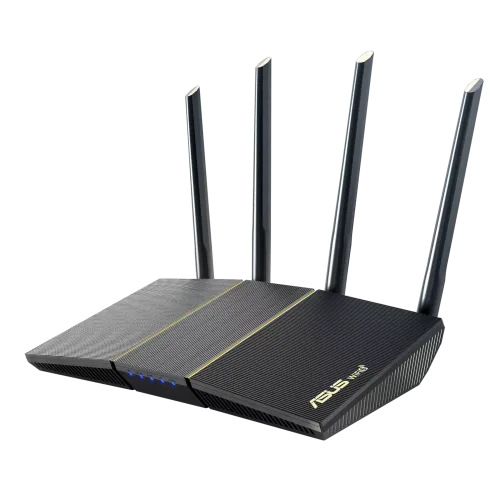
TP-Link vs ASUS Wi-Fi Routers At a Glance
Both brands have routers ranging from basic dual-band models to high-end multi-gig Wi-Fi 7 systems. The table below focuses on features that can matter in a senior household.
| Feature | TP-Link | ASUS |
|---|---|---|
| Setup | Tether app | ASUS Router app |
| Wi-Fi 7 options | Yes | Yes |
| Mesh system | EasyMesh | AiMesh |
| Security | HomeShield on many models | AiProtection on many models |
| Advanced controls | Available on selected models | Extensive on selected models |
| Smart-home options | IoT features on selected models | Smart Home Master on selected models |
| Best fit | Simple everyday networking | Advanced control and flexibility |
TP-Link’s current Wi-Fi 7 range includes dual-band and tri-band options, while ASUS also offers dual-band and tri-band Wi-Fi 7 routers with different levels of networking features.
TP-Link Router Review for Senior Homes
TP-Link offers a wide range of home routers, including current Wi-Fi 7 models such as the Archer BE230, BE400, BE5000, BE600, and higher-end models. Features vary by model, so buyers should check the exact router rather than assuming every TP-Link model has the same hardware.
Ease of Use
TP-Link places a clear focus on app-based setup. The Tether app is used to manage compatible routers, and current models describe setup and network management as a simple app-based process.
That can be helpful for seniors who prefer managing Wi-Fi from a phone rather than navigating complicated web settings.
Key strengths
- Tether app for setup and management
- EasyMesh support on many current models
- Wide choice of price and performance levels
- Wi-Fi 7 options from basic to high-end
- HomeShield security features on many models
Potential Drawbacks
- Features vary considerably between models.
- Some advanced features may require more technical knowledge.
- High-end models can offer much more speed than a typical home needs.
- Choosing between many similar Archer models can be confusing.
ASUS Router Review for Senior Homes
ASUS has a broad Wi-Fi 7 lineup, from more straightforward routers to powerful multi-gig models. Its current range includes models such as the RT-BE86U, RT-BE90U, RT-BE9700, and RT-BE96U.
Ease of Use
ASUS provides an ASUS Router app for setup and management. Current Wi-Fi 7 models also support AiMesh, allowing compatible ASUS routers to work together as a whole-home network.
This can be useful when one router does not provide enough coverage. However, ASUS also offers many advanced networking controls, so the experience can become more complex for someone who only wants basic Wi-Fi.
Key Strengths
- Broad Wi-Fi 7 selection
- AiMesh whole-home networking
- Advanced security features on selected models
- VPN features on many higher-end models
- Smart-home networking features on selected routers
- Strong multi-gig networking options
Potential Drawbacks
- Advanced settings can be unnecessary for simple users.
- Some models are designed around very high performance.
- Premium models may offer features a basic household will never use.
- The large product range makes model selection important.
Which Is Easier for Seniors to Use?
Ease of use depends heavily on the exact model, but both brands provide phone-based management.
TP-Link’s Tether app and EasyMesh approach can be appealing if the priority is a relatively simple home network. Current TP-Link models such as the Archer BE400 specifically advertise easy setup through Tether and EasyMesh compatibility.
ASUS also provides an easy mobile setup experience, but its ecosystem can offer more advanced options. For a senior who enjoys controlling network settings, this can be useful. For someone who wants to set up Wi-Fi once and leave it alone, extra options may not provide much benefit.
The simplest router is often the one that solves the home’s coverage and speed needs without adding features the user will never use.
Performance Comparison
Both brands now offer Wi-Fi 7 routers capable of much higher theoretical speeds than older Wi-Fi standards.
TP-Link’s Archer BE600, for example, is a tri-band Wi-Fi 7 router rated up to 9.7 Gbps, with 6 GHz, 5 GHz, and 2.4 GHz bands. The Archer BE400 is a dual-band model rated up to 6.5 Gbps.
ASUS also offers high-performance Wi-Fi 7 models. The RT-BE9700 is rated up to 9.7 Gbps, while the RT-BE86U is a dual-band model rated up to 6.8 Gbps.
| Performance Area | TP-Link | ASUS |
|---|---|---|
| Wi-Fi 7 | Available | Available |
| Multi-Link Operation | Selected models | Selected models |
| 6 GHz | Selected models | Selected models |
| Multi-gig Ethernet | Selected models | Selected models |
| Whole-home mesh | EasyMesh | AiMesh |
The important point is that theoretical router speed is not the same as actual internet speed. Your internet plan, client devices, distance, walls, interference, and router placement all affect real-world performance.
Comfort, Accessibility, and Senior-Friendly Design
Routers do not require physical handling during everyday use, so senior-friendly design is mainly about setup, visibility, management, and troubleshooting.
A senior who wants minimal interaction may benefit from:
- A simple mobile app
- Clear connection status
- Easy password management
- Automatic updates where supported
- Simple mesh expansion
- Straightforward troubleshooting
- Reliable coverage throughout the home
TP-Link’s Tether app and ASUS Router app both reduce the need to use a computer for routine management.
Features Comparison
The most useful difference is not the number of features. It is how relevant those features are to the household.
| Feature | TP-Link | ASUS |
|---|---|---|
| Mobile management | Tether | ASUS Router |
| Mesh | EasyMesh | AiMesh |
| Network security | HomeShield | AiProtection |
| IoT networking | Selected models | Smart Home Master on selected models |
| VPN | Selected models | Selected models |
| Advanced controls | Model dependent | Strong on selected models |
TP-Link’s current Archer BE700, for example, combines Wi-Fi 7, EasyMesh, HomeShield, VPN functions, and Tether management. ASUS models such as the RT-BE9700 combine Wi-Fi 7, AiMesh, Smart Home Master, VPN features, and AiProtection.
Price, Maintenance, and Long-Term Value
Router prices change often, and the two brands cover a wide range of models. It is more useful to compare the features you actually need than to choose purely by price.
A basic dual-band router can be enough for a senior living in a smaller home with a moderate internet plan. A larger home may benefit more from a mesh system.
For long-term value, check:
- Router hardware
- Internet speed supported
- Ethernet port speeds
- Mesh compatibility
- Security features
- App management
- Warranty
- Firmware support
- Cost of adding mesh units
TP-Link offers EasyMesh-compatible routers and extenders across its range, while ASUS uses its AiMesh ecosystem for compatible routers and mesh devices.
Who Should Choose TP-Link?
- Choose TP-Link if simple app-based management is important.
- Choose TP-Link if you want a broad range of router prices and performance levels.
- Choose TP-Link if EasyMesh compatibility fits your home.
- Choose TP-Link if you want Wi-Fi 7 without automatically moving to a premium router.
- Choose TP-Link if straightforward everyday networking is your main goal.
Who Should Choose ASUS?
- Choose ASUS if you want detailed network controls.
- Choose ASUS if AiMesh is useful for your home.
- Choose ASUS if you want advanced VPN and security features on compatible models.
- Choose ASUS if you have several smart-home devices and want dedicated networking features.
- Choose ASUS if you want a high-performance router with room for advanced configuration.
TP-Link vs ASUS Wi-Fi Router — Final Verdict
There is no single model that fits every senior household. TP-Link is particularly appealing for users who value straightforward setup and everyday network management, while ASUS can be a better fit for households that want broader advanced networking controls and a flexible AiMesh ecosystem.
The most important decision is to match the router to the home’s size, internet plan, number of devices, and the user’s comfort with technology.
Scoring Summary
Scores are a practical editorial comparison of the brand ecosystems discussed above, not laboratory test results. Individual models can differ.
| Category | TP-Link | ASUS |
|---|---|---|
| Ease of Use | 9/10 | 8/10 |
| Senior-Friendly Setup | 9/10 | 8/10 |
| Performance Options | 9/10 | 9/10 |
| Mesh Flexibility | 9/10 | 9/10 |
| Advanced Features | 8/10 | 10/10 |
| Everyday Value | 9/10 | 8/10 |
How We Evaluate Products
For senior-focused router comparisons, the most useful factors are simple setup, app management, coverage, reliability, security, maintenance, and long-term practicality.
This comparison is based on current manufacturer information and published specifications. It does not claim hands-on testing or laboratory measurements. TP-Link and ASUS both have multiple router families, so exact performance depends on the selected model.
Senior-Specific Buying Considerations
Setup
Look for a router with a clear mobile setup process. This can reduce the need for complicated computer-based configuration.
Controls
Check whether the app makes common tasks easy, such as changing the Wi-Fi password, checking connected devices, and restarting the network.
Coverage
For a larger house, consider a compatible mesh system instead of simply buying the most powerful single router.
Maintenance
Choose a system that makes firmware updates and basic troubleshooting manageable.
Internet Plan
Do not pay for extremely high theoretical Wi-Fi speeds if the household’s internet connection and devices cannot take advantage of them.
Common Buying Mistakes
- Choosing the router only by its maximum advertised speed.
- Buying an expensive Wi-Fi 7 model for a basic internet plan.
- Ignoring the home’s size and wall layout.
- Forgetting to check Ethernet port speeds.
- Assuming every router from the same brand has identical features.
- Buying a mesh system when a single router already provides enough coverage.
Safety
Routers have relatively few physical safety concerns during normal use, but they should be placed in a well-ventilated location and kept away from liquids.
For seniors who may find network troubleshooting difficult, it can also help to keep the router, modem, and power connections clearly labeled. Avoid repeatedly unplugging networking equipment unless the manufacturer or internet provider recommends it.
Frequently Asked Questions
Is TP-Link easier to use than ASUS for seniors?
TP-Link can be easier for users who want straightforward app management, while ASUS may appeal more to users who want additional network controls.
Does ASUS have better Wi-Fi than TP-Link?
Neither brand is universally better. Wi-Fi performance depends heavily on the specific router model, client devices, home layout, and internet connection.
Does TP-Link support mesh Wi-Fi?
Yes. Many current TP-Link routers support EasyMesh, allowing compatible routers and extenders to create a whole-home network.
Does ASUS support mesh Wi-Fi?
Yes. ASUS uses AiMesh to connect compatible ASUS routers and create a whole-home network.
Do seniors need a Wi-Fi 7 router?
Not necessarily. Wi-Fi 7 can be useful for newer compatible devices and demanding home networks, but a senior with a modest internet plan may not need the extra performance.
Should I choose a router based on advertised Wi-Fi speed?
No. Advertised speed is only one factor. Coverage, device compatibility, Ethernet ports, ease of management, and mesh support can matter more for everyday use.
Conclusion
TP-Link and ASUS both offer capable routers for senior households. TP-Link focuses strongly on accessible app management and EasyMesh across many models, while ASUS provides a broad range of Wi-Fi 7 hardware with AiMesh and more advanced networking options on selected models.
For the simplest everyday setup, focus on the specific router’s app, coverage, and support features. For a more advanced home network, compare the exact TP-Link and ASUS models rather than choosing by brand alone.