
TP-Link vs Google Nest Wi-Fi Router for Seniors: Which?


Automatic Pill Dispenser

Hands-Free Neck Magnifier

Air Fryer for Easy Cooking
Choosing between a TP-Link vs Google Nest wi-fi router for seniors comes down to more than speed. Setup, app controls, coverage, and long-term support can matter just as much.
There is also an important difference in this comparison. TP-Link sells many router models, while Google Nest Wifi refers to a specific older system. For a fair current comparison, this article uses the TP-Link Archer BE3600 as the TP-Link example and the Google Nest Wifi Router as the Google example.
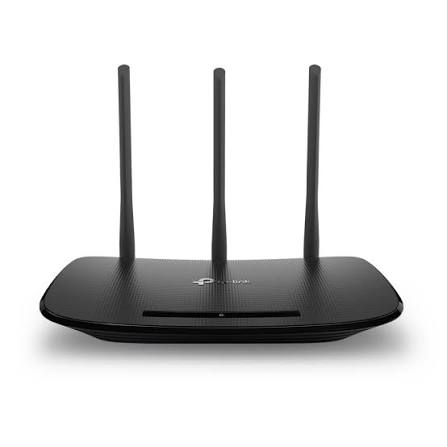
Quick Comparison
For a new purchase, the TP-Link Archer BE3600 offers newer Wi-Fi 7 technology, faster wired ports, and a current product platform. Google Nest Wifi can still be useful for someone who already owns the system and wants simple mesh management through Google Home.
For seniors buying a router today, the main question is not just speed. It is whether the router is easy to manage and makes sense for the home and internet plan.

TP-Link vs Google Nest WiFi At a Glance
The two options take different approaches. TP-Link gives users more modern hardware and networking options, while Nest Wifi focuses on simple whole-home Wi-Fi.
| Feature | TP-Link Archer BE3600 | Google Nest Wifi |
|---|---|---|
| Wi-Fi standard | Wi-Fi 7 | Wi-Fi 5 |
| Wireless class | Up to 3.6 Gbps | AC2200 |
| Bands | 2.4 GHz + 5 GHz | 2.4 GHz + 5 GHz |
| Mesh support | EasyMesh | Nest Wifi mesh |
| Wired ports | 2.5G WAN + 2.5G LAN + 3× 1G | 2× Gigabit |
| Main app | TP-Link Tether | Google Home |
| Security | WPA3, HomeShield | WPA3, automatic updates |
| Best fit | New buyers and newer devices | Existing Google smart-home users |
TP-Link lists the Archer BE3600 as a dual-band Wi-Fi 7 router with up to 3.6 Gbps wireless speed and 2.5 Gbps ports. Google lists Nest Wifi as an AC2200 Wi-Fi 5 mesh router with two Gigabit Ethernet ports.
TP-Link Archer BE3600 Review for Seniors
The Archer BE3600 is a modern router aimed at homes that want newer Wi-Fi technology without moving to a high-end router.
It supports Wi-Fi 7, Multi-Link Operation, beamforming, EasyMesh, and management through the TP-Link Tether app.
Ease of Use
The Tether app is designed to make network management easier. TP-Link also provides setup guides and support materials for the Archer BE3600.
For a senior who is comfortable using a smartphone, this can make basic network tasks less dependent on a computer.
Key strengths
- Newer Wi-Fi 7 technology
- Tether app for network management
- EasyMesh support
- 2.5 Gbps wired ports
- WPA3 security
- Works with older Wi-Fi devices
Potential drawbacks
- Wi-Fi 7 features may offer little benefit with older devices.
- The extra settings may be more than some users need.
- Router choice within the TP-Link range can be confusing because the brand sells many models.
Google Nest WiFi Review for Seniors
Google Nest Wifi was designed around simple whole-home Wi-Fi. The router supports mesh networking and can work with Nest Wifi points and compatible Google Wifi devices.
Ease of Use
Google manages Nest Wifi through the Google Home app. This can be convenient for someone who already uses Google smart-home products.
The system also supports automatic client roaming and proactive band steering. Google says a Nest Wifi router can handle up to 100 connected devices under its stated test conditions.
Key strengths
- Simple Google Home management
- Mesh support
- Automatic roaming
- WPA3 security
- Familiar option for Google Home users
Potential drawbacks
- It uses older Wi-Fi 5 technology.
- Wired connections are limited to Gigabit Ethernet.
- It is an older product platform.
- Google lists its original five-year minimum security-update period as ending in October 2024, although Google has continued publishing firmware and security updates for Nest Wifi.
Which Is Easier for Seniors to Use?
Both systems can be managed from a phone, which removes much of the need to use a browser-based router panel.
Nest Wifi has an advantage for someone already familiar with Google Home. The interface is built around Google’s smart-home ecosystem.
TP-Link can be a better fit for someone who wants more control. The Tether app provides access to router settings, while the Archer BE3600 also offers newer networking features.
Simple setup matters more than having every advanced feature.
For a senior who wants a basic home network, either can work. For someone buying new hardware, the newer TP-Link platform gives more room for future devices.
Performance Comparison
Performance depends on the router, internet plan, connected devices, home layout, and wireless interference.
The Archer BE3600 supports Wi-Fi 7 and a rated wireless speed of up to 3.6 Gbps. It also supports Multi-Link Operation and 2.5 Gbps wired connections.
Nest Wifi uses Wi-Fi 5 and has a rated AC2200 wireless configuration. Its router has two Gigabit Ethernet ports.
| Performance Area | TP-Link BE3600 | Google Nest Wifi |
|---|---|---|
| Wi-Fi generation | Wi-Fi 7 | Wi-Fi 5 |
| New-device support | Strong | More limited |
| Multi-gig wired use | Yes | No |
| Mesh | EasyMesh | Nest Wifi mesh |
| Everyday streaming | Strong | Good for typical use |
For basic web browsing, video calls, email, and streaming, Nest Wifi can still be adequate. The newer TP-Link model has more technical headroom for newer devices and faster internet plans.
Comfort, Accessibility, and Senior-Friendly Design
A router does not require much physical effort after installation. The bigger issue for seniors is usually setup and management.
The TP-Link app and Google Home app both reduce the need to handle complicated router menus.
Google Nest Wifi may feel simpler for a person already using Google Home. TP-Link may suit someone who wants more network control.
Neither router is designed specifically as an accessibility product, so users should consider their own comfort with smartphone apps and network settings.
Features Comparison
The biggest feature difference is the age of the networking technology.
| Feature | TP-Link BE3600 | Google Nest Wifi |
|---|---|---|
| Wi-Fi generation | Wi-Fi 7 | Wi-Fi 5 |
| Mesh | EasyMesh | Nest Wifi |
| WPA3 | Yes | Yes |
| App control | Tether | Google Home |
| Multi-Link Operation | Yes | No |
| 2.5G Ethernet | Yes | No |
| Automatic roaming | Mesh dependent | Yes |
TP-Link also offers a broad range of current Wi-Fi 7 routers and mesh products, while Google’s current documentation places Nest Wifi alongside the newer Nest Wifi Pro rather than presenting the original Nest Wifi as its newest hardware.
Price, Maintenance, and Long-Term Value
Price can change by retailer, model, and region. TP-Link introduced the Archer BE3600 at a starting price of $99.99 in the U.S.
Nest Wifi is an older product, so current prices may depend on remaining stock or used-market availability.
For long-term value, hardware age matters. A newer Wi-Fi 7 router can make more sense when buying from scratch, especially if the home has newer phones, computers, or other Wi-Fi devices.
Nest Wifi can still make sense when someone already owns compatible Nest Wifi points and wants to keep the existing mesh system.
Who Should Choose TP-Link?
Choose the TP-Link Archer BE3600 if:
- You are buying a new router.
- You want newer Wi-Fi technology.
- You have newer Wi-Fi devices.
- You want 2.5 Gbps wired connections.
- You want EasyMesh expansion options.
- You want more network features and control.
Who Should Choose Google Nest WiFi?
Choose Google Nest Wifi if:
- You already use Google Home.
- You already own Nest Wifi points.
- You prefer a simple Google-based setup.
- Your internet plan does not require multi-gig wired networking.
- Your existing Nest Wifi system is working well.
TP-Link vs Google Nest WiFi — Final Verdict
For a new router purchase, the Archer BE3600 has the advantage of newer Wi-Fi 7 technology, faster wired ports, and a more current hardware platform.
Nest Wifi remains relevant for existing Google users who value its simple mesh setup. But its Wi-Fi 5 hardware is much older, and Google’s published minimum security-support period for the original Nest Wifi ended in 2024. Google has nevertheless continued to publish firmware and security updates for the device in 2026.
Best for a new setup: TP-Link Archer BE3600
Best for existing Google Home users: Google Nest Wifi
Best for newer Wi-Fi devices: TP-Link Archer BE3600
Best for an existing Nest mesh: Google Nest Wifi
Scoring Summary
Scores here are practical editorial assessments based on the documented features above, not laboratory test results.
| Category | TP-Link BE3600 | Google Nest Wifi |
|---|---|---|
| Ease of Use | 8/10 | 9/10 |
| Senior-Friendly Design | 8/10 | 9/10 |
| Performance | 9/10 | 7/10 |
| Maintenance | 8/10 | 9/10 |
| Long-Term Value | 9/10 | 7/10 |
The scores should be read alongside the comparison rather than treated as universal results. A senior with an existing Google smart-home setup may value simplicity more than newer Wi-Fi technology.
How We Evaluate Products
This comparison focuses on practical factors that can affect everyday senior use.
We consider:
- Ease of setup
- App usability
- Network performance
- Mesh support
- Security
- Maintenance
- Compatibility
- Long-term practicality
- Value
No hands-on testing is claimed here. The comparison is based on manufacturer documentation and current published information.
Senior-Specific Buying Considerations
Setup
Check whether you can complete the initial setup using a phone and whether someone can help if configuration becomes difficult.
Controls
Look at the app before buying. A simple interface can make routine network tasks easier.
Coverage
A large or multi-story home may need mesh points. Walls and home layout can affect wireless coverage.
Compatibility
Check the router against your internet plan and your current phones, computers, TVs, and smart-home devices.
Security
WPA3 and automatic security updates are useful features to consider. Keep the router firmware current.
Common Buying Mistakes
Avoid these common mistakes:
- Buying based only on advertised Wi-Fi speed
- Ignoring the age of the router
- Buying a router with features your devices cannot use
- Forgetting about mesh coverage
- Ignoring wired port speeds
- Choosing a system that feels difficult to manage
Safety
Routers have few physical safety concerns during normal use. Keep the router in a well-ventilated location and use the supplied power adapter.
For seniors who need help with installation, a family member, caregiver, or qualified technician can handle the initial setup.
Frequently Asked Questions
Is TP-Link better than Google Nest Wifi for seniors?
It depends on the user’s needs. The TP-Link Archer BE3600 has newer Wi-Fi 7 hardware, while Nest Wifi offers a simple Google Home-based experience.
Is Google Nest Wifi still supported?
Google continues to publish software and security updates for Nest Wifi in 2026. However, Google’s published five-year minimum security-update period for the original Nest Wifi ended in October 2024.
Is TP-Link Archer BE3600 easy to set up?
TP-Link provides setup guidance and supports management through the Tether app.
Does Nest Wifi support Wi-Fi 7?
No. The original Nest Wifi uses Wi-Fi 5 technology.
Does TP-Link support mesh Wi-Fi?
Yes. The Archer BE3600 supports EasyMesh-compatible networking.
Conclusion
The choice between TP-Link and Google Nest Wifi depends on whether you are buying new or extending an existing setup. The TP-Link Archer BE3600 brings newer Wi-Fi 7 technology and faster wired connections, while Nest Wifi remains attractive for users already invested in the Google Home ecosystem.
For a fresh setup, check your internet speed, home size, current devices, and comfort with the router app before deciding. For an existing Nest Wifi home, keeping the current system may be simpler if it still meets your needs.