
Netgear vs ASUS Wi-Fi Router for Seniors Guide


Electric Recliner Lift Chair

Sock Aid for Seniors

Digital Thermometer
If you are comparing Netgear vs ASUS wi-fi router for seniors, the choice depends on what matters most at home. For this comparison, we are looking at the Netgear Nighthawk RS300 and ASUS RT-BE58U, two current Wi-Fi 7 routers with different approaches to home networking.
The Netgear RS300 is a tri-band router with 6GHz support and a simple Nighthawk app setup. The ASUS RT-BE58U is a dual-band Wi-Fi 7 router with AiMesh, USB storage support, and more network controls.

Quick Comparison
For seniors who want simple setup, strong speed, and 6GHz Wi-Fi, the Netgear RS300 has clear advantages. Its Nighthawk app is designed to guide users through setup, and it supports three Wi-Fi bands.
The ASUS RT-BE58U makes more sense for someone who wants more control, mesh expansion, USB features, and network settings. ASUS also supports AiMesh, so compatible ASUS routers can be added later.
The easier choice is not always the router with the most features. For many older adults, simple setup and easy daily management matter more.
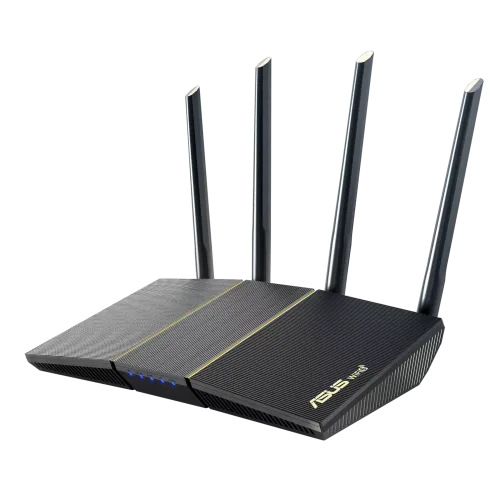
Netgear RS300 vs ASUS RT-BE58U At a Glance
These are not identical routers. The RS300 is a faster tri-band model, while the RT-BE58U is a more affordable dual-band option.
| Feature | Netgear RS300 | ASUS RT-BE58U |
|---|---|---|
| Wi-Fi standard | Wi-Fi 7 | Wi-Fi 7 |
| Wi-Fi bands | Tri-band | Dual-band |
| 6GHz | Yes | No |
| Rated Wi-Fi speed | Up to 9.3 Gbps | Up to 3.6 Gbps |
| 2.5Gbps ports | 3 total | 1 |
| USB | USB 3.0 | USB 3.2 Gen 1 |
| Mesh | Netgear ecosystem | AiMesh |
| Setup | Nighthawk app | ASUS Router app |
| Weight | 0.95 kg | 461 g |
| Official US price checked | $299.99 | $149.99 |
Netgear lists the RS300 at up to 9.3 Gbps, with 2.5Gbps WAN/LAN connectivity and 2.5GHz, 5GHz, and 6GHz bands. ASUS lists the RT-BE58U at up to 3.6 Gbps with 2.5Gbps and Gigabit Ethernet ports.
The listed US prices were $299.99 for the RS300 and $149.99 for the RT-BE58U when checked. Prices can change.
Netgear RS300 Review for Senior Use
The Netgear Nighthawk RS300 is aimed at homes with many connected devices and faster internet plans. It has three Wi-Fi bands and supports up to 2,500 square feet according to Netgear.
Ease of Use
Setup is one of the RS300’s strongest practical points. Netgear says the router can be connected to an existing modem and set up through the Nighthawk app.
That can be helpful for seniors who prefer guided phone-based setup instead of working through many web settings.
The router itself is larger and heavier than the ASUS model. Netgear lists its weight at 0.95 kg.
Key Strengths
- Tri-band Wi-Fi 7
- Includes the 6GHz band
- Up to 9.3 Gbps rated Wi-Fi speed
- Three 2.5Gbps Ethernet ports
- Nighthawk app setup
- Up to 2,500 sq. ft. coverage
- USB 3.0 port
Potential Drawbacks
- Costs much more than the ASUS model at the listed prices
- Larger and heavier
- Its extra performance may be unnecessary for a basic internet plan
- Advanced features can be more than a simple household needs
ASUS RT-BE58U Review for Senior Use
The ASUS RT-BE58U takes a different approach. It is a dual-band Wi-Fi 7 router with a lower listed US price and a strong set of home-network features. ASUS lists four external antennas, a quad-core 2.0GHz processor, and 1GB of RAM.
Ease of Use
ASUS provides the ASUS Router app as well as its ASUSWRT web interface. The router also supports automatic firmware updates and connection diagnosis features.
For a senior who only wants to connect phones, TVs, tablets, and computers, the large number of settings may not be necessary. But they can be useful if a family member or caregiver manages the network.
Key Strengths
- Lower listed price
- Wi-Fi 7 support
- AiMesh expansion
- 2.5Gbps WAN/LAN port
- USB 3.2 Gen 1
- AiProtection security features
- Parental controls
- VPN support
- 461g weight
Potential Drawbacks
- No 6GHz band
- Lower rated Wi-Fi speed than the RS300
- More advanced settings may feel complex
- Only one 2.5Gbps port
Which Is Easier for Seniors to Use?
Both routers can be managed with smartphone apps, which is useful for users who do not want to work with a web browser.
The Netgear RS300 has an edge when simple initial setup and fast wireless performance are the priority. Netgear specifically promotes Nighthawk app setup.
The ASUS RT-BE58U may be easier to live with when a family member wants to manage the network remotely or expand it later with AiMesh-compatible routers.
| Usability Area | Netgear RS300 | ASUS RT-BE58U |
|---|---|---|
| App setup | Simple | Simple |
| Physical weight | Heavier | Lighter |
| Basic home use | Strong | Strong |
| Advanced controls | Good | Extensive |
| Mesh expansion | Available | AiMesh |
| 6GHz access | Yes | No |
For a senior who wants less fuss, the RS300’s guided setup can be attractive. For someone who wants more control or future expansion, ASUS has more flexibility.
Performance Comparison
The biggest hardware difference is the wireless design.
The RS300 is a tri-band BE9300 router. It has 2.4GHz, 5GHz, and 6GHz radios, with Netgear rating them at 0.7, 2.9, and 5.8 Gbps respectively.
The ASUS RT-BE58U is a BE3600 dual-band router. ASUS lists up to 688 Mbps on 2.4GHz and 2,882 Mbps on 5GHz.
This means the Netgear has much more wireless capacity on paper.
However, that does not mean every senior will notice a large difference. Internet speed, device support, home layout, distance from the router, and interference all affect real-world performance.
Comfort, Accessibility, and Senior-Friendly Design
Routers do not require much physical interaction after setup, so ergonomics are less important here than they are for products such as vacuum cleaners or kitchen tools.
The main physical difference is size and weight. The ASUS weighs about 461g, while the Netgear RS300 weighs about 0.95kg.
The ASUS also has four external antennas. The Netgear uses four internal antennas with high-power amplifiers.
For most seniors, the more important accessibility factor is likely to be how easy the network is to manage, not how easy it is to physically move the router.
Features Comparison
The two routers offer very different feature sets.
| Feature | Netgear RS300 | ASUS RT-BE58U |
|---|---|---|
| 6GHz Wi-Fi | Yes | No |
| Multi-Link Operation | Wi-Fi 7 | Wi-Fi 7 |
| Mesh option | Netgear ecosystem | AiMesh |
| USB | USB 3.0 | USB 3.2 Gen 1 |
| Security | Armor, WPA3 | AiProtection, WPA3 |
| VPN | Yes | Yes |
| Parental controls | Available | Available |
| Traffic controls | Available | Adaptive QoS |
ASUS lists AiProtection, VPN features, Adaptive QoS, parental controls, guest networking, and AiMesh support. Netgear lists built-in Armor security and VPN features for the RS300.
Price, Maintenance, and Long-Term Value
Price is a major difference.
At the time checked, Netgear listed the RS300 at $299.99, while ASUS listed the RT-BE58U at $149.99 in its US store. That makes the ASUS roughly half the listed price.
| Cost Factor | Netgear RS300 | ASUS RT-BE58U |
|---|---|---|
| Listed US price | $299.99 | $149.99 |
| Replacement batteries | Not applicable | Not applicable |
| Subscription consideration | Armor terms apply | No comparable requirement stated here |
| Mesh expansion | Available | AiMesh |
| Long-term value | Strong for high-speed homes | Strong for budget-focused homes |
The RS300 may make more sense when its extra speed and 6GHz band will actually be used. The ASUS can provide better value for a household that does not need those features.
Who Should Choose Netgear RS300?
- Choose the RS300 if you want 6GHz Wi-Fi.
- Choose it if you have a fast internet plan.
- Choose it if many devices use the network at once.
- Choose it if guided Nighthawk app setup matters.
- Choose it if you want stronger Wi-Fi 7 performance on paper.
- Choose it if you want multiple 2.5Gbps Ethernet ports.
Who Should Choose ASUS RT-BE58U?
- Choose the RT-BE58U if keeping the cost lower matters.
- Choose it for normal browsing, streaming, video calls, and smart-home devices.
- Choose it if you want AiMesh expansion.
- Choose it if a family member wants detailed network controls.
- Choose it if you want a lighter router.
- Choose it if you do not need a 6GHz band.
Netgear RS300 vs ASUS RT-BE58U — Final Verdict
The Netgear RS300 is the more capable router on paper. Its tri-band design, 6GHz support, higher rated wireless speed, and multiple 2.5Gbps ports make it better suited to a fast and busy home network.
The ASUS RT-BE58U is the more budget-friendly choice. It still offers Wi-Fi 7, AiMesh, USB connectivity, security features, and useful network controls at a much lower listed price.
| Category | Netgear RS300 | ASUS RT-BE58U |
|---|---|---|
| Ease of Use | 9/10 | 8/10 |
| Senior-Friendly Design | 8/10 | 9/10 |
| Performance | 10/10 | 8/10 |
| Features | 9/10 | 9/10 |
| Value | 7/10 | 9/10 |
These scores are editorial summaries of the documented differences, not laboratory test scores.
How We Evaluate Products
For senior-focused router comparisons, the useful factors are simple setup, app management, wireless performance, security, network controls, physical practicality, maintenance, and long-term value.
We do not claim hands-on testing unless actual testing data is available. This comparison is based on current manufacturer specifications and product information.
Senior-Specific Buying Considerations
Setup
Check whether the router can be installed with a simple mobile app. Both models provide app-based management.
Controls
Think about who will manage the router. A senior who wants basic Wi-Fi may not need extensive settings.
Maintenance
Routers need little physical maintenance. Firmware updates and occasional troubleshooting are more important.
Coverage
Check the home’s size and layout before paying for extra wireless capacity. A larger or faster router does not automatically remove every dead spot.
Security
Look for current security features such as WPA3 and regular firmware updates. Both models provide modern security options.
Common Buying Mistakes
- Paying for 6GHz when your devices cannot use it.
- Choosing a router based only on its maximum speed.
- Ignoring the home’s size and layout.
- Forgetting to check your internet plan.
- Buying advanced features that nobody will use.
- Ignoring who will handle setup and troubleshooting.
Safety
Routers are generally low-maintenance devices, but they still use mains electricity.
Keep the router and power adapter away from water. Use the supplied power adapter and allow reasonable airflow around the router. Do not place networking equipment where cables could create a trip hazard.
Conclusion
The Netgear RS300 and ASUS RT-BE58U are aimed at different types of home users. The RS300 offers a faster tri-band Wi-Fi 7 platform with 6GHz support, while the ASUS focuses on lower cost, AiMesh expansion, and a broad set of network controls.