
Optical Magnifier vs Digital Magnifier Guide


Hearing Aid Cleaning Kit

Adaptive Eating Utensils

Arthritis Gloves
Choosing between an optical magnifier vs digital magnifier can change how you read and live. Both tools help older adults see fine print and enjoy daily tasks again. Finding the right tool depends entirely on your eye health and hand strength.
Many seniors give up their favorite books when their eyes get weak. This does not have to happen. We will look closely at the real differences between these two tools so you can make the best choice for your daily needs.
Quick Comparison
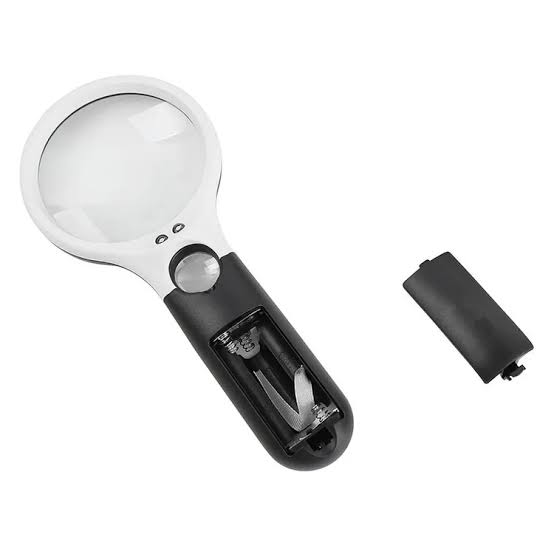
A basic glass lens is best for fast tasks like checking a pill bottle. It is cheap, very light, and needs no setup at all. You can grab it and use it right away.
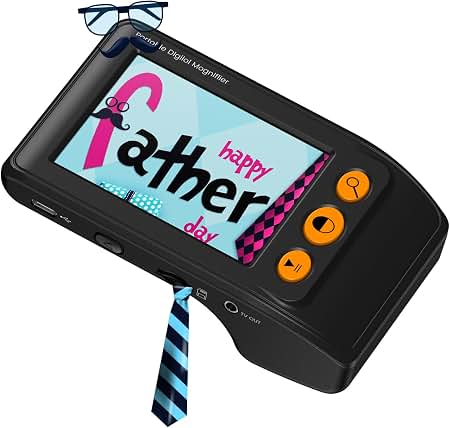
A smart screen device is much better for reading a whole book. It costs more but offers high zoom and changes background colors. It is the best choice if your hands shake or if you have serious vision loss.
Optical vs Digital Magnifiers At A Glance
Here is a fast look at how these two reading tools compare. This clear chart shows the main features of each type side by side.
| Feature | Optical Magnifier | Digital Magnifier |
| Main Use | Quick, short tasks | Long reading times |
| Power Source | None, or tiny batteries | Plug-in battery pack |
| Zoom Power | Low to medium | Very high and changing |
The Classic Optical Magnifier Review
These classic tools use a curved piece of glass to make words big. Many older adults keep one in a drawer for fast help. They come in many shapes, like handheld wands or flat domes.
Ease of Use
You just pick it up, hold it over the page, and look. There are no screens to fix or tricky menus to learn. It works the exact same way every single time you use it.
Key Strengths
- Very cheap to buy at any local drug store.
- Never needs to be plugged into a wall outlet.
- Light enough to slip right into a small purse.
- No learning curve at all for any new user.
- Great for taking out to a dim restaurant.
Potential Drawbacks
- Zoom power is quite low for most severe needs.
- The edge of the glass can bend the small words.
- You must hold it at the exact right height.
- Can make your hand very tired after a while.
The Modern Digital Magnifier Review
These modern tools use a small camera to show words on a bright screen. They give you a lot more power to see bad print. Some are pocket size, while others sit flat on a desk.
Ease of Use
You do have to learn a few buttons to zoom and change screen colors. But once you learn them, reading feels much less hard on your eyes. The screen does all the hard work for you.
Key Strengths
- Very high zoom power for the worst tiny print.
- High contrast colors like bright white on black.
- Large, flat viewing screen stops bad eye strain.
- Flat base means no hand shaking at all.
- Many let you freeze a picture to read it later.
Potential Drawbacks
- Costs a lot more money up front to buy.
- Needs to be plugged in and charged up often.
- Can feel much too heavy to pack for a long trip.
- Buttons take some extra time to learn and use.
Which Is Easier for Seniors to Use?
The glass lens wins for pure and simple setup. Anyone can grab it and read a price tag right away. You do not have to turn it on or wait for it to boot up.
But smart screens win for physical comfort over long times. You do not have to hold a heavy piece of glass in the air. You just rest the flat base on the page and slide it along.
“Resting the tool flat on the desk stops your hands from shaking and keeps the words in clear focus.”
This flat base design helps a great deal if your hands shake or feel weak. It takes away the physical work of reading. You just sit back and look at the bright screen.
Performance Comparison
A basic glass tool gives a fixed zoom size. Most give two or three times the normal size. If you buy a stronger glass lens, the clear viewing space gets very small. The edges of the glass can also make words look bent or fuzzy. A glass lens can also reflect bad glare from room lights.
Smart screens perform much better for very bad eyes. They can zoom up to twenty times bigger or more. The camera keeps the whole screen sharp and clear from edge to edge. The screen creates its own light. This means the screen stays bright no matter where you sit. The camera reads the text and makes it bold, making thin, gray text look thick and black.
Comfort, Accessibility, and Senior-Friendly Design
Hand strength plays a huge part in finding comfort. A basic glass lens gets quite heavy if you try to read a whole news page. Your arm will get very tired. You might also bend your neck too far down to see the words. You have to keep shifting your arm to find the sweet spot.
Smart models are built to rest flat on your desk. This stops hand pain and keeps your posture straight. Your hand just rests on the device to guide it gently. You can sit back in your chair and look straight ahead. Many also have bold, bright buttons that are very easy to see and press.
Features Comparison
Let us look closely at the special traits each tool offers. The differences here change how you read your mail each day.
| Feature | Optical Magnifier | Digital Magnifier |
| Lights | Basic LED or none | Bright screen backlights |
| Color Modes | Standard view only | Yellow, black, white flips |
| Picture Save | Not possible at all | Freezes image to look closer |
Price, Maintenance, and Long-Term Value
A basic glass lens is a very cheap buy. You only need to wipe it clean with a soft cloth from time to time. If you drop it and it breaks, it is cheap to replace. There are no software updates or charging cords to break down. A good glass tool can last for ten years or more.
Electronic models cost much more, often a few hundred dollars. You are paying for a bright screen, a camera, and a battery. You will also need to plug it in to charge it up every few days. The battery may wear out over a few long years. But the huge gain in reading power is often worth the high cost.
Who Should Choose an Optical Magnifier?
Some seniors just need a quick, handy tool. This simple type is great for fast needs around the home.
- Seniors with very mild vision loss.
- People who want to spend very little money.
- Those who only read short items like tags or mail.
- Users who hate cords, buttons, and batteries.
- Seniors looking for a light tool for their pocket.
Who Should Choose a Digital Magnifier?
Other seniors need much more help to see well. This smart choice is best for serious reading needs.
- Seniors with macular issues or very low vision.
- People who love to read long books or papers.
- Those who need high contrast colors like white on black.
- Users with weak hands who need a flat desk design.
- Seniors who want to freeze a picture to read it closely.
Optical vs Digital Final Verdict
The right choice comes down to how bad the vision loss is. Both tools serve a clear and noble purpose for older adults.
- Best for most seniors: Digital Magnifier
- Best for quick checks: Optical Magnifier
- Best overall value: Optical Magnifier
- Best for reading comfort: Digital Magnifier
Scoring Summary
Here is how these two tools score on important senior traits. These scores reflect everyday use at home for an older adult.
| Category | Optical Magnifier | Digital Magnifier |
| Ease of Setup | 10/10 | 6/10 |
| Reading Comfort | 4/10 | 9/10 |
| Zoom Power | 3/10 | 10/10 |
| Hand Strain | 4/10 | 9/10 |
| Overall Value | 9/10 | 7/10 |
How We Evaluate Products
We focus strictly on what matters most to older adults. This includes how easy the tool is to hold, read, and maintain. We look at actual daily use, like reading pill bottles, menus, and books.
We check weight, button size, screen brightness, and overall value. We do not just read the box. We think about how a senior will use the tool day after day in a real home.
Senior-Specific Buying Considerations
Keep these main points in mind before you buy anything. Thinking about daily habits will help you pick the right reading tool.
- Hand Strength: Can the user hold a tool up in the air for a long time?
- Eye Needs: Does the user need the background colors flipped to see better?
- Tech Comfort: Will the senior plug a smart tool in to charge it up?
- Light Source: Does the room have good light, or do you need a built-in bright lamp?
- Desk Space: Do you have a nice flat desk space to use a larger screen?
Common Buying Mistakes
Many people buy the wrong tool and never use it. Avoid these simple traps when shopping for vision help.
- Buying a huge glass lens thinking it zooms more, when they actually zoom much less.
- Ignoring the weight of the device for tired or weak hands.
- Forgetting that smart screens need to be plugged in and charged up.
- Choosing a tool based only on a cheap price tag.
- Not checking if the smart buttons are too small to press easily.
- Buying a complex smart tool for someone who hates all new tech.
General Safety Facts
Both types of tools are quite safe, but there are a few things to note. Keep these simple safety tips in mind for a safe home.
- Never leave a curved glass lens in bright sunlight, as it can start a fire.
- Keep charging cords tucked away flat so no one trips and falls on them.
- Do not stare right into the bright LED lights on the base.
- Keep smart screens away from water or hot coffee spills.
- If vision loss is fast or sudden, always see an eye doctor right away.
Conclusion
Finding the best reading tool makes a huge difference in daily life. An optical lens is perfect for fast, cheap, and simple tasks around the house. It is the best tool for checking a quick price tag, reading a short menu, or scanning the daily mail.
A digital screen gives you the real power to read books clearly again. It costs more money, but it saves your hands and neck from bad pain. Think deeply about hand strength and zoom needs before you make a final choice. Taking the time to pick the right tool will bring the pure joy of reading back to your day.