
Logitech vs Poly Webcam for Seniors Compared


Portable Wheelchair
Tablet for Seniors

Automatic Jar Opener
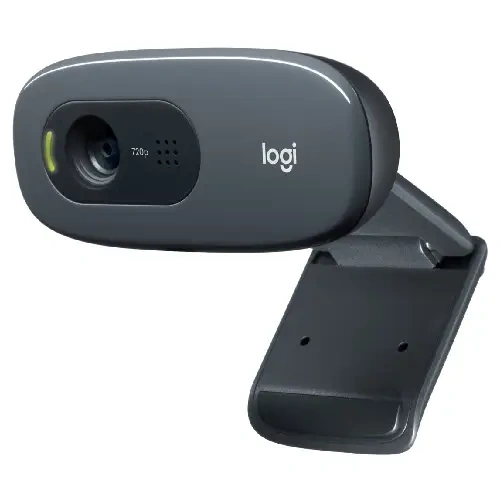
Logitech vs Poly webcam for seniors is a useful comparison if clear video calls and simple setup matter. For this comparison, the Logitech Brio 505 and Poly Studio P5 are used as representative models. Both are designed for video calls and work well for home offices.
The main difference is how each camera handles video, audio, controls, and setup. Logitech offers useful automatic features such as light correction and auto-framing. Poly focuses on a narrow view, low-light help, and a directional microphone.
Quick Comparison
For seniors who want simple video calls, both cameras are practical choices. The Logitech Brio 505 has more flexible viewing options and automatic light correction. The Poly Studio P5 keeps the view focused on the user and has a directional microphone.
The better choice depends on the setup. Logitech may suit users who want more camera flexibility. Poly may suit users who want a simple, focused view during calls.
Simple choice: Logitech offers more flexibility, while Poly keeps the experience focused and straightforward.

Logitech vs Poly At a Glance
The table below focuses on features that can affect everyday senior use.
| Feature | Logitech Brio 505 | Poly Studio P5 |
|---|---|---|
| Video | 1080p | 1080p |
| Low-light support | RightLight 4 with HDR | Automatic low-light compensation |
| Microphone | Stereo, noise-reducing | Directional microphone |
| Zoom | 4x digital | 4x digital |
| Privacy | Integrated shutter | Integrated privacy shutter |
| Connection | USB-C | USB-A |
| Setup | Plug and play | Adjustable monitor clamp |
| Software | Logi Tune | Poly Lens Desktop |
Logitech lists 1080p video, autofocus, several viewing angles, 4x digital zoom, USB-C, and an integrated privacy shutter for the Brio 505. Poly’s Studio P5 offers 1080p video, 4x digital zoom, automatic low-light compensation, a directional microphone, and a privacy shutter.
Logitech Brio 505 Review for Seniors
The Logitech Brio 505 is a Full HD webcam built for video meetings. Its automatic light correction and autofocus can reduce the need for manual camera adjustments.
Ease of Use
The Brio 505 uses USB-C plug-and-play connectivity. It also has autofocus and an integrated privacy shutter. Logitech lists compatibility with Windows, macOS, and ChromeOS.
Its viewing angle can also be changed between 90°, 78°, and 65°. This gives users more control over how much of the room appears on screen.
The optional auto-framing feature works through Logi Tune. Logitech notes that Logi Tune is not available on ChromeOS.
Key Strengths
- Full HD 1080p video
- Autofocus
- Automatic light correction
- Adjustable field of view
- Integrated privacy shutter
- USB-C plug-and-play setup
- Stereo noise-reducing microphones
- 3-year limited hardware warranty
Potential Drawbacks
- Auto-framing needs Logi Tune
- USB-C may require an adapter on some older computers
- Some features may be more than a basic video-call user needs
Poly Studio P5 Review for Seniors
The Poly Studio P5 is a compact USB-A webcam designed mainly for video meetings. Its camera uses automatic low-light compensation and a focused field of view.
Ease of Use
The P5 has an adjustable monitor clamp and is also tripod-ready. HP describes it as easy to set up, while its integrated privacy shutter helps cover the camera between calls.
The USB-A connection can also be useful with older desktop computers and laptops that still have standard USB ports.
Key Strengths
- 1080p video
- 4x digital zoom
- Automatic low-light compensation
- Directional microphone
- Integrated privacy shutter
- Adjustable monitor clamp
- Tripod-ready design
- Poly Lens software support
Potential Drawbacks
- USB-A is less convenient on computers with only USB-C ports
- The narrower view gives less framing flexibility
- The P5 is an older Poly model, so buyers should check current availability and support before purchase
HP continues to provide Studio P5 setup guides and release information, including a January 2025 firmware release.
Which Is Easier for Seniors to Use?
Both webcams are designed to reduce setup work. Neither needs a separate power supply, and both can sit on a monitor.
Logitech has an advantage when flexible framing matters. Its 90°, 78°, and 65° viewing options allow the user to show more or less of the room.
Poly may feel simpler when the goal is to keep the camera focused on one person. HP describes the P5’s field of view as optimized to keep the user centered without showing too much of the surroundings.
| Ease Factor | Logitech Brio 505 | Poly Studio P5 |
|---|---|---|
| Setup | Plug and play | Simple USB setup |
| Framing | More flexible | More focused |
| Privacy | Built-in shutter | Built-in shutter |
| Lighting | Automatic correction | Automatic low-light help |
For a senior who wants fewer framing choices, Poly’s focused view may be easier. For someone who wants control over the camera view, Logitech offers more flexibility.
Performance Comparison
Both models provide 1080p video and 4x digital zoom. The main differences are in image adjustment and microphone design.
The Brio 505 uses Logitech’s RightLight 4 with HDR to adjust for different lighting conditions. It also has autofocus and stereo microphones.
The Poly Studio P5 uses automatic low-light compensation and a directional microphone. HP says the microphone focuses on the user’s voice and reduces background noise.
| Performance Area | Logitech Brio 505 | Poly Studio P5 |
|---|---|---|
| Resolution | 1080p | 1080p |
| Zoom | 4x digital | 4x digital |
| Focus | Autofocus | Video-conferencing focused |
| Lighting | RightLight 4 with HDR | Automatic low-light compensation |
| Microphone | Stereo noise-reducing | Directional |
For general video calls, both provide enough resolution for a clear face-to-face image. The choice becomes more about lighting, framing, and microphone needs.
Comfort, Accessibility, and Senior-Friendly Design
Webcams do not require much physical effort after installation. The main senior-friendly factors are mounting, privacy, connection type, and software controls.
The Logitech Brio 505 weighs 121 g with its mount and cable. Its removable mounting clip fits laptops and monitors.
The Poly P5 also uses an adjustable monitor clamp and can be mounted on a tripod.
A senior who already has a USB-C computer may find Logitech easier to connect. A user with a standard USB-A port may find the Poly connection more convenient.
Features Comparison
The most meaningful differences are not the basic 1080p resolution. Both cameras offer that. The bigger differences are the viewing system, microphone design, and connection type.
| Feature | Logitech Brio 505 | Poly Studio P5 |
|---|---|---|
| Field of view | 90° / 78° / 65° | Focused view |
| Microphone | Stereo | Directional |
| Privacy | Built-in shutter | Built-in shutter |
| Software | Logi Tune | Poly Lens |
| Connection | USB-C | USB-A |
Logitech also supports Show Mode and auto-framing, while Poly emphasizes focused video conferencing and voice pickup.
Price, Maintenance, and Long-Term Value
Webcam prices can change often, so a current price should be checked before publishing or buying. Logitech currently lists the Brio 505 in its U.S. business webcam range, while HP continues to provide support resources for the Poly Studio P5.
Neither webcam needs batteries or regular cleaning beyond normal lens and surface care. The main long-term concern is compatibility with the computer and continued software support.
For value, do not look only at the purchase price. Check the available USB port, software needs, warranty, and whether the camera has the features the user will actually use.
Who Should Choose Logitech?
Choose the Logitech Brio 505 if:
- You want adjustable viewing angles.
- You use a USB-C computer.
- Automatic lighting correction is useful.
- You want autofocus.
- You prefer stereo microphones.
- You want a longer listed hardware warranty.
- You want more control over framing.
Who Should Choose Poly?
Choose the Poly Studio P5 if:
- You use a computer with USB-A.
- You prefer a focused camera view.
- Background noise is a concern.
- You want a directional microphone.
- You like the simple monitor-clamp design.
- You want a webcam built mainly around video conferencing.
Logitech vs Poly Webcam for Seniors — Final Verdict
The Logitech Brio 505 and Poly Studio P5 are both capable 1080p webcams, but they take different approaches. Logitech gives users more control over framing and includes autofocus, RightLight 4, and several field-of-view options. Poly keeps the camera view more focused and uses a directional microphone for voice pickup.
For seniors who want more framing flexibility and automatic image adjustment, the Logitech Brio 505 is the more suitable match. For seniors who want a focused view and directional voice pickup, the Poly Studio P5 may be a better fit.
Scoring Summary
Because this comparison is based on published specifications rather than hands-on testing, numeric scores would suggest more precision than the evidence supports.
| Category | Logitech Brio 505 | Poly Studio P5 |
|---|---|---|
| Ease of use | Strong | Strong |
| Senior-friendly features | Strong | Strong |
| Video features | Strong | Strong |
| Microphone design | Noise-reducing stereo | Directional |
| Framing flexibility | More flexible | More focused |
| Privacy | Built-in shutter | Built-in shutter |
| Connection | USB-C | USB-A |
This specification-based approach avoids assigning arbitrary 8/10 or 9/10 scores without independent testing.
How We Evaluate Products
We compare webcams around the things that matter during everyday senior use.
Our focus is practical use, not marketing claims.
We consider:
- Setup difficulty
- Controls and software
- Video quality
- Audio features
- Privacy
- Camera positioning
- Compatibility
- Maintenance
- Long-term practicality
- Value
The comparison is based on available product information. It does not claim hands-on testing.
Senior-Specific Buying Considerations
Connection
Check the computer before buying. The Brio 505 uses USB-C, while the P5 is a USB-A webcam.
Controls
Think about whether the user wants simple video calls or extra framing controls. More features can help, but they can also add another software step.
Setup
A webcam should sit securely on the monitor. Check the monitor shape and available USB port before purchase.
Privacy
Both models have an integrated privacy shutter. This lets the user physically cover the camera when it is not needed.
Lighting
If the room is often dim, automatic lighting features can be useful. Neither feature replaces good room lighting, but both cameras provide automatic help.
Common Buying Mistakes
- Buying without checking the USB port
- Choosing based only on resolution
- Ignoring microphone needs
- Overlooking the field of view
- Paying for features that will not be used
- Forgetting to check current support and availability
Safety
The main safety issue is privacy. Cover the webcam when it is not in use if that provides greater peace of mind.
Also place the webcam securely on the monitor. Avoid loose mounting that could cause the camera to fall.
Conclusion
Logitech and Poly both offer practical webcam options for seniors who use Zoom, Google Meet, Microsoft Teams, or similar services. The Logitech Brio 505 focuses on flexible framing, automatic lighting, autofocus, and USB-C connectivity. The Poly Studio P5 focuses on a narrower view, low-light compensation, and directional audio.
The most important choice is not simply the brand. Check the computer’s USB port, the user’s preferred camera view, and how much control they want. Those details can make one model much easier to live with than the other.