
Blood Sugar Meter vs Glucose Monitor for Seniors


Bed Exit Alarm Sensor

Large Print Keyboard

Shiatsu Neck Massager
Blood Sugar Meter vs Glucose Monitor can mean two different ways to track glucose at home. A blood sugar meter usually means a finger-stick meter, while “glucose monitor” can also refer to a continuous glucose monitor (CGM).
For seniors, the key difference is how often testing happens and how much hands-on work is needed. A meter gives a reading from a small blood sample. A CGM uses a sensor under the skin and can provide frequent glucose readings and trends.
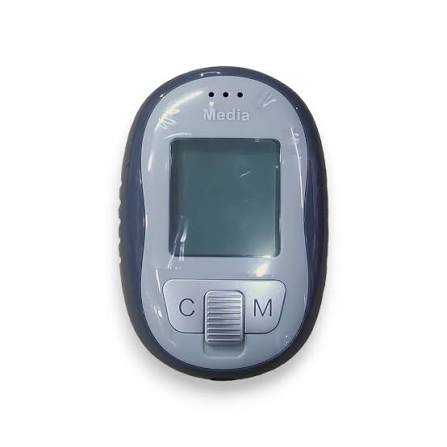
Quick Comparison
A blood sugar meter may suit seniors who want a simple device for occasional or scheduled checks and do not mind finger-stick testing.
A CGM may be more useful for someone who wants frequent readings, trend information, and alerts without repeated finger sticks. However, it involves wearing a sensor and using a compatible reader or smart device.
The better choice depends on the person’s monitoring plan, dexterity, comfort with technology, cost, and healthcare needs.

Blood Sugar Meter vs Glucose Monitor At a Glance
Both can help track glucose, but they work in very different ways.
| Feature | Blood Sugar Meter | Glucose Monitor / CGM |
|---|---|---|
| Testing method | Small blood sample | Sensor measures interstitial glucose |
| Finger sticks | Usually required | Usually much less frequent |
| Readings | Individual checks | Frequent readings and trends |
| Setup | Simple | Sensor setup required |
| Alerts | Usually limited | Many CGMs offer glucose alerts |
| Phone use | Optional on some meters | Common with many CGMs |
| Consumables | Test strips and lancets | Sensors and related supplies |
| Best suited to | Scheduled checks | Frequent monitoring and trends |
Blood Sugar Meter Review
A blood sugar meter is a small device designed to measure glucose from a blood sample. Most home meters use a lancet, a test strip, and the meter itself.
For a senior who wants a straightforward testing routine, this format can be easier to understand because each test follows the same basic process.
Ease of Use
The basic process is fairly direct:
- Prepare the meter and strip.
- Wash and dry the hands.
- Use a lancet to obtain a small blood sample.
- Apply the sample to the test strip.
- Read the result.
The CDC recommends learning the procedure from a healthcare professional, especially for people who are new to glucose monitoring.
Large displays, simple buttons, and spoken instructions can also matter for seniors with limited vision. The FDA specifically lists display size and spoken instructions or results among features worth considering.
Key Strengths
- Simple testing concept
- Usually compact and portable
- No sensor worn continuously
- Can be useful for scheduled checks
- Does not require a smartphone for basic operation
Potential Drawbacks
- Requires finger-stick testing
- Test strips and lancets need regular replacement
- Each test provides a single reading
- Fine motor control may be needed to handle small strips and lancets
Glucose Monitor / CGM Review
If “glucose monitor” means a continuous glucose monitor, the experience is different. A CGM uses a small sensor placed under the skin to measure glucose in interstitial fluid. Readings can be sent to a receiver or compatible smart device.
This gives a much broader picture of glucose changes during the day instead of relying only on separate finger-stick readings.
Ease of Use
A CGM can reduce the need for repeated finger sticks, which may be helpful for someone who finds lancets uncomfortable or difficult to handle.
However, there is a different learning curve. The sensor must be applied correctly, the system must be monitored, and the user may need to understand readings, trends, alerts, and app functions.
Many CGMs also need periodic sensor replacement. The CDC notes that CGM sensors commonly need replacement every 7 to 14 days, depending on the system.
Key Strengths
- Frequent glucose information
- Trend information rather than isolated readings
- Many systems can provide alerts
- Fewer routine finger sticks
- Data can be shared with caregivers or healthcare teams on supported systems
Potential Drawbacks
- Requires wearing a sensor
- Sensor application takes practice
- Smartphone or receiver compatibility may matter
- Ongoing sensor costs can be significant
- Some people may find the technology more complicated
Which Is Easier for Seniors to Use?
For basic scheduled testing, a blood sugar meter may feel more straightforward. There are fewer components to learn, and the user only handles the equipment when taking a reading.
For frequent monitoring, a CGM may reduce the repeated physical task of obtaining blood samples. This can matter for seniors who have difficulty handling lancets or test strips.
Still, “easier” depends on the person. A senior who dislikes smartphone apps may prefer a traditional meter, while someone who wants frequent information may appreciate a CGM.
The easiest system is usually the one that fits the user’s monitoring routine and ability to operate it correctly.
Performance Comparison
The two systems provide different kinds of information.
A meter gives a glucose measurement from a blood sample at the moment of testing. A CGM provides repeated measurements and can show how glucose is moving over time.
That makes the comparison less about one device being universally “more accurate” and more about what type of information the user needs.
A CGM measures glucose in interstitial fluid, so its readings can differ from blood glucose readings, particularly when glucose levels are changing quickly. The CDC notes that some people using CGMs may still need occasional finger-stick checks.
Comfort, Accessibility, and Senior-Friendly Design
A blood sugar meter has no sensor attached to the body, which some users may find more comfortable.
Its main physical challenge is the finger-stick process and handling small supplies. Seniors with reduced dexterity may want a meter with an easy-to-read screen and simple controls.
A CGM avoids repeated routine finger sticks but introduces another physical consideration: wearing and replacing the sensor.
For seniors, useful accessibility features can include:
- Large, clear displays
- Simple controls
- Easy-to-follow instructions
- Audible results where available
- Easy-to-handle supplies
- Straightforward data sharing
Features Comparison
The most useful features depend on the person’s monitoring routine rather than the number of features listed on the package.
| Feature | Blood Sugar Meter | CGM |
|---|---|---|
| Single glucose reading | Yes | Yes |
| Continuous trend information | No | Yes |
| Low/high alerts | Limited by model | Available on many systems |
| Data storage | Common | Common |
| App connectivity | Some models | Common with many systems |
| Wearable sensor | No | Yes |
Price, Maintenance, and Long-Term Value
A blood sugar meter may have a lower upfront cost, but the long-term expense can include test strips and lancets. The FDA recommends considering the cost of the meter and test strips when choosing a system.
CGMs have a different cost structure. Sensors must be replaced according to the particular system, and insurance coverage varies by user and device. The CDC notes that CGMs can become expensive without insurance coverage.
Value therefore depends on usage.
Someone taking a few readings at planned times may get more practical value from a meter. Someone who needs frequent glucose information may find the additional CGM features more useful.
Who Should Choose a Blood Sugar Meter?
A blood sugar meter may make sense for seniors who:
- Prefer a simple testing routine.
- Do not want to wear a sensor.
- Prefer not to rely on a smartphone.
- Need individual glucose readings.
- Are comfortable using lancets and test strips.
- Want to keep the equipment small and portable.
Who Should Choose a Glucose Monitor?
A CGM may be worth considering for seniors who:
- Need frequent glucose information.
- Want to see glucose trends.
- May benefit from alerts.
- Find repeated finger sticks difficult.
- Are comfortable wearing a sensor.
- Want compatible data-sharing features for caregivers or healthcare teams.
The specific choice should fit the person’s diabetes care plan. A healthcare professional can help determine whether a CGM or meter is appropriate.
Blood Sugar Meter vs Glucose Monitor — Final Verdict
There is no single winner for every senior. A blood sugar meter is a practical option for direct, scheduled checks and may be easier for someone who prefers simple equipment.
A CGM offers a different experience, with frequent glucose readings, trend information, and alerts on supported systems. It may be especially useful when repeated monitoring is important.
For seniors, the most important question is not simply which device has more features. It is which system the person can use correctly, comfortably, and consistently.
Scoring Summary
Because these are different types of glucose-monitoring systems, fixed numerical scores can create a false sense of precision. The more useful comparison is based on the intended use.
| Category | Blood Sugar Meter | CGM |
|---|---|---|
| Simple scheduled testing | Strong fit | May be more than needed |
| Frequent monitoring | More hands-on | Strong fit |
| No wearable sensor | Strong fit | Not applicable |
| Trend information | Limited | Strong fit |
| Reduced routine finger sticks | No | Strong fit |
| Simple equipment | Strong fit | More components |
How We Evaluate Products
For this comparison, the key factors are ease of use, accessibility, comfort, monitoring method, maintenance, safety, cost, and long-term practicality.
The comparison does not assume hands-on testing. Device features can also vary by manufacturer, model, country, and healthcare coverage.
Senior-Specific Buying Considerations
Physical Effort
Consider whether handling lancets and test strips is comfortable. If wearing a sensor, consider whether the user can manage sensor placement and replacement.
Controls
Look for clear displays, simple controls, and readable results. The FDA identifies ease of use and accessibility features as important considerations when selecting a blood glucose monitoring device.
Maintenance
Meters require proper handling of strips and lancets. CGMs require sensor changes and attention to the system’s instructions.
Setup
A meter usually has a simple physical setup. A CGM may require sensor insertion, pairing, app setup, or receiver configuration.
Safety
Follow the manufacturer’s instructions and the person’s healthcare plan. Do not share blood glucose meters, lancets, or other monitoring equipment. The FDA also warns against using unauthorized glucose-measuring devices that claim to work without an appropriate sensor or blood sample.
Common Buying Mistakes
Avoid these mistakes when choosing between the two:
- Choosing based only on the initial device price.
- Ignoring the ongoing cost of strips or sensors.
- Selecting a system that is too difficult to operate.
- Overlooking display and accessibility features.
- Assuming every CGM works with every smartphone.
- Choosing a device without considering the person’s diabetes care plan.
Safety
Glucose monitoring is a health-related task, so proper technique matters.
For meters, hands should be washed and dried before testing, and test strips should be stored as directed. The FDA also notes that improperly stored strips can affect result accuracy.
CGM readings come from interstitial fluid rather than directly from a blood sample. Because readings can differ, users should follow the manufacturer’s instructions and their healthcare professional’s guidance about when a finger-stick check is needed.
Frequently Asked Questions
Is a blood sugar meter the same as a glucose monitor?
Often, yes, the terms are used loosely. A blood sugar meter usually means a glucometer that measures glucose from a blood sample. “Glucose monitor” can also refer to a CGM, so the exact device should be clarified.
Is a CGM easier than a blood sugar meter?
It can be easier for people who dislike repeated finger sticks. However, CGMs involve sensor placement and technology that may require more setup.
Does a CGM eliminate finger-stick testing?
Not always. The need varies by CGM and situation. The CDC notes that finger-stick checks may still be needed in some circumstances.
Which is cheaper, a meter or CGM?
A meter may have lower equipment costs, but ongoing strips and lancets add expense. CGM costs depend heavily on the sensor system and insurance coverage.
Can seniors use a CGM without a smartphone?
Some CGM systems use a dedicated receiver, while others depend on compatible smart devices. Check the specific system before buying.
Should a senior choose a meter or CGM?
The choice depends on the person’s monitoring needs, dexterity, comfort with technology, cost, and healthcare plan. A healthcare professional can help match the device to those needs.
Conclusion
A blood sugar meter and a glucose monitor such as a CGM serve the same broad goal but provide glucose information in different ways. A meter is built around individual blood tests, while a CGM can provide frequent readings and trends.
For seniors, focus on the daily experience. Consider finger-stick requirements, sensor comfort, display readability, setup, ongoing costs, and the monitoring approach recommended by the healthcare team.