
Apple Watch vs Fitbit for Seniors


Weekly Pill Organizer

Quad Cane for Seniors

Jar Opener for Weak Hands
Apple Watch vs Fitbit is a useful comparison for seniors who want a wearable for health, activity, sleep, and daily alerts. The two options take different approaches. Apple Watch is a full smartwatch with a strong health and safety focus. Fitbit offers trackers and smartwatches that put more focus on health and fitness tracking.
For seniors, the best choice often depends on the phone they use, how often they want to charge the device, and which features matter most. An iPhone user may value Apple Watch integration, while someone who wants longer battery life may prefer a Fitbit device.
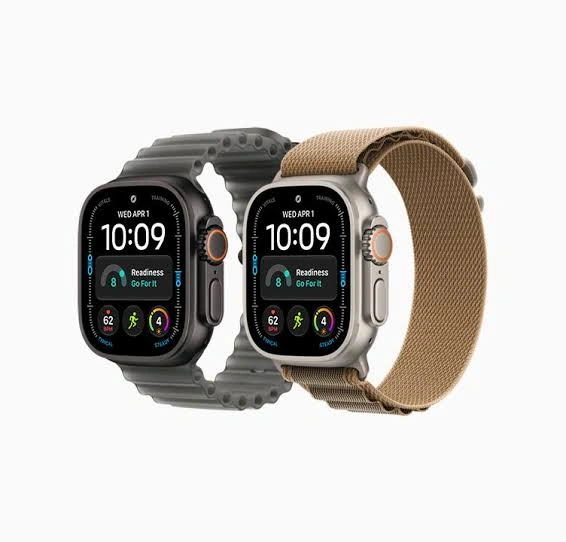
Apple Watch vs Fitbit At a Glance
Both can track daily activity, heart rate, sleep, and workouts. The bigger difference is the overall experience: Apple Watch offers more smartwatch and safety features, while Fitbit can offer simpler tracking and longer battery life.
| Feature | Apple Watch | Fitbit |
|---|---|---|
| Ease of use | Feature-rich | Generally simpler |
| Phone support | iPhone | iPhone and Android |
| Battery | About 24 hours on Series 12 | Up to 7 days on Charge 6 |
| Health tracking | Extensive | Extensive |
| ECG | Available on supported models | Available on select models |
| Safety features | Strong | More model-dependent |
| Smartwatch features | Extensive | Varies by model |
Apple Watch Review for Seniors
Apple Watch is more than a fitness tracker. Current models such as Apple Watch Series 12 combine health tracking, activity tools, notifications, and safety features in one device. Apple says Series 12 offers heart-rate sensing, sleep tracking, ECG on supported models, fall detection, and Emergency SOS.
Ease of Use
Apple Watch has a touch screen, side controls, and many on-screen features. This gives users a lot of control, but it can also mean more settings to learn.
For a senior who already uses an iPhone, the experience may feel more familiar. Apple Watch Series 12 also requires an iPhone 11 or later with iOS 27 or later for setup.
A simple device is not always the one with the fewest features. It is the one that makes the features you need easy to reach.
Key Strengths
- Strong iPhone integration
- Large range of health and activity features
- Fall Detection and Emergency SOS on supported models
- ECG on supported models
- Rich smartwatch functions
- Clear access to notifications and apps
Potential Drawbacks
- Requires an iPhone
- More features can mean a steeper learning curve
- More frequent charging than most Fitbit trackers
- Some health features vary by model and region
Fitbit Review for Seniors
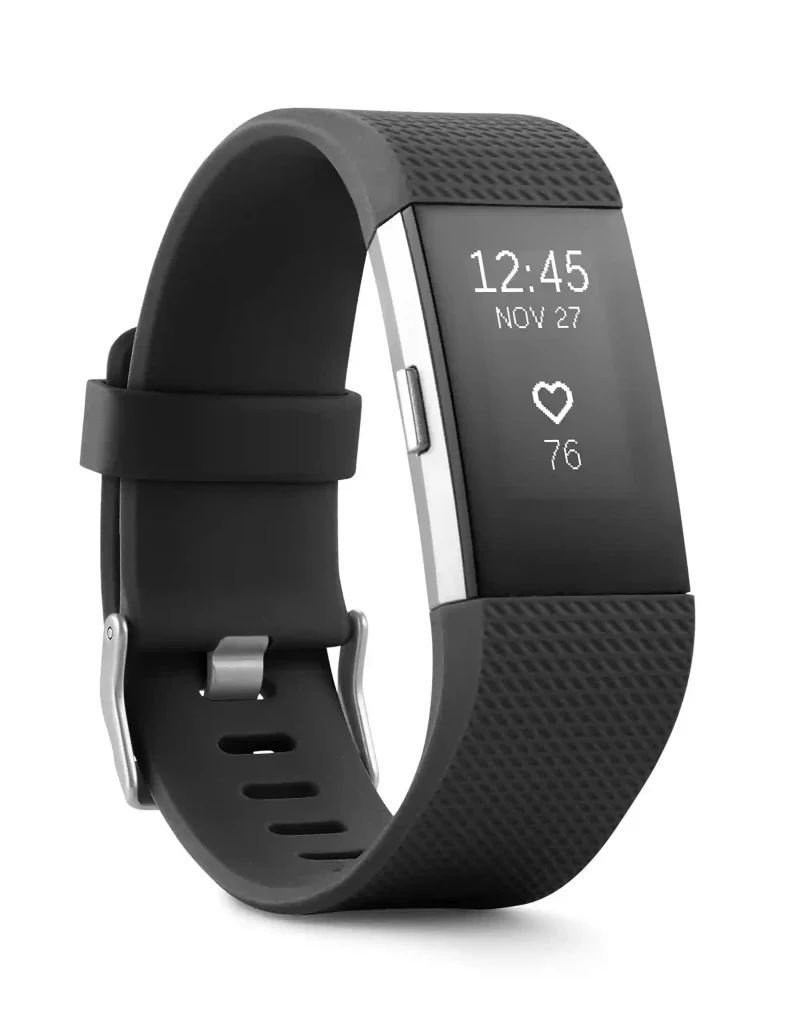
Fitbit covers several device types, including trackers such as Charge 6 and smartwatches such as Sense 2 and Versa 4. Google currently lists these devices as part of the Fitbit range.
Ease of Use
Fitbit can be a good fit for someone who mainly wants steps, heart rate, sleep, exercise, and other health information without needing a full smartwatch experience.
Fitbit devices work with both iPhones and Android phones. For example, Charge 6 supports most phones running Android 11 or newer or iOS 16.4 or newer.
Key Strengths
- Works with iPhone and Android
- Long battery life on many models
- Strong activity and sleep tracking
- Several device sizes and styles
- ECG is available on select Fitbit models
- Useful health information without requiring an Apple ecosystem
Potential Drawbacks
- Features vary greatly between Fitbit models
- Some advanced features may require a subscription
- Smartwatch functions are generally more model-dependent
- Some features work differently on iPhone and Android
Which Is Easier for Seniors to Use?
Fitbit may be easier for seniors who want a focused health and activity tracker. Apple Watch may be easier for seniors already comfortable with an iPhone.
The important point is not simply the number of buttons or features. It is how often the wearer needs to interact with the device.
Apple Watch can handle calls, notifications, apps, health information, and safety functions. That makes it powerful, but there is more to learn.
Fitbit can feel more focused. A Charge 6, for example, is built around tracking daily activity, health metrics, exercise, and sleep.
For someone with limited dexterity, screen size and control layout should be checked on the exact model before buying.
Performance Comparison
Both brands can cover the basic needs of daily activity tracking.
Apple Watch Series 12 adds high-frequency heart-rate and HRV measurements, sleep tracking, workout tracking, and a new readiness feature. Apple says the watch measures heart rate every five seconds and offers a readiness score based on activity, vitals, and sleep data.
Fitbit also tracks activity, sleep, heart rate, and exercise. Charge 6, Sense 2, and Versa 4 support GPS functions, with the exact GPS method depending on the model and setup.
| Performance Area | Apple Watch | Fitbit |
|---|---|---|
| Steps | Strong tracking | Strong tracking |
| Heart rate | Advanced | Advanced |
| Sleep | Yes | Yes |
| Exercise | Extensive | Extensive |
| GPS | Available | Available on select models |
| Readiness tools | Current models offer readiness | Fitbit offers health and activity insights |
Comfort, Accessibility, and Senior-Friendly Design
Comfort depends heavily on the exact watch, case size, and band.
Apple Watch offers several models and case materials. A senior who dislikes bulky watches should pay attention to case size and weight rather than choosing only by features.
Fitbit also offers different form factors. A tracker such as Charge 6 is smaller than a traditional smartwatch, while Sense 2 and Versa 4 use larger watch-style designs.
Visibility matters too. A larger display may help someone who has trouble reading small text. On the other hand, a smaller tracker may feel less noticeable during sleep.
Features Comparison
The biggest difference is the depth of the smartwatch and safety experience.
| Feature | Apple Watch | Fitbit |
|---|---|---|
| Fall Detection | Supported models | Model-dependent |
| Emergency SOS | Available | More limited/model-dependent |
| ECG | Supported models | Charge 6, Sense 2, select models |
| Sleep tracking | Yes | Yes |
| Heart-rate alerts | Yes | Yes |
| Smartphone notifications | Yes | Yes |
| Apps | Broad smartwatch ecosystem | More limited |
| Google services | Limited compared with Fitbit | Stronger Google integration |
Fitbit’s Google ECG app is available on Charge 6 and Sense 2, among other compatible devices, but availability depends on location. Google also states that ECG results are not a diagnosis.
Price, Maintenance, and Long-Term Value
Price changes by model, region, and retailer, so the exact purchase price should be checked before buying. Apple Watch Series 12 currently starts at $399 in the U.S.
Battery life is one of the clearest differences.
Apple Watch Series 12 is rated for up to 24 hours of everyday battery life. Apple also says 15 minutes of charging can provide up to 12 additional hours under its testing conditions.
Fitbit generally lasts much longer between charges. Google lists up to seven days for Charge 6 and up to 6+ days for Sense 2 and Versa 4, although features such as GPS and always-on display can reduce battery life.
| Cost Factor | Apple Watch | Fitbit |
|---|---|---|
| Initial cost | Often higher | Varies widely |
| Charging frequency | More frequent | Less frequent on many models |
| Subscription | Some services are separate | Some features require Premium |
| Accessories | Many options | Many options |
| Long-term value | Strong for iPhone users | Strong for long battery life |
Who Should Choose Apple Watch?
- Choose Apple Watch if the senior already uses an iPhone.
- Choose it if fall detection and Emergency SOS are important.
- Choose it if ECG and broader health features matter.
- Choose it if the user wants smartwatch features as well as health tracking.
- Choose it if family members want a device that can do more than count steps.
Who Should Choose Fitbit?
- Choose Fitbit if Android compatibility matters.
- Choose it if long battery life is a priority.
- Choose it if the main goal is activity, sleep, and health tracking.
- Choose it if the user wants a less complex wearable.
- Choose it if charging every day would be inconvenient.
Apple Watch vs Fitbit — Final Verdict
Best for iPhone users: Apple Watch
Best for long battery life: Fitbit
Best for broader safety features: Apple Watch
Best for simple health tracking: Fitbit
Best for a full smartwatch experience: Apple Watch
These are not absolute rules. The exact Fitbit and Apple Watch model matters. A senior who wants basic tracking may not need the extra features of an Apple Watch. A senior who wants emergency functions and a wider smartwatch experience may value those extra capabilities.
Scoring Summary
Scores can hide important differences between individual models, so the comparison is better understood as a practical guide rather than a laboratory test.
| Category | Apple Watch | Fitbit |
|---|---|---|
| Ease of Use | Strong | Strong |
| Senior-Friendly Design | Strong | Strong |
| Health Features | Very broad | Broad |
| Battery Convenience | Moderate | Strong |
| Smartwatch Features | Very broad | Model-dependent |
| Value | Depends on needs | Depends on needs |
How We Evaluate Products
We focus on factors that matter in everyday senior use.
These include:
- Ease of use
- Accessibility
- Comfort
- Safety features
- Health tracking
- Battery life
- Setup
- Maintenance
- Compatibility
- Long-term practicality
This comparison does not claim hands-on testing. Product information is based on current manufacturer and Google support information.
Senior-Specific Buying Considerations
Before choosing either device, check these points.
Phone Compatibility
This may be the first question to answer. Apple Watch requires an iPhone for setup and use. Fitbit supports both iPhone and Android on compatible models.
Battery Routine
Think about when the watch will be charged. Daily charging may be fine for one person and annoying for another.
Screen and Controls
Check the display size, text visibility, buttons, and touch controls. The exact model can make a big difference.
Health Features
Do not choose a device only because it lists many health features. Check whether those features are available in your country and on the exact model.
Safety
If fall detection or emergency calling is a key reason for buying, verify the feature on the exact watch before purchase. Apple lists Fall Detection and Emergency SOS among its supported safety features, but availability can depend on the model and connection.
Common Buying Mistakes
- Choosing a watch before checking phone compatibility
- Focusing only on battery claims
- Buying advanced health features that will never be used
- Ignoring screen size and readability
- Forgetting subscription costs
- Assuming every model has the same safety features
- Choosing by brand instead of the exact model
Safety
Smartwatches and fitness trackers are wellness tools. They should not replace professional medical care.
Health features such as ECG and heart-rate alerts can provide useful information, but they do not replace a medical evaluation. Google specifically notes that its ECG feature is not a diagnosis.
If a health reading is concerning or symptoms are present, contact an appropriate healthcare professional rather than relying only on the wearable.
Conclusion
Apple Watch and Fitbit can both be useful for seniors, but they suit different priorities. Apple Watch offers a broader smartwatch and safety experience, especially for people already using an iPhone. Fitbit stands out for cross-platform support and longer battery life on many models.
The most important step is to choose the exact model based on phone compatibility, battery needs, screen readability, health features, and safety functions. For many seniors, those practical details matter more than the brand name on the watch.