
Apple HomePod vs Sonos Smart Speaker for Seniors: Which?


Memory Foam Seat Cushion

Adjustable Bed Frame

Rollator Walker with Seat
Apple HomePod vs Sonos smart speaker for seniors is a useful comparison when sound quality, simple controls, and voice assistance matter. The two brands take different approaches. HomePod is closely tied to Apple’s ecosystem, while Sonos focuses more on flexible audio and multi-room listening.
For this comparison, I’m using the Apple HomePod (2nd generation) and Sonos Era 100 as the reference models. That keeps the comparison fair because “Sonos smart speaker” can refer to several products. Apple lists the HomePod with Siri, smart-home hub features, temperature and humidity sensing, Sound Recognition, and AirPlay. Sonos Era 100 adds Wi-Fi, Bluetooth, touch controls, AirPlay 2, Sonos Voice Control, and Amazon Alexa support.
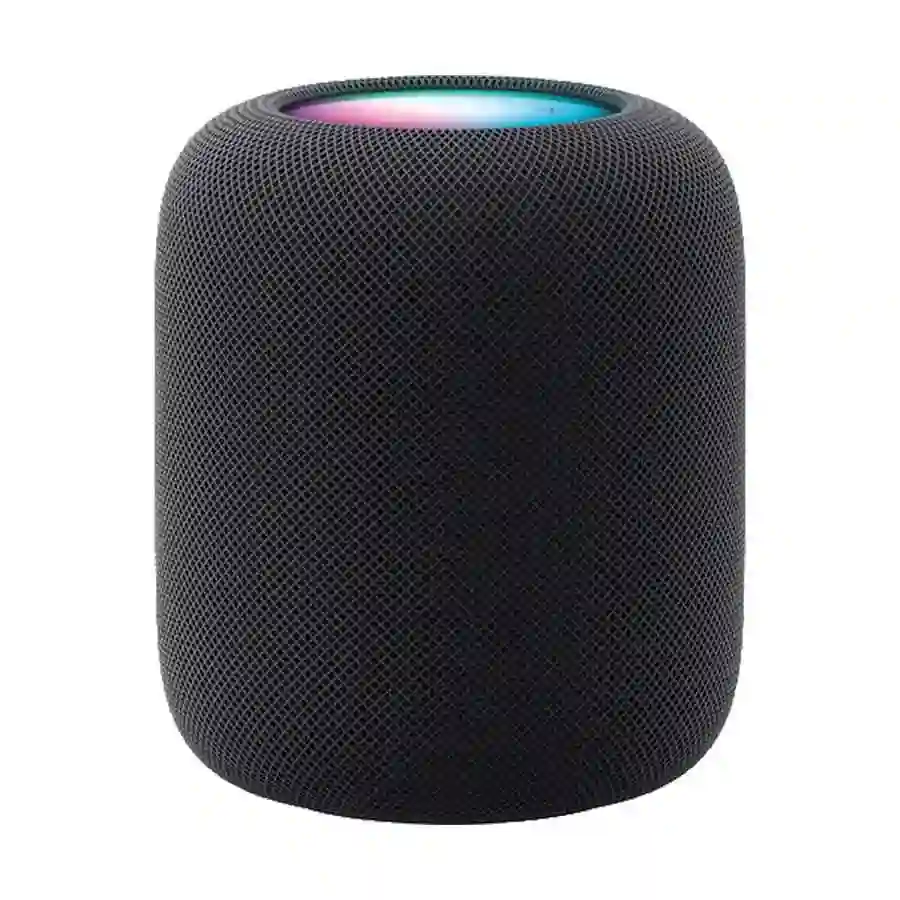
Quick Comparison
For most seniors already using an iPhone, Apple HomePod is the easier overall choice. Siri, Apple Home, AirPlay, and smart-home controls work together in one ecosystem.
Sonos Era 100 is the better choice for seniors who care more about flexible music playback, Bluetooth, physical touch controls, and building a larger Sonos system.
The biggest difference is not simply sound. It is ecosystem and control.
Simple rule: iPhone-heavy household → HomePod. Flexible audio setup → Sonos.
Apple HomePod vs Sonos At a Glance
The table below focuses on features that can affect everyday use rather than listing every technical specification.
| Feature | Apple HomePod | Sonos Era 100 |
|---|---|---|
| Voice assistant | Siri | Sonos Voice Control, Alexa |
| Wi-Fi | Yes | Yes |
| Bluetooth audio | Limited ecosystem approach | Yes |
| AirPlay | AirPlay | AirPlay 2 |
| Physical controls | Touch controls | Touch controls |
| Smart home | Strong Apple Home integration | Alexa and Sonos ecosystem |
| Room sensing | Yes | Trueplay tuning |
| Multi-room audio | Yes | Yes |
| Line-in | No standard analog input | Yes, with adapter |
| Weight | 2.3 kg | 2.02 kg |
| Current US list price checked | $349 | $219 |
Apple’s current US store lists the HomePod at $349, while Sonos currently lists the Era 100 at $219. Prices vary by market and can change.

Apple HomePod Review for Senior Users
Apple HomePod is a strong fit for seniors who already use Apple devices. Its main advantage is how closely it works with Siri and Apple’s smart-home system.
The HomePod can act as a smart-home hub and supports features such as automations, Intercom, temperature and humidity sensing, and Sound Recognition.
Ease of Use
HomePod is designed around voice control. A senior can ask Siri to play music, set reminders, control compatible lights, or perform other supported tasks without reaching for a phone.
The top touch surface also provides basic controls:
- Tap to play or pause
- Double-tap to skip
- Triple-tap to go back
- Touch and hold for Siri
- Tap or hold volume controls
Apple also lists accessibility features such as VoiceOver and Touch Accommodations.
That can be helpful for someone who prefers voice commands or needs larger, simpler interaction options.
Key Strengths
- Excellent fit for iPhone users
- Siri voice control
- Strong Apple Home integration
- Smart-home hub functionality
- Temperature and humidity sensing
- Sound Recognition for smoke and carbon monoxide alarms
- AirPlay support
- Stereo-pair and multi-room capabilities
Potential Drawbacks
- More expensive than the Era 100 based on current US list prices
- Best experience is tied closely to Apple’s ecosystem
- Heavier than the Era 100
- Less flexible for users who want Bluetooth and wired audio options
Sonos Era 100 Review for Senior Users
Sonos Era 100 takes a more flexible audio-first approach. It supports Wi-Fi, Bluetooth, AirPlay 2, touch controls, and voice services.
Sonos says setup involves connecting the speaker to power, connecting a phone or tablet to Wi-Fi, and using the Sonos app.
Ease of Use
The Era 100 has physical touch controls for volume, playback, skipping, and other basic functions. It also has a microphone switch and voice-service controls.
For a senior who does not want to rely entirely on voice commands, these physical controls are useful.
Bluetooth is another advantage. A compatible phone or other Bluetooth device can connect directly to the speaker.
Key Strengths
- Bluetooth support
- Physical touch controls
- Sonos app
- Sonos Voice Control
- Amazon Alexa support
- AirPlay 2
- Trueplay room tuning
- Can be paired with another Era 100
- Can become part of a larger Sonos home audio system
Potential Drawbacks
- The Sonos app adds another layer to setup and control
- Some accessories, such as the line-in adapter, cost extra
- The full Sonos system can become more complex as more speakers are added
- Voice-service availability varies by country and language
Which Is Easier for Seniors to Use?
Both can be simple, but they are simple in different ways.
HomePod is easier for an iPhone user who wants voice-first control. Siri can handle many everyday tasks without requiring the user to open an app.
Era 100 is easier for someone who prefers physical controls and flexible connections. Its touch controls, Bluetooth, app control, and voice options give users several ways to operate the speaker.
| Usability Area | HomePod | Era 100 |
|---|---|---|
| Voice control | Excellent | Excellent |
| Physical control | Simple | Simple |
| Bluetooth | Not its main strength | Yes |
| App control | Apple Home | Sonos app |
| Setup | Best within Apple ecosystem | Requires Sonos app |
| Flexibility | Apple-focused | More flexible |
For a senior who already uses an iPhone every day, I would give HomePod the edge for simplicity.
Performance Comparison
Sound quality is one area where both products are serious options.
HomePod uses a high-excursion woofer and five horn-loaded tweeters. It also supports room sensing, computational audio, and Spatial Audio with Dolby Atmos.
Era 100 uses two angled tweeters for stereo separation and is designed to produce room-filling sound. Sonos also offers Trueplay tuning to adjust the speaker based on room acoustics.
| Performance Area | HomePod | Era 100 |
|---|---|---|
| Music quality | Excellent | Excellent |
| Room tuning | Room sensing | Trueplay |
| Stereo | Yes | Yes |
| Spatial audio | Yes | No equivalent in this model |
| Multi-room | Yes | Yes |
| Bluetooth playback | Less flexible | Yes |
For a listener who mainly wants rich music and already owns Apple devices, HomePod is compelling.
For someone who wants a more flexible audio system, Era 100 has the stronger practical case.
Comfort, Accessibility, and Senior-Friendly Design
Neither speaker is designed specifically for seniors, so the better choice depends on how the person interacts with technology.
HomePod weighs about 2.3 kg, while Era 100 weighs about 2.02 kg. The difference is modest, but the Sonos speaker has a slight advantage if it needs to be moved.
HomePod has accessibility features including VoiceOver and Touch Accommodations.
Era 100 offers a physical microphone switch, touch controls, voice control, and visible status indicators.
| Senior Need | Better Fit | Why |
|---|---|---|
| iPhone integration | HomePod | Strong Apple ecosystem |
| Physical controls | Era 100 | Easy touch controls |
| Voice commands | HomePod | Siri integration |
| Bluetooth | Era 100 | Direct Bluetooth support |
| Accessibility features | HomePod | Built-in Apple accessibility options |
| Flexible audio | Era 100 | Wi-Fi, Bluetooth, AirPlay and line-in options |
Features Comparison
The biggest feature differences become clearer when you look at how each speaker fits into a home.
| Feature | HomePod | Era 100 |
|---|---|---|
| Voice assistant | Siri | Sonos Voice Control / Alexa |
| Smart-home hub | Yes | No equivalent role |
| Temperature sensor | Yes | No |
| Sound Recognition | Yes | No equivalent feature |
| Bluetooth | Not a primary playback method | Yes |
| Line-in | No | Yes, with adapter |
| AirPlay | Yes | AirPlay 2 |
| Stereo pair | Yes | Yes |
| Multi-room | Yes | Yes |
HomePod has a clear advantage if smart-home functions are important. Sonos has the advantage if the speaker needs to connect to different types of audio sources.
Price, Maintenance, and Long-Term Value
Price is a major difference.
Apple currently lists the HomePod at $349 in the US, while Sonos lists the Era 100 at $219. That makes the Era 100 substantially less expensive at the listed prices checked for this comparison.
| Cost Factor | HomePod | Era 100 |
|---|---|---|
| Current US list price checked | $349 | $219 |
| Consumables | None | None |
| Main maintenance | Software updates and cleaning | Software updates and cleaning |
| Extra audio accessories | Limited need | Line-in adapter sold separately |
| Expansion | HomePod ecosystem | Large Sonos ecosystem |
The better value depends on what you need.
If the buyer wants a simple Apple smart-home speaker, HomePod may justify its higher price.
If the buyer mainly wants a good smart speaker for music, Era 100 offers stronger value at the current listed price.
Who Should Choose Apple HomePod?
Choose HomePod if:
- The senior already uses an iPhone or iPad.
- Siri is preferred over app-based controls.
- Apple Home smart-home features matter.
- Sound Recognition could be useful.
- AirPlay is already part of the household.
- Privacy and Apple’s ecosystem are priorities.
- The higher price is acceptable.
Who Should Choose Sonos Era 100?
Choose Era 100 if:
- Music is the main priority.
- Bluetooth is important.
- Physical touch controls are preferred.
- The household uses different audio devices.
- You want to build a Sonos multi-room system.
- You want a lower current list price.
- You may want to add another Sonos speaker later.
Apple HomePod vs Sonos — Final Verdict
For most seniors who already use Apple devices, I would choose HomePod. Its Siri integration, Apple Home features, accessibility options, and simple voice-first operation make it a strong everyday choice.
But that does not make Sonos a poor alternative. Era 100 is the better pick for flexible music listening, especially for someone who values Bluetooth, physical controls, and a broader multi-room audio system.
| Category | Winner |
|---|---|
| Best for most iPhone users | HomePod |
| Best for flexible audio | Era 100 |
| Best smart-home integration | HomePod |
| Best physical controls | Era 100 |
| Best Bluetooth support | Era 100 |
| Best accessibility ecosystem | HomePod |
| Best current listed value | Era 100 |
| Best for Apple households | HomePod |
Scoring Summary
These scores are editorial judgments based on the features discussed above, not laboratory test results.
| Category | HomePod | Era 100 |
|---|---|---|
| Ease of Use | 9/10 | 8.5/10 |
| Senior-Friendly Design | 9/10 | 8.5/10 |
| Performance | 9.5/10 | 9/10 |
| Maintenance | 9/10 | 9/10 |
| Value | 7.5/10 | 9/10 |
The scoring is close because the speakers are designed for somewhat different users.
How We Evaluate Products
This comparison focuses on practical factors that can affect senior use:
- Ease of operation
- Voice control
- Physical controls
- Accessibility
- Setup
- Sound performance
- Connectivity
- Maintenance
- Smart-home features
- Price and long-term value
The comparison uses current manufacturer information rather than claiming hands-on testing. Apple and Sonos specifications can change with new software, models, or regional availability.
Senior-Specific Buying Considerations
Before choosing either speaker, consider how the person will actually use it.
Physical Effort
Neither speaker requires much physical effort during normal operation. Voice control can reduce the need to reach for a phone.
Controls
Consider whether the user prefers voice commands, physical touch controls, or smartphone control.
Setup
HomePod makes the most sense when the household already uses Apple devices. Era 100 requires the Sonos app during setup.
Smart Home
If the speaker will control lights, thermostats, locks, or other smart devices, check compatibility before buying.
Hearing and Alerts
Do not assume that a smart speaker will replace a dedicated alarm or accessibility device. Features such as HomePod’s Sound Recognition are useful additions, but they should not be treated as a substitute for purpose-built safety equipment. Apple says HomePod can recognize smoke and carbon monoxide alarm sounds and send notifications to Apple devices.
Common Buying Mistakes
Avoid these mistakes when choosing between HomePod and Sonos:
- Choosing based only on sound quality.
- Ignoring the phone ecosystem the user already has.
- Buying HomePod without considering its Apple-focused experience.
- Buying Sonos without considering app setup.
- Paying for features the senior will never use.
- Forgetting that some Sonos accessories are sold separately.
- Assuming all smart-home devices work with both platforms.
Safety
Smart speakers are generally low-risk consumer electronics, but they still need sensible placement.
Keep the speaker on a stable, dry surface with enough ventilation. Avoid placing cords where they can create a trip hazard.
Also consider privacy. HomePod supports voice interaction with Siri, while Sonos provides microphone controls and a physical microphone switch on Era 100.
Conclusion
Apple HomePod vs Sonos smart speaker for seniors is really a choice between ecosystem simplicity and audio flexibility. HomePod is the stronger option for an iPhone-based household that wants Siri and smart-home control in one place.
Sonos Era 100 is the better value-oriented choice for seniors who want Bluetooth, straightforward physical controls, and a flexible multi-room music system. For most Apple users, I would pick HomePod. For flexible music use, I would pick Era 100.
