
AnkerWork vs Poly Webcam for Seniors: Which?


Bedside Commode Chair

Digital Blood Pressure Monitor

Long Handle Shoe Horn
AnkerWork vs Poly webcam for seniors is a useful comparison for anyone who wants clearer video calls without a complicated setup. Both brands offer USB webcams designed for personal workspaces, but their features vary by model.
AnkerWork offers options such as the PowerConf C200, C300, C302, and C310. Poly offers personal webcams and video bars such as the Studio P5 and Studio P15. Because the models are different, the right choice depends on the type of video calls, audio needs, and setup a senior prefers.
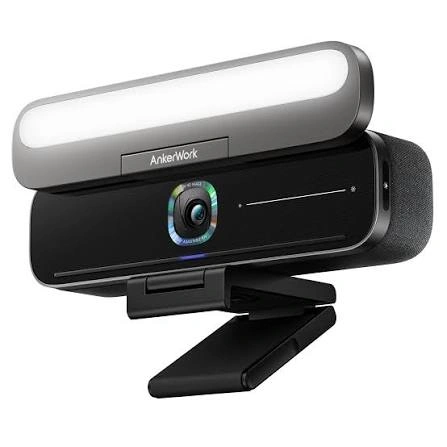
Quick Comparison
For a simple webcam setup, an AnkerWork model such as the PowerConf C200 can be appealing because it has a built-in privacy cover, autofocus, adjustable field of view, and dual microphones.
Poly becomes more interesting when audio and automatic framing matter. The Studio P15 combines a 4K camera, automatic framing, a microphone array, an integrated speaker, and noise-blocking features.
The biggest difference is not simply image quality. It is how much of the video-call setup the device handles for you.

AnkerWork vs Poly At a Glance
Here is a simple look at the main differences.
| Feature | AnkerWork | Poly |
|---|---|---|
| Webcam options | C200, C300, C302, C310 | Studio P5, Studio P15 |
| Video options | Up to 2K on several models | Up to 4K on P15 |
| Privacy | Built-in or included privacy cover, depending on model | Integrated privacy shutter on P5/P15 |
| Microphones | Dual microphones on several models | Directional or multi-microphone systems |
| Automatic framing | Available on selected models | Available on Studio P15 |
| Integrated speaker | Depends on model | Studio P15 includes one |
| Setup | USB webcam setup | USB webcam or video-bar setup |
| Software | AnkerWork software | Poly Lens / Poly software |
| Best fit | Simple personal webcam use | Video calls with stronger audio features |
Features vary by model, so this table should be treated as a brand-level guide rather than a specification sheet for every product.
AnkerWork Webcam Features for Seniors
AnkerWork has several webcam choices, which makes the brand flexible for different needs. Its current lineup includes the PowerConf C200, C300, C302, and C310.
Ease of Use
The PowerConf C200 is designed for a personal workspace and can clip onto the top of a monitor. It supports autofocus, adjustable viewing angles, and a built-in privacy cover.
That makes it a practical option for seniors who mainly want to connect a webcam, open a video-call app, and start talking.
AnkerWork also provides software for adjusting device settings and checking firmware updates. This can be useful, although users who only need basic webcam functions may not need to change many settings.
Key Strengths
- Several webcam models to choose from
- Easy monitor mounting
- Privacy cover on the C200
- Autofocus on the C200
- Noise reduction features
- Adjustable field of view on supported models
- Software for device customization
Potential Drawbacks
- Features vary considerably between models
- Some advanced functions require software
- The C200 does not include a built-in speaker
- Choosing between several models may add confusion
Poly Webcam Features for Seniors
Poly offers personal webcams such as the Studio P5 and more complete personal video solutions such as the Studio P15. The P5 is a conventional webcam, while the P15 adds a speaker and more advanced camera and audio functions.
Ease of Use
The Poly Studio P5 has 1080p video, autofocus, 4X zoom, a directional microphone, and an integrated privacy shutter. It is also designed to work with standard USB/UVC applications.
The Studio P15 goes further. It supports automatic camera framing, 4K video, a privacy shutter, and an integrated speaker. Its adjustable monitor clamp can also make positioning easier.
Key Strengths
- Clear video options
- Strong audio features
- Privacy shutters
- Simple USB connectivity
- Automatic framing on Studio P15
- Integrated speaker on Studio P15
- Zoom and Microsoft Teams certification on P15
Potential Drawbacks
- Some Poly solutions are larger than a basic webcam
- Advanced features may be unnecessary for simple calls
- The P15 requires external power
- Higher-end features can make the setup more involved
Which Is Easier for Seniors to Use?
Both can work well, but the easier choice depends on what the user wants from the webcam.
An AnkerWork C200-style setup is attractive for someone who wants a straightforward camera and microphone. Its monitor clip, autofocus, and privacy cover reduce the need for extra accessories.
Poly’s Studio P5 is similarly simple. The P15 is different because it combines the camera, microphone system, speaker, and automatic framing in one device. That can reduce the need for separate equipment during video calls.
For a senior who values simple webcam operation, a basic AnkerWork or Poly P5 setup may make more sense than a feature-heavy video bar.
Performance Comparison
Video quality depends heavily on the specific model.
The PowerConf C200 provides 2K resolution, autofocus, and several field-of-view options. The C300 offers 1080p video with AI-powered autofocus and AI framing, while other AnkerWork models have different specifications.
The Poly Studio P5 provides 1080p video with 4X zoom. The Studio P15 supports 4K UHD video, 4X zoom, autofocus, and automatic framing.
| Performance Area | AnkerWork | Poly |
|---|---|---|
| Video resolution | Up to 2K on C200/C302 | Up to 4K on P15 |
| Autofocus | Available | Available |
| Automatic framing | Available on selected models | P15 |
| Low-light features | Available on selected models | P5 has automatic low-light compensation |
| Audio | Dual microphones on several models | Directional or multi-mic systems |
| Speaker | Model dependent | P15 includes speaker |
For normal family video calls, 1080p can already provide a clear picture. A higher resolution does not automatically make every call better if the internet connection or calling platform limits video quality.
Comfort, Accessibility, and Senior-Friendly Design
A webcam should remove friction, not create more of it.
For seniors, useful design features include a simple mounting system, clear privacy controls, automatic focusing, and minimal cable management. These features can make regular video calls less frustrating.
AnkerWork’s C200 has a built-in privacy cover and monitor mounting design. Poly’s P5 also includes an integrated privacy shutter, while the P15 adds an adjustable monitor clamp and status indicator.
The P15 is also designed to keep the user centered with automatic framing. This may be useful for someone who moves slightly during a call and does not want to keep adjusting the camera.
Features Comparison
The most useful features depend on how the webcam will be used.
| Feature | AnkerWork | Poly |
|---|---|---|
| Privacy cover | Available | Available |
| Autofocus | Available | Available |
| Auto framing | Selected models | Studio P15 |
| Noise reduction | Available | NoiseBlockAI on P15 |
| Speaker | Model dependent | Built into P15 |
| Monitor mounting | Available | Available |
| Tripod support | Model dependent | P15 is tripod ready |
Poly’s P15 uses NoiseBlockAI and Acoustic Fence technology, while AnkerWork uses voice enhancement and noise-cancellation features on supported webcams.
Price, Maintenance, and Long-Term Value
Price changes by model and market, so it is better to compare the equipment you actually need rather than choose a brand based on a temporary price.
A basic AnkerWork webcam may be enough for someone who already has good computer speakers and only needs a camera and microphone.
A Poly P15 can make more sense when the user wants a more complete video-call device with an integrated speaker, advanced microphone features, and automatic framing. Poly lists a standard two-year limited warranty for the P15.
AnkerWork also provides software for customization and firmware updates.
Who Should Choose AnkerWork?
Choose an AnkerWork webcam if:
- You want a simple personal webcam.
- You already have speakers or headphones.
- A privacy cover is important.
- You want several model options.
- You prefer a compact monitor-mounted camera.
- You want useful features without needing an integrated speaker.
Who Should Choose Poly?
Choose Poly if:
- Audio quality is a major concern.
- You want a webcam with strong meeting-focused features.
- Automatic framing would be useful.
- You want an integrated speaker in a personal video solution.
- You regularly use platforms such as Zoom or Microsoft Teams.
- You prefer a more complete video-call setup.
AnkerWork vs Poly — Final Verdict
There is no single choice for every senior. AnkerWork is a practical fit for someone who mainly wants a straightforward webcam, while Poly offers options ranging from the simple Studio P5 to the more complete Studio P15.
For simple everyday video calls, a basic AnkerWork or Poly P5 webcam can be enough. For someone who wants automatic framing, stronger integrated audio, and an all-in-one setup, the Poly Studio P15 offers more built-in functionality.
Scoring Summary
Rather than assigning arbitrary numerical scores, the differences are easier to understand by looking at where each type of product fits.
| Category | AnkerWork | Poly |
|---|---|---|
| Simple webcam use | Strong fit | Strong fit |
| Model choice | Several options | Several personal options |
| Advanced framing | Selected models | Strong option with P15 |
| Integrated audio | Model dependent | Strong option with P15 |
| Privacy | Strong | Strong |
| Basic setup | Straightforward | Straightforward |
| Complete video solution | Model dependent | P15 offers more |
How We Evaluate Products
This comparison focuses on practical factors that can affect everyday senior use.
We consider:
- Ease of setup
- Camera controls
- Audio features
- Privacy
- Accessibility
- Physical setup
- Software requirements
- Maintenance
- Long-term practicality
- Useful features rather than marketing claims
The comparison is based on published product information. It does not claim hands-on testing.
Senior-Specific Buying Considerations
Before choosing a webcam, check these points.
Setup
A simple USB connection may be enough for basic video calls. More advanced devices can require additional power or software.
Controls
Look for features that reduce manual adjustments. Autofocus and automatic framing can be helpful during calls.
Audio
If hearing the other person clearly is important, check whether the webcam includes a speaker or whether separate speakers or headphones will be needed.
Privacy
A physical privacy shutter or cover gives a simple way to block the camera when it is not being used.
Compatibility
Check that the webcam works with the computer and video-call software being used.
Common Buying Mistakes
Avoid these common mistakes:
- Choosing based only on camera resolution
- Buying advanced features that will never be used
- Forgetting about speaker requirements
- Ignoring privacy controls
- Overlooking software requirements
- Failing to check computer compatibility
Safety
Webcams have relatively few physical safety concerns, but privacy deserves attention.
Use the physical privacy cover or shutter when the camera is not needed. Keep cables arranged so they do not create a trip hazard around the desk.
For devices with external power adapters, use the supplied or manufacturer-approved power equipment.
Conclusion
AnkerWork vs Poly webcam for seniors comes down to the type of video-call experience you want. AnkerWork offers flexible webcam choices for simple personal use, while Poly provides both straightforward webcams and more advanced personal video solutions.
For a senior who wants a basic camera for family calls, either brand can provide a practical option. If automatic framing, integrated audio, and a more complete meeting setup matter more, Poly’s Studio P15 is a notable option. If simplicity and a compact webcam are the priority, an AnkerWork model or Poly Studio P5 may be a better fit.