
Amazon Fire TV vs Google TV Streaming Device for Seniors: Which?


5X Large Rechargeable Hands Free Magnifying Glass with Light

HOMLAND Shower Chair with Padded Armrests and Back

Bed Rails for Elderly Adults Safety, 380 LBS
Amazon Fire TV vs Google TV streaming device for seniors can be a close choice. Both let you stream movies, shows, music, and other apps from a TV. The main difference is how each system handles the home screen, voice control, apps, and smart-home features.
For this comparison, Amazon Fire TV refers to the Fire TV Stick 4K Max (2nd Gen), while Google TV refers to the Google TV Streamer (4K). This keeps the comparison focused on two current standalone streaming devices rather than mixing different Fire TV models. Amazon identifies the 4K Max 2nd Gen as a high-end Fire TV streaming stick with Wi-Fi 6E, while Google lists the Google TV Streamer as its current 4K streaming box.

Quick Comparison
For seniors who already use Alexa or Amazon devices, Fire TV may feel more familiar. Its Alexa voice control and compact stick design can make everyday streaming simple.
Google TV Streamer is a strong choice for people who prefer Google services, want built-in Ethernet, or value a larger amount of storage. It also has a remote-finding feature that can be useful when a remote gets misplaced.
The better choice depends less on raw streaming quality and more on the user’s preferred ecosystem and how much simplicity they want.
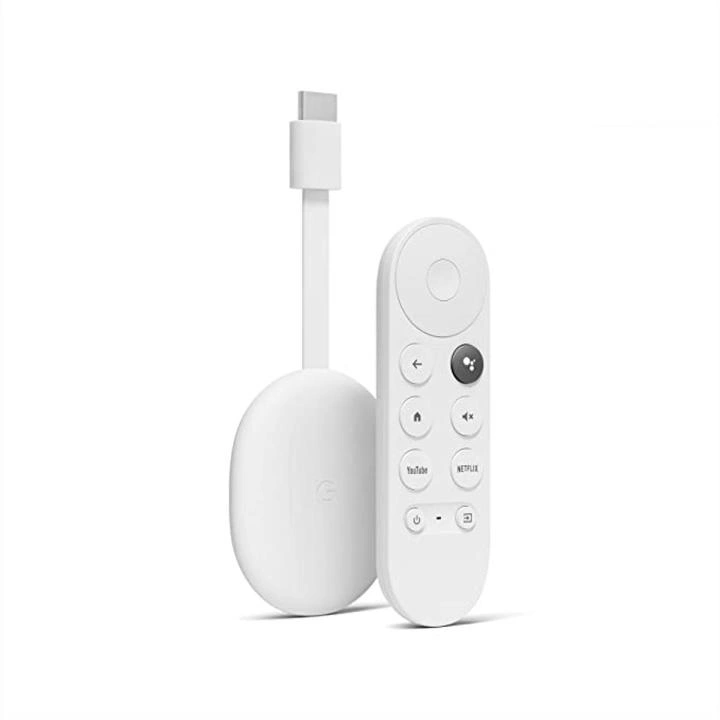
Amazon Fire TV vs Google TV At a Glance
Both devices support 4K streaming and modern HDR formats. However, they take different approaches to hardware and the user experience.
| Feature | Fire TV Stick 4K Max | Google TV Streamer |
|---|---|---|
| Resolution | Up to 4K | Up to 4K HDR |
| Storage | 16GB | 32GB |
| Connectivity | Wi-Fi 6E | Wi-Fi 802.11ac + Ethernet |
| Voice control | Alexa | Google Assistant |
| Form factor | Streaming stick | Streaming box |
| Dolby Vision | Yes | Yes |
| Dolby Atmos | Yes | Yes |
Amazon lists 16GB storage and Wi-Fi 6E for the 4K Max 2nd Gen. Google lists 32GB storage, 4GB memory, Wi-Fi 5, Bluetooth 5.1, and built-in Gigabit Ethernet for the Google TV Streamer.
Amazon Fire TV Review for Senior-Friendly Streaming
The Fire TV Stick 4K Max is designed as a compact streaming stick. It connects to the TV through HDMI and keeps the main hardware out of the way.
For seniors, the biggest appeal is the combination of a familiar remote and Alexa voice control. A user can press the microphone button and use voice commands instead of typing long searches with the remote. Amazon also supports Alexa interaction through compatible Fire TV remotes.
Ease of Use
The Fire TV interface is built around apps, recommendations, and Amazon’s content ecosystem. Users can search for content with Alexa rather than entering every title letter by letter.
That can be helpful for someone who finds on-screen typing slow or frustrating.
The stick design also takes up little physical space. It can be a good fit when the TV setup has limited room around it.
Key Strengths
- Alexa voice search can reduce typing.
- Compact stick design keeps the setup tidy.
- 16GB storage provides room for apps.
- Wi-Fi 6E can help on compatible networks.
- Supports 4K, Dolby Vision, HDR10+, and Dolby Atmos.
- Works well for households already using Alexa devices.
Potential Drawbacks
- The Fire TV range includes several models, so buyers need to check the exact device.
- Some users may prefer a less Amazon-focused interface.
- The stick can be less convenient than Ethernet for a TV far from a reliable Wi-Fi signal.
- The best features may be unnecessary for someone who only watches a few streaming services.
Google TV Review for Senior-Friendly Streaming
The Google TV Streamer is a small box rather than an HDMI stick. It offers 4K HDR streaming and comes with a redesigned voice remote.
Google gives the device 4GB of memory and 32GB of storage. It also includes an Ethernet port, which can provide a wired connection when Wi-Fi is not ideal.
Ease of Use
Google TV brings recommendations from supported streaming services into one interface. Voice search can also make it easier to find movies and shows without typing.
One particularly useful feature for some seniors is Find My Remote. Google says the remote can be made to ring from the streamer or through Google Assistant.
Key Strengths
- 32GB storage.
- 4GB memory.
- Built-in Gigabit Ethernet.
- Voice remote with customizable button.
- Find My Remote feature.
- Google Home and Matter support.
- Thread border router built in.
- Dolby Vision and Dolby Atmos support.
Potential Drawbacks
- The box needs space near the TV.
- An HDMI 2.1 cable is required and sold separately for the optimal connection setup.
- Users who mainly use Alexa devices may prefer Fire TV’s ecosystem.
- Some of its smart-home features may be unnecessary for basic streaming.
Which Is Easier for Seniors to Use?
Both can be easy to operate, but the better fit depends on what the user already knows.
Fire TV may be easier for seniors who:
- Already use Alexa.
- Have other Amazon devices.
- Prefer a compact streaming stick.
- Want voice search through Alexa.
Google TV may be easier for seniors who:
- Already use Google services.
- Want a dedicated remote-finding feature.
- Prefer a traditional box-style device.
- Need Ethernet for a more stable wired connection.
Neither device requires advanced technical skills for normal streaming. The bigger factor is familiarity with the ecosystem.
Performance Comparison
Both devices support 4K streaming and modern HDR formats, so picture quality can be very good on a compatible TV.
The Fire TV Stick 4K Max has an advantage in wireless connectivity because Amazon lists Wi-Fi 6E support. Google TV Streamer uses Wi-Fi 802.11ac but adds built-in Gigabit Ethernet.
| Performance Area | Fire TV Stick 4K Max | Google TV Streamer |
|---|---|---|
| 4K streaming | Yes | Yes |
| Dolby Vision | Yes | Yes |
| HDR10+ | Yes | Yes |
| Dolby Atmos | Yes | Yes |
| Wireless | Wi-Fi 6E | Wi-Fi 5 |
| Wired Ethernet | No built-in Ethernet | Yes |
For a home with strong Wi-Fi, both should handle normal streaming needs. Ethernet gives Google TV Streamer another connection option, while Fire TV’s Wi-Fi 6E can be useful with a compatible router.
Comfort, Accessibility, and Senior-Friendly Design
Streaming devices do not require much physical effort, so accessibility mainly comes down to the remote, voice control, screen interface, and setup.
Voice search is useful for users who dislike typing with a directional pad. It can also reduce the number of remote-button presses needed to find a particular title.
Google’s Find My Remote feature is another small but practical convenience. A missing remote can be located by making it ring.
For many seniors, the easiest streaming device is the one that matches the devices and services they already use.
Features Comparison
The two devices have different strengths beyond basic streaming.
| Feature | Fire TV Stick 4K Max | Google TV Streamer |
|---|---|---|
| Voice assistant | Alexa | Google Assistant |
| Storage | 16GB | 32GB |
| Remote finding | — | Yes |
| Smart-home integration | Alexa ecosystem | Google Home, Matter, Thread |
| Ethernet | No built-in port | Built-in Gigabit Ethernet |
| Form factor | Stick | Box |
Google TV Streamer is particularly notable as a smart-home hub. Google says it supports Matter and includes a Thread border router.
Price, Maintenance, and Long-Term Value
Streaming devices generally require little physical maintenance. The main ongoing considerations are software updates, internet service, accessories, and any subscriptions used with streaming apps.
Amazon currently offers several Fire TV streaming models, so the price and capabilities depend heavily on the exact model purchased. Amazon’s current device documentation lists the 4K Max 2nd Gen alongside newer Fire TV Stick models.
Google lists the Google TV Streamer at $99.99 on its comparison page, although pricing can vary by country and retailer.
For long-term value, do not look only at the purchase price. Consider storage, connectivity, remote features, and whether the device fits your existing smart-home setup.
Who Should Choose Amazon Fire TV?
Choose the Fire TV Stick 4K Max if:
- You already use Alexa.
- You have other Amazon devices.
- You prefer a small HDMI streaming stick.
- You want Wi-Fi 6E support.
- Voice search is important.
- You mainly want straightforward streaming without needing a smart-home hub.
Who Should Choose Google TV?
Choose Google TV Streamer if:
- You use Google Home or other Google services.
- You want 32GB of storage.
- Built-in Ethernet is useful.
- You often misplace remote controls.
- You want Matter and Thread smart-home support.
- You prefer a box-style streaming device.
Amazon Fire TV vs Google TV — Final Verdict
Best for Alexa households: Amazon Fire TV Stick 4K Max
Best for Google smart-home users: Google TV Streamer
Best for built-in Ethernet: Google TV Streamer
Best for Wi-Fi 6E: Fire TV Stick 4K Max
Best for storage: Google TV Streamer
Best for remote finding: Google TV Streamer
There is no need to treat one device as universally better. Fire TV makes particular sense for seniors already comfortable with Alexa and Amazon services. Google TV Streamer makes more sense for users who prefer Google services, need Ethernet, or value its extra storage and remote-finding feature.
Scoring Summary
These scores are a practical comparison based on documented features, not hands-on testing.
| Category | Fire TV Stick 4K Max | Google TV Streamer |
|---|---|---|
| Ease of Use | 9/10 | 9/10 |
| Senior-Friendly Design | 9/10 | 9/10 |
| Performance | 9/10 | 9/10 |
| Features | 9/10 | 10/10 |
| Connectivity | 9/10 | 10/10 |
| Value | 9/10 | 9/10 |
The scores should be viewed as a simple editorial summary rather than laboratory measurements. Exact suitability can change based on the user’s TV, internet connection, and preferred ecosystem.
How We Evaluate Products
We compare streaming devices around practical factors that matter in everyday senior use.
These include:
- Ease of setup
- Remote control simplicity
- Voice control
- Display and interface
- Streaming performance
- Connectivity
- Storage
- Smart-home compatibility
- Maintenance
- Long-term practicality
- Overall value
This comparison does not claim personal testing or laboratory testing. Current specifications are based on manufacturer information.
Senior-Specific Buying Considerations
Controls
Check whether the remote’s buttons and layout feel easy to understand. Voice search can be useful when typing with the remote is difficult.
Setup
Think about Wi-Fi access and the available HDMI port before buying. Google TV Streamer also provides Ethernet if a wired connection is preferred.
Storage
More storage can provide additional room for apps. Google TV Streamer has 32GB, compared with 16GB on the Fire TV Stick 4K Max 2nd Gen.
Compatibility
Check the TV’s HDMI connection and make sure the desired streaming apps are supported.
Smart Home
If the household already uses Alexa or Google Home, staying within the same ecosystem may make voice control and smart-home management simpler.
Common Buying Mistakes
- Buying a Fire TV model without checking the exact generation.
- Paying for features that will never be used.
- Ignoring the available Wi-Fi connection.
- Forgetting to check HDMI compatibility.
- Choosing an ecosystem that does not match the user’s existing devices.
- Looking only at device price instead of long-term needs.
Safety
Both are electronic devices, so use the supplied power equipment and follow the manufacturer’s setup instructions.
Keep cables organized around the TV to reduce clutter and avoid creating a trip hazard. The Google TV Streamer also requires an HDMI 2.1 cable for its recommended connection setup, and Google says that cable is sold separately.
Conclusion
Amazon Fire TV and Google TV can both provide a simple way to turn a compatible television into a modern streaming setup. The Fire TV Stick 4K Max is particularly suitable for users already familiar with Alexa and Amazon devices.
Google TV Streamer stands out with 32GB storage, built-in Ethernet, Find My Remote, and Google Home, Matter, and Thread support.
For seniors, the most important question is not simply which device has more features. It is which interface, remote, voice assistant, and ecosystem will feel easiest to use every day.