
Amazon Echo vs Sonos Smart Speaker for Seniors: Which?


Heated Blanket

Orthopedic Pillow

Electric Recliner Lift Chair
Amazon Echo vs Sonos smart speaker for seniors is mainly a choice between easy smart-home help and better music-focused sound. Echo devices use Alexa for voice commands, reminders, questions, calls, and smart-home control.
Sonos focuses more on sound quality and whole-home listening. Current voice-enabled Sonos speakers, such as the Era 100, support Sonos Voice Control and Amazon Alexa.
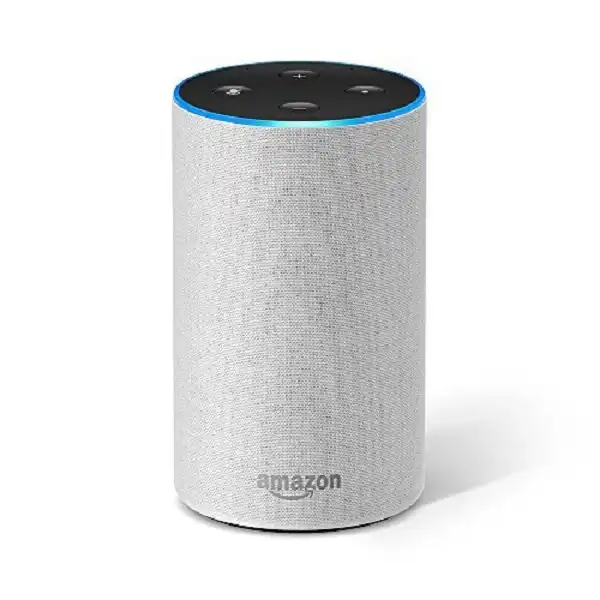
Quick Comparison
For most seniors who want a simple smart speaker for everyday tasks, Amazon Echo is the better overall choice. Alexa offers a broad range of voice features and smart-home controls.
Sonos is the better choice for seniors who care most about music quality, especially if they want to build a multi-room audio system.
Simple rule: Choose Echo for smart features. Choose Sonos for better music and a premium audio system.
Amazon Echo vs Sonos At a Glance
The two brands overlap, but they are built around different priorities. Echo is more Alexa-centered, while Sonos puts greater emphasis on audio.

| Feature | Amazon Echo | Sonos |
|---|---|---|
| Main focus | Smart features and voice control | Music and whole-home audio |
| Voice assistant | Alexa | Sonos Voice Control and Alexa on supported models |
| Smart-home control | Excellent | Good with Alexa |
| Music quality | Good to very good, model dependent | Generally stronger |
| Multi-room audio | Yes | Excellent |
| Setup | Alexa app | Sonos app |
| Physical controls | Varies by model | Touch controls on many models |
| Privacy controls | Microphone controls available | Mic switch on supported voice models |
| Best for | Everyday smart assistance | Music lovers |
Amazon Echo models vary considerably, so features depend on the specific model. Amazon currently lists several Echo speakers and displays, including Echo Dot, Echo Pop, Echo Dot Max, and Echo Studio.
Amazon Echo Review for Senior-Friendly Use
Amazon Echo is appealing when a senior wants more than a speaker. Alexa can answer questions, provide weather information, manage reminders, make calls, and control compatible smart-home devices.
Ease of Use
Echo is designed around voice control. Once setup is complete, many common tasks can be done without reaching for a phone.
Amazon’s setup process uses the Alexa app, Wi-Fi, and an Amazon account.
Some newer Echo models also support tap gestures for tasks such as pausing music and dismissing timers.
Key Strengths
- Simple voice-based operation
- Strong smart-home support
- Useful reminders and timers
- Many Alexa-compatible devices
- Several Echo sizes and styles
- Some models include screens
- Accessibility features are available on Echo devices with screens
Echo devices with screens can offer features such as VoiceView, captioning, screen magnification, and Tap to Alexa.
Potential Drawbacks
- Alexa depends on cloud processing for voice requests
- Setup requires an Amazon account and app
- Different Echo models have different capabilities
- Some advanced features may take time to learn
Amazon says the microphone on Echo Dot can be turned off, and users can review or delete Alexa voice-recording history.
Sonos Smart Speaker Review for Senior Use
Sonos is a stronger fit for someone who wants a high-quality music system that can grow across several rooms.
Current Sonos speakers include the Era 100, Era 300, Five, Move 2, and Roam 2. Not every model has built-in voice control, so the exact model matters.
Ease of Use
Sonos offers touch controls, its own app, and voice control on supported speakers.
The Era 100, for example, has touch controls for play, pause, skipping, volume, muting the voice assistant, and grouping Sonos products.
Key Strengths
- Strong music-focused design
- Excellent multi-room audio
- Touch controls
- Sonos Voice Control on supported models
- Amazon Alexa support on supported models
- Bluetooth on models such as Era 100
- Microphone switch on supported voice-enabled speakers
Sonos Voice Control processes voice requests locally on the speaker rather than sending the audio to the cloud, according to Sonos.
Potential Drawbacks
- The Sonos system can be more complex than a basic Echo setup
- Prices are generally higher for comparable premium speakers
- Voice features vary by model and country
- Some Sonos features require the Sonos app
- Not every Sonos speaker has built-in voice control
Which Is Easier for Seniors to Use?
For basic everyday tasks, Amazon Echo has the edge.
A senior can ask Alexa to set a timer, play music, answer a question, or control compatible smart-home devices. That reduces the need to interact with a phone or small buttons.
Sonos can also be easy once configured, especially for music. Its touch controls can be useful for someone who prefers physical controls over voice commands.
Echo may be easier for:
- Reminders
- Timers
- Weather questions
- Smart-home control
- Voice-based everyday tasks
Sonos may be easier for:
- Playing music around the home
- Adjusting music playback
- Managing multiple Sonos rooms
- Users who prefer touch controls
Performance Comparison
The biggest performance difference is not simply volume. It is the purpose of the speaker.
Echo is built as a smart assistant first, with music as an important feature. Sonos is much more focused on sound quality and multi-room listening.
Sonos says the Era 100 uses two angled tweeters and a midwoofer for stereo separation, vocals, and bass.
| Performance Area | Amazon Echo | Sonos |
|---|---|---|
| Voice assistance | Excellent | Very good |
| Music quality | Good to very good | Excellent on suitable models |
| Whole-home music | Very good | Excellent |
| Smart-home control | Excellent | Good with Alexa |
| Simple daily tasks | Excellent | Good |
For a senior who mainly listens to podcasts, asks Alexa questions, and controls lights, Echo makes more sense.
For someone who spends a lot of time listening to music, Sonos is usually the stronger option.
Comfort, Accessibility, and Senior-Friendly Design
Neither brand should be treated as automatically better for every older adult. The right choice depends on how the speaker will be used.
Echo has a useful advantage if visual accessibility matters and the buyer chooses an Echo Show model. Amazon provides accessibility tools such as screen magnification, captioning, VoiceView, and Tap to Alexa on supported devices.
Sonos focuses more on simple touch controls and voice-based music control. The Era 100 has physical touch areas and a dedicated microphone switch.
For seniors with limited dexterity, voice control can reduce the need for small buttons. But a simple physical control can still be valuable when voice commands are inconvenient.
Features Comparison
The most useful features depend on whether the speaker is mainly an assistant or a music system.
| Feature | Amazon Echo | Sonos |
|---|---|---|
| Voice assistant | Alexa | Sonos Voice Control + Alexa on supported models |
| Smart-home control | Strong | Strong with Alexa |
| Music grouping | Yes | Excellent |
| Touch controls | Model dependent | Available on many models |
| Bluetooth | Model dependent | Available on selected models |
| Privacy microphone control | Available | Available on supported models |
| Accessibility tools | Stronger on Echo Show | More focused on voice and touch |
Sonos also allows Alexa to control playback on compatible Sonos systems, so choosing Sonos does not necessarily mean giving up Alexa.
Price, Maintenance, and Long-Term Value
Echo generally offers more ways to enter the smart-speaker ecosystem at different price levels. The Echo family includes compact speakers as well as larger and screen-equipped devices.
Sonos is more of an investment in a dedicated audio system. Current Sonos listings show models such as the Era 100 and Era 300 at different price points, along with multi-room bundles.
| Cost Factor | Amazon Echo | Sonos |
|---|---|---|
| Entry cost | Usually easier to manage | Usually higher |
| Accessories | Model dependent | Can add stands and adapters |
| Multi-room expansion | Flexible | Excellent but can become costly |
| Long-term value | Strong for smart-home users | Strong for music lovers |
| Maintenance | Low | Low |
The better value depends on what the speaker will actually do. Paying more for Sonos may make little sense if the user mainly wants reminders and smart-home commands.
Who Should Choose Amazon Echo?
Choose Amazon Echo if:
- Smart-home control is important.
- Voice commands will be used often.
- The user wants reminders and timers.
- Easy access to Alexa matters.
- A lower-cost entry point is preferred.
- Accessibility features on a screen could help.
- The speaker will do more than play music.
Who Should Choose Sonos?
Choose Sonos if:
- Music quality is the top priority.
- The user wants several speakers around the home.
- Whole-home audio matters.
- The user already owns Sonos products.
- Touch controls are useful.
- The buyer wants a more dedicated music system.
- Alexa is wanted but high-quality audio is still the priority.
Amazon Echo vs Sonos — Final Verdict
Best for most seniors: Amazon Echo
Best for music quality: Sonos
Best for smart-home control: Amazon Echo
Best for multi-room music: Sonos
Best for accessibility features: Amazon Echo, especially supported Echo Show models
Best for privacy-focused local voice control: Sonos Voice Control
The key difference is simple: Echo is the better all-around smart assistant, while Sonos is the better choice for a premium music experience.
Scoring Summary
These scores are editorial judgments based on the features and use cases discussed above, not laboratory test results.
| Category | Amazon Echo | Sonos |
|---|---|---|
| Ease of Use | 9/10 | 8/10 |
| Senior-Friendly Design | 9/10 | 8/10 |
| Smart Features | 10/10 | 8/10 |
| Music Performance | 8/10 | 10/10 |
| Maintenance | 9/10 | 9/10 |
| Value | 9/10 | 8/10 |
How We Evaluate Products
This comparison focuses on practical factors that can affect everyday senior use.
We look at:
- Ease of setup
- Voice and physical controls
- Accessibility
- Smart features
- Sound performance
- Privacy controls
- Maintenance
- Multi-room use
- Long-term value
We do not claim hands-on testing or laboratory testing. Current product information was checked against manufacturer information.
Senior-Specific Buying Considerations
A smart speaker should fit the user’s actual routine.
Controls
Consider whether the user prefers voice commands, touch controls, or both.
Setup
Echo setup uses the Alexa app, while Sonos uses the Sonos app. Both require Wi-Fi for their connected features.
Accessibility
If visual accessibility is important, consider an Echo model with a screen and its available accessibility tools.
Privacy
Check how microphones can be disabled. Echo provides microphone controls, while supported Sonos speakers can disconnect microphone hardware with a physical switch.
Common Buying Mistakes
Avoid these mistakes when choosing between Echo and Sonos:
- Buying Sonos when the main need is simple Alexa assistance.
- Buying Echo when music quality is the main priority.
- Assuming every Echo model has the same features.
- Assuming every Sonos speaker has built-in voice control.
- Ignoring the need for a phone app during setup.
- Choosing a speaker without considering where it will be placed.
Safety
Smart speakers are generally low-risk household devices, but they still need sensible setup.
Keep power cables away from walking paths. Place the speaker on a stable surface. Follow manufacturer instructions for electrical connections and keep devices away from liquids unless the specific model is designed for that environment.
Also review microphone and privacy settings so the user understands when voice features are active.
Conclusion
Amazon Echo is the better overall choice for seniors who want an easy voice assistant, reminders, smart-home control, and flexible everyday features. Its range of devices also makes it easier to choose a model that fits the user’s needs.
Sonos is the stronger option for seniors who care more about music quality and whole-home listening. Its voice-enabled models can also work with Alexa, making Sonos a practical choice for someone who wants better audio without giving up Alexa entirely.
