
Razer vs Poly Webcam for Seniors: Which?


Large Button TV Remote

Lightweight Aluminum Walker

Rollator Walker with Seat
Razer vs Poly webcam for seniors is mainly a choice between two different approaches. Razer focuses heavily on image quality and features, while Poly focuses on simple video calls and clear voice communication.
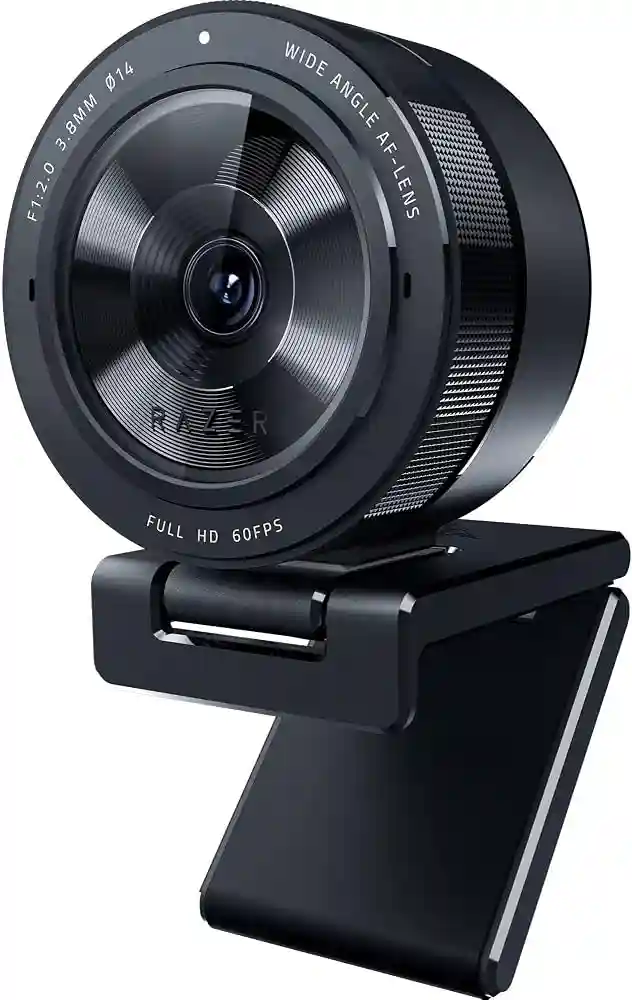
Because both brands make several cameras, this comparison uses the Razer Kiyo V2 and Poly Studio P5 as representative personal webcams. The Kiyo V2 offers up to 4K video, autofocus, HDR, and image controls through Razer Synapse. The Poly Studio P5 offers 1080p video, autofocus, 4X zoom, low-light compensation, a directional microphone, and a privacy shutter.
Quick Comparison
For seniors who want a simple webcam for video calls, the Poly Studio P5 has a straightforward feature set and a strong focus on voice clarity and easy everyday use. It also has an integrated privacy shutter.
The Razer Kiyo V2 is more feature-rich. It can be a better fit for seniors who want sharper video, more camera control, or a wider range of image settings.
The main choice is simple: easy video calling or more control over the camera.

Razer vs Poly At a Glance
The two webcams take different approaches. Here are the main differences that may matter to older users.
| Feature | Razer Kiyo V2 | Poly Studio P5 |
|---|---|---|
| Video | Up to 4K at 30 fps | 1080p |
| Autofocus | Yes | Yes |
| Low-light support | HDR and image controls | Automatic low-light compensation |
| Microphone | Stereo | Directional |
| Privacy | Built-in shutter | Integrated privacy shutter |
| Zoom | Digital/software options | 4X zoom |
| Software | Razer Synapse | Poly Lens |
| Connection | USB-C | USB |
The Razer model offers more advanced camera options, while the Poly model keeps the feature set focused on calls and communication.
Razer Kiyo V2 Review for Seniors
The Razer Kiyo V2 is aimed at users who want strong video quality and more control over the camera. It supports 4K at 30 fps, 1440p at 30 fps, and 1080p at up to 60 fps. It also has autofocus, HDR, a 93-degree configurable field of view, and a built-in privacy shutter.
Ease of Use
The Kiyo V2 connects through USB-C and works with camera software for adjusting image settings. Razer Synapse provides fine control over the picture.
That can be useful for a senior who enjoys adjusting the camera. But it may feel like extra work for someone who only wants to plug in a webcam and make calls.
Key Strengths
- Up to 4K video
- Autofocus
- HDR support
- Wide field of view
- Built-in privacy shutter
- Stereo microphone
- Tripod mounting support
- Adjustable image settings
Potential Drawbacks
- More advanced settings may be unnecessary for basic calls.
- Some features are aimed more at creators and streamers.
- USB-C may require an adapter on some older computers.
Poly Studio P5 Review for Seniors
The Poly Studio P5 is designed around personal video calls. It provides 1080p video, autofocus, 4X zoom, automatic low-light compensation, and a directional microphone. It also includes an integrated privacy shutter.
Ease of Use
The P5 has a more focused feature set. For a senior who mainly uses Zoom, Teams, or similar video-call apps, that can make the webcam easier to understand.
Its directional microphone is also useful because it is designed to focus on the speaker’s voice rather than surrounding noise.
Key Strengths
- 1080p video
- Autofocus
- 4X zoom
- Automatic low-light compensation
- Directional microphone
- Integrated privacy shutter
- Tripod ready
- USB/UVC compatibility
Potential Drawbacks
- It does not offer the 4K resolution available on the Kiyo V2.
- Users wanting advanced image controls may prefer Razer.
- The feature set is more focused on calls than content creation.
Which Is Easier for Seniors to Use?
For many older users, the important question is not maximum resolution. It is how much work the webcam requires.
The Poly Studio P5 has a practical advantage here. Its automatic low-light compensation and focused feature set reduce the need for manual camera adjustment. Its directional microphone also puts more emphasis on clear speech.
The Razer Kiyo V2 is still easy to connect, but its extra controls are more useful for people who want to fine-tune their video.
| Senior Need | Razer Kiyo V2 | Poly Studio P5 |
|---|---|---|
| Simple video calls | Very good | Very good |
| Easy picture setup | Good | Very good |
| Advanced control | Excellent | Good |
| Low-light help | Very good | Very good |
| Voice focus | Good | Very good |
| Privacy | Very good | Very good |
For a senior who wants fewer settings, Poly may be easier. For someone who likes control, Razer may be more appealing.
Performance Comparison
Video quality is where the Razer Kiyo V2 has a clear specification advantage. It can record up to 4K at 30 fps and supports 1080p at 60 fps. Its 8.3 MP Sony STARVIS sensor and HDR support also give it a strong set of image features.
The Poly Studio P5 is limited to 1080p, but that is still enough for common video calls. Its automatic low-light compensation is designed to keep the image usable when room lighting is not ideal.
For normal family calls, 1080p may be more than enough. The extra resolution of Razer matters more if the user wants detailed video or plans to create content.
Comfort, Accessibility, and Senior-Friendly Design
Webcams do not require much physical effort, so comfort is mainly about setup and daily use.
Both cameras can be mounted on a monitor, and both support tripod mounting. The Poly P5 also uses a standard USB/UVC connection, which can help with compatibility across supported applications.
Privacy is another useful feature. Both cameras include a physical shutter, so the lens can be covered when the webcam is not being used.
For seniors who want a simple setup, fewer manual adjustments can be a benefit.
Features Comparison
The biggest difference is the balance between advanced video features and simple communication.
| Feature | Razer Kiyo V2 | Poly Studio P5 |
|---|---|---|
| Maximum video | 4K | 1080p |
| HDR | Yes | Not listed |
| Autofocus | Yes | Yes |
| Low-light support | Yes | Automatic compensation |
| Microphone | Stereo | Directional |
| Privacy shutter | Yes | Yes |
| Software | Razer Synapse | Poly Lens |
| 4X zoom | Not listed as a core feature | Yes |
These specifications make the two webcams suitable for different types of users.
Price, Maintenance, and Long-Term Value
Webcam prices can change often, so the current price should be checked before buying.
The main long-term difference is not maintenance. Neither webcam needs batteries or regular cleaning beyond keeping the lens and exterior free from dust.
Think about value in terms of the features the user will actually use.
A senior who only makes family calls may get little benefit from paying more for advanced 4K and image controls. A senior who enjoys online teaching, streaming, recording, or detailed video may make better use of those features.
Who Should Choose Razer Kiyo V2?
Choose the Razer Kiyo V2 if:
- You want higher-resolution video.
- You want more control over the image.
- HDR matters to you.
- You want 1080p at up to 60 fps.
- You enjoy adjusting camera settings.
- You may use the webcam for streaming or content creation.
Its stronger video specification makes it the more feature-heavy option.
Who Should Choose Poly Studio P5?
Choose the Poly Studio P5 if:
- You mainly make video calls.
- You want a simple feature set.
- Clear voice pickup is important.
- You want automatic low-light help.
- You prefer a physical privacy shutter.
- You want 1080p without needing 4K.
The P5’s directional microphone and automatic low-light compensation are useful for everyday calls.
Razer vs Poly — Final Verdict
There is no need to choose based on brand name alone.
Best for advanced video: Razer Kiyo V2
Best for simple video calls: Poly Studio P5
Best for camera control: Razer Kiyo V2
Best for focused call features: Poly Studio P5
Best for privacy: Both
The Razer Kiyo V2 makes more sense for seniors who want strong video quality and extra control. The Poly Studio P5 makes more sense for seniors who want a straightforward webcam for regular calls.
Scoring Summary
These scores are editorial comparisons based on the documented features above, not laboratory test results.
| Category | Razer Kiyo V2 | Poly Studio P5 |
|---|---|---|
| Ease of Use | 8/10 | 9/10 |
| Senior-Friendly Design | 8/10 | 9/10 |
| Video Features | 10/10 | 8/10 |
| Call Features | 8/10 | 9/10 |
| Privacy | 9/10 | 9/10 |
| Flexibility | 10/10 | 8/10 |
The scores reflect feature differences rather than personal hands-on testing.
How We Evaluate Products
This comparison focuses on the things that can matter most to older users:
- Ease of setup
- Controls
- Video quality
- Voice clarity
- Privacy
- Low-light performance
- Software
- Compatibility
- Long-term practicality
No hands-on testing is claimed here. The comparison is based on available manufacturer specifications and product information.
Senior-Specific Buying Considerations
Before choosing a webcam, consider these points.
Setup
Check whether the webcam can attach easily to the computer monitor and whether the computer has the required USB port.
Controls
If the user does not enjoy changing settings, a simpler webcam may be easier.
Audio
For family calls, clear voice pickup can matter as much as image quality.
Privacy
A physical privacy shutter is useful when the camera is not in use.
Lighting
A webcam with automatic low-light support can be useful in rooms that do not have strong lighting.
Common Buying Mistakes
Avoid these common mistakes:
- Buying 4K when 1080p is enough.
- Ignoring the computer’s available USB ports.
- Focusing only on camera resolution.
- Forgetting microphone quality.
- Ignoring the privacy shutter.
- Paying for advanced features the user will never use.
Safety
Webcams have few physical safety concerns, but privacy is important.
Cover the lens when the camera is not needed. Keep the webcam software updated, and only give camera access to apps that need it.
Also check the webcam’s placement. A secure monitor or tripod mount can help prevent accidental falls.
Conclusion
Razer vs Poly webcam for seniors comes down to priorities. The Razer Kiyo V2 offers higher video resolution and more camera controls, while the Poly Studio P5 focuses on simple calls, low-light support, and voice pickup.
For a senior who wants advanced video features, Razer is the more feature-rich choice. For someone who mainly wants an easy webcam for everyday family and work calls, Poly offers a more focused approach.
